
Social Media Profile: What to Include + a 10-Point Checklist
A social media profile is the page on a network that tells people who you are, and on almost every network it has the same six parts: a username, a display name, a profile picture, a bio, a link and a banner. What changes from network to network is the rules for each part: how long a username can be, which characters it takes, how many characters a bio holds and whether you get a link at all.
This guide puts those rules for 12 networks in one table, then takes each part in turn with its sources, and ends with a 10-point checklist you can run on any profile. Each part links to a deeper guide.
Table of Contents
- What is a social media profile?
- What should a social media profile include on each network?
- How do you choose a username and display name?
- What makes a good profile picture?
- How do you write a bio that says who you are and what to do next?
- Where does your link go? Link in bio on each platform
- Which networks have a banner or cover photo?
- How to optimize your social media profile: a 10-point checklist
- Can Outfeed set up or edit your profile?
- Frequently asked questions
What is a social media profile?
A social media profile is the information about you that a network shows on your own page: Cambridge Dictionary’s social-media sense of “profile” is information about a person’s life, work and interests on a social media website. Checked against Cambridge Dictionary: profile In practice that information sits in six parts most networks share:
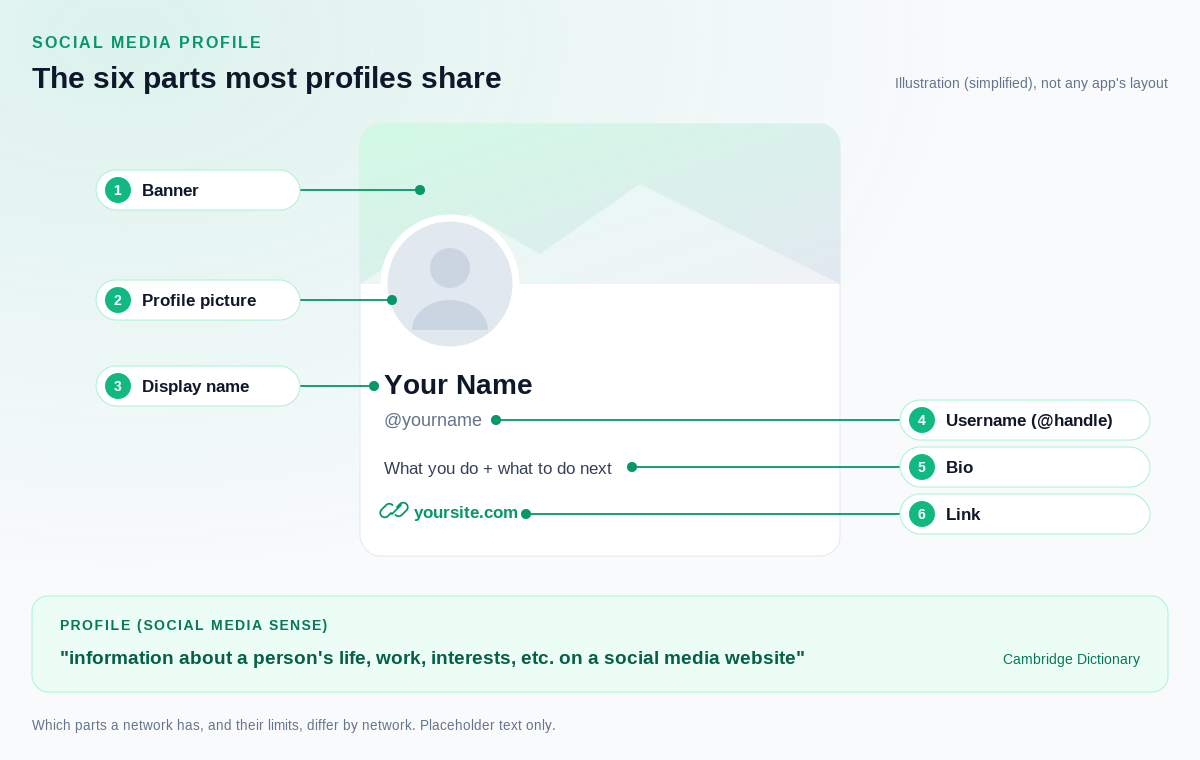
- Username (handle): the unique name after the @, which usually forms your profile’s web address. Our explainer on what a social media handle is covers the term itself.
- Display name: the free-text name shown above or beside the username.
- Profile picture: the photo or logo next to everything you post.
- Bio: a short description of who you are.
- Link: a clickable website address, where the network allows one.
- Banner: a wide header image across the top, on the networks that have one.
The same six parts are what you check when a profile might be fake; our guide on how to spot a fake Instagram account walks through them.
What should a social media profile include on each network?
Every profile needs the six parts above, but the limits differ: the table shows username length and characters, the bio limit, profile links and whether there is a banner, first for nine major networks, then for Discord, Telegram and Snapchat. Each figure is restated with its source in the section that covers it below.
| Network | Username length | Username characters | Bio limit | Profile links | Banner |
|---|---|---|---|---|---|
| 1–30 (widely reported) | Letters, numbers, . and _ | 150 characters | Up to 5 | — | |
| TikTok | 2–24 | Letters, numbers, _ and . (no period at the end) | Not published by TikTok | One website link at 1,000+ followers or with a Verified Business Account | — |
| X | 4–15 | Letters, numbers and _ | 160 weighted characters | — | Header |
| 5 or more | Letters, numbers and . | No official figure found | — | Cover photo | |
| YouTube | 3–30 (Latin scripts) | Letters, numbers, _ - . and · | — | Up to 14 | Banner |
| 3–100 (custom profile URL) | Letters, numbers and - | — (headline and About section) | — | Background photo | |
| 3–30 | Letters, numbers and _ (needs a letter) | 500 characters | Website field | Profile cover (business accounts) | |
| Threads | Not published; your Instagram username by default | — | — | Up to 5 (press report, 2025) | — |
| Bluesky | 3–18 (before .bsky.social), or your own domain | Letters, numbers and - | 256 characters (graphemes) | Profile links (from 22 October 2026) | Banner |
| Discord | 2–32 | Lowercase a–z, 0–9, _ and . | 190 characters (About Me) | Links inside About Me | Image banner (Nitro only) |
| Telegram | 5–32 | a–z, 0–9 and _ | 70 characters (140 with Premium) | Link in bio with Premium | — |
| Snapchat | 3–15 | Latin letters, numbers and one of - _ . | — | — | — |
A dash means our sources hold no official figure for that cell, not that the network lacks the feature. Discord, Telegram and Snapchat are messaging and community apps, listed because people set up profiles there too. For a walk through one network’s setup, see setting up a Pinterest profile. Image sizes are not repeated here: they live in the guide to profile picture and banner sizes.
How do you choose a username and display name?
Your username is the unique handle in your profile’s web address; your display name is the free-text name shown above it. A handle of 5 to 15 characters, lowercase letters and numbers only and starting with a letter, passes the published username format on every network in the table. Instagram’s and Threads’ rules are not officially published, so for those two it fits the widely reported format and Meta’s default.
That rule comes straight from the ledger values in the table:
- Length: the longest minimum is 5 characters (Facebook), and Telegram’s usernames are 5 to 32 characters. Checked against Telegram APIs: account.updateUsername The shortest maximum is 15 (X), and Snapchat’s usernames are 3 to 15 characters. Checked against Snapchat Support: How do I change my Snapchat username?
- Characters: underscores fail on Facebook, LinkedIn and Bluesky; periods fail on X, LinkedIn, Pinterest and Bluesky; hyphens fail on Instagram, TikTok, X, Facebook and Pinterest. Letters and numbers are the only characters every network accepts.
- First character and case: Snapchat usernames must start with a letter and end with a letter or number, and Discord usernames are lowercase only: 2 to 32 characters of a–z, 0–9, underscores and periods, never two periods in a row. Checked against Discord Support: New Usernames & Display Names Telegram usernames use a–z, 0–9 and underscores and are case-insensitive. Checked against Telegram FAQ: What can I use as my username?
Illustrative example: lunabakes (9 characters) passes the format checks for 9 of the 9 networks in our social media username checker (Instagram, TikTok, X, Facebook, YouTube, LinkedIn, Pinterest, Threads and Bluesky). A format check can’t tell you whether a name is taken: open the profile link yourself, or try the username generator for more options.
The username rules for the nine networks, as each network states them:
- Instagram: widely reported as 1 to 30 characters of letters, numbers, periods and underscores; Instagram itself names only the allowed extras. Checked against Instagram Help Center: username already claimed but seems inactiveCommunity-reported
- TikTok: 2 to 24 characters of letters, numbers, underscores and periods, no period at the end, changeable once every 30 days. Checked against TikTok Support: Changing your username More on picking one in our guide to TikTok usernames.
- X: up to 15 characters of letters, numbers and underscores; X words the minimum as more than 4. Checked against X Help Center: Help with username registrationArchived copy, 19 September 2026 View the archived copy
- Facebook: at least 5 characters of letters, numbers and periods; periods and capital letters don’t make a username different. Checked against Facebook Help Center: Guidelines for creating a custom username Meta says your Facebook username is your profile’s web address, and changing it changes that address, plus your Instagram username if you sync profile information between the two. Checked against Facebook Help Center: How to find or change your Facebook username Here’s how to find your Facebook profile URL.
- YouTube: 3 to 30 characters for Latin-script handles; YouTube allows two handle changes and two channel-name changes within a 14-day period, and a name change removes a verification badge. Checked against YouTube Help: Manage your YouTube channel's profile
- LinkedIn: there is no @handle, only a custom profile URL of 3 to 100 characters, changeable up to five times in six months. Checked against LinkedIn Help: Manage your public profile URL
- Pinterest: 3 to 30 characters of letters, numbers and underscores, not numbers alone. Checked against Pinterest Help: Edit your profile
- Threads: Meta publishes no username rules; by default your Threads username is your Instagram username. Checked against Threads Help: About username changes between Threads and InstagramNot verified
- Bluesky: 3 to 18 characters of letters, numbers and hyphens before .bsky.social. Checked against Bluesky Help: What is the suggested user handle format? You can also use a domain you own as your handle by verifying it in Settings. Checked against Bluesky blog: How to verify your Bluesky account (domain handle tutorial)
Change limits matter before you commit: Discord allows two username changes a week and display-name changes at any time Checked against Discord Support: New Usernames & Display Names, and Snapchat allows one username change a year. Checked against Snapchat Support: How do I change my Snapchat username? Discord’s three name layers are explained in Discord usernames and display names.
Display names are looser. A TikTok name can be up to 30 characters and changed once every 7 days Checked against TikTok Support: Changing your nicknameArchived copy, 23 December 2025 View the archived copy; an X name up to 50 characters, changed at any time Checked against X Help: How to change your X usernameArchived copy, 4 July 2026 View the archived copy; a Bluesky display name up to 64 characters Checked against AT Protocol lexicon app.bsky.actor.profile; a Discord display name 1 to 32 characters, with emoji, spaces and non-Latin text Checked against Discord Support: New Usernames & Display Names; a Snapchat display name up to 30 characters, not unique, changeable any time. Checked against Snapchat Support: How do I change my Snapchat username? Facebook is the strict one: a personal profile uses the name you go by in everyday life, with no symbols, numbers or unusual capitalization. Checked against Facebook Help Center: Names allowed on Facebook
What makes a good profile picture?
Most networks crop the profile picture to a circle or a square, so keep your face or logo centred with space around it. Exact upload sizes are in the guide to profile picture and banner sizes; the shapes are:
- LinkedIn: a round crop, so a square image fits it best: 1:1 (widely reported) (LinkedIn Help: Photo won't upload to your profile).
- YouTube: YouTube recommends a square or round image (YouTube Help: Manage your channel branding).
- Bluesky: the official app crops avatars to 1:1 (AT Protocol lexicon: app.bsky.actor.profile).
- X: a square image, recommended at 400 x 400 pixels (X Help: How to upload X profile photos and headers).
- Discord: anyone can upload their own image as an avatar; Nitro subscribers can also use an animated GIF. Checked against Discord Support: Custom Profiles
Pick an image that still reads at thumbnail size: one face or one logo, plain background, no small text. On TikTok, your name, username and profile photo stay visible to anyone even if your account is private, so choose a photo you’re happy for strangers to see. Checked against TikTok Help Center: Choosing between a private or public account If you’ve seen the term and wondered, here’s what PFP means.
How do you write a bio that says who you are and what to do next?
A bio does four jobs: who you are, what you post or offer, one proof point, and one next step, all inside the network’s limit. Fill this template (illustrative):
- Line 1, who: [role or niche] in [place], in the words a stranger would search.
- Line 2, what: [what you post] every [day or rhythm].
- Line 3, proof: [one result, credential or detail only you have].
- Line 4, next: [Book / Shop / Read] ↓ pointing at your link.
The room you get for those four lines varies a lot:
- Instagram: 150 characters (Instagram Help: Add a bio to your Instagram profile). Our guide on how to write an Instagram bio goes line by line.
- X: 160 weighted characters (X Help: How to customize your profile).
- Pinterest: 500 characters (Pinterest Help: Edit your profile).
- Bluesky: 256 characters (graphemes) (AT Protocol lexicon: app.bsky.actor.profile).
- LinkedIn: the headline and the About section do the bio’s job. LinkedIn writes a headline automatically when you add positions, but you can rewrite it Checked against LinkedIn Help: Create a good LinkedIn profile, and it recommends an About section of one or two paragraphs. Checked against LinkedIn Help: Create a good LinkedIn profile
- TikTok: TikTok publishes no bio limit (TikTok Support (searched; no bio limit published)), so keep it to one or two short lines.
- Discord: the About Me holds 190 characters, and emoji, markdown and links all count. Checked against Discord Support: Custom Profiles See Discord About Me ideas.
- Telegram: 70 characters, or 140 with Telegram Premium, per Telegram’s API documentation. Checked against Telegram APIs: Client configuration (help.getAppConfig defaults) Every bio in our list of short Telegram bios fits the standard limit.
Stuck on wording? Start from bio ideas to copy or the free social media bio generator, then cut until every word earns its place.
Where does your link go? Link in bio on each platform
Instagram allows up to 5 profile links, YouTube up to 14, Threads up to 5 (reported) and Pinterest one website field; TikTok needs 1,000 followers or a Verified Business Account, and Bluesky added profile links on 22 October 2026. Network by network:
- Instagram: up to 5 websites under Edit profile, Links, visible to anyone on or off Instagram. Checked against Instagram Help Center: Add a website to your Instagram profile Meta says an eligible Meta One plan raises that to 20 links on a link page; teens can’t use it. Checked against Meta Help Center: How to add a link page to your Instagram bio with Meta One
- YouTube: up to 14 links on your channel, the first shown near the Subscribe button. Checked against YouTube Help: Manage your YouTube channel's profile
- Threads: TechCrunch reported on 15 May 2025 that Threads began allowing up to five links in a profile bio. Checked against TechCrunch: Threads now lets creators add up to 5 links to profiles, track clicks (15 May 2025)Press report
- Pinterest: a Website field under Edit profile; claim the site as well to see its analytics. Checked against Pinterest Help: Add your website to your profile
- TikTok: a website link needs at least 1,000 followers or a Verified Business Account, and TikTok no longer supports links that open or log you into other social apps. Checked against TikTok Help Center: How to add a link to your TikTok profile Our TikTok link in bio guide has the steps.
- Bluesky: profile links, announced on 22 October 2026, sit at the top of your profile and are added through Edit Profile. Checked against Bluesky blog: Introducing Profile Links (22 Oct 2026)
- Telegram: Premium subscribers can write a longer bio and include a link in it. Checked against Telegram Blog: 700 Million Users and Telegram Premium
If one link has to serve several destinations, read what link in bio means on each app before choosing a link page. Tag the link so you can see in your analytics which profile sent the visit: Google Analytics says to always use utm_source, utm_medium and utm_campaign Checked against Google Analytics Help: URL builders: Collect campaign data with custom URLs, and recommends lowercase values because they are case-sensitive. Checked against Google Analytics Help: URL builders: Collect campaign data with custom URLs The free UTM generator builds the tagged link, and if it’s too long to share, here’s how a URL shortener like Bitly works.
Which networks have a banner or cover photo?
X (header), LinkedIn (background photo), Facebook (cover photo), YouTube (banner), Pinterest (profile cover) and Bluesky (banner) all have one; on Discord, an image banner is a Nitro perk. Sizes for each are in our guide to profile picture and banner sizes, with deeper pages for the LinkedIn banner size, Twitter banner size and Facebook cover photo size.
- X header: 3:1, with the top and bottom edges at risk of cropping on some screens (X Help: How to upload X profile photos and headers).
- LinkedIn background photo: 4:1; your profile photo overlaps its lower left (LinkedIn Help: Add or change the cover image on your profile).
- Facebook Page cover photo: Meta’s two help centers describe its display size differently on computers and phones, so check both crops before you upload (Facebook Help Center: Facebook Page profile picture and cover photo dimensions).
- YouTube banner: 16:9, with a central safe area (YouTube Help: Manage your channel branding).
- Pinterest profile cover: business accounts, 16:9 recommended (Pinterest Business Help: Add a profile cover).
- Bluesky banner: the official app crops it to 3:1 (Bluesky app source: UserBanner (3:1 crop)).
- Discord banner: only Nitro members can upload an image or animated GIF. Checked against Discord Support: Custom Profiles
Keep anything important, such as a tagline, away from the edges and from the corner the profile picture covers.
How to optimize your social media profile: a 10-point checklist
Run these ten checks, in order, on all the social media profiles you keep; it doubles as a social media profile template. Print it from your browser or copy it into your notes. If you run several profiles on one network, check how many Instagram accounts you can have before you add another.
- ☐ 1. One handle where the rules allow. 5 to 15 lowercase letters and numbers, starting with a letter (see the username section).
- ☐ 2. A clear display name. Your name or brand, as people would search for it; on a personal Facebook profile, the name you use in everyday life.
- ☐ 3. A centred profile picture. One face or logo that survives a circle crop.
- ☐ 4. A bio inside the limit, with one next step. Who, what, proof, next.
- ☐ 5. A tagged link. utm_source, utm_medium and utm_campaign, in lowercase.
- ☐ 6. A banner, if the network has one. Nothing important near the edges.
- ☐ 7. Public where you want reach. Check each network’s visibility setting.
- ☐ 8. LinkedIn headline rewritten. Replace the automatic job title with what you do for people.
- ☐ 9. Privacy fields reviewed. Remove a home address or personal phone number from anything public.
- ☐ 10. Re-check after any rename. A new username usually means a new profile link: update it everywhere you shared it.
Why some of these matter:
- LinkedIn: LinkedIn calls your profile “a professional landing page” and recommends a professional photo, a headline you rewrite yourself and an About section of one or two paragraphs. Checked against LinkedIn Help: Create a good LinkedIn profile Your profile is generally fully visible to signed-in members, Contact Info only to 1st-degree connections, and, depending on your settings, a public version can appear in Google and Bing. Checked against LinkedIn Help: What People Can See on Your Profile Older advice to switch on Creator Mode is out of date: Social Media Today reported in February 2024 that LinkedIn was removing that switch. Checked against Social Media Today: LinkedIn's Removing Its Creator Mode Option (5 Feb 2024)Press report
- TikTok: a private account still shows your name, username and photo to anyone, so check those three before anything else. Checked against TikTok Help Center: Choosing between a private or public account
- Facebook: your main profile is created when you sign up, is where you reach the Pages you manage, and can only be deleted by deleting the account, so keep it accurate rather than starting over. Checked against Facebook Help Center: The difference between your Facebook account and profile
- Renames: on Facebook a new username changes your profile’s web address, and Meta warns you may not get the old one back. Checked against Facebook Help Center: How to find or change your Facebook username
Can Outfeed set up or edit your profile?
Schedule the posts your profile promises with Outfeed AI
Frequently asked questions
What is a social media profile?
It is the page on a social network that tells people who you are: Cambridge Dictionary describes a profile as information about a person’s life, work and interests on a social media website. Most profiles have six parts: a username, a display name, a profile picture, a bio, a link and a banner.
What should a social media profile include?
A recognisable username and display name, a clear profile picture, a bio that says what you do and what to do next, a working link where the network allows one, and a banner where it has one. The comparison table above shows the limits for each network.
Should my username be the same on every platform?
Use one handle if you can, but the rules differ: Snapchat and X cap usernames at 15 characters, Telegram and Facebook need at least 5, and Facebook, LinkedIn and Bluesky do not accept underscores. Lowercase letters and numbers only, 5 to 15 characters and starting with a letter, fits all of them.
Can I change my username later?
Yes, with limits: TikTok allows a username change once every 30 days, YouTube twice in 14 days, Discord twice a week and Snapchat once a year. On TikTok and Facebook, changing the username also changes your profile link, so update that link everywhere you shared it.
What is the difference between a personal and a business profile?
A personal profile represents you; a business profile or account represents a brand and usually adds business tools. The details differ by network:
- Facebook: your personal profile is created when you sign up and is where you reach the Pages you manage. Checked against Facebook Help Center: The difference between your Facebook account and profile
- Pinterest: a business account is free and adds Pinterest Analytics Checked against Pinterest Business Help: Get a business account, and business accounts get a profile cover (see the banner section).
- TikTok: a Verified Business Account can add a website link without waiting for 1,000 followers. Checked against TikTok Help Center: How to add a link to your TikTok profile