
Pick the field you are writing (post, display name, bio or alt text) and paste your text. The counter marks the part that runs over and can trim it at the limit without cutting an emoji or a link in half. It is one of our free social media tools and works entirely in your browser.
What is the Bluesky character limit?
A Bluesky post holds 300 characters, counted as graphemes (what you see as one character), with a separate cap of 3,000 bytes. A post with images or a video can have no text at all. Checked against AT Protocol lexicon app.bsky.feed.post (Bluesky GitHub)
The 300 limit itself is the same in every Bluesky app, because it is set in the post record of the AT Protocol, the protocol underneath how Bluesky works; only the way links are counted can differ between apps (see below). A grapheme is what Unicode calls a user-perceived character. Checked against Unicode Standard Annex #29: Unicode Text Segmentation
How does Bluesky count emoji, accents and links?
Every character you see counts once, so an emoji, a flag or an accented letter is one of your 300. In the official app, a long link counts in a shortened form: the site name plus the first 13 characters of the rest of the address, then "...". The link still opens the full address. Checked against Bluesky social-app source on GitHub: toShortUrl (url-helpers.ts), shortenLinks, composer state and post API
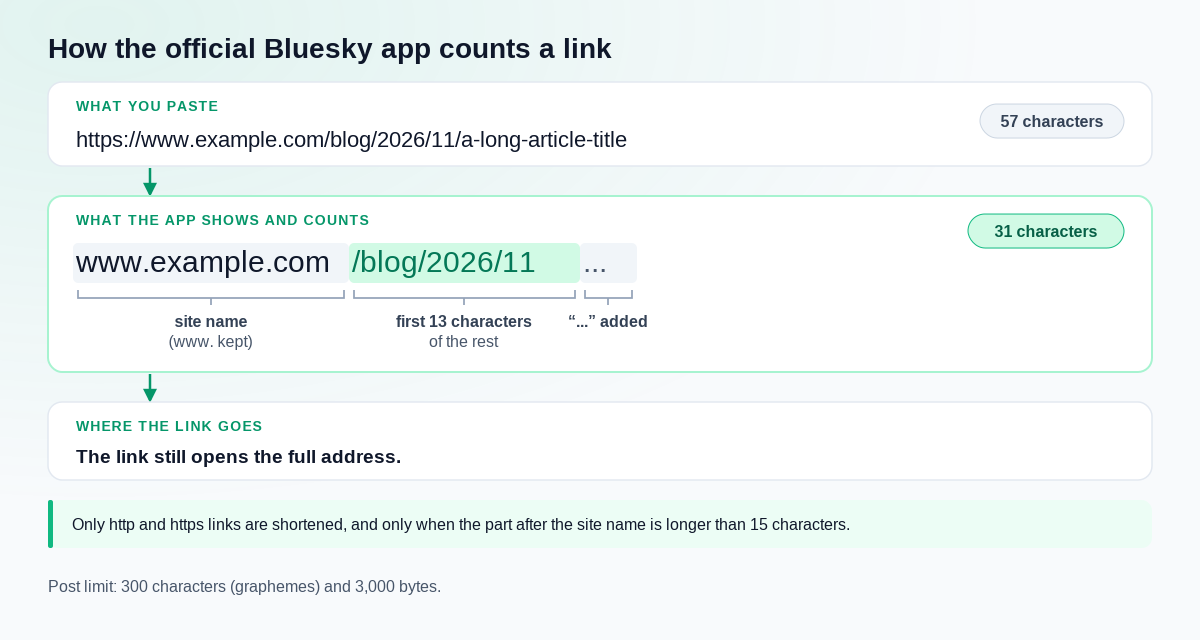
In that illustrative example, a 57-character address costs 31 characters. Only http and https links are shortened, and only when the part after the site name is longer than 15 characters; "www." stays as part of the site name. This is how the official app counts and publishes links, not a protocol rule, so other Bluesky apps may count them in full. The "With full links" tile in the counter shows that worst case.
Mentions and hashtags are not shortened: an @mention counts every character of the handle, @ included, and a hashtag counts as typed. Checked against Bluesky social-app source on GitHub: shortenLinks (src/lib/strings/rich-text-manip.ts) One hashtag can be up to 64 characters, not counting the #. Checked against AT Protocol lexicon app.bsky.richtext.facet (Bluesky GitHub)
Bluesky limits beyond the post: display name, bio and alt text
Display names take up to 64 characters and bios 256, both counted as graphemes; image alt text takes up to 2,000 in the official app. Post text, display names and bios are set in the protocol, and each also has a byte cap:
| Placement | Character limit | Counted in | Source |
|---|---|---|---|
| Post text | 300 characters (graphemes) | graphemes (an emoji counts 1) | AT Protocol lexicon: app.bsky.feed.post |
| Display name | 64 characters (graphemes) | graphemes (an emoji counts 1) | AT Protocol lexicon: app.bsky.actor.profile |
| Profile description (bio) | 256 characters (graphemes) | graphemes (an emoji counts 1) | AT Protocol lexicon: app.bsky.actor.profile |
Alt text is different: its 2,000-character limit is a setting in the official Bluesky app, not in the protocol. Checked against Bluesky social-app source on GitHub: constants.ts (MAX_ALT_TEXT)
Bluesky video limit: how long can a video be, and how many images per post?
One video per post, up to 10 minutes and 300 MB, or up to four images of up to 2 MB each, each with its own alt text. Since August 25, 2026, Bluesky posts can include videos up to 10 minutes long. Checked against Official @bsky.app account on Bluesky The protocol takes one MP4 file of up to 300 MB per post. Checked against AT Protocol lexicon app.bsky.embed.video (Bluesky GitHub) For images, the limit is four per post. Checked against AT Protocol lexicon app.bsky.embed.images (Bluesky GitHub)
Over 300 characters: thread or trim?
Trim first. Cut filler words and repeated points. A long link already counts in its shortened form in the official app, so swapping it for a shorter address saves little; a long @mention or hashtag costs its full length. Don't move overflow into alt text either: alt text is there to describe the image.
If the point still needs more room, it needs a second post.
You can still schedule Bluesky posts one at a time.
Cross-posting a 300-character post to X or Threads
A post that fits Bluesky can still miss on X, because each network sets its own limit and counts in its own way. Bluesky counts visible characters and shortens long links in its official app; X weights characters and counts every link at a fixed length; Meta's Threads API counts each emoji as its number of UTF-8 bytes. Checked against Meta for Developers: Threads API, Posts
| Placement | Character limit | Source |
|---|---|---|
| Bluesky · Post text | 300 characters (graphemes) | AT Protocol lexicon: app.bsky.feed.post |
| X (Twitter) · Post text | 280 weighted characters 25,000 for X Premium subscribers (longer posts) | X Developer Platform: Counting characters |
| Threads · Post text | 500 characters | Threads API: overview |
So write the shortest version first, then check it where it is going: the X character counter applies X's weighting and link rule, and the Threads character counter shows the plain count next to the API's emoji count. For how the two networks differ beyond the limits, see Bluesky vs Twitter (X).