
Social Media Scheduling API and MCP Server
A social media scheduling API lets your own code, or an AI assistant, store posts that are published later through each network's official API.
MCP and API access come with every plan.
Starter includes a 3-day free trial with 100 AI credits. Card required. Pro and Agency are billed from the first day.
What is a social media scheduling API?
A social media scheduling API is an interface your code calls to store a post and have it published later, through each network's own posting API. It works as a unified social media API: your code talks to one service instead of one API per network, and that service deals with each network's permissions, quotas and app review, which the table below sets out.
For Outfeed AI itself: MCP and API access come with every plan. What the API and MCP server can call is set out further down; the in-app side is covered in chat-first social media management.
How do the networks' own social media posting APIs work?
Each network has its own publishing API, with its own permissions, app review, rate limits and, on X, a price per call. This is what a scheduling API handles for you. Each line restates the network's developer documentation.
| Network | What publishing needs | Limits and costs |
|---|---|---|
| Meta's Content Publishing API, for professional accounts only; media must sit on a public server and JPEG is the only image format. Checked against Meta for Developers: Instagram Platform, Content Publishing (updated Oct 20, 2026) An account linked to a Page that requires Page Publishing Authorization cannot be published to until that is completed. Checked against Meta for Developers: Instagram Platform, Content Publishing | 100 API-published posts per account in a moving 24 hours; a carousel counts as one. Checked against Meta for Developers: Instagram Platform, Content Publishing | |
| A Page access token with permissions such as pages_manage_posts, from a user who can do the CREATE_CONTENT, MANAGE and MODERATE tasks on the Page. Checked against Meta for Developers: Pages API, Posts | Scheduling through the Pages API: published=false and a scheduled_publish_time 10 minutes to 30 days ahead. Checked against Meta for Developers: Pages API, Posts | |
| TikTok | The approved video.publish scope and a creator-info query before each Direct Post. Checked against TikTok for Developers: Content Posting API, Direct Post (updated Oct 27, 2026) A privacy level (public, mutual friends, followers or only me) picked from the options TikTok returns. Checked against TikTok for Developers: Content Posting API, Direct Post | 6 post-initialisation requests a minute per user token. Checked against TikTok for Developers: Content Posting API, Direct Post (updated Oct 27, 2026) |
| w_member_social to post as a member; w_organization_social for a Page, held only by Page Administrators, Direct Sponsored Content Posters and Content Admins. Checked against Microsoft Learn: LinkedIn Marketing API, Posts API | A Linkedin-Version header (YYYYMM) on every request; LinkedIn says version 202601 will be sunset on January 15, 2027. Checked against Microsoft Learn: LinkedIn Marketing API, Posts API | |
| X | The v2 REST endpoints, which publish posts among other things. Checked against X Developer Platform: X API introduction | Pay-per-usage: credits bought upfront, a unit cost per endpoint, no subscriptions. Checked against X Developer Platform: Pricing |
| Threads | An approved app permission granted by the user, then two steps: create a media container, publish it; text posts up to 500 characters. Checked against Meta for Developers: Threads API, Posts | 250 API-published posts per profile in a rolling 24 hours, a carousel counting as one; scheduling apps must enforce it themselves. Checked against Meta for Developers: Threads API overview (rate limiting) |
| YouTube | videos.insert takes files up to 256 GB, supports a scheduled publishAt time, and makes a video public when no privacy status is set (unless the creator's settings say private). Checked against Google for Developers: YouTube Data API, Videos: insert | By default 100 videos.insert calls a day, 100 search.list calls and 10,000 units for everything else, which Google says may change. Checked against Google for Developers: YouTube Data API, Getting started (quota) Every request, even an invalid one, costs at least one point. Checked against Google for Developers: YouTube Data API, Getting started (quota) |
| API v5 creates a Pin on a board the authorised account owns, for new content the user created. Checked against Pinterest Developers: API v5, Create Pin | Every app is reviewed: Trial access keeps new Pins visible only to their creator, with daily call limits, until Standard access is granted. Checked against Pinterest Developers: Access tiers | |
| Bluesky | A post is an app.bsky.feed.post record in the user's repository, needing only text and a createdAt time. Checked against Bluesky Documentation: Creating a post | 5,000 write points an hour and 35,000 a day per account; creating a record costs 3. Checked against Bluesky Documentation: Rate limits |
What can you do with Outfeed's API and MCP server?
With a key, a REST API lists and runs the same 26 public tools the assistant uses (accounts, drafts, scheduling, publishing, cancelling and updating posts, bulk drafts and bulk scheduling, media, account groups and a calendar summary), up to 120 tool calls a minute. API and MCP calls pass the same checks and plan limits as the app and act directly: the confirmation card is part of the in-app chat.
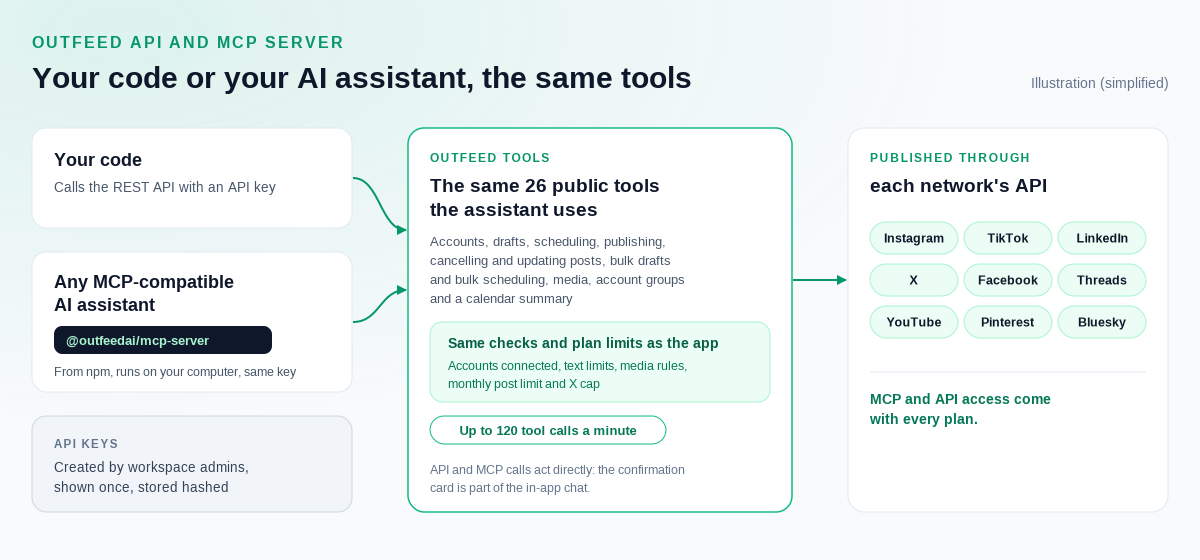
The 26 tools fall into these groups:
- Accounts
- Drafts
- Scheduling
- Publishing
- Cancelling and updating posts
- Bulk drafts and bulk scheduling
- Media
- Account groups
- A calendar summary
The checks are the app's own: Before a post is accepted into the schedule, Outfeed checks that every account is still connected, the text fits each network's limit, the media passes each network's rules, and required fields (YouTube's made-for-kids answer) are set, along with TikTok's privacy setting for a post going straight to TikTok. Problems are reported then, not hours later. For batches, see bulk scheduling on a pattern, and read how the same tools work in the Outfeed chat.
How do you connect an MCP client to Outfeed?
The @outfeedai/mcp-server package from npm runs on your computer and connects any MCP-compatible AI assistant to those tools with the same key. No hosted MCP server address and no one-click MCP sign-in: the MCP server runs on your computer from the npm package with an API key.
- Create an API key in Outfeed (see who can create API keys).
- Add the @outfeedai/mcp-server package on npm to your AI assistant's MCP settings and give it that key.
- Ask the assistant to draft or schedule a post.
For a client that reads an mcpServers JSON file, the entry looks like this. Replace the placeholder
with your own key, and check the package's README on npm for your client's settings file.
{
  "mcpServers": {
    "outfeed": {
      "command": "npx",
      "args": [
        "-y",
        "@outfeedai/mcp-server"
      ],
      "env": {
        "OUTFEED_API_KEY": "your-outfeed-api-key"
      }
    }
  }
}
For what an assistant is good at in this work, see using an AI assistant for social media work.
What are the rate limits, and who can create API keys?
The REST API runs up to 120 tool calls a minute. Workspace admins create API keys; each key is shown once and stored hashed. Admins manage billing, create and revoke API keys, and can disconnect accounts that other people connected.
The networks' own limits in the table above still apply on top, because every post ends up as a call to that network's API.
Twitter MCP: can you post to X through an MCP server?
Yes, if the MCP server sits on a tool that publishes through the X API, which X sells per use. Calling X directly means buying credits upfront and paying each endpoint's unit cost. Checked against X Developer Platform: Pricing
To use X's own scheduler instead, see how to schedule X posts natively.
Which other schedulers offer an API or MCP access?
Several do, so compare what each one lists on its own pages. In alphabetical order, with what each vendor says about itself:
| Tool | What its own pages list | Fits if |
|---|---|---|
| Ayrshare | An API to embed in other products, with posting, scheduling, analytics and comment, DM and review moderation. Checked against Ayrshare: PricingVendor's own description Billed per social profile, not per seat; published plans, custom Enterprise and a trial of one plan. Checked against Ayrshare: PricingVendor's own description | you are building social posting into your own product. |
| Buffer | API access with 5 API keys on every plan, including Free, with monthly request allowances per channel. Checked against Buffer: PricingVendor's own description A developer site with an API explorer, and agent use with tools such as Claude, ChatGPT and Cursor. Checked against Buffer API (developers.buffer.com)Vendor's own description | you want API keys on a free plan. |
| Hootsuite | Publishing, Inbox, Amplify and Analytics APIs authorised with OAuth2. Checked against Hootsuite Developer: The Hootsuite PlatformVendor's own description A Lumen MCP connector for listening insights on Enterprise. Checked against Hootsuite: Plans, Prices, and FeaturesVendor's own description | you need several separate APIs, or MCP access to listening data on Enterprise. |
| Metricool | Its AI assistant and Metricool MCP on the Free plan. Checked against Metricool: PricingVendor's own description | you want to try MCP access without paying. |
| Planable | A public API for custom integrations. Checked against Planable: PricingVendor's own description | you are building a custom integration around Planable. |
| Sked Social | "Limited MCP access" on the Grow plan. Checked against Sked Social: PricingVendor's own description | you are already on Sked's Grow plan. |
| SocialPilot | MCP access and monthly AI credits on every plan. Checked against SocialPilot: PlansVendor's own description | you want MCP on any of its plans. |
| Vista Social | Ask Vista, its AI command centre, and MCP connections to AI tools on every plan. Checked against Vista Social: PricingVendor's own description | you want an in-app AI command centre as well as MCP. |
What doesn't the Outfeed API do?
What the API and MCP server leave out:
- No Zapier, Make or webhook integration; the public interface is the REST API and the MCP server.
- Retrying failed networks is a web-app action only; the assistant, the REST API and MCP cannot retry a post.
No automatic queue or best-time slots
There is no automatic posting queue or best-time slotting: you (or the assistant, on your instruction) choose the time.
- No. Outfeed has no analytics: it tracks no reach, engagement, conversions or attribution, and it has no UTM reporting. It publishes your own posts to the accounts you connect: you pick an exact date and time for one post that can target several accounts across networks, and Outfeed publishes it at that moment through each network's API. Read results in each network's own analytics. See the free UTM generator and the engagement rate calculator.
- No. Outfeed has no social inbox and reads or sends no direct messages on any network. It publishes your own posts to the accounts you connect: you pick an exact date and time for one post that can target several accounts across networks, and Outfeed publishes it at that moment through each network's API.
X (Twitter)
- No images, GIFs or video on X.
- No threads.
- No polls.
- X posts are capped per billing period by plan. If the cap is reached, new X posts are refused until the next period or an upgrade.
Outfeed facts on this page were checked against the Outfeed app code on 2026-11-21.
Which plans include API access?
MCP and API access come with every plan. Compare plans and limits in full.
Starter
$29 per month, billed monthly
- Connected accounts
- 10
- Posts per month
- 100
- Team members
- 1
- Bulk scheduling
- No
- X posts per month
- 75
Pro
$59 per month, billed monthly
- Connected accounts
- 25
- Posts per month
- Unlimited
- Team members
- 3
- Bulk scheduling
- Yes
- X posts per month
- 150
Agency
$149 per seat/month, billed monthly
- Connected accounts
- 250
- Posts per month
- Unlimited
- Team members
- Unlimited
- Bulk scheduling
- Yes
- X posts per month
- 350
Enterprise
Custom
- Connected accounts
- Unlimited
- Posts per month
- Unlimited
- Team members
- Unlimited
- Bulk scheduling
- Yes
- X posts per month
- Unlimited
Starter and Pro are flat monthly prices, not billed per seat. Agency is billed per seat. Enterprise is custom.
Agency's 250 accounts is an organization-wide cap; it does not grow with seats.
Starter includes a 3-day free trial with 100 AI credits. Card required. Pro and Agency are billed from the first day.
Read the full Outfeed AI pricing breakdown or compare plans on the Outfeed AI homepage.
Social media scheduling API FAQ
Which MCP clients work with Outfeed AI?
Any MCP-compatible AI assistant, connected through the @outfeedai/mcp-server package from npm. No hosted MCP server address and no one-click MCP sign-in: the MCP server runs on your computer from the npm package with an API key.
Is there a free social media scheduling API?
Some schedulers list API or MCP access on their free tiers: Buffer lists API access with API keys on every plan, Free included, and Metricool lists its MCP on its Free tier, according to their own pricing pages. The networks' own APIs have their own terms, and X's API is pay-per-use. Outfeed AI has no free tier. Starter includes a 3-day free trial with 100 AI credits. Card required. Pro and Agency are billed from the first day.
Can I post images or video to X through the Outfeed API?
No. No images, GIFs or video on X.
Which Outfeed AI plans include the API and MCP server?
MCP and API access come with every plan.
Does an API or MCP call ask for confirmation before it publishes?
No. API and MCP calls pass the same checks and plan limits as the app and act directly: the confirmation card is part of the in-app chat.
Scheduling guides
Schedule your next post with Outfeed AI
Starter includes a 3-day free trial with 100 AI credits. Card required. Pro and Agency are billed from the first day.