
Bitly URL Shortener: How It Works, Free Plan + Alternatives
The Bitly URL shortener turns a long web address into a short bit.ly link that sends every click on to the original page and counts it. The free plan now comes with real limits: 5 links a month, and an ad page your visitors see before the link opens.
This guide covers how Bitly works, how to make a link, what the free plan includes, and when a short link actually helps on social media, network by network. It’s part of our guide to the links on your social media profile. The last section compares Bitly alternatives by pricing model, with no ranking.
Table of Contents
- What is a URL shortener (link shortener) and what does it do?
- How does the Bitly URL shortener work?
- How do you shorten a link with Bitly?
- Is Bitly free? What the free plan includes
- Should you shorten links on social media?
- How do you track clicks from social with UTM tags and short links?
- Bitly alternatives: which URL shortener fits you?
- Frequently asked questions
What is a URL shortener (link shortener) and what does it do?
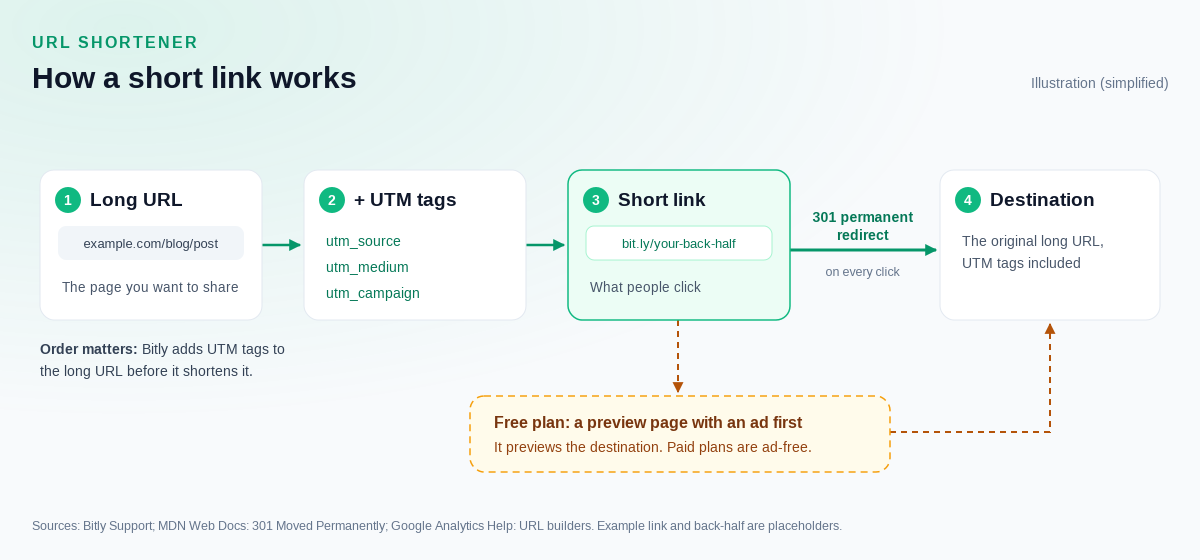
A URL shortener (or link shortener) gives a long web address a short one that redirects to it, usually with a 301 permanent redirect, and counts the clicks on the way. You share the short link; a visitor’s browser asks the shortener for it and is sent on to the page you started with.
The 301 is a standard web status. MDN defines 301 Moved Permanently as meaning the requested resource has moved for good to the address in the response’s Location header, and notes that search engines credit links to the original URL to the redirect’s target. Checked against MDN Web Docs: 301 Moved Permanently Google Search Central recommends a permanent server-side redirect (301 or 308) wherever possible, and says permanent redirects tell Google to show the target URL in results. Checked against Google Search Central: Redirects and Google Search
So what does a link shortener do for you? Three things: it makes a link short enough to type or print, it can carry your own words or domain, and it counts clicks. Whether any of that matters depends on where the link goes, which is the social section below.
How does the Bitly URL shortener work?
Bitly turns a long URL into a bit.ly link, or a branded link on paid plans, that 301-redirects to it. Bitly says it never re-uses or changes a short link, so each one keeps pointing at the same long URL unless a paid plan redirects it. Checked against Bitly Support: How does a shortened link work?Vendor's own description
Bitly describes itself as three products: Bitly Links for shortening and managing links, Bitly Codes for dynamic QR codes, and Bitly Pages for mobile-friendly landing pages, with features varying by plan from Free to Enterprise. Checked against Bitly Support: What is Bitly?Vendor's own description Anyone can create a Bitly QR code that sends scans to a link, with scan data by time and location. Checked against Bitly Support: What is Bitly?Vendor's own description
Bitly names four kinds of link: Checked against Bitly Support: What is a custom link?Vendor's own description
- Standard short link: bit.ly plus random characters.
- Custom back-half: bit.ly plus your own words.
- Branded link: your own domain in front.
- Custom link: your domain plus a custom back-half. Custom domains need a paid plan; if you’re weighing one, here’s what a vanity URL is.
The limits: a custom back-half can be up to 255 characters of upper- and lowercase letters, numbers, dashes and underscores, Bitly shortens long URLs of up to 2,048 characters, and a custom domain can be up to 32 characters including the dot. Checked against Bitly Support: What's the character limit for Bitly Links?Vendor's own description
Bitly says its links never expire unless you set an expiration. A deleted link stops working and returns a 404 error, while a hidden link keeps working. Checked against Bitly Support: Will the links I create on Bitly ever expire?Vendor's own description
How do you shorten a link with Bitly?
In your account, choose Create new, then Shorten a link, paste the destination URL, add any options, and select Create your link. Bitly’s own steps:
In your Bitly account:
- Log in to your Bitly account.
- Click Create new in the left sidebar and select Shorten a link.
- Enter your destination URL.
- Enter a custom back-half to make your link more unique (your limit depends on your plan).
- Optionally toggle a QR Code, a Bitly Page, UTM parameters or Link Expiration.
- Click Create your link.
Checked against Bitly Support: How do I create links with Bitly?.Vendor's own description
You can also paste a URL on the bitly.com homepage and select “Get your link for free” without signing in, but Bitly says you then need an account to see analytics and manage the link. Checked against Bitly Support: How do I create links with Bitly?Vendor's own description Links made with Bitly’s old no-account shortener still work, but they show a destination preview with ads and can’t be edited, redirected, tracked or moved into an account. Checked against Bitly Support: Free Short Link Generator (Anonymous Link) FAQVendor's own description
Is Bitly free? What the free plan includes
Yes, with limits: 5 links, 2 QR codes and 3 custom back-halves a month, no destination edits, no custom domain, and an ad page before free links open. Here is the Free plan as Bitly’s pricing page lists it: Checked against Bitly: PricingVendor's own description
| Bitly Free plan | What you get |
|---|---|
| Links | 5 a month |
| QR codes | 2 a month |
| Custom back-halves | 3 a month |
| Custom landing pages | 2 |
| Clicks and scans | Unlimited |
| Changing where a link points | Not included |
| Branded custom domain | Not included |
| Ads | Shown to visitors before the link opens |
Older guides may not mention the ads. Bitly says it now shows ads on links from free accounts: visitors land on an interstitial page with a preview of the destination and an ad, and only paid plans are ad-free. Checked against Bitly Support: Why are there ads on my links?Vendor's own description Bitly published its support article on the change in December 2024.
Editing where a link points (a redirect) is available only on some paid plans, each with a monthly redirect limit, and a redirected link counts as a new link against your monthly link allowance. Checked against Bitly Support: How do I redirect a Bitly Link?Vendor's own description
Above Free, Bitly publishes three paid plans (Core, which is billed annually only, Growth and Premium, which can be billed monthly or annually) and a quote-only Enterprise plan. Checked against Bitly: PricingVendor's own description Current prices are on Bitly’s pricing page.
Should you shorten links on social media?
Rarely for length: X counts every link as 23 characters and wraps it in a t.co link anyway. Short links help most on printed QR codes and for click counts. Pinterest doesn’t allow certain shorteners and Meta bans deceptive redirects, so on those networks, link straight to the page. Here is the answer for each network, from its own rules:
| Network | Does a short link help? | The network’s rule |
|---|---|---|
| X | Not for length. A bit.ly link still works and keeps its own click tracking. | Every URL counts 23 characters whatever its length (X Developer Platform: Counting characters), and X shortens every link to t.co, with no opt-out. Checked against X Help Center: About X's link service (t.co)Archived copy, 16 November 2026 View the archived copy |
| Usually not: link directly to the source. | Pinterest doesn’t allow certain redirects or URL shorteners and may block misleading or spammy links. Checked against Pinterest Help: Fix a broken link | |
| For your profile, it’s a question of which links, not how long. | The documented place for clickable links outside Stories is your profile: up to 5 websites. Checked against Instagram Help Center: Add a website to your Instagram profile | |
| Only if the link is clear about where it goes. | Meta’s spam policy bans deceptive or misleading URLs, cloaking and deceptive redirect behavior. Checked against Meta Transparency Center: Spam (Community Standards) |
X. X says its t.co service exists so long URLs fit in a post, to count clicks as a quality signal for how relevant a post is, and to warn people before they open potentially harmful URLs. Checked against X Help Center: About X's link service (t.co)Archived copy, 16 November 2026 View the archived copy Shortening first saves you nothing in characters.
Pinterest. Pinterest asks for “no surprises”: people should be able to anticipate where a link goes, and links with excessive or deceptive redirection, or shorteners abused for spam, may be blocked. Checked against Pinterest Policy: Community Guidelines See how to add a link to a Pinterest Pin the direct way.
Instagram. If you’re looking for a URL shortener for Instagram, the real limit is the number of profile links, not their length. Meta says you can add up to 5 links to your Instagram bio without a subscription. Checked against Meta Help Center: How to add a link page to your Instagram bio with Meta One Bitly markets its Bitly Pages as a link-in-bio page for social profiles. Checked against Bitly Support: What are Bitly Pages?Vendor's own description Our guide to which apps allow a clickable link in bio covers the other networks.
Facebook. Meta’s policy names no shortener; the point is that a short link must not hide or misrepresent its destination. To share a page there, see how to post a link on Facebook. For video, here’s how links in a YouTube description work.
Bitly’s own rules point the same way. Its Acceptable Use Policy forbids using its links to spread malware, phish, spam, cloak a destination through another redirect service, impersonate others or evade abuse detection, and Bitly may suspend accounts that do. Checked against Bitly: Acceptable Use PolicyVendor's own description
How do you track clicks from social with UTM tags and short links?
Add utm_source, utm_medium and utm_campaign to the destination first, then shorten the tagged URL. The short link counts clicks; the UTM tags tell your analytics which network and campaign the visit came from.
Google Analytics says that when you add parameters to a URL you should always use utm_source, utm_medium and utm_campaign. Checked against Google Analytics Help: URL builders: Collect campaign data with custom URLs It also says UTM values are case-sensitive, so Meta and meta count as different sources, and recommends lowercase, one consistent utm_source per platform and one utm_medium per channel. Checked against Google Analytics Help: URL builders: Collect campaign data with custom URLs
- Build the tagged URL in our free UTM generator.
- Shorten the tagged URL. If you add UTM parameters inside Bitly instead, Bitly says it adds them to the long URL before shortening; its pricing page lists a UTM Builder from the Core plan up. Checked against Bitly Support: How do I create links with Bitly?Vendor's own description
- Use a separate link per network, so each one carries its own utm_source.
Try the Outfeed AI scheduling app
Bitly alternatives: which URL shortener fits you?
Rebrandly and Short.io publish free plans, TinyURL lists paid tiers on its pricing page, and Dub lists no free plan. Which is the best URL shortener depends on what you need: a branded domain, volume or link edits. Each row below is the vendor’s own description of its pricing, with no dollar figures; follow the source link for current prices.
| Shortener | Pricing model (vendor’s own pricing page) | Fits if |
|---|---|---|
| Bitly | Free plan with ads; Core, Growth and Premium; quote-only Enterprise. Checked against Bitly: PricingVendor's own description | You want links, QR codes and landing pages in one account. |
| Rebrandly | Free plan with 10 links and 10 QR codes a month, custom back-halves and one custom domain; Essentials, Professional and Growth billed monthly or annually with free trials; quote-only Enterprise. Checked against Rebrandly: PricingVendor's own description | You want a branded domain from the free plan. |
| Short.io | Free plan with 1 user, 5 custom domains, 1,000 branded links in total and 50,000 tracked clicks a month; paid plans with a free trial. Checked against Short.io: PricingVendor's own description | You want several custom domains and click analytics on every plan. |
| TinyURL | Paid tiers (Pro and Bulk 50K, billed monthly or yearly) for branded domains, link editing and analytics; custom Enterprise plan. Checked against TinyURL: Plans and PricingVendor's own description | You’re comparing paid tiers for branding and link edits. |
| Dub | Business, Advanced and Enterprise plans aimed at affiliate and partner programs, each with a 14-day trial; no free plan listed. Checked against Dub: PricingVendor's own description | You run an affiliate or partner program. |
One note on the table: the Rebrandly URL shortener’s free custom domain is of the yourbrand.bio kind, alongside its own Rebrand.ly domain, so check that it suits your brand before you print it anywhere.
Frequently asked questions
Is Bitly free?
Bitly has a free plan with limits: 5 links and 2 QR codes a month, no destination edits, and an ad page visitors see before free links open. Paid plans remove the ads; see the plan table above.
Do Bitly links expire?
Bitly says its links never expire unless you set an expiration. A deleted link stops working, while a hidden link keeps working.
Do short links save characters on X?
No. X counts every link as 23 characters whatever its length and shortens it to a t.co link automatically, though a bit.ly link still works and keeps its own click tracking.
What is the best URL shortener?
It depends on what you need. For a free start, Bitly, Rebrandly and Short.io publish free plans (Bitly’s shows ads); for a branded domain or editing where a link points, compare the paid plans of Bitly, Rebrandly, Short.io, TinyURL and Dub in the alternatives table.
Is Bitly safe?
Bitly’s Acceptable Use Policy forbids using its links to spread malware, phish or spam, and Bitly may suspend accounts that do. Checked against Bitly: Acceptable Use PolicyVendor's own description That is a rule for the people who make links, not a check on every link, and a short link hides where it goes, so open bit.ly links only from senders you trust. Links from free accounts open on a Bitly page that previews the destination first. Checked against Bitly Support: Why are there ads on my links?Vendor's own description