
How to use the social media ROI calculator
Add a month's or a quarter's costs (software, hours times an hourly rate, content production, ad spend) and the value you can attribute (revenue, leads times what a lead is worth), and this social media ROI calculator returns ROI, net return, cost per lead and break-even. It starts empty, with no example numbers, so it never shows a flattering ROI you did not earn. It is one of our free social media tools, and it runs in your browser and sends nothing anywhere.
- Pick one period and stick to it for every line: a month or a quarter.
- Fill in the cost lines you have. Hours and an hourly rate turn time into a cost.
- Fill in the value lines: revenue you can trace to social, and leads with your own value per lead.
- Read ROI and net return, check how much value is still needed to break even, and use Copy the working for a report.
How do you calculate social media ROI?
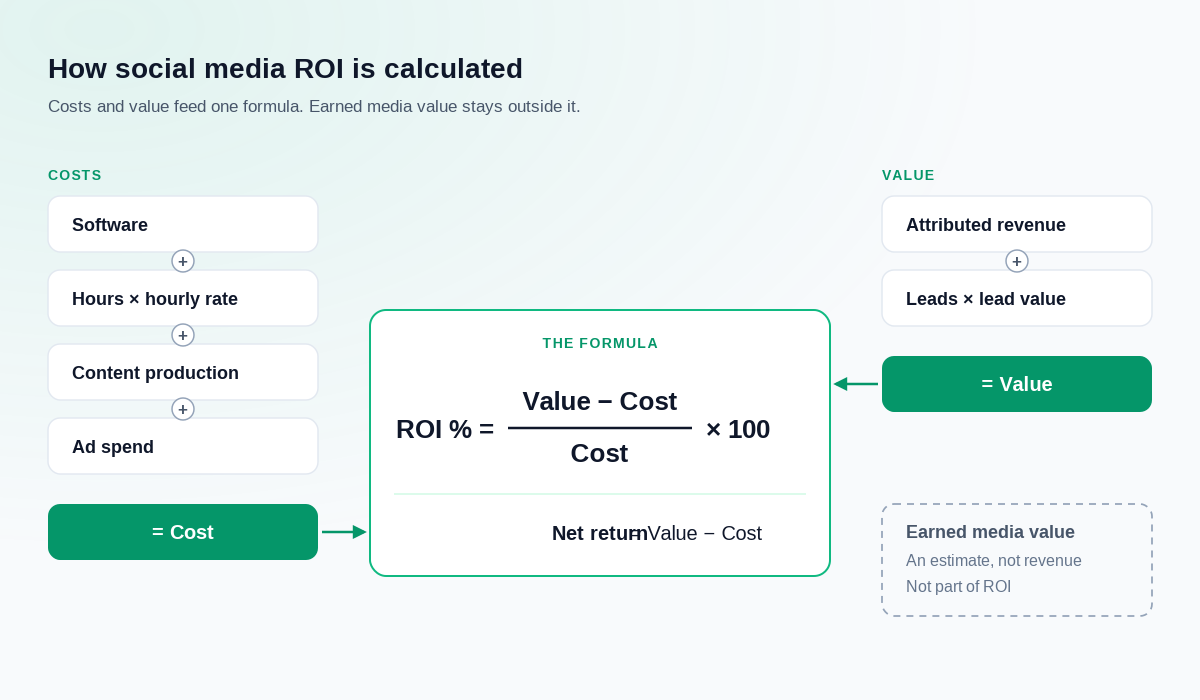
ROI = (value − cost) ÷ cost × 100: the profit social media brought in a period, compared with what you put into it. That matches the dictionary meaning of return on investment, the profit from an activity for a period compared with the amount invested in it. Checked against Cambridge Business English Dictionary: return on investment Business Queensland's calculator states the same formula as net profit divided by the cost of the investment, times 100. Checked against Business Queensland (Queensland Government): Return on investment calculator The U.S. Small Business Administration gives the same advice for marketing in general: compare marketing costs with the revenue they generate, and measure consistently, because some tactics, such as word of mouth, are hard to measure. Checked against U.S. Small Business Administration: Manage your business — Marketing and sales
A worked example (illustrative numbers)
Say a month cost $100 in software, 20 hours at $40 an hour ($800), $300 in content and $400 in ads: $1,600 in total. Social links brought $2,800 in tracked sales and 8 leads worth $50 each, so the value is $3,200. ROI is ($3,200 − $1,600) ÷ $1,600 × 100 = 100%. Leave the hours out and the same month seems to return 300%.
Organic social media ROI (no ad spend)
Organic ROI uses the same formula with the ad spend line left empty: your costs are software, hours and content, and the value is what your unpaid posts brought. Google Analytics reports visits from non-ad links on social sites as Organic Social, separate from Paid Social, so tag the links you post and read that channel's sessions and key events for the period. Checked against Analytics Help: [GA4] Default channel group The UTM and GA4 steps below show how.
What is a good social media ROI?
The calculator doesn't set a target, and it ships no benchmark. Above 0% means the period returned more than it cost, 0% is break-even, and below 0% means it cost more than it brought in. The most useful comparison is with your own earlier periods, so measure the same way each time: the U.S. Small Business Administration's advice is to compare marketing costs with the revenue they generate and to measure consistently. Checked against U.S. Small Business Administration: Manage your business — Marketing and sales
ROI or ROAS?
ROAS (return on ad spend) answers a narrower question. Google Ads Help describes it as conversion value per cost, sales divided by ad spend times 100%, so $5 in sales for each $1 of ad spend is a 500% ROAS. Checked against Google Ads Help: About Target ROAS bidding ROI uses net profit over every cost, so it is the figure to use when time and tools are part of the spend.
What counts as a cost in social media ROI?
Everything you spent on social in the period: software, people's hours times their hourly rate, content production and ad spend. Leaving labour out makes ROI look higher than it is: in the example above it moves from 100% to 300%. If you have no rate for your own time, work out an hourly rate first. For paid campaigns, the Facebook ad cost calculator shows what a budget buys before you spend it.
The optional Outfeed plan picker adds a plan to the software line at its monthly price: Starter is $29 per month, billed monthly, Pro is $59 per month, billed monthly and Agency is $149 per seat/month, billed monthly. Prices verified on outfeed.ai/#pricing
What counts as value?
Revenue you can attribute to social links, plus leads multiplied by what a lead is worth to you. Google Analytics calls the actions you count "key events": in March 2024 it renamed what it used to call conversions. Checked against Google Analytics Help: Conversions vs. key events in Google Analytics It reports visits from non-ad links on social sites as Organic Social and visits from social ads as Paid Social. Checked against Analytics Help: [GA4] Default channel group
On its own, the value section is a social media value calculator: it shows what the period was worth before costs. The value per lead is your own figure, such as your average sale times the share of leads that buy. Pick the social media KPIs that feed it before the period starts, not after.
Earned media value: an estimate, not revenue
Earned media is coverage you don't pay for, such as news mentions and word of mouth, and putting a money value on it is contested, so the calculator keeps any earned media value on its own line. MASB's marketing dictionary defines earned media as content distributed through third-party-owned channels without a fee. Checked against MASB Universal Marketing Dictionary: PEO (Paid-Earned-Owned) Model AMEC, the measurement industry body, does not recognize advertising value equivalents, which price coverage as if it were advertising, as a valid measurement or meaningful metric. Checked against AMEC Policy on AVEs (PDF)
As an earned media value calculator, it takes your own value per impression or engagement, ships no multiplier, and never adds the result to value or ROI. For the concept itself, here is what earned media is.
How do you track social media ROI with UTM links and GA4?
Tag every link you post with utm_source, utm_medium and utm_campaign, then read sessions and key events in Google Analytics' Traffic acquisition report. Google Analytics says to always use those three parameters. Checked against Google Analytics Help: URL builders: Collect campaign data with custom URLs UTM values are case-sensitive, so keep them lowercase, with one utm_source per platform and one utm_medium per channel. Checked against Google Analytics Help: URL builders: Collect campaign data with custom URLs The results show under Reports, then Acquisition, then Traffic acquisition, by session campaign and session source / medium. Checked against Google Analytics Help: [GA4] Traffic acquisition report Google Analytics itself is free of charge. Checked against Google Marketing Platform: Google Analytics
The UTM generator builds tagged links in the same lowercase format. Outfeed is our product; here is where it stands on measurement: