
Twitter Banner Size 2026: 1500x500 X Header + Safe Zone
Last verified: 27 September 2026
The middle 1500 x 380 pixels of an X header is safe from X’s top-and-bottom crop, because X Help warns that up to 60 px at the top and bottom may be cropped. The Twitter banner size itself is 1500 x 500 pixels at a 3:1 ratio, and X now calls it the header. Keep the lower-left of that band clear too, because your profile photo sits over it.
X publishes that upload size and the crop rule, and nothing else: no display size and no header file-size limit. Where X is silent, this page says so rather than filling the gap.
| Placement | Upload size (px) | Aspect ratio | Safe zone | Max file size | File types | Source |
|---|---|---|---|---|---|---|
| Header (banner) | 1500 x 500 | 3:1 | Top 60 px · Bottom 60 px, on 1500 x 500 | Not recorded | JPEG, GIF, PNG | X Help: How to upload X profile photos and headers |
| Profile photo | 400 x 400 | 1:1 | Not recorded | 2 MB | JPEG, GIF, PNG | X Help: How to upload X profile photos and headers |
| In-post image | Not recorded | 16:9, 1:1 Widely reported | Not recorded | 5 MB Photos. Animated GIFs: 5 MB on mobile, 15 MB on web. | JPEG, PNG, GIF, WEBP (API) | X Help: How to post pictures or GIFs |
| Link card image (summary_large_image) Not verified | Not recorded | 2:1 | Not recorded | Not recorded | Not recorded | X Developer Platform: Cards markup (tried; image rules not readable) |
Widely reported: the platform does not publish it. · Not verified: the platform does not publish it and reports disagree.
An empty cell means X does not publish that value. To crop a photo you already have to 1500 x 500 pixels, use the free image resizer, which has an X header preset, runs in your browser and needs no account.
Table of Contents
- What is the Twitter banner size in 2026?
- Is the Twitter header the same as an X banner or cover?
- How much of the X header gets cropped?
- Where does the profile photo overlap the header?
- What file types and sizes does X accept for headers?
- What size is an X profile photo?
- What size should images in X posts be?
- How Outfeed handles X headers and post images
- Frequently Asked Questions
What is the Twitter banner size in 2026?
X recommends a header image of 1500 x 500 pixels, a 3:1 ratio, and gives the same figure on two separate help pages. It publishes no minimum or maximum pixel size for headers, only that recommendation, so treat 1500 x 500 as the size to export rather than a floor to clear.
Both sources are X’s own: the X Help page on uploading profile photos and headers, which also carries the crop warning, and the X Help guide to customizing your profile. X gives one recommended size, with no separate header for phones or tablets, so one file serves every screen.
Why does the right-sized header still lose its tagline?
- Upload size is what you export: 1500 x 500 pixels. This is the only header dimension X publishes.
- Display size is what a visitor actually sees, and X doesn’t publish it. It depends on the visitor’s screen and browser, which is exactly why X attaches a crop warning to its recommendation.
- Safe zone is the part that survives every screen: the middle 1500 x 380 pixels, worked out from X’s crop rule in the section below.
A header can be the right upload size and still lose its tagline, because the tagline sat outside the safe zone. That’s the mistake this page is built to prevent.
What is 1500 x 500 in inches?
Pixels have no fixed physical size, so a 1500 x 500 header has no single size in inches. Screens display pixels, not inches. If a design app insists on inches, a canvas of 5 by 1⅔ inches at 300 pixels per inch produces exactly 1500 x 500 pixels. Setting the document up in pixels skips the conversion altogether.
Is the Twitter header the same as an X banner or cover?
Yes. Banner, header and cover are three names for one image: the 1500 x 500 pixel strip across the top of an X profile. X’s help center calls it the header. “Banner” and “cover” are older habits and borrowings from other networks, and they all point to the same spec, whether you search Twitter header size, Twitter cover size or Twitter banner dimensions.
People who type “header for Twitter size”, “size header twitter” or “Twitter header banner size” are asking the same question in shorthand: what pixel dimensions does the image at the top of my profile need? Same answer, same file. There is no separate “cover” upload on X and no second header for the mobile app.
Where the names do matter is across platforms. A Facebook cover or a LinkedIn banner is a different shape with its own rules, so a file built for X won’t drop straight into another profile. The social media image sizes guide lists every platform’s cover and banner side by side.
Whatever you call it, the header is the first thing a visitor sees when a repost (what RT means on X) or a reply sends them to your profile, so it’s worth getting the crop right.
How much of the X header gets cropped?
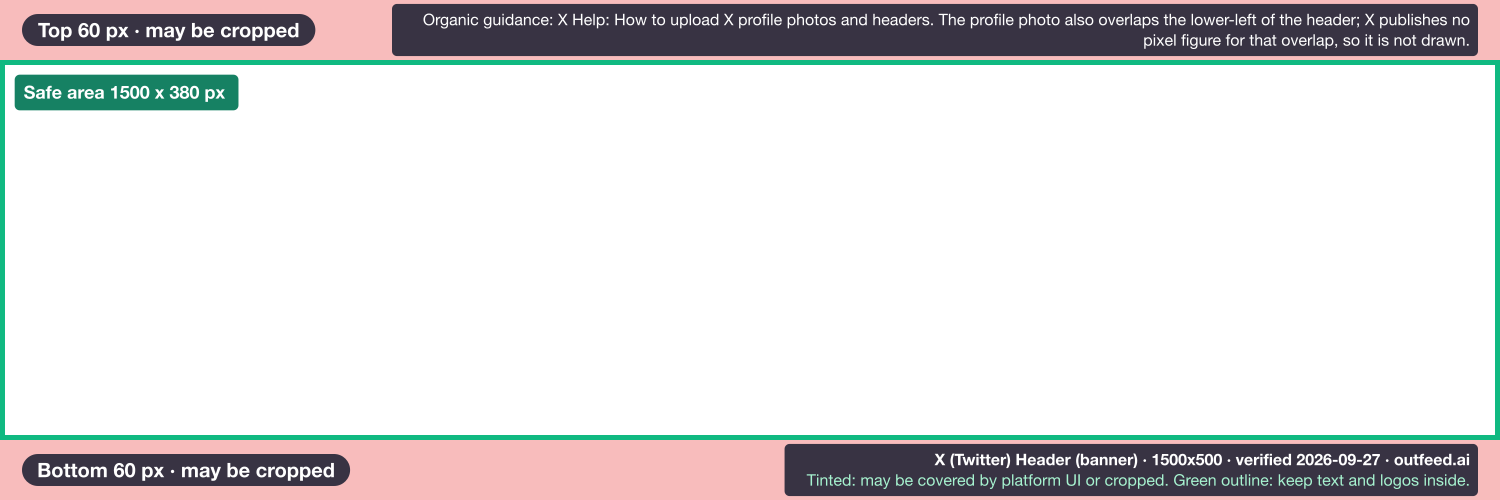
X says up to 60 px at the top and 60 px at the bottom of the header can be cropped, depending on the monitor and browser. Take both strips off the 1500 x 500 pixel canvas and a band of 1500 x 380 pixels remains. That band is our arithmetic on X’s figure, not a number X publishes, but it’s the only safe zone that traces back to X itself.
You can download the X header safe-zone overlay, a transparent PNG to lay over your design so the cropped strips show while you work.
Why does the header crop differently on each screen?
Because X renders the header differently on different screens, and its help page allows up to 60 px to disappear at the top and the bottom. A design checked on one screen can lose its top or bottom edge on another. X doesn’t publish a per-device crop, so design for the worst case: nothing that matters inside either strip.
Where do the other safe-zone numbers come from?
Other guides quote a “central 40%” rule, a 600 x 200 centre strip or a 1260 x 420 centre box, and none of them cites X. They are design conventions, and checked against X’s own rule they behave very differently:
- 600 x 200 leaves 150 px above and below the text, far more margin than X asks for. Conservative, and safe.
- 1260 x 420 leaves only 40 px above and below, which puts text inside the strips X says can be cropped. It’s not safe by X’s rule.
- “Central 40%” doesn’t say 40% of what, so it can’t be checked at all.
If you want side margins as well, any centre box no taller than 380 pixels stays inside X’s rule.
How do I make a Twitter banner that fits on mobile and desktop?
- Start at 1500 x 500 pixels. Set the canvas in pixels. If you are cropping a wider photo, the free aspect ratio calculator works out the 3:1 height for any width.
- Lay the overlay on top, or draw guides 60 px in from the top and bottom edges.
- Keep text and logos in the middle band, and leave the lower-left corner for the profile photo.
- Export at exactly 1500 x 500 pixels as a PNG for lettering and flat colour, or a JPEG for photographs.
- Check the live profile on a phone and in a desktop browser before you point anyone at it.
Where does the profile photo overlap the header?
On X, the profile photo sits over the lower-left of the header, and X publishes no pixel figure for how much of it the photo covers. That’s why the diagram above leaves the overlap undrawn: any rectangle would be a guess. Treat the lower-left corner as off-limits for text and logos, and check your own profile after uploading, because that is the only reliable measurement.
Two design habits make the overlap a non-issue:
- Put the message centre or right of centre, inside the middle band, well away from the photo’s corner.
- Keep the lower-left calm. Plain colour or soft texture there gives the photo a clean edge to sit on. A busy corner behind a busy photo reads as clutter.
LinkedIn has the same problem in a different shape. Its personal banner is 1584 x 396 pixels at 4:1, and LinkedIn doesn’t publish its overlap in pixels either. The LinkedIn banner size guide covers that one.
What file types and sizes does X accept for headers?
X accepts JPEG, GIF and PNG for header images, and it does not publish a file-size limit for headers. The only file-size cap on X’s header help page is 2 MB, and it applies to profile photos. The 5 MB header limit repeated across many guides doesn’t appear there, so this page doesn’t state a header cap.
In practice, if a header upload fails, check that it is one of those three file types, then re-export it as a JPEG at a lower quality setting.
Can a Twitter header be a GIF?
GIF is on X’s list of accepted header formats, but X’s help page doesn’t say whether an animated GIF plays once it’s set as a header. Build a header that works as a still image, and don’t rely on motion to carry the message.
Why does my X header look blurry after upload?
Most soft headers start as an image smaller than 1500 x 500 pixels, which then has to be enlarged to fill the space. Export at the full recommended size rather than scaling a small image up. Save text-heavy designs as PNG, which keeps edges sharp where JPEG compression can smear them. X doesn’t publish how it processes header images, so the fix is on the export side.
What size is an X profile photo?
X recommends 400 x 400 pixels for profile photos, a 1:1 square, as JPEG, GIF and PNG up to 2 MB. It’s the one image on an X profile with a published file-size cap. Because the photo sits over the header’s lower-left, plan the two together: crop the photo square, keep the subject centred, and check how it lands on the header before you publish either.
The bio sits right under both images. If yours needs a rewrite, the free social media bio generator drafts X bios that fit the field.
What size should images in X posts be?
X publishes no official pixel size for images in posts. X’s help page on posting pictures and GIFs covers the rest: 1 to 4 photos per post, photos up to 5 MB, and animated GIFs up to 5 MB on mobile and 15 MB on the web, in GIF, JPEG or PNG. X’s media API best practices add WEBP for uploads made through the API.
The ratios most guides give are 16:9 and 1:1 (widely reported). X’s media documentation names those for video and names none for images, which is why they carry the “widely reported” label.
The 1600 x 900 and 1280 x 720 sizes you’ll see elsewhere are conventions, not X figures. Outfeed’s resizer uses 1600 x 900 as its 16:9 preset for X posts, and that is our preset, not a number X publishes.
Link previews are less certain still. For large link cards, guides quote a 2:1 image ratio, but that figure is not verified: it could not be confirmed against X’s cards documentation, so this page gives no pixel sizes for link cards.
The words matter as much as the picture. The free Twitter character counter counts a draft with X’s own weighting, and the best time to post on X covers when to send it.
How Outfeed handles X headers and post images
Outfeed publishes posts, not profile settings, so you set the header and profile photo in X’s own Edit profile screen. Two facts about X posts come straight from Outfeed’s publishing code. It counts X post text with X’s own twitter-text library. And it doesn’t attach media to X posts yet: the publisher blocks images and video on X for now, so image posts to X still go out from X itself.
What Outfeed does do is draft and schedule posts for X and the other eight platforms from one conversation, with a per-platform preview before anything goes live. Plan your next X posts in Outfeed.
Frequently Asked Questions
What is the Twitter banner size?
The Twitter banner, which X now calls the header, is 1500 x 500 pixels at a 3:1 aspect ratio, per X Help, in JPEG, GIF or PNG. Banner, header and cover all name the same image, so one 1500 x 500 file answers every phrasing of the question.
Why is my Twitter header cropped on mobile?
X Help says up to 60 pixels at the top and bottom of the header can be cropped on different monitors and browsers. Keep text and logos inside the middle 1500 x 380 pixels, which is the 1500 x 500 canvas minus those two 60-pixel strips, and out of the lower-left corner, where the profile photo overlaps.
What is the maximum file size for a Twitter header?
X does not publish a file-size limit for header images. The 2 MB cap on X’s help page applies to profile photos, and the 5 MB header figure repeated in many guides does not appear on X’s header help page. If a header upload fails, re-export it as a JPEG at a lower quality setting.
Can a Twitter header be an animated GIF?
X accepts GIF files for headers, alongside JPEG and PNG, but its help page doesn’t say an animated GIF will play once it is set as a header, so design a header that works as a still image and do not rely on motion to carry the message.
What size is the X profile picture?
X recommends 400 x 400 pixels for profile photos, a 1:1 square, in JPEG, GIF or PNG up to 2 MB. The photo overlaps the lower-left of the 1500 x 500 header, so plan the two images together rather than one at a time.
What is the image size for X posts?
X publishes no official pixel size for images in posts. You can attach 1 to 4 photos of up to 5 MB each, and animated GIFs can be 5 MB on mobile and 15 MB on the web. The 1600 x 900 and 1280 x 720 sizes in many guides are conventions, not X figures.