
This YouTube thumbnail maker is a canvas editor and thumbnail creator, not an AI YouTube thumbnail generator, and it has no stock-photo library: you bring the image, it handles the layout, the text and the export. It is one of our free social media tools, and the whole thing runs in your browser, which draws and exports the image itself. Checked against MDN Web Docs: HTMLCanvasElement.toBlob()
How to use the YouTube thumbnail maker
Pick one of six layout templates, add your own background image, up to three text layers and an optional second image, then export a JPG or PNG. There is no account and no watermark, and your images stay on your device.
- Choose a YouTube thumbnail template. Text + image, Big number, Before / after, Question, List or Minimal. Each one is a layout, and its sample text is only a placeholder for yours.
- Add your images. A background photo, plus a second image for the templates that use one. The position sliders keep the subject in frame.
- Write the text. A headline, a subtext line and a tag. Text shrinks to fit its box; turn on the outline when it sits on a busy photo.
- Export. Pick a size and a format, check the measured file size, then download.
Need a background? YouTube suggests taking pictures during your shoot so you have several thumbnail options when you upload. Checked against YouTube Help: Thumbnail & title tips
Which export size should you pick?
Use 3840 x 2160 pixels (16:9), the size YouTube Help now recommends; the minimum width is 640 pixels. 1280 x 720 was YouTube's own advice until March 2026 and still fits the rules if you want fewer pixels. For a Shorts thumbnail, pick 2160 x 3840 (9:16).
| Placement | Upload size (px) | Minimum size (px) | Aspect ratio | Max file size | File types | Source |
|---|---|---|---|---|---|---|
| Video thumbnail | 3840 x 2160 | 640 x 360 Widely reported | 16:9 | 50 MB Desktop upload. From mobile: 2 MB (10 MB for podcasts). | JPG, PNG | YouTube Help: Add custom thumbnails on YouTube |
| Shorts thumbnail | 2160 x 3840 | 360 x 640 Widely reported | 9:16 | 50 MB Desktop upload. | JPG, PNG | YouTube Help: Add custom thumbnails on YouTube |
Widely reported: the platform does not publish it.
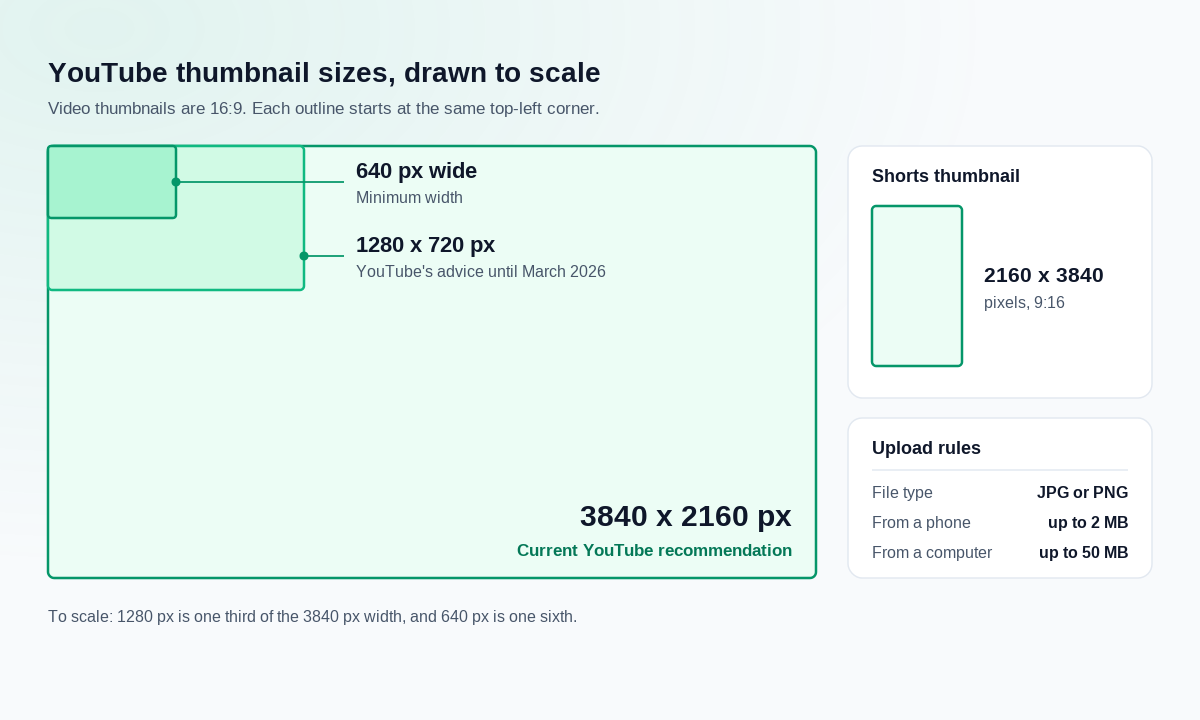
Bigger is the safer default: YouTube says a custom thumbnail should be as large as possible because it is also the preview image in the embedded player. Checked against YouTube Help: Add custom thumbnails on YouTube The 1920 x 1080 option sits between the two in the same shape. When the advice changed, and what the archived help pages said, is in our YouTube thumbnail size guide.
Two cases this maker does not cover. For vertical videos, YouTube replaces a 16:9 custom thumbnail with an auto-generated 4:5 one on the home, explore and subscription pages, while yours still shows in the watch feed and watch history. Checked against YouTube Help: Add custom thumbnails on YouTube Podcast playlists take a 1:1 image instead of 16:9. Checked against YouTube Help: Add custom thumbnails on YouTube
How do you keep a thumbnail under YouTube's 2 MB phone limit?
YouTube caps thumbnail uploads at 2 MB from a phone and 50 MB from a computer. The maker measures the exported file before you download it; if it is over 2 MB, lower the JPG quality or switch to the 1280 x 720 size.
The number you see is the real file, not an estimate: this thumbnail maker for YouTube reads the size of the file it
just made. The browser encodes the image with the canvas
toBlob() method: JPG takes a quality value from 0 to 1, PNG takes none, and file size varies from one
browser to another, so the maker measures instead of predicting.
Checked against MDN Web Docs: HTMLCanvasElement.toBlob()
For the Shorts size it checks only the computer cap, because Shorts thumbnails are added from a computer.
YouTube thumbnail preview: will your text read when it is small?
Check it before you export: the preview strip redraws your thumbnail at small, medium and large sizes on light and dark backgrounds. YouTube's own tips ask for readable text and branding, a simple design and the rule of thirds. Checked against YouTube Help: Thumbnail & title tips
The strip's sizes are illustrative, not YouTube's display sizes. YouTube's point is that thumbnails show up differently across devices, and that too much going on overwhelms the eye. Checked against YouTube Help: Thumbnail & title tips If the headline turns into a smudge at the small size, cut words before you shrink the type.
The title and the thumbnail work as a pair: for general audiences, YouTube suggests judging them by click-through rate on Home and Suggested in the first 24 hours after publishing. Checked against YouTube Help: Thumbnail & title tips While you are here, check your title against YouTube's limits. For composition, colour and contrast, read our YouTube thumbnail best practices.
How do you add a custom thumbnail on YouTube?
Upload it in YouTube Studio once your account is verified; until then YouTube only lets you pick one of its auto-generated thumbnails. Custom Shorts thumbnails can currently be added only in YouTube Studio on a computer. Checked against YouTube Help: Add custom thumbnails on YouTube On 24 July 2026 YouTube said creators in the YouTube Partner Program can upload custom Shorts thumbnails, expanding to more creators over time. Checked against YouTube Official Blog: New thumbnail updates in YouTube Studio (24 Jul 2026)
Custom thumbnails are an intermediate feature, which YouTube unlocks when you verify your phone number. Checked against YouTube Help: Learn about feature access for YouTube Creators If you have not done that yet, here is how to verify your YouTube account by phone. Then follow YouTube's steps:
On a computer: Video thumbnail:
- Sign in to YouTube Studio.
- From the left menu, select Content.
- Go to the video you'd like to edit > click the edit icon.
- Below "Thumbnail," click Upload file to create a custom video thumbnail from an image on your device or select Get suggestions to generate a thumbnail.
- Click SAVE.
On a computer: Short thumbnail:
- Sign in to YouTube Studio.
- From the left menu, select Content > Shorts at the top.
- Go to the Short you'd like to edit > click the edit icon.
- Below "Thumbnail," click Upload file to create a custom Shorts thumbnail from an image on your device. For uploaded files, the recommended aspect ratio is 9:16.
- Click SAVE.
Checked against YouTube Help: Add custom thumbnails on YouTube.
You can change a thumbnail after uploading the same way, from the video's page in YouTube Studio, and YouTube says the change may take time to appear. Checked against YouTube Help: Add custom thumbnails on YouTube (Computer) YouTube Studio also offers its own thumbnail suggestions, through Get suggestions or Ask Studio. Checked against YouTube Help: Add custom thumbnails on YouTube (Computer)
Two limits apply. A channel can upload only so many custom thumbnails a day; YouTube does not publish the number, and if you see "Daily custom thumbnail limit reached", try again in 24 hours. Checked against YouTube Help: Add custom thumbnails on YouTube YouTube's Thumbnails policy also bans thumbnails that mislead viewers about the video or show nudity, sexual acts, shocking violence, gore or vulgar language, and a violating thumbnail can be removed and earn a strike. Checked against YouTube Help: Thumbnails policy