A free boolean generator for search strings, not true/false test data. Type your words, pick LinkedIn, X, Bluesky, Reddit, Google or a listening tool, and copy a string written in that engine's own syntax.
Separate entries with commas or new lines. An entry with a space in it is quoted as an exact phrase.
Your LinkedIn string
Type at least one word to include and the string appears here.
Runs in your browser. Nothing you type is sent anywhere, and the tool never runs a search: an Open link only opens that site's own search when you click it. Not AI: the same inputs always give the same string.
Use the boolean generator to build a search string
Fill in the words that must appear, the any-of words, the words to exclude and any exact phrases, pick the engine, and copy the string.
It works as a boolean string generator: it writes the operators each engine documents and warns about the ones it does not, so the same inputs
give a different, valid string for LinkedIn, X, Bluesky, Reddit and Google. It is one of our free social media tools,
and it is not AI: the same inputs always give the same string.
Pick where you will search. Each engine button switches the syntax and the optional filters, such as from: or site:.
Fill the four boxes. Separate entries with commas or new lines. An entry with a space in it is quoted as an exact phrase.
Copy the string or open it. The Open link is an ordinary link to that site's own search. The tool never runs a search or fetches results.
Read the notes. A note that rests on a platform rule names the help page it comes from, so you can see why a word was quoted, split or left out.
Check a string you already have. The Check tab flags lowercase operators, unclosed quotes, unmatched parentheses and, on LinkedIn, an OR that will be read last.
How do you write a boolean search string?
Combine terms with AND, OR and NOT, put exact phrases in quotation marks and group OR terms in parentheses.
LinkedIn's definitions are a good baseline: AND returns results that include all the listed terms and usually narrows a search, OR returns
results with one or more of them and usually broadens it, and NOT before a term excludes it.
Checked against LinkedIn Help: Use Boolean search on LinkedIn
Which search operators work on X, LinkedIn, Bluesky, Google and Reddit?
Each engine documents a different set, and the tool writes only what each one documents.
LinkedIn and Reddit take AND, OR and NOT with parentheses; X documents OR, the minus sign, quotes and filters on its X Pro help page; Bluesky documents
quotes and filters but no OR and no minus; Google's help page lists quotes, the minus sign and site:; we found no operators documented for Threads.
Boolean strings for social listening: brand, competitor and campaign examples
Start from the brand name and its common variants in an OR group, add the product or campaign term, and exclude the noise words that share the name.
The strings below are illustrative, for a made-up coffee brand called Northpine, and each one was written by the tool above.
Goal
Engine
String (illustrative)
Brand mentions, minus the trees
Reddit
(Northpine OR "North Pine") NOT (lumber OR forestry)
Posts naming a competitor too
X
(Northpine OR "North Pine") AND Kettlecrest -giveaway since:2026-11-01
Campaign hashtag in English
Bluesky
#BrewBetterWeek lang:en since:2026-11-01
Hiring a community manager
LinkedIn
(Instagram OR TikTok) AND "community manager" NOT intern
Strings like these are the starting point of social listening: you run them by hand in each network's
search, or paste them into one of the social listening tools that track mentions over time.
Boolean search query optimization: how to tighten a string
Fewer false positives come from tighter strings: group OR terms, quote multi-word names, exclude the words that cause noise and add a date filter where the engine has one.
Quote names with a space in them. LinkedIn, X, Bluesky and Google all document quotes for an exact phrase (sources under the operator table), so "North Pine" is searched as one exact phrase.
Checked against LinkedIn Help: Use Boolean search on LinkedIn
Lowercase operators, + and - or wildcards on LinkedIn, a space after a Google operator, a minus sign on Bluesky and an OR group without parentheses are the errors the Check tab of this boolean search generator flags.
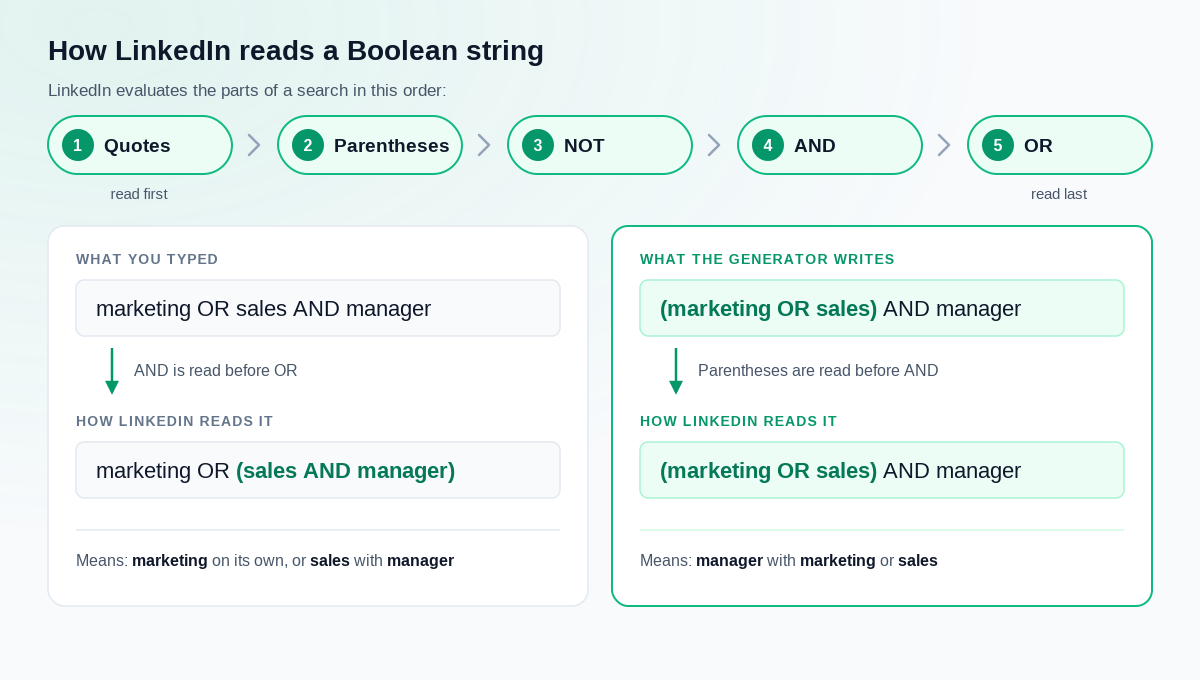
The most common one is the order of operations: type marketing OR sales AND manager on LinkedIn and it reads marketing OR (sales AND manager), while the
generator writes (marketing OR sales) AND manager.
Illustration (simplified); the example words are made up. Order of operations from LinkedIn Help's Boolean search article.
A search query that combines words with AND, OR and NOT, uses quotation marks for exact phrases and parentheses for grouping. LinkedIn, for example, accepts these in its main search bar when the operators are typed in capitals.
Does LinkedIn support boolean search?
Yes. LinkedIn accepts AND, OR and NOT in capitals, quotation marks and parentheses. It says + and - are not officially supported, and it does not support wildcards such as * or brackets.
In what order does LinkedIn read AND, OR and NOT?
Quoted phrases first, then parentheses, then NOT, then AND, and OR last, so wrap OR groups in parentheses to keep the meaning you want.
Can you use boolean operators in Bluesky search?
Bluesky documents quotation marks for exact phrases and filters such as from:, mentions:, domain:, lang:, since: and until:. It does not document AND, OR or a minus sign for excluding words, so this tool writes one search per alternative and leaves exclusions out for Bluesky.
Which search operators does Google list?
Google Search Help lists quotation marks for an exact match, site:, a minus sign to exclude a word, before:, after: and filetype:, and says not to put a space between the operator and the search term.