
How to Find Your Facebook URL (Profile, Page or Group)
Your Facebook URL is facebook.com/ followed by your username. Checked against Facebook Help Center: How to find or change your Facebook username To find it on a computer, log in and click your profile picture and name: your username shows in the browser’s address bar, and that address is your URL. Checked against Facebook Help Center: How to find or change your Facebook username
This guide covers how to find your Facebook URL for a profile, a Page, a group or a single post, on a computer or a phone, plus what happens when you change it. For everything else about the network, see our guide on how to use Facebook.
How to find your Facebook URL
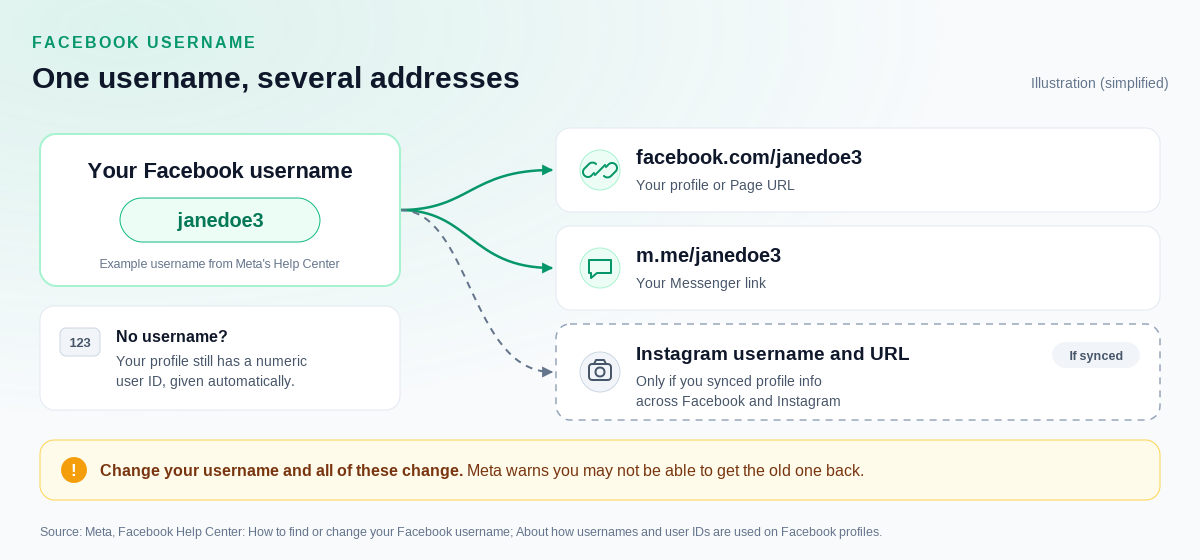
Log in, click your profile picture and name, and copy the address from your browser’s address bar. Meta says your username is the web address of your profile or Page, in the form facebook.com/username, and the same username is your Messenger address at m.me/username. Checked against Facebook Help Center: How to find or change your Facebook username
- Log in to Facebook on a computer.
- Click your profile picture and name.
- Copy the address shown in your browser’s address bar.
Checked against Facebook Help Center: How to find or change your Facebook username.
Meta separates your Facebook account (your login, contact details and password) from your main profile, which is created when you sign up, uses the name you go by in everyday life and is where you reach the Pages you manage. Your URL points to that profile. Checked against Facebook Help Center: The difference between your Facebook account and profile
Which Facebook URL do you need: profile, Page, group or post?
Profiles and Pages have a username-based address; for a group, an event or a single post, open it and copy the address Facebook shows. A profile represents a person, a Page is for artists, public figures, businesses, brands, organizations and nonprofits, and a group is for communicating about shared interests. You need a profile to create or manage a Page or a group. Checked against Facebook Help Center: Differences between Profiles, Pages and Groups on Facebook
| You want the link to | How Meta says to get it | What the link looks like | Source |
|---|---|---|---|
| Your profile | Click your profile picture and name, then copy the address bar | facebook.com/username | Checked against Facebook Help Center: How to find or change your Facebook username |
| A Page | Its username sits under the Page name and forms the address | facebook.com/username | Checked against Facebook Help Center: Create a username for your Facebook Page |
| A group or event | Search its name, open it and copy the URL from the address bar | The address Facebook shows | Checked against Facebook Help Center: Get a link (URL) to report a piece of content on Facebook |
| A post, comment or photo | Click its date or time, then copy that address | The address Facebook shows | Checked against Facebook Help Center: Get a link (URL) to report a piece of content on Facebook |
If your Page has no username yet, someone who manages it with Facebook access can create one from a computer, in Settings > Page setup > Name. Checked against Facebook Help Center: Create a username for your Facebook Page Still setting one up? Here’s how to create a Facebook Page.
How do I find my Facebook URL on a phone?
Use your phone’s web browser: Meta’s iPhone and Android help sends you to m.facebook.com rather than giving steps inside the Facebook app.
- Open m.facebook.com in your phone’s web browser.
- Tap Search and enter the name of the profile, Page, group or event.
- Tap the profile, Page, group or event.
- Tap and hold the address bar, then tap Copy.
Checked against Facebook Help Center: Get a link (URL) to report a piece of content on Facebook (iPhone app tab).
The same route works for your own profile: search your name, open your profile and copy the address.
What if your profile has no username?
Your profile still has a user ID, a string of numbers every profile gets automatically, whether or not you create a username. Meta says someone with your user ID can see your profile and its public information. Checked against Facebook Help Center: About how usernames and user IDs are used on Facebook profiles Apps you allow to connect to your Facebook account can also use your user ID to see public information, such as your public profile and friend list, and you control what your profile shows publicly. Checked against Facebook Help Center: About how usernames and user IDs are used on Facebook profiles
Want a link people can type? Create a username, as the next section shows.
How do you change your Facebook URL?
Change your username: your URL changes with it. For a profile, Meta lists these steps:
- Click your profile picture.
- Go to Settings & privacy, then Settings.
- Open Accounts Center, then Profiles.
- Select your profile.
- Click Username, enter the new one and click Done.
Checked against Facebook Help Center: How to find or change your Facebook username.
Meta is gradually moving people to Meta Accounts, so your settings may show Meta Account instead of Accounts Center. Checked against Facebook Help Center: How to find or change your Facebook username
A new username has to follow Meta’s rules: at least 5 characters, only the letters A to Z, numbers 0 to 9 and periods, no generic terms or domain extensions, and not impersonating anyone. It must be unique, and periods and capital letters don’t count, so johnsmith55 and John.Smith55 are the same username. Each profile or Page gets one. Checked against Facebook Help Center: Guidelines for creating a custom username or screen name on Facebook
For a Page, the username can only be changed on a computer, by someone with Facebook access to the Page (not task access), and Meta can remove a Page username because of inactivity. Checked against Facebook Help Center: Change your Page's username and web address Meta’s steps:
On a computer:
- Log into Facebook, then click your profile photo in the top right.
- Click See all profiles, then select the Page you want to switch into.
- Click your Page's profile picture at the top right.
- Click Settings & Privacy, then click Settings.
- Click Page setup.
- Click Name.
- Below General Page Settings, click Edit next to your username.
- Update your username, then click Save changes.
Checked against Facebook Help Center: Change your Page's username and web address.
Before you change it, know what else moves. A new username changes your profile address at facebook.com/username and your Messenger address at m.me/username. If you synced profile information across Facebook and Instagram, it also changes your Instagram username and URL. Meta warns you may not be able to get your original username back. Checked against Facebook Help Center: How to find or change your Facebook username
A custom address like this is a kind of vanity URL; read what a vanity URL is for how they work across networks.
Where should you share your Facebook URL?
Anywhere people should find you: Meta says a username gives you a custom link to share with friends or post on other websites, and lets people search for you on Messenger. Checked against Facebook Help Center: About how usernames and user IDs are used on Facebook profiles
- Your other profiles. Put it in the link or website field of your other social profiles, where the network offers one. Our social media profile checklist covers each network’s fields.
- Links back to your site. When your Page posts link to your own website, tag those links with our UTM link builder so your website analytics show which visits came from Facebook.
Collecting links for every network? Next, find your Pinterest URL the same way.
Where Outfeed AI, the tool behind this blog, stands:
Facebook URL FAQ
What is my Facebook URL?
It is facebook.com/ followed by your Facebook username. Meta says your username is the web address of your profile or Page, and the same username is used for your Messenger link at m.me/username.
Where do I find my Facebook URL on a computer?
Log in to Facebook and click your profile picture and name. Your profile opens and your username shows in your browser’s address bar; copy the whole address to share it.
How do I find my Facebook URL on my phone?
Meta’s help for iPhone and Android uses your phone’s web browser: open m.facebook.com, tap Search and enter the name, tap the profile, Page, group or event, then tap and hold the address bar and tap Copy.
Can I change my Facebook URL?
Yes, by changing your username in Accounts Center under Profiles. That also changes your facebook.com and m.me addresses, and your Instagram username and URL if you synced profile information across Facebook and Instagram. Meta warns you may not be able to get your old username back.
What are the rules for a Facebook username?
It must be at least 5 characters, use only the letters A to Z, numbers and periods, contain no generic terms or domain extensions and be unique; periods and capital letters do not count toward uniqueness. Each profile or Page gets one username.