
Reels Planner: Plan and Schedule Instagram Reels
A reels planner is where you decide which Reels to make, what each caption says and when each one goes out, then schedule them to post.
Any post with exactly one video is published as a Reel. Outfeed checks the video against Instagram's API limits (3 seconds to 15 minutes, up to 300 MB, MP4 or MOV) before it can be scheduled.
Starter includes a 3-day free trial with 100 AI credits. Card required. Pro and Agency are billed from the first day.
What is a reels planner, and can Reels post automatically?
Yes, Reels can post automatically to Instagram professional accounts: Meta's Instagram Content Publishing API publishes single images, videos, reels and carousels to them. Checked against Meta for Developers: Instagram Platform, Content Publishing (updated Oct 20, 2026) A reels planner adds the plan around that: which Reel, which caption and which time. Scheduling across every network is covered on Outfeed's social media scheduler page.
You pick an exact date and time (in chat or the composer) for one post that can target several accounts across networks. Outfeed stores it and a timed trigger publishes it at that moment through each network's API. Outfeed does not hand posts to the networks' own schedulers.
Instagram's own app can schedule Reels too, up to 30 days in advance, according to Instagram Help Center: How to create and manage scheduled posts and Reels on Instagram. A planner earns its place when you plan several Reels at once, or post the same week's content to other networks as well.
What counts as a Reel when you schedule it in Outfeed?
Feed posts: a single image, a single video (published as a Reel), or a carousel of up to 10 images and/or videos. Every Instagram post needs at least one image or video.
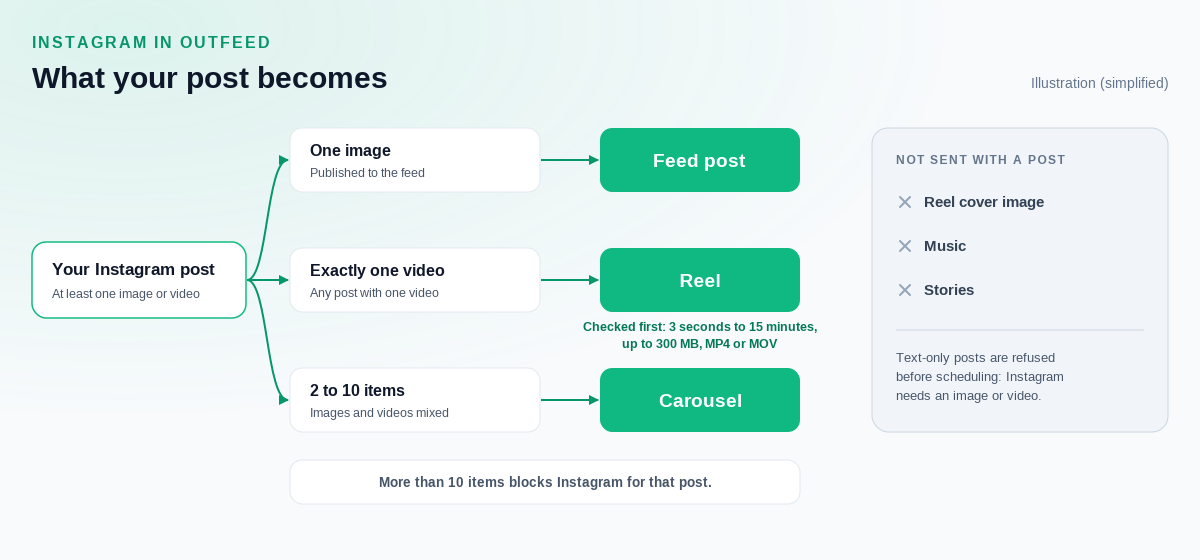
The 15-minute ceiling is the API's limit, not the Instagram app's. Reels published through Meta's API must be MOV or MP4 files of 3 seconds to 15 minutes and at most 300 MB, at 23 to 60 frames per second and at most 1920 pixels wide, and Meta recommends a 9:16 aspect ratio. Checked against Meta for Developers: Instagram Platform, IG User Media reference (updated Sep 28, 2026) To work out 9:16 in pixels for any width, use the free aspect ratio calculator. In the Instagram app, Instagram documents reels of up to 20 minutes and says reels over 3 minutes won't be recommended to new audiences. Checked against Instagram Help Center: How do I post a video? (serves "Record a reel on Instagram")
On Instagram itself, Meta announced on 21 July 2022 that new video posts shorter than 15 minutes would be shared as reels, and that earlier videos would stay videos. Checked against About Meta newsroom: Introducing New Ways to Collaborate and Create With Reels (21 July 2022) For the other networks, see what Outfeed publishes on every network.
How do you plan a month of Reels? An illustrative reels plan
Plan Reels a week at a time: one theme, one hook, the caption notes and a posting time you choose for each. The table below is an illustrative example of that structure, for a small business. It is not a recommendation of themes or times that perform better.
| Week | Theme | Hook idea (first seconds) | Caption notes | Posting time |
|---|---|---|---|---|
| 1 | Behind the scenes | "Here's what happens after you place an order" | Name the product; end with one question | A day and time you pick |
| 2 | How-to | "Three mistakes people make with…" | Repeat the steps in text for viewers with sound off | A day and time you pick |
| 3 | Customer question | Read a real question on screen, then answer it | Credit the question without naming the customer | A day and time you pick |
| 4 | Product or offer | Show the result first, then how it's made | Price or offer details, and where to buy | A day and time you pick |
Illustrative example. Swap in your own themes and times.
For one Reel at a time, a reel planner entry needs six fields. Copy this block into your notes or a calendar cell and fill it in (illustrative, not a formula that performs better):
Pillar:       (which content theme this Reel serves)
Hook:         (what viewers see and hear in the first seconds)
Shot list:    (3 to 5 shots, in order)
Caption notes: (key line, question or offer; repeat steps as text for sound-off viewers)
CTA:          (one action: comment, save, visit, buy)
Posting time: (the day and time you pick, with your time zone)
Copy the structure into the free content calendar template, and read when a Reel beats a feed post before a week's idea goes to Reels by default.
Where Outfeed fits in that plan:
- The calendar shows your posts by month, week or day, and you can filter it by account.
- The assistant writes the post text, can give each network its own version, writes the YouTube title and writes alt text for your images.
What does Outfeed check before a Reel can be scheduled?
Before a post is accepted into the schedule, Outfeed checks that every account is still connected, the text fits each network's limit, the media passes each network's rules, and required fields (YouTube's made-for-kids answer) are set, along with TikTok's privacy setting for a post going straight to TikTok. Problems are reported then, not hours later.
A video Instagram's API would refuse is better caught when you schedule than when the Reel is due. For Instagram, Outfeed checks:
- Times are read in the time zone you give (any IANA zone, such as America/Toronto), with daylight saving handled. The time must be in the future.
- In chat, scheduling and publishing are confirmed by you before they happen; the assistant does not schedule silently.
- Images and videos you upload stay in a media library: search it by file name, filter by type, sort it and star favourites; add alt text, see which posts use a file, add a file from a public link, and trim a video into a new copy.
For the limits on each kind of Instagram video, see Instagram video length limits.
What doesn't the Instagram Reels scheduler do?
Meta's API offers several Reel settings, and the notes below say which of them Outfeed sends. When a reel is published through the API, the app can choose whether it may also appear in the Feed, set a cover image or cover frame, add up to 3 collaborators and publish it as a trial reel; reels cannot be placed in carousels. Checked against Meta for Developers: Instagram Platform, IG User Media reference (updated Sep 28, 2026)
No AI image or video generation. No iOS or Android app and no browser extension.
No automatic queue or best-time slots
There is no automatic posting queue or best-time slotting: you (or the assistant, on your instruction) choose the time.
- Stories (image or video) are not published to Instagram.
- No first-comment scheduling. Outfeed does not request Instagram's comment permission and never posts a comment.
- No user tags, product tags, location, collaborator invites, music or polls are sent with a post.
- No Reel cover image or thumbnail selection.
Outfeed facts on this page were checked against the Outfeed app code on 2026-11-21.
Which plan do you need to schedule Reels?
Starter
$29 per month, billed monthly
- Connected accounts
- 10
- Posts per month
- 100
- Team members
- 1
- Bulk scheduling
- No
- X posts per month
- 75
Pro
$59 per month, billed monthly
- Connected accounts
- 25
- Posts per month
- Unlimited
- Team members
- 3
- Bulk scheduling
- Yes
- X posts per month
- 150
Agency
$149 per seat/month, billed monthly
- Connected accounts
- 250
- Posts per month
- Unlimited
- Team members
- Unlimited
- Bulk scheduling
- Yes
- X posts per month
- 350
Enterprise
Custom
- Connected accounts
- Unlimited
- Posts per month
- Unlimited
- Team members
- Unlimited
- Bulk scheduling
- Yes
- X posts per month
- Unlimited
Starter and Pro are flat monthly prices, not billed per seat. Agency is billed per seat. Enterprise is custom.
Agency's 250 accounts is an organization-wide cap; it does not grow with seats.
Starter includes a 3-day free trial with 100 AI credits. Card required. Pro and Agency are billed from the first day.
Read the full Outfeed AI pricing breakdown or compare plans on the Outfeed AI homepage.
Reels planner FAQ
Can you schedule Instagram Reels in advance?
Yes. Instagram's own app schedules Reels up to 30 days in advance, according to Instagram Help Center: How to create and manage scheduled posts and Reels on Instagram. In Outfeed: Outfeed holds the post and publishes it through Instagram's API at the time you chose; it does not appear in Instagram's or Meta Business Suite's own scheduled list.
How long can a scheduled Reel be?
Outfeed checks the video against Instagram's API limits (3 seconds to 15 minutes, up to 300 MB, MP4 or MOV) before it can be scheduled. Any post with exactly one video is published as a Reel.
Can I post the same video as a Reel and to other networks?
Yes. You pick an exact date and time (in chat or the composer) for one post that can target several accounts across networks. Any post with exactly one video is published as a Reel.
Can I schedule Instagram Stories too?
No. Stories (image or video) are not published to Instagram.
Is the reels planner free?
No. There is no free plan. Starter includes a 3-day free trial with 100 AI credits. Card required. Pro and Agency are billed from the first day.
Reels guides and free tools
- What Reels are
The format explained.
- When a Reel beats a feed post
- Hashtags for Reels
- Instagram video length limits
- Free content calendar template
Lay out a month of Reels.
Schedule your next Reel with Outfeed AI
Starter includes a 3-day free trial with 100 AI credits. Card required. Pro and Agency are billed from the first day.