
Feature

Social Media Publishing Tool, Network by Network

A social media publishing tool sends a finished post to each network through that network's own publishing API, at the moment you choose.

You pick an exact date and time (in chat or the composer) for one post that can target several accounts across networks. Outfeed stores it and a timed trigger publishes it at that moment through each network's API. Outfeed does not hand posts to the networks' own schedulers.

Starter includes a 3-day free trial with 100 AI credits. Card required. Pro and Agency are billed from the first day.

What does a social media publishing tool do?

Publishing is the send; scheduling is choosing when it happens. A publishing tool makes the send through each network's publishing API, so what it can post is set by that API as much as by the tool. Instagram is a clear example: Meta's Content Publishing API publishes single images, videos, reels and carousels to Instagram professional accounts, accepts JPEG as its only image format and does not support shopping tags or filters. Checked against Meta for Developers: Instagram Platform, Content Publishing (updated Oct 20, 2026)

So the useful question about any social media publishing platform is what it sends to each network, and what it leaves out. This page answers that for Outfeed, network by network. How you pick the time is covered on Outfeed's social media scheduler page.

What can Outfeed publish on each network?

Each card lists what Outfeed sends to that network (✓), what it doesn't send (✗), the text limit, how the account connects and what happens at the scheduled time. For the dimensions each network recommends, see image and video sizes for each network. For Instagram video, see how Reels are planned and checked.

Instagram

Feed posts: a single image, a single video (published as a Reel), or a carousel of up to 10 images and/or videos. Every Instagram post needs at least one image or video.

  • Supported: Single image post.Published to the feed. Alt text you add is sent with the image. Images Instagram's API would refuse (PNG, WebP, GIF, AVIF, TIFF, or a ratio outside 4:5 to 1.91:1, or over the size cap) are converted to a JPEG copy at publish time, padded with white and never cropped. HEIC cannot be converted and is blocked.
  • Supported: Reel (single video).Any post with exactly one video is published as a Reel. Outfeed checks the video against Instagram's API limits (3 seconds to 15 minutes, up to 300 MB, MP4 or MOV) before it can be scheduled. There is no separate cover-image or share-to-feed setting.
  • Supported: Carousel.Two to 10 items, images and videos mixed. More than 10 items blocks Instagram for that post.
  • Not supported: Stories.Not published. The publishing code only creates feed images, Reels and carousels; no Story container is ever sent.
  • Not supported: Text-only post.Refused before scheduling: Instagram posts need at least one image or video.
Text limit
Captions are checked against 2,200 characters before the post can be scheduled.
How it connects
Connected through Instagram's own business login (the Instagram API with Instagram Login), with permission to read the profile and publish content. It does not go through a Facebook Page.
At the scheduled time
Outfeed holds the post and publishes it through Instagram's API at the time you chose; it does not appear in Instagram's or Meta Business Suite's own scheduled list.
Facebook

Page feed posts: text only, text with one photo, or text with one video.

  • Supported: Text-only Page post.Published to the Page feed.
  • Supported: Single photo.Published as a Page photo post with your text as the caption; alt text you add is sent.
  • Supported: Single video.Uploaded as a Page video with your text as the description. It is a regular Page video, not a Reel.
  • Not supported: Multi-photo post / album.Facebook takes one media item per post in Outfeed. A post with more than one item is blocked for Facebook before it can be scheduled.
  • Not supported: Stories or Reels.Not published. Only the Page feed, photo and video endpoints are used.
Text limit
Checked against 63,206 characters before the post can be scheduled.
How it connects
Connected with Facebook Login; you pick from the Facebook Pages you manage. Outfeed publishes to Pages only. It has no permission to post to a personal profile or to Groups.
At the scheduled time
Outfeed holds the post and publishes it through the Page API at the chosen time; it does not use Meta Business Suite's scheduler, so it will not show there as scheduled.

TikTok

A video post, or a photo post of up to 35 JPEG or WebP images, sent through TikTok's Content Posting API: posted to TikTok directly, or sent to your TikTok drafts for you to finish and post in the TikTok app. Posts currently publish as private (visible only to the connected account), the only privacy level TikTok allows the Outfeed app for now. For now TikTok also accepts a direct post only to a private TikTok account: it refuses a direct post to a public TikTok account, so use Send to TikTok drafts for a public account instead.

  • Supported: Video.One video per post (the first video if several are attached). It is posted directly with the privacy level you pick from the ones TikTok offers for the account (there is no default), or sent to your TikTok drafts. Comments, Duet and Stitch are off unless you turn each one on, and any you have turned off in TikTok stay off. Checked against TikTok's API limits (up to 10 minutes, up to 4 GB, MP4, MOV or WebM).
  • Supported: Photo post (carousel).Up to 35 images, JPEG or WebP only (PNG is refused), posted directly or sent to your TikTok drafts. The first 90 characters of your text become the photo post's title and the full text its description. Comments are off unless you turn them on; photo posts have no Duet or Stitch.
  • Not supported: Text-only post.Refused: TikTok posts need a video or at least one image.
Text limit
Checked against 4,000 characters before scheduling. For video posts the caption is cut to 2,200 characters when sent; photo posts keep up to 4,000 in the description.
How it connects
Connected with TikTok login, with TikTok's video-publish permission and its upload permission for sending posts to your TikTok drafts.
At the scheduled time
Outfeed holds the post and sends it to TikTok at the chosen time; TikTok's own scheduler is not used.
A post going straight to TikTok cannot be scheduled until you pick who can view it from the privacy levels TikTok offers for the account. A post sent to your TikTok drafts needs no setting, because you finish it in the TikTok app.
You can mark a post going straight to TikTok as commercial content, for your own brand or as branded content for someone else, and TikTok shows its label on the post; TikTok does not allow branded content to be private. You can also switch on TikTok's AI-generated content label.

TikTok posts from Outfeed currently publish as private, visible only to the connected account, until TikTok approves the Outfeed app: you pick from the privacy levels TikTok offers, and until then that is private only. They do not reach followers yet. Until then TikTok also accepts a direct post only to a private TikTok account; it refuses a direct post to a public TikTok account, so use Send to TikTok drafts for a public account instead.

LinkedIn

Posts on your personal profile: text only, text with one image, or text with one video.

  • Supported: Text post.Published to your profile.
  • Supported: Single image.Uploaded to LinkedIn and attached; alt text you add is sent.
  • Supported: Single video.Uploaded in parts and published once LinkedIn has processed it (MP4, 3 seconds to 30 minutes).
  • Not supported: Multi-image post.Only the first media item is published to LinkedIn; the composer warns you when more are attached.
  • Not supported: Document / PDF carousel.Not published.
Text limit
3,000 characters.
How it connects
Connected with LinkedIn sign-in to your personal LinkedIn profile. Outfeed posts as you, the member; it does not post to LinkedIn Company Pages.
At the scheduled time
Outfeed holds the post and publishes it to LinkedIn at the chosen time; LinkedIn's own scheduler is not used.

X (Twitter)

Text-only posts up to 280 characters as X counts them (links count 23, emoji and CJK count 2). Images and video cannot be sent to X yet.

  • Supported: Text post.Checked with X's own counting method before scheduling.
  • Not supported: Post with images or video.Blocked for X before scheduling: X media publishing is not built yet. Remove the media for X or leave X out of that post.
  • Not supported: Thread (chain of replies).Not published. Each post goes out as one standalone post; no reply chains are created.
Text limit
280 characters, weighted the way X weights them.
How it connects
Connected with X login (OAuth 2.0), with permission to read and write posts.
At the scheduled time
X is available on every plan, with a monthly cap on X posts per plan. Each X account a post targets counts once against the cap.

X posts are capped per billing period by plan. If the cap is reached, new X posts are refused until the next period or an upgrade.

Threads

Text posts, a single image or video, or a carousel of up to 20 images and/or videos.

  • Supported: Text-only post.Published as a text post.
  • Supported: Single image or video.Alt text you add is sent with images.
  • Supported: Carousel.Up to 20 items, images and videos mixed. More than 20 blocks Threads for that post.
  • Not supported: Multi-post thread (reply chain).Not published. Each post goes out as one standalone post.
Text limit
500 characters.
How it connects
Connected with Threads login, with permission to read the profile and publish.
At the scheduled time
Outfeed holds the post and publishes it to Threads at the chosen time; the Threads app's own scheduler is not used.

YouTube

A video upload with a title (up to 100 characters), your text as the description, a Public, Unlisted or Private setting, and your answer to YouTube's made-for-kids question.

  • Supported: Video upload.Uploaded to the channel at the chosen time. You set the title and privacy (Public, Unlisted or Private; Public is preselected) in the composer, and must answer whether the video is made for kids; Outfeed never answers that for you and will not schedule the video without it.
  • Not supported: Shorts.There is no Shorts option. Every video goes through the same upload with the same fields; Outfeed does not mark, detect or format anything as a Short. How YouTube classifies a vertical video is up to YouTube.
  • Not supported: Community posts / images.Not published. YouTube in Outfeed takes video only.
Text limit
Description checked against 5,000 bytes (UTF-8) before scheduling; the title is limited to 100 characters.
How it connects
Connected with Google sign-in, with upload and read-only YouTube permissions.
At the scheduled time
Outfeed uploads the video at the time you chose. It does not upload early as Private with a YouTube publish time, so the video will not sit in YouTube Studio as 'Scheduled'.
The category is always set to People & Blogs; there is no category choice.

Pinterest

Image Pins to a board you pick. Video Pins are not supported yet.

  • Supported: Image Pin.One image per Pin (the first image if several are attached; the composer warns). Your text becomes the Pin description and alt text you add is sent (Pinterest caps alt text at 500 characters).
  • Supported: Board selection.The composer lists your boards and you pick one (it preselects your first board). If no board was chosen, for example on a post created in chat, the Pin goes to the first board Pinterest returns.
  • Not supported: Video Pin.Refused: video Pins are not implemented yet.
Text limit
Pin description checked against 800 characters.
How it connects
Connected with Pinterest login, with permission to read your boards and create Pins.
At the scheduled time
Outfeed holds the Pin and creates it at the chosen time; Pinterest's own scheduler is not used.

Bluesky

Text posts up to 300 characters, with up to 4 images or one video. Links and @mentions in the text are made clickable automatically.

  • Supported: Text post.Links and mentions are detected and linked.
  • Supported: Images.Up to 4 images (JPEG, PNG or WebP, up to 2 MB each); alt text you add is sent. More than 4 blocks Bluesky for that post.
  • Supported: Video.One video per post, uploaded through Bluesky's video service (MP4 preferred; up to 10 minutes and 300 MB).
  • Not supported: Thread (reply chain).Not published. Each post goes out as one standalone post.
Text limit
300 characters, counted as visible characters (graphemes), the way Bluesky counts.
How it connects
Connected with your Bluesky handle and an app password you create in Bluesky's settings (Bluesky does not use the usual login redirect). The app password is stored encrypted and used to sign in each time a post is published.
At the scheduled time
Outfeed holds the post and publishes it at the chosen time. Bluesky has no built-in scheduler to hand it to.

Bluesky connects with an app password rather than a login redirect; Outfeed stores it encrypted. Use an app password, never your main Bluesky password.

What does Outfeed check before a post is accepted?

Before a post is accepted into the schedule, Outfeed checks that every account is still connected, the text fits each network's limit, the media passes each network's rules, and required fields (YouTube's made-for-kids answer) are set, along with TikTok's privacy setting for a post going straight to TikTok. Problems are reported then, not hours later.

A network refuses a post it can't take, so finding that out while you can still fix the post is the point of checking early. Around those checks:

  • As you type, the composer counts the text against the selected network's limit (in bytes for a YouTube description).
  • The composer shows a simplified preview of the post for each of the nine networks, in a phone-style frame, before you schedule it.
  • If a connected account's login expires or is revoked, a banner across the app names the account and links to reconnect it. Logins that can be refreshed are renewed before they expire by a daily check.

What happens at publish time if one network fails?

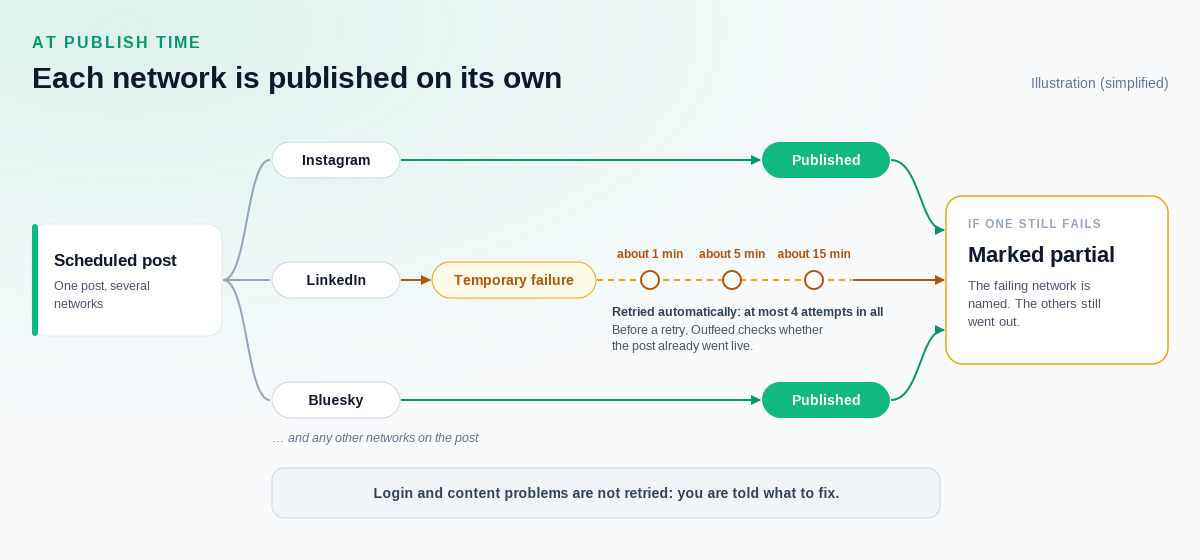
Each network is published independently. If one fails, the others still go out and the post is marked partial, with the failing network named.

Temporary failures (rate limits, network errors, the network being down) are retried automatically after about 1, 5 and 15 minutes, at most 4 attempts in all. Login and content problems are not retried; you are told what to fix. Before a retry that could double-post, Outfeed first checks whether the post already went live.

Diagram of what happens at publish time in Outfeed: each network is published on its own, temporary failures are retried after about 1, 5 and 15 minutes up to 4 attempts, and a post with a failed network is marked partial with that network named
Illustration of how Outfeed publishes a scheduled post (simplified).

For a failed or partly published post, Retry in the web app publishes again to the networks that failed only; networks that already published are skipped. Retrying failed networks is a web-app action only; the assistant, the REST API and MCP cannot retry a post.

Each network card above shows, under "At the scheduled time", how that network's own scheduler relates to a post from Outfeed. Until a post starts publishing you can still change it: editing, cancelling and publishing now are covered on how Outfeed's scheduler handles edits and cancelling. If you would rather use the built-in schedulers, the guide to native scheduling on each network walks through them.

What can't Outfeed publish?

These are the formats and settings Outfeed doesn't send, network by network, as the app code stands. Read them before you pay. For Instagram video, see how Reels are planned and checked.

No automatic queue or best-time slots

There is no automatic posting queue or best-time slotting: you (or the assistant, on your instruction) choose the time.

Instagram

  • Stories (image or video) are not published to Instagram.
  • No first-comment scheduling. Outfeed does not request Instagram's comment permission and never posts a comment.
  • No user tags, product tags, location, collaborator invites, music or polls are sent with a post.
  • No Reel cover image or thumbnail selection.

Facebook

  • No posting to personal Facebook profiles.
  • No posting to Facebook Groups.
  • No multi-photo posts or albums (one media item per post).
  • No Facebook Stories or Reels.
  • No first-comment scheduling.
  • Outfeed does not switch on or use Meta's own Facebook-to-Instagram sharing setting.

TikTok

  • Posts cannot be published publicly yet: until TikTok approves the Outfeed app, TikTok only lets Outfeed publish posts as private (only the connected account can see them), and only to a private TikTok account: it refuses a direct post to a public TikTok account, so use Send to TikTok drafts for a public account instead.
  • No TikTok sounds or music selection.
  • No Stories.
  • A video sent to your TikTok drafts carries no caption or settings from Outfeed; you add them in the TikTok app.
  • TikTok posts from Outfeed currently publish as private, visible only to the connected account, until TikTok approves the Outfeed app: you pick from the privacy levels TikTok offers, and until then that is private only. They do not reach followers yet. Until then TikTok also accepts a direct post only to a private TikTok account; it refuses a direct post to a public TikTok account, so use Send to TikTok drafts for a public account instead.

LinkedIn

  • No LinkedIn Company Page posting.
  • No multi-image posts (first item only).
  • No document or PDF carousel posts.
  • No polls, articles or newsletters.

X (Twitter)

  • No images, GIFs or video on X.
  • No threads.
  • No polls.
  • X posts are capped per billing period by plan. If the cap is reached, new X posts are refused until the next period or an upgrade.

Threads

  • No reply chains (multi-post threads).
  • No polls or topic tags.

YouTube

  • No Shorts-specific handling.
  • No YouTube-side scheduled publish time (Outfeed publishes at the time itself).
  • No pinned comment or any comment: Outfeed does not have YouTube's comment permission.
  • No custom thumbnail, tags, playlist or category selection.

Pinterest

  • No video Pins.
  • No destination link (click-through URL) is set on the Pin.
  • No separate Pin title field.
  • No multi-image or carousel Pins (first image only).

Bluesky

  • No threads (reply chains).
  • No language tag is set on posts.
  • Bluesky connects with an app password rather than a login redirect; Outfeed stores it encrypted. Use an app password, never your main Bluesky password.

Outfeed facts on this page were checked against the Outfeed app code on 2026-11-21.

How do other social media publishing tools handle Stories, X and reminders?

Other social media publishing tools, and content publishing tools in general, work within the same network rules, and fill the gaps in different ways: reminders to finish a post in the network's app, paid add-ons for X, and features held for higher plans. Each fact below comes from the vendor's own pricing page.

  • Reminders. Buffer includes a re-orderable posting queue on every plan and reminder notifications that let you finish Instagram, TikTok and YouTube posts natively in the app. Checked against Buffer: PricingVendor's own description Planoly auto-posts where a platform allows it and otherwise sends a push notification so you post natively. Checked against Planoly: Pricing & PlansVendor's own description
  • Instagram tags and locations. Later auto-publishes to Instagram business and creator accounts, TikTok, Facebook, Threads, Pinterest and LinkedIn, and says Instagram's limitations mean users can be tagged only in single-image auto-published posts, and locations added only to single-image and video posts. Checked against Later: PricingVendor's own description
  • First comments. Buffer's first-comment scheduling for Instagram, Facebook and LinkedIn posts is on its Essentials and Team plans, not Free. Checked against Buffer: PricingVendor's own description
  • X. Agorapulse sells X as an add-on: X Lite covers scheduling and publishing posts and threads, X Plus covers full X management. Checked against Agorapulse: Pricing PlansVendor's own description Metricool needs a paid X add-on, available from its Starter plan. Checked against Metricool: PricingVendor's own description

For plan prices side by side, see publishing tools compared on price.

Limits every publishing tool works within

The networks set these limits for every app that publishes through their APIs.

  • Instagram: accounts are limited to 100 API-published posts in a moving 24-hour period, and a carousel counts as one post. Checked against Meta for Developers: Instagram Platform, Content Publishing
  • Threads: the API publishes in two steps (create a media container, then publish it), only for users who grant an approved app permission, and limits text posts to 500 characters. Checked against Meta for Developers: Threads API, Posts
  • YouTube: the upload endpoint accepts files up to 256 GB, draws on a separate upload quota, supports a scheduled publish time, and makes a video public when no privacy status is set, unless the creator's account settings make it private. Checked against Google for Developers: YouTube Data API, Videos: insert
  • Pinterest: the API creates a Pin on a board the authorised account owns, and Pinterest says it is only for publishing new content the user created. Checked against Pinterest Developers: API v5, Create Pin
  • TikTok: to post directly, an app needs TikTok's approved publishing permission, must first ask for the creator's details and use one of the privacy options TikTok returns, and each user's token may send 6 post-initialisation requests a minute. Checked against TikTok for Developers: Content Posting API, Direct Post (updated Oct 27, 2026)

Which plan do you need for the social media publishing platform?

One scheduled post counts as one post against the monthly post limit however many accounts it targets. X is counted separately, once per X account targeted, against the X cap.

The Bulk scheduling row below shows which plans include it, and the bulk scheduling page shows how to lay a batch of posts out on a pattern.

Starter

$29 per month, billed monthly

Connected accounts
10
Posts per month
100
Team members
1
Bulk scheduling
No
X posts per month
75

Pro

$59 per month, billed monthly

Connected accounts
25
Posts per month
Unlimited
Team members
3
Bulk scheduling
Yes
X posts per month
150

Agency

$149 per seat/month, billed monthly

Connected accounts
250
Posts per month
Unlimited
Team members
Unlimited
Bulk scheduling
Yes
X posts per month
350

Enterprise

Custom

Connected accounts
Unlimited
Posts per month
Unlimited
Team members
Unlimited
Bulk scheduling
Yes
X posts per month
Unlimited

Starter and Pro are flat monthly prices, not billed per seat. Agency is billed per seat. Enterprise is custom.

Agency's 250 accounts is an organization-wide cap; it does not grow with seats.

Starter includes a 3-day free trial with 100 AI credits. Card required. Pro and Agency are billed from the first day.

Read the full Outfeed AI pricing breakdown or compare plans on the Outfeed AI homepage.

Social media publishing tool FAQ

What is the difference between publishing and scheduling on social media?

Publishing is the moment a post is sent to a network through that network's publishing API. Scheduling is choosing that moment in advance. You pick an exact date and time (in chat or the composer) for one post that can target several accounts across networks. Outfeed stores it and a timed trigger publishes it at that moment through each network's API. Outfeed does not hand posts to the networks' own schedulers.

Will a post scheduled in Outfeed AI show in Meta Business Suite?

No. Outfeed holds the post and publishes it through Instagram's API at the time you chose; it does not appear in Instagram's or Meta Business Suite's own scheduled list.

What happens if one network rejects a post at publish time?

Each network is published independently. If one fails, the others still go out and the post is marked partial, with the failing network named. Temporary failures (rate limits, network errors, the network being down) are retried automatically after about 1, 5 and 15 minutes, at most 4 attempts in all. Login and content problems are not retried; you are told what to fix. Before a retry that could double-post, Outfeed first checks whether the post already went live.

Can Outfeed AI post Instagram Stories, images to X or video Pins?

No. Stories (image or video) are not published to Instagram. No images, GIFs or video on X. No video Pins.

Can I write different text for each network?

Yes. One post can carry different text per network: write a main version and override it for specific networks. Before a post is accepted into the schedule, Outfeed checks that every account is still connected, the text fits each network's limit, the media passes each network's rules, and required fields (YouTube's made-for-kids answer) are set, along with TikTok's privacy setting for a post going straight to TikTok. Problems are reported then, not hours later.

Publishing guides

Publish your next post with Outfeed AI

Starter includes a 3-day free trial with 100 AI credits. Card required. Pro and Agency are billed from the first day.