
Social Media Bulk Scheduling: Patterns, CSVs and Limits
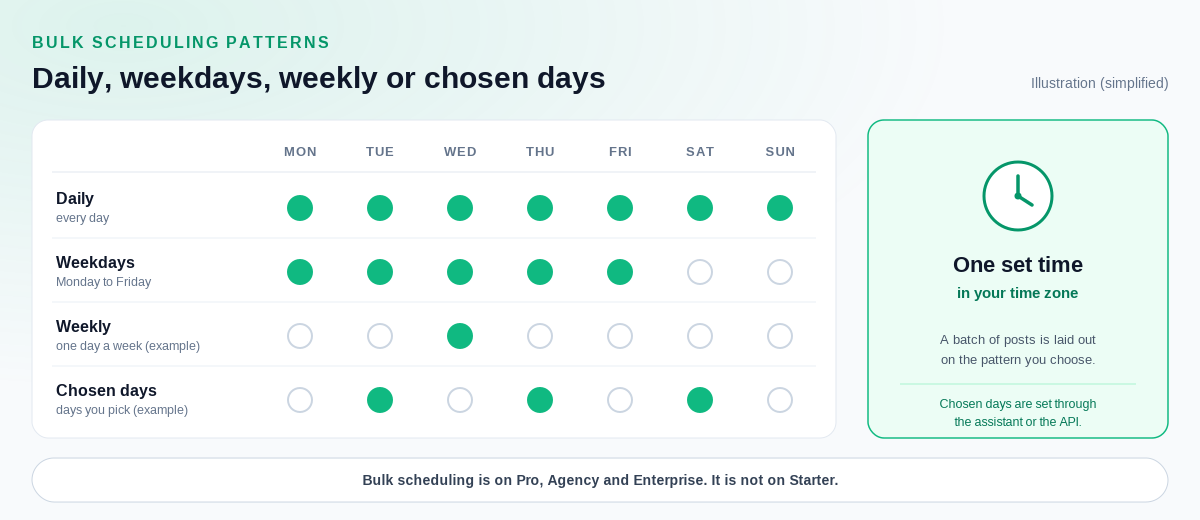
Bulk scheduling lays a batch of posts out on a pattern (daily, weekdays, weekly or chosen days, at a set time in your time zone). It is not on Starter; it is on Pro, Agency and Enterprise.
Starter includes a 3-day free trial with 100 AI credits. Card required. Pro and Agency are billed from the first day.
What is social media bulk scheduling?
Social media bulk scheduling means scheduling a batch of posts in one go instead of setting up each post by hand. Bulk scheduling social media posts saves the most time when the batch is planned first. Many schedulers do it with an uploaded CSV file of one row per post, as the examples further down show. Below is how it works in Outfeed's social media scheduler, then how CSV uploads work elsewhere.
A pattern suits a regular rhythm. A file suits a batch where every post needs its own date and time.
How do you bulk schedule social media posts in Outfeed?
Four steps: draft the batch, pick a pattern and a time, set the time zone, then confirm. What Outfeed does at each step is set out below.
Step 1: Draft the batch
Decide what the batch covers before you write it. If you need a plan, plan a week of pillar posts or start from the free content calendar template. Drafting a batch of posts in one go is on Pro, Agency and Enterprise only, the same as laying a batch out on a pattern; Starter has neither.
Step 2: Pick a pattern and a time
The composer's bulk schedule menu offers Daily, Weekdays (Mon–Fri) and Weekly at a time you set; other days of the week are set through the assistant or the API. Developers can also bulk-schedule from your own code through the API.
Step 3: Set your time zone
Times are read in the time zone you give (any IANA zone, such as America/Toronto), with daylight saving handled. The time must be in the future.
Step 4: Confirm before anything is scheduled
In chat, scheduling and publishing are confirmed by you before they happen; the assistant does not schedule silently. Before a post is accepted into the schedule, Outfeed checks that every account is still connected, the text fits each network's limit, the media passes each network's rules, and required fields (YouTube's made-for-kids answer) are set, along with TikTok's privacy setting for a post going straight to TikTok. Problems are reported then, not hours later.
Which patterns can you choose: daily, weekdays, weekly or chosen days?
Four patterns: daily, weekdays, weekly or chosen days, each at one set time. Bulk scheduling lays a batch of posts out on a pattern (daily, weekdays, weekly or chosen days, at a set time in your time zone).
How the posts in a batch count against your plan: One scheduled post counts as one post against the monthly post limit however many accounts it targets. X is counted separately, once per X account targeted, against the X cap.
Can you bulk schedule Instagram posts?
Yes, within the limits Meta sets for every app that publishes to Instagram. Each Instagram account can take 100 posts published through the API in a moving 24-hour period, and a carousel counts as one. Checked against Meta for Developers: Instagram Platform, Content Publishing
For a single post, follow the guide to schedule Instagram posts one at a time.
What doesn't bulk scheduling do? No CSV import and no queue
Know these before you plan a month of posts in one go.
No automatic queue or best-time slots
There is no automatic posting queue or best-time slotting: you (or the assistant, on your instruction) choose the time.
- No. Outfeed has no CSV or spreadsheet import of posts. Bulk scheduling lays a batch of posts out on a pattern (daily, weekdays, weekly or chosen days, at a set time in your time zone); it is not on Starter, only on Pro, Agency and Enterprise.
- Stories (image or video) are not published to Instagram.
- No first-comment scheduling. Outfeed does not request Instagram's comment permission and never posts a comment.
- No user tags, product tags, location, collaborator invites, music or polls are sent with a post.
- No Reel cover image or thumbnail selection.
X (Twitter)
- No images, GIFs or video on X.
- No threads.
- No polls.
- X posts are capped per billing period by plan. If the cap is reached, new X posts are refused until the next period or an upgrade.
Outfeed facts on this page were checked against the Outfeed app code on 2026-11-21.
What goes in a bulk upload file?
Every bulk upload file needs a date and time on each row; post text, links, media and labels are usually optional columns. The checklist below draws only on what the vendors in the next table say about their own files, so build yours on your tool's template: column names and rules differ.
| Field | Required? | What the vendors say |
|---|---|---|
| Date and time | Yes | Agorapulse needs a scheduled date and time on every row. Zoho Social needs each post at least an hour after the upload; Loomly at least 30 minutes after the upload and 30 minutes apart. |
| Post text | Usually | Optional in Agorapulse's import, though most posts need it. |
| Link | Optional | A link column is optional in Agorapulse's import. |
| Images | Optional | Public image URLs, separated by semicolons for a carousel, in Agorapulse; up to 10 public .JPG/.JPEG links per post in Zoho Social; single images only in Buffer. |
| Video | Optional | A public video URL in Agorapulse; Buffer's upload takes no video; Loomly takes media from the Loomly Media Library. |
| Labels | Optional | Agorapulse accepts labels to sort the imported posts. |
| File type and size | Set by the tool | Zoho Social takes .CSV, .XLS or .XLSX; Loomly a CSV on its template of up to 60 rows and 200 KB; Agorapulse up to 200 rows per file. |
Sources: Agorapulse Checked against Agorapulse Help Centre: How to Bulk Import Posts via CSV File (August 12, 2026)Vendor's own description; Zoho Social Checked against Zoho Social Help: Bulk SchedulerVendor's own description; Loomly Checked against Loomly Help Center: Bulk uploadingVendor's own description; Buffer Checked against Buffer Help: How to upload posts in bulk to BufferVendor's own description.
How a row names the account or network it posts to is set by each tool's template, so copy that column exactly as the template shows it. To plan the batch before you build the file, start from the free content calendar template.
How do CSV bulk uploads work in other schedulers?
In these schedulers you build a file with one row per post, upload it, and each tool applies its own cap and rules. The table restates what each vendor says about its own feature, in alphabetical order. Check the vendor's help centre before you build a file, because caps and plan lists change.
| Scheduler | What the vendor says about its bulk upload |
|---|---|
| Agorapulse | CSV import of up to 200 rows per file. Every row needs a scheduled date and time; post text, a link, a public video URL, public image URLs (separated by semicolons for a carousel) and labels are optional. Checked against Agorapulse Help Centre: How to Bulk Import Posts via CSV File (August 12, 2026)Vendor's own description |
| Buffer | CSV bulk upload on every plan, including Free: up to 10 posts per channel per upload on Free (limited by free queue slots) and up to 100 on paid plans. Text and single-image posts only, no video or carousels, and not for YouTube. Checked against Buffer Help: How to upload posts in bulk to BufferVendor's own description |
| Hootsuite | Bulk Composer schedules up to 350 posts at once from an uploaded .csv file and is listed on every plan. Checked against Hootsuite: Plans, Prices, and FeaturesVendor's own description |
| Loomly | A CSV built on Loomly's template, at most 60 rows and 200 KB. Posts must be at least 30 minutes after the upload and 30 minutes apart, with media from the Loomly Media Library. On the Starter and Beyond plans and Enterprise, not the free trial. Checked against Loomly Help Center: Bulk uploadingVendor's own description |
| SocialPilot | Creates and schedules up to 500 posts at once from an uploaded CSV, across multiple accounts. Checked against SocialPilot: Bulk Social Media Posting & Scheduling via CSVVendor's own description Its plans page lists bulk scheduling under Premium. Checked against SocialPilot: PlansVendor's own description |
| Zoho Social | Bulk Scheduler takes .CSV, .XLS or .XLSX files of up to 350 posts, each at least an hour after the upload, with up to 10 images per post as public .JPG/.JPEG links or Social library links. On the Professional, Premium, Agency and Agency Plus editions. Checked against Zoho Social Help: Bulk SchedulerVendor's own description |
Which plans include bulk scheduling?
It is not on Starter; it is on Pro, Agency and Enterprise. Look at the Bulk scheduling row below, or compare plans and limits in full.
Starter
$29 per month, billed monthly
- Connected accounts
- 10
- Posts per month
- 100
- Team members
- 1
- Bulk scheduling
- No
- X posts per month
- 75
Pro
$59 per month, billed monthly
- Connected accounts
- 25
- Posts per month
- Unlimited
- Team members
- 3
- Bulk scheduling
- Yes
- X posts per month
- 150
Agency
$149 per seat/month, billed monthly
- Connected accounts
- 250
- Posts per month
- Unlimited
- Team members
- Unlimited
- Bulk scheduling
- Yes
- X posts per month
- 350
Enterprise
Custom
- Connected accounts
- Unlimited
- Posts per month
- Unlimited
- Team members
- Unlimited
- Bulk scheduling
- Yes
- X posts per month
- Unlimited
Starter and Pro are flat monthly prices, not billed per seat. Agency is billed per seat. Enterprise is custom.
Agency's 250 accounts is an organization-wide cap; it does not grow with seats.
Starter includes a 3-day free trial with 100 AI credits. Card required. Pro and Agency are billed from the first day.
Read the full Outfeed AI pricing breakdown or compare plans on the Outfeed AI homepage.
Social media bulk scheduling FAQ
How many posts can you bulk schedule at once?
It depends on the tool. According to their own help and pricing pages, Loomly takes up to 60 rows per file, Buffer up to 100 posts per channel per upload on paid plans, Agorapulse up to 200 rows per file, Hootsuite and Zoho Social up to 350 posts, and SocialPilot up to 500. The networks set their own limits on top: an Instagram account takes 100 API-published posts in a moving 24 hours.
What columns does a bulk upload CSV need?
A date and time on every row at minimum. Agorapulse requires a scheduled date and time and treats post text, a link, a public video URL, public image URLs and labels as optional. Media usually goes in as public links: Zoho Social accepts up to 10 image links per post. Build the file on your tool's own template, because column names and rules differ.
Is bulk scheduling on Starter, and is there a free version?
No. Bulk scheduling lays a batch of posts out on a pattern (daily, weekdays, weekly or chosen days, at a set time in your time zone). It is not on Starter; it is on Pro, Agency and Enterprise. Starter includes a 3-day free trial with 100 AI credits. Card required. Pro and Agency are billed from the first day.
Can I import a CSV file to bulk schedule posts in Outfeed AI?
No. Outfeed has no CSV or spreadsheet import of posts. Bulk scheduling lays a batch of posts out on a pattern (daily, weekdays, weekly or chosen days, at a set time in your time zone); it is not on Starter, only on Pro, Agency and Enterprise.
Which time zone does a bulk pattern use?
Times are read in the time zone you give (any IANA zone, such as America/Toronto), with daylight saving handled. The time must be in the future.
Scheduling guides and free tools
- Outfeed AI social media scheduler
How scheduling works for a single post.
- How to schedule social media posts
Network-by-network scheduling guides.
- Content pillars: plan a week of posts
- Free content calendar template
- How to schedule Instagram posts
Schedule your next post with Outfeed AI
Starter includes a 3-day free trial with 100 AI credits. Card required. Pro and Agency are billed from the first day.