
Discord Usernames: Rules, Display Names + 200 Ideas
Discord usernames are unique, 2 to 32 characters long, always lowercase, and can use only the letters a to z, numbers, underscores and periods, never two periods in a row. Checked against Discord Support: New Usernames & Display Names The old Name#1234 tags are gone, and the name most people see is now a separate display name.
This page covers the rules first, then which of your three Discord names shows where, how to change your username, and 200 ideas: lowercase usernames that pass the rules, plus display names and server nicknames, which are far more flexible. Discord is one stop on a wider social media profile that works best when the names match.
Table of Contents
- What are the rules for Discord usernames?
- Username vs display name vs server nickname
- How do you change your Discord username?
- Cool Discord username ideas
- Cute and aesthetic Discord display name ideas
- Funny and gamer Discord names
- Discord nickname ideas for servers
- Frequently asked questions
What are the rules for Discord usernames?
Discord usernames must be unique, 2 to 32 characters, and are forced to lowercase; they may contain only Latin letters a to z, numbers 0 to 9, underscores and periods, with no two periods in a row. Discord’s own example: .a.b. is allowed, a..b. is not.
| Rule | Discord usernames |
|---|---|
| Length | 2 to 32 characters |
| Case | Case insensitive, forced lowercase |
| Characters | a to z, 0 to 9, underscore (_), period (.) |
| Periods | Never two in a row |
| Non-Latin letters | Not allowed (display names accept them) |
| Unique? | Yes, no two users share one |
Checked against Discord Support: New Usernames & Display Names.
Discord’s developer documentation adds that usernames can’t contain @, #, :, three backticks in a row or the word “discord”, and can’t be “everyone” or “here”. Checked against Discord Developer Documentation: Usernames and Nicknames
Where the numbers went. On May 3, 2023, Discord co-founder Stanislav Vishnevskiy announced that usernames would drop the four-digit discriminator in favour of unique usernames, with new display names keeping how people appear to others. Checked against Discord Blog: Evolving Usernames on Discord (Stanislav Vishnevskiy) From March 4, 2024, Discord began assigning new usernames to anyone who hadn’t chosen one, trying to keep them close to the old name. Checked against Discord Support: New Usernames & Display Names Your old name and tag can still show on your profile as a Legacy Username Badge, which you can switch off in User Settings > Profiles. Checked against Discord Support: New Usernames & Display Names
New accounts need verifying: if a new account isn’t verified, Discord adds 5 random digits to the end of its username 7 days after it was created. Checked against Discord Support: New Usernames & Display Names For how other apps handle the same question, see the username rules on other networks.
Username vs display name vs server nickname
Your username is the unique ID people use to add you as a friend; your display name is how you mainly appear across Discord; a server nickname, where set, shows instead of your display name inside that one server.
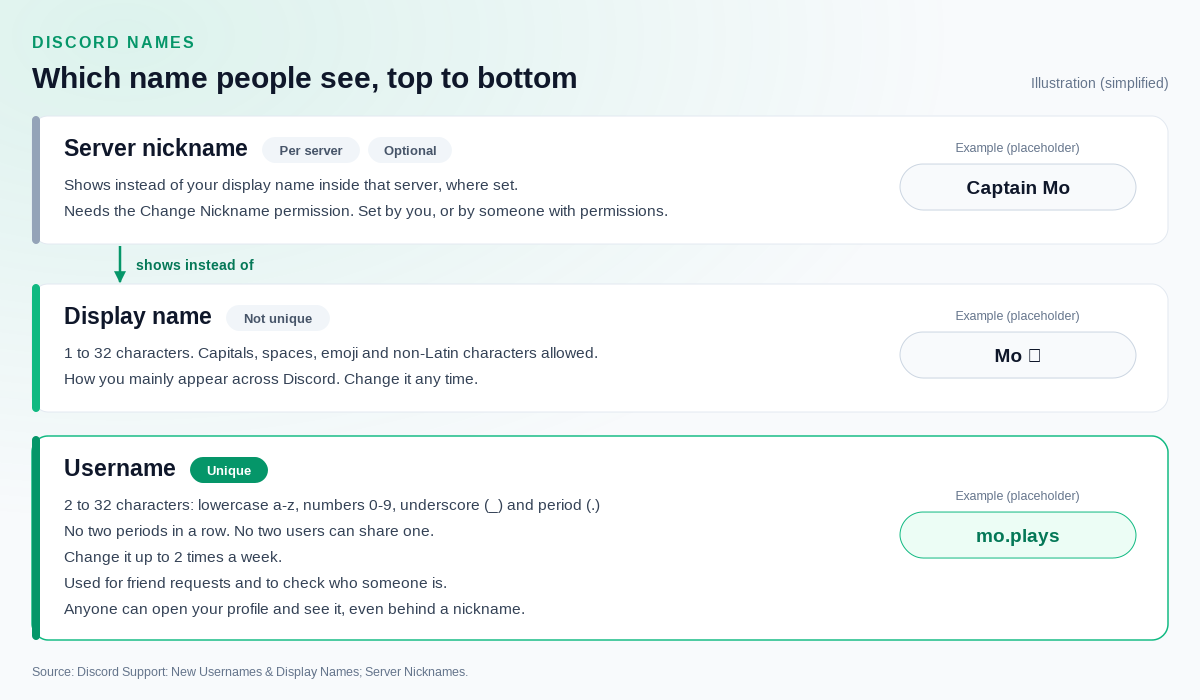
| Username | Display name | Server nickname | |
|---|---|---|---|
| Unique? | Yes | No | No |
| Length | 2 to 32 characters | 1 to 32 characters | 1 to 32 characters |
| Capitals, spaces, emoji | No | Yes | Most characters allowed |
| Where it shows | Your profile; friend requests | Across Discord | Inside one server |
| Changes | Up to 2 a week | Any time | Where your role allows |
A display name is not unique, and it can include special characters, spaces, emoji, capitals and non-Latin letters; you change it under User Settings > My Account > Profiles. Checked against Discord Support: New Usernames & Display Names Friend and server nicknames take priority over the display name where they’re set, and a friend nickname is visible only to the person who set it. Checked against Discord Support: New Usernames & Display Names Nicknames run 1 to 32 characters, and Discord trims extra spaces from them. Checked against Discord Developer Documentation: Usernames and Nicknames
Nitro subscribers can also restyle their display name with Discord’s Display Name Styles, a choice of fonts, effects and colours; without Nitro you can preview a style but not save it. Checked against Discord Support: Discord Display Name Styles FAQ Your profile’s About Me is the other text people read there; for it, see our Discord bio ideas.
How do you change your Discord username?
On desktop, open User Settings > My Account and press Edit next to Username; on mobile, open the profile tab, then Account > Username. Your account must be verified by email or phone to claim a new username, and Discord’s own steps are:
Desktop/Browser App:
- Go to User Settings > My Account page.
- Press the Edit button next to Username.
Mobile App:
- Navigate to the profile tab in the bottom right corner of the app.
- Select the Account menu option, then choose Username and update your username from this screen.
Checked against Discord Support: New Usernames & Display Names.
You can change your username up to 2 times per week, while your display name can change whenever you like. Checked against Discord Support: New Usernames & Display Names
If the name you want is taken, Discord suggests adding numbers, underscores or periods to it. Checked against Discord Support: New Usernames & Display Names Every username idea below uses only those characters and is 20 characters or fewer, so adding two digits or an underscore to one keeps it valid.
Cool Discord username ideas
Good Discord name ideas are two short words joined by a period or underscore, lowercase, with no double periods. Our top three: quietstorm, cobalt.fox and midnight.relay. All 60 usernames for Discord below pass the rules above.
- One word or close to it:
quietstorm·hollowpine·glasswing·nightjar·ironleaf·northbound_·nullpointer_·blank.canvas_·vapor.trail_ - Nature and night:
lowtide.echo·midnight.relay·cobalt.fox·obsidian.otter·moss.signal·copper.kite·dusk.runner·parallax.pine·boreal.bit·tundra.tune·feral.fern·kestrel.key·thistle.thread·rook.and.raven·ashen.thorn·polar.pixel - Techy:
ember.static·slate.and.signal·frostbyte.wav·orbit.lag·velvet.circuit·driftwood.dev·the.last.byte·solar.static·hush.protocol·ion.drift·crimson.cache·lantern.lag·sundial.sync·aurora.async·maple.macro·chrome.cricket - Odd pairs:
cipher.moth·static.bloom·inkwell.void·neon.monk·paperplane.pilot·kilowatt.kid·echo.lane·rusty.compass·starboard·tidal.loop·quartz.quill·lunar.latch·wildcard.wren·gravel.ghost·sable.sprite·halcyon.hum·zero.gravity.zen·ripple.ronin·marble.mantis
Using the same name elsewhere? Our TikTok username ideas follow TikTok’s own rules. For more variations, try the free username generator, then check the same name on nine networks before you settle on it.
Cute and aesthetic Discord display name ideas
Display names don’t have to be unique and can use capitals, spaces and emoji, so these 50 Discord display name ideas are free-form. Keep each one to 32 characters. Our top three: Little Cloud ☁️, Honey Toast 🍯 and Velvet Rain. For your About Me, see these emoji ideas for your bio.
- Soft: Little Cloud ☁️ · Velvet Rain · Cozy Fern 🌿 · Lilac Hour · moonmilk · Rosewater · Cloudberry · Dewdrop 💧 · Seafoam · Willow Wisp · Fernlight · Moss & Mist · Orchid Echo · Night Bloom 🌙
- Sweet: Honey Toast 🍯 · Peach Tea 🍑 · Mochi Bun 🍡 · Matcha Latte 🍵 · Strawberry Moon 🍓 · Bubble Tea Break 🧋 · Sunday Toast · Biscuit 🍪 · Pudding Cup 🍮 · Tea & Toast · Snow Pea · Maple Syrup 🍁
- Bright: Starlit ✨ · Pocket Sun ☀️ · Daisy Byte 🌼 · Petal Pixel 🌸 · Tiny Comet ☄️ · Marigold Mornings · Sleepy Star ⭐ · Glow Worm · Honeyed Moon 🌕 · Plum Blossom · Clover Kid 🍀 · Buttercup ✿
- A little odd: sleepy moth 🌙 · Sugar Static · Soft Thunder ⛈️ · Cinnamon Ghost 👻 · Bunny Patch 🐰 · Lavender Lo-fi · Paper Lantern 🏮 · Frosted Fern ❄️ · Pastel Riot · Velvet Moth · Cotton Static · Kitten Mitten 🧤
Funny and gamer Discord names
Funny gamer names joke about your own play, never about someone else. Discord doesn’t allow names that impersonate Discord, its staff or system messages, or any person, group or organization, nor names that attack people, promote hate or use sexually explicit language.
Checked against Discord Support: New Usernames & Display Names Our top three: afk.again, one.hp.left and healer.on.strike. All 50 are written as valid usernames; add capitals and spaces if you use one as a display name.
- Skill issues:
lag.is.my.excuse·noob.in.disguise·button.masher·one.hp.left·tank.who.panics·missed.every.shot·crit.miss·dps.check.failed·bad.aim.good.vibes·no.scope.no.hope·last.place.legend·carried.by.friends·ranked.anxiety·friendly.fire.oops - AFK and lag:
afk.again·snack.break.afk·ping.999·wifi.warrior·controller.drift·loading.screen.lore·low.ping.high.hopes·2fps.dreams·alt.f4.enthusiast·ctrl.z.everything·save.file.corrupt·muted.mic.mood - Role jokes:
healer.on.strike·potion.hoarder·rage.quitter.retired·tutorial.skipper·side.quest.addict·cheese.strat.chef·lobby.lurker·emote.spammer·inventory.full·npc.energy·dlc.pending·mana.on.cooldown·rng.blessed - Cosy gamers:
coop.couch.potato·pause.menu.picnic·glitch.in.the.snack·boss.fight.nap·map.reader.lost·quest.log.overflow·cozy.game.goblin·speedrun.to.bed·grind.never.stops·xp.farmer.daily·respawn.pls
A brand name in a username isn’t automatically trademark infringement, Discord says; it encourages brands to make a server their home on Discord and acts on complaints only when an account uses the name in a misleading way. Checked against Discord Support: Usernames and Trademark Crossroads
Discord nickname ideas for servers
A server nickname replaces your display name inside one server, and you can set one only where your role has the Change Nickname permission. Anyone can still open your profile and see your real username. These 40 Discord nickname ideas suit common roles and themed servers; Discord’s steps follow the list.
- Gaming squads: Shotcaller · Backup Healer · Loot Goblin · Scout · Medic on Call · Raid Snacks · Map Reader
- Book clubs: Chapter Chaser · Spoiler Police · Footnote Fan · Late Library Book · Plot Twist Prophet
- Study servers: Flashcard Fiend · Pomodoro Pal · Night Owl Notes · Highlighter Hero · Coffee Break Captain
- Art servers: Sketch Goblin · Colour Picker · Layer 47 · Undo Button · Doodle Desk
- Music servers: Bassline Bandit · Setlist Keeper · Off-key Choir · Metronome Mo
- Helpers: Welcome Wagon · Rules Reminder · Thread Tidier · Snack Captain · Head of Memes · Lore Keeper
- Fantasy and roleplay: Tavern Keeper · Wandering Bard · Potion Seller · Dragon Sitter · Hedge Wizard
- Seasonal: Pumpkin Spice 🎃 · Snowball Sniper ❄️ · Spring Cleaner 🌷
On desktop:
- Right-click your own username in the Server Member List (or your avatar/username on a recent message).
- Press on the Edit per-server profile option and type in a new nickname.
- Press the Save button to confirm your changes.
Slash command:
- Type the command '/nick' and then your nickname, and send it in the text channel.
Checked against Discord Support: Server Nicknames.
A note on where Outfeed fits:
Promote your server from the networks Outfeed AI posts to
For where Discord fits among the rest, see our guide to other social media apps.
Frequently asked questions
What is the difference between a Discord username and display name?
Your username is unique, lowercase and used for friend requests. Your display name is how you mainly appear across Discord, does not have to be unique and can include capitals, spaces and emoji.
How long can a Discord username be?
Between 2 and 32 characters, using only lowercase letters a to z, numbers 0 to 9, underscores and periods, with no two periods in a row.
Why did Discord remove the numbers from usernames?
In May 2023 Discord announced it would drop the four-digit tag, as in Name#1234, in favour of unique usernames, with new display names keeping how people appear to others. From March 4, 2024 it began assigning new usernames to people who had not picked one themselves.
How often can you change your Discord username?
Up to 2 times per week, and your account must be verified by email or phone to claim a new username. Your display name can be changed whenever you want.