
Social Media Image Sizes 2026: Every Platform, One Table
Last verified: 27 September 2026
Social media image sizes in 2026 come down to three shapes: 1080 x 1350 pixels (4:5) for feed images, 1080 x 1920 pixels (9:16) for vertical video, and 1200 x 630 pixels for link previews. Google Ads recommends that vertical size, and it is widely used on Stories, Reels, TikTok and Shorts. Banners differ on every platform.
The master table below gives every placement on Instagram, TikTok, LinkedIn, X, Facebook, Threads, YouTube, Pinterest and Bluesky, each linked to its source. The platform sections add file caps and file types.
Table of Contents
- What are the correct social media image sizes in 2026?
- Is there one image size that works on every platform?
- What are the Instagram image sizes?
- What are the Facebook image sizes?
- What are the LinkedIn image sizes?
- What are the X (Twitter) image sizes?
- What are the TikTok and YouTube sizes?
- What are the Pinterest, Threads and Bluesky image sizes?
- Why does a platform show a different size than the one you upload?
- What changed in 2025 and 2026?
- How are these sizes verified, and what do the labels mean?
- Where are the character limits and video lengths?
- How does Outfeed handle image sizes when it publishes?
- Frequently Asked Questions
What are the correct social media image sizes in 2026?
The correct size is the one each platform publishes for each placement, and they rarely match. Instagram and LinkedIn feeds take 1080 x 1350 pixels, X headers 1500 x 500, LinkedIn profile banners 1584 x 396, YouTube channel banners 2560 x 1440 and Pinterest Pins 1000 x 1500. The table gives every placement on all nine platforms, with its source.
| Placement | Upload size (px) | Aspect ratio | Source |
|---|---|---|---|
| Instagram · Profile photo Widely reported | 320 x 320 | 1:1 | Hootsuite social media image sizes guide (updated 2026-09-02) |
| Instagram · Feed photo post | 1080 x 1350 4:5 → 1080 x 1350 · 1:1 → 1080 x 1080 · 3:4 → 1080 x 1440 · 1.91:1 → 1080 x 566 | 4:5, 1:1, 3:4, 1.91:1 In the app: between 1.91:1 and 3:4 (1080 wide, 566 to 1440 tall). Via the publishing API: 4:5 to 1.91:1. | Instagram Help: Image resolution of photos you share on Instagram |
| Instagram · Carousel post | 1080 x 1350 | 4:5, 1:1, 3:4, 1.91:1 | Instagram Help: Share a post with multiple photos or videos |
| Instagram · Story | 1080 x 1920 Widely reported | 9:16 | Instagram Graph API: IG User Media (story specs) |
| Instagram · Reel | 1080 x 1920 Widely reported | 9:16 Between 1.91:1 and 9:16 (Instagram Help). | Instagram Help: Reel size & aspect ratios on Instagram |
| Instagram · Reel cover photo | 420 x 654 | 1:1.55 | Instagram Help: Reel size & aspect ratios on Instagram |
| Instagram · Profile grid thumbnail Widely reported | Not recorded | 3:4 | Social Media Today (2025-01-19), quoting Adam Mosseri |
| Facebook · Page profile picture | 320 x 320 | 1:1 | Facebook Help Center: Facebook Page profile picture and cover photo dimensions |
| Facebook · Page cover photo | 851 x 315 Min 400 x 150 | 851:315 | Facebook Help Center: Facebook Page profile picture and cover photo dimensions |
| Facebook · Event cover photo Widely reported | 1920 x 1005 | 1.91:1 | Snappa: Facebook event photo size (updated 2026-01-02) |
| Facebook · Feed image | 1440 x 1800 Ad spec: Meta Ads Guide: Facebook Feed image ads · Min 600 x 750 | 4:5 | Meta Ads Guide: Facebook Feed image ads |
| Facebook · Story | 1440 x 2560 Ad spec: Meta Ads Guide: Facebook Stories image ads | 9:16 | Meta Ads Guide: Facebook Stories image ads |
| Facebook · Link preview image (og:image) | 1200 x 630 Min 200 x 200 | 1.91:1 | Meta for Developers: Images in link shares |
| LinkedIn · Personal profile photo | 400 x 400 Min 400 x 400 · Max 7680 x 4320 | 1:1 Widely reported | LinkedIn Help: Photo won't upload to your profile |
| LinkedIn · Personal profile cover (banner) | 1584 x 396 | 4:1 | LinkedIn Help: Add or change the cover image on your profile |
| LinkedIn · Company Page logo | 400 x 400 Min 268 x 268 | 1:1 | LinkedIn Help: Image specifications for your LinkedIn Pages and Career Pages |
| LinkedIn · Company Page cover image | 1512 x 256 Min 1512 x 256 | 189:32 | LinkedIn Help: Image specifications for your LinkedIn Pages and Career Pages |
| LinkedIn · Feed image post | 1080 x 1350 4:5 → 1080 x 1350 · 1:1 → 1080 x 1080 · 3:1 → 1080 x 360 · Min 552 x 276 | 4:5, 1:1, 1.91:1, 3:1 From 3:1 to 4:5 (width:height); wider images are centred and cropped to the max ratio. | LinkedIn Help: Share photos on LinkedIn |
| LinkedIn · Link preview image | 1200 x 627 | 1.91:1 | LinkedIn Help: Image specifications for your LinkedIn Pages and Career Pages |
| X (Twitter) · Profile photo | 400 x 400 | 1:1 | X Help: How to upload X profile photos and headers |
| X (Twitter) · Header (banner) | 1500 x 500 | 3:1 | X Help: How to upload X profile photos and headers |
| X (Twitter) · In-post image | Not recorded | 16:9, 1:1 Widely reported | X Help: How to post pictures or GIFs |
| X (Twitter) · Link card image (summary_large_image) Not verified | Not recorded | 2:1 | X Developer Platform: Cards markup (tried; image rules not readable) |
| TikTok · Profile photo Widely reported | 200 x 200 | 1:1 | Hootsuite social media image sizes guide (updated 2026-09-02) |
| TikTok · Video post | 1080 x 1920 Widely reported Min 360 x 360 · Max 4096 x 4096 | 9:16 | TikTok Support: camera tools (video length) |
| TikTok · Photo post (carousel) | Not recorded | 9:16 Widely reported | TikTok Content Posting API: photo post reference |
| YouTube · Channel profile picture | Not recorded | 1:1 | YouTube Help: Manage your channel branding |
| YouTube · Channel banner | 2560 x 1440 Min 2048 x 1152 | 16:9 | YouTube Help: Manage your channel branding |
| YouTube · Standard video | 1920 x 1080 Ladder: 426 x 240 to 7680 x 4320 | 16:9 | YouTube Help: Video resolution & aspect ratios |
| YouTube · Video thumbnail | 3840 x 2160 Widely reported Min 640 x 360 | 16:9 | YouTube Help: Add custom thumbnails on YouTube |
| YouTube · Short | 1080 x 1920 Ad spec: Google Ads Help: video ad specs | 9:16, 1:1 | YouTube Help: Understand three-minute YouTube Shorts |
| YouTube · Shorts thumbnail | 2160 x 3840 Widely reported Min 360 x 640 | 9:16 | YouTube Help: Add custom thumbnails on YouTube |
| Pinterest · Profile photo Not verified | Not recorded | 1:1 | Hootsuite social media image sizes guide (disputed) |
| Pinterest · Profile cover (business accounts) | Not recorded Min 800 x 450 | 16:9 | Pinterest Business Help: Add a profile cover |
| Pinterest · Standard image Pin | 1000 x 1500 Ad spec: Pinterest Business Help: ad specs | 2:3 | Pinterest Business Help: Review ad specs |
| Threads · Profile photo Not verified | Not recorded | 1:1 | Hootsuite social media image sizes guide (single source) |
| Threads · Image post | Not recorded | 4:5, 1:1, 3:4 Widely reported Up to 10:1 (Threads API). | Threads API: overview |
| Threads · Carousel post | Not recorded | Not recorded | Threads API: overview |
| Bluesky · Profile picture (avatar) | 1000 x 1000 Widely reported | 1:1 | AT Protocol lexicon: app.bsky.actor.profile |
| Bluesky · Profile banner | 3000 x 1000 Widely reported | 3:1 | Bluesky app source: UserBanner (3:1 crop) |
| Bluesky · Image post | Not recorded | Not recorded | AT Protocol lexicon: app.bsky.embed.images |
Widely reported: the platform does not publish it. · Not verified: the platform does not publish it and reports disagree.
The upload size is the file you export, not what people see on screen; why a platform shows a different size explains the gap. A dash means the platform publishes a ratio or a file cap but no pixel size, as X does for images in posts and Threads and Bluesky do for every post image. A Widely reported or Not verified label means the number doesn’t come from the platform itself.
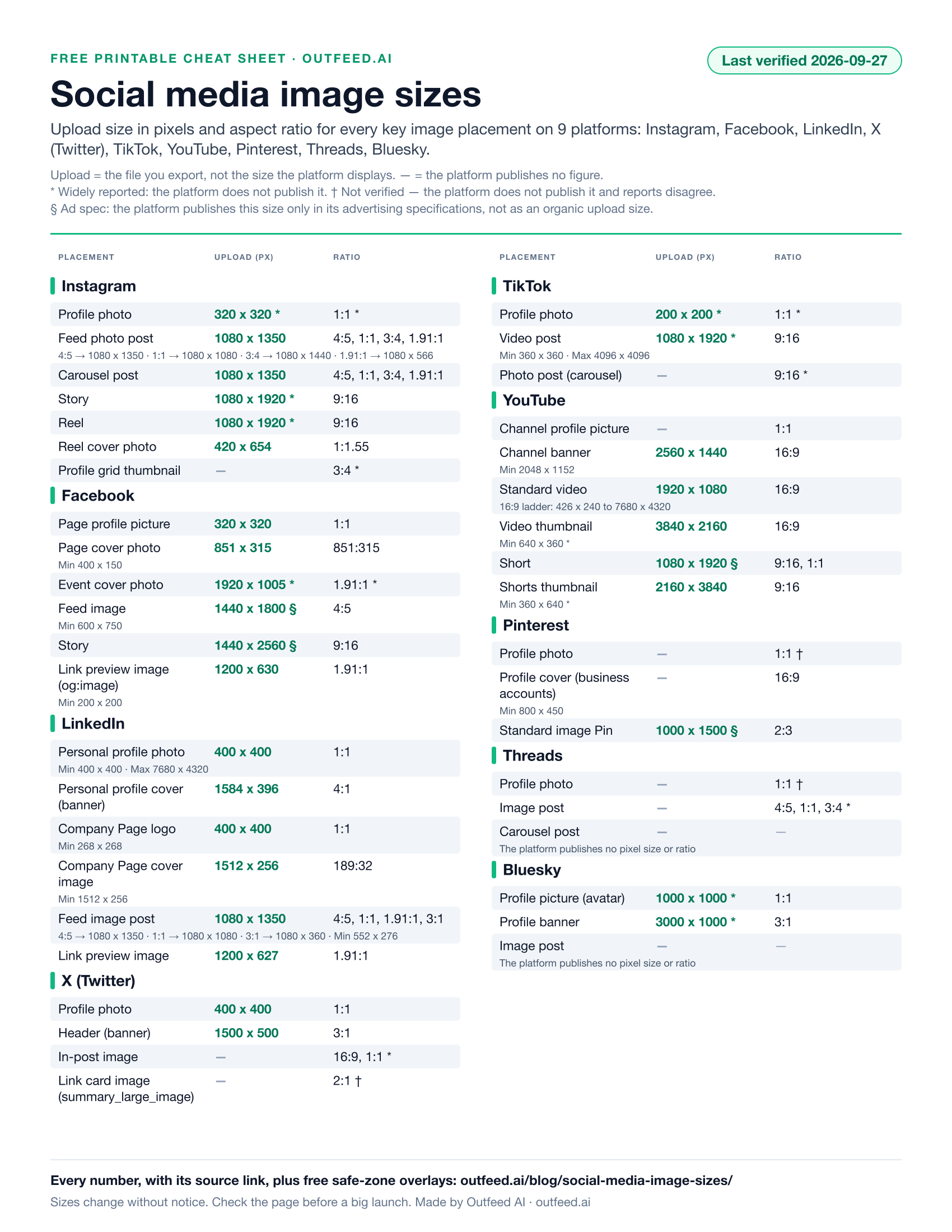
Each row’s Copy button copies its values with the label, the source link and the verification date, so a number pasted into a brief keeps its provenance. If you’d rather have these social media dimensions on paper, the printable social media cheat sheet puts the upload sizes and ratios from this table on one page, dated the same day.
Is there one image size that works on every platform?
No single image size works everywhere, but two master files cover most posts: a 4:5 image at 1080 x 1350 pixels for feeds, and a 9:16 file at 1080 x 1920 pixels for full-screen placements. Profile photos are square on every platform that states a shape. Covers, banners and Pinterest Pins still need their own files, because each platform uses its own shape.
Why do banners need their own files?
Because no two platforms use the same banner shape, except X and Bluesky. Pinterest’s 2:3 image Pins also sit outside the two-file rule. For the Instagram choice between 4:5 and 3:4, see Instagram post size.
To turn any of these ratios into pixels at your own width, use the free aspect ratio calculator. To crop one photo into several of these sizes at once, resize the image to each platform’s size in your browser with our free resizer.
What are the Instagram image sizes?
Instagram’s feed photo size is 1080 x 1350 pixels (4:5), Stories and Reels are widely uploaded at 1080 x 1920 pixels, and the profile photo at a widely reported 320 x 320 pixels, shown as a circle. The app also accepts photos up to 3:4, or 1080 x 1440 pixels, but the publishing API that schedulers use stops at 4:5.
| Placement | Max file size | File types |
|---|---|---|
| Feed photo post | 8 MB Publishing API limit (JPEG). The app publishes no file-size cap. | JPEG (API) |
| Story | 100 MB Video, via the publishing API. Images: 8 MB JPEG via the API. The app publishes no cap. | JPEG (image, API), MP4, MOV |
| Reel | 300 MB Publishing API limit. The app publishes no cap. | MP4, MOV |
Since January 2025 the profile grid has shown posts as vertical tiles, widely reported as 3:4, and carousels take up to 20 items in the app. The breakdown by format, including how the grid crops a post, is in our Instagram post size guide.
What are the Facebook image sizes?
Facebook’s Page cover photo loads fastest at 851 x 315 pixels, the Page profile picture should be 320 x 320 pixels, and Meta’s ad guidance gives 1440 x 1800 pixels for feed images and 1440 x 2560 pixels for Stories. Meta publishes no size at all for event covers.
| Placement | Displays at (px) | Max file size | File types |
|---|---|---|---|
| Page cover photo | Desktop 820 x 312 · Mobile 640 x 360 These display sizes are from Meta Business Help Center. | 100 KB Not a cap: the size at which the cover 'loads fastest'. | JPG (sRGB), PNG for logos or text |
| Feed image | Not recorded | 30 MB Ads guide. Organic Page photos via the Graph API: 10 MB. | JPG, PNG |
| Story | Not recorded | 30 MB | JPG, PNG |
Meta publishes feed and Story numbers only in its Ads Guide, so treat those rows as ad recommendations, and the cover’s 100 KB figure is a fast-loading target, not a cap; our Facebook cover photo size guide explains the display sizes. For events, 1920 x 1005 pixels is a third-party convention, covered in Facebook event cover photo size.
What are the LinkedIn image sizes?
A LinkedIn personal profile banner is 1584 x 396 pixels (4:1), and a Company Page cover is now 1512 x 256 pixels. Profile photos must be at least 400 x 400 pixels, Company Page logos are 400 x 400, feed images are 1080 x 1350 at their tallest, and link previews are 1200 x 627 pixels.
| Placement | Minimum size (px) | Max file size | File types |
|---|---|---|---|
| Personal profile cover (banner) | Not recorded | 8 MB LinkedIn Help: 'Lesser than 8MB'. | JPG, PNG |
| Company Page cover image | 1512 x 256 | 3 MB | PNG, JPEG |
| Feed image post | 552 x 276 | 5 MB | Not recorded |
LinkedIn’s Page image specifications list 1512 x 256 as both the minimum and the recommended Company Page cover, with a 3 MB cap. How that figure changed, and how the personal banner crops under your profile photo, are in our LinkedIn banner size guide.
What are the X (Twitter) image sizes?
X’s header is 1500 x 500 pixels (3:1) and its profile photo is 400 x 400 pixels, both from X Help. For images inside posts, X publishes no pixel size: it accepts up to 4 photos of up to 5 MB each, and names no image ratio.
| Placement | Safe zone | Max file size | File types |
|---|---|---|---|
| Header (banner) | Top 60 px · Bottom 60 px, on 1500 x 500 | Not recorded | JPEG, GIF, PNG |
| Profile photo | Not recorded | 2 MB | JPEG, GIF, PNG |
| In-post image | Not recorded | 5 MB Photos. Animated GIFs: 5 MB on mobile, 15 MB on web. | JPEG, PNG, GIF, WEBP (API) |
X Help warns that up to 60 px at the top and bottom of the header could be cropped on different screens, and your profile photo sits over the lower left, so keep text in the middle band. The 1600 x 900 and 1280 x 720 frames quoted for in-post images are guide conventions, not X figures; the header crop in detail is in our Twitter banner size guide.
What are the TikTok and YouTube sizes?
TikTok’s widely used video size is 1080 x 1920 pixels at 9:16. YouTube’s standard HD upload is 1920 x 1080 pixels (16:9), Shorts use 1080 x 1920, thumbnails are 3840 x 2160 pixels, and channel banners are 2560 x 1440 pixels.
TikTok: video, photo posts and profile photo
| Placement | Max file size | File types | Max items |
|---|---|---|---|
| Video post | 4 GB Content Posting API limit. The app publishes no cap. | MP4 (recommended), WebM, MOV | Not recorded |
| Photo post (carousel) | 20 MB Per image, Content Posting API. | JPEG, WebP | 35 |
TikTok publishes no recommended organic resolution: its posting API accepts frames from 360 x 360 up to 4096 x 4096 pixels, and the 200 x 200 profile photo size is widely given rather than published. The safe zone and how to reframe a 16:9 clip are in our TikTok video size guide.
YouTube: thumbnails, banner and channel picture
| Placement | Minimum size (px) | Max file size | File types |
|---|---|---|---|
| Video thumbnail | 640 x 360 Widely reported | 50 MB Desktop upload. From mobile: 2 MB (10 MB for podcasts). | JPG, PNG |
| Channel banner | 2048 x 1152 | 6 MB | Not recorded |
| Channel profile picture | Not recorded | 15 MB | JPG, GIF (not animated), BMP, PNG |
Widely reported: the platform does not publish it.
YouTube’s custom thumbnail help now recommends 3840 x 2160 pixels, with a 50 MB cap from a computer but 2 MB from a phone, and the channel picture renders at just 98 x 98 pixels. The full resolution ladder and the banner safe area are in our YouTube video size guide, and vertical video specs are in YouTube Shorts dimensions.
What are the Pinterest, Threads and Bluesky image sizes?
Pinterest recommends 1000 x 1500 pixels (2:3) for standard Pins. Threads and Bluesky publish no recommended image size, only file limits: 8 MB per Threads image and 2,000,000 bytes per Bluesky image. None of the three publishes a profile-photo size you can quote as official.
Pinterest: Pins, profile cover and profile photo
| Placement | Upload size (px) | Aspect ratio | Safe zone | Max file size | Source |
|---|---|---|---|---|---|
| Standard image Pin | 1000 x 1500 Ad spec: Pinterest Business Help: ad specs | 2:3 | Top 270 px · Right 195 px · Bottom 790 px · Left 65 px, canvas not stated | 20 MB Web. In the app: 32 MB (ads specs page). | Pinterest Business Help: Review ad specs |
| Profile cover (business accounts) | Not recorded Min 800 x 450 | 16:9 | Not recorded | Not recorded | Pinterest Business Help: Add a profile cover |
| Profile photo Not verified | Not recorded | 1:1 | Not recorded | Not recorded | Hootsuite social media image sizes guide (disputed) |
Not verified: the platform does not publish it and reports disagree.
Pinterest’s own spec page warns that “Pins with an aspect ratio greater than 2:3 might get cut off in people’s feeds,” and its Pin safe-zone margins come without the canvas they apply to, so treat them as a guide. Pinterest publishes no profile-photo size, so that row is marked not verified; for timing rather than sizing, see the best time to post on Pinterest.
Threads: image posts, carousels and profile photo
| Placement | Aspect ratio | Max file size | Max items | File types | Source |
|---|---|---|---|---|---|
| Image post | 4:5, 1:1, 3:4 Widely reported Up to 10:1 (Threads API). | 8 MB | Not recorded | JPEG, PNG | Threads API: overview |
| Carousel post | Not recorded | Not recorded | 20 | Not recorded | Threads API: overview |
| Profile photo Not verified | 1:1 | Not recorded | Not recorded | Not recorded | Hootsuite social media image sizes guide (single source) |
Widely reported: the platform does not publish it. · Not verified: the platform does not publish it and reports disagree.
Threads’ API scales images narrower than 320 pixels up and wider than 1440 pixels down, allows ratios up to 10:1, and takes carousels of 2 to 20 items. The 4:5, 1:1 and 3:4 in the table are common choices, not a list Threads publishes; what Threads is and how it works covers the basics.
Bluesky: post images, avatar and banner
| Placement | Upload size (px) | Aspect ratio | Max file size | Max items | Source |
|---|---|---|---|---|---|
| Image post | Not recorded | Not recorded | 2,000,000 bytes Per image. Raised from 1,000,000 on 2026-04-08. | 4 | AT Protocol lexicon: app.bsky.embed.images |
| Profile picture (avatar) | 1000 x 1000 Widely reported | 1:1 | 1,000,000 bytes | Not recorded | AT Protocol lexicon: app.bsky.actor.profile |
| Profile banner | 3000 x 1000 Widely reported | 3:1 | 1,000,000 bytes | Not recorded | Bluesky app source: UserBanner (3:1 crop) |
Widely reported: the platform does not publish it.
The Bluesky banner size that matches the app is 3:1: Bluesky’s own app code crops banners to that ratio and compresses them to at most 2,000 pixels on the long edge, so the widely quoted 3000 x 1000 upload is stored no wider than that. Avatars are cropped square and capped at 1,000,000 bytes, and a post can carry up to 4 images; the best time to post on Bluesky covers when to publish.
Why does a platform show a different size than the one you upload?
Because the file you export, the size a screen draws and the area that survives every crop are separate numbers, and most platforms publish only one or two of them. The platform guides work through each case: Facebook’s cover, where two Meta help pages disagree on display size, the X header, which can lose its top and bottom edges on some screens, and the LinkedIn banner, which sits partly under your profile photo.
To check a design against those zones, download a free safe-zone overlay: a transparent PNG at the platform’s canvas size with the covered areas tinted. Lay it over your design in any editor.
- Instagram Story safe-zone overlay
- Instagram Reel safe-zone overlay
- Facebook Story safe-zone overlay
- TikTok video safe-zone overlay
- YouTube Short safe-zone overlay
- YouTube channel banner safe-zone overlay
- X header safe-zone overlay
- Pinterest video Pin safe-zone overlay
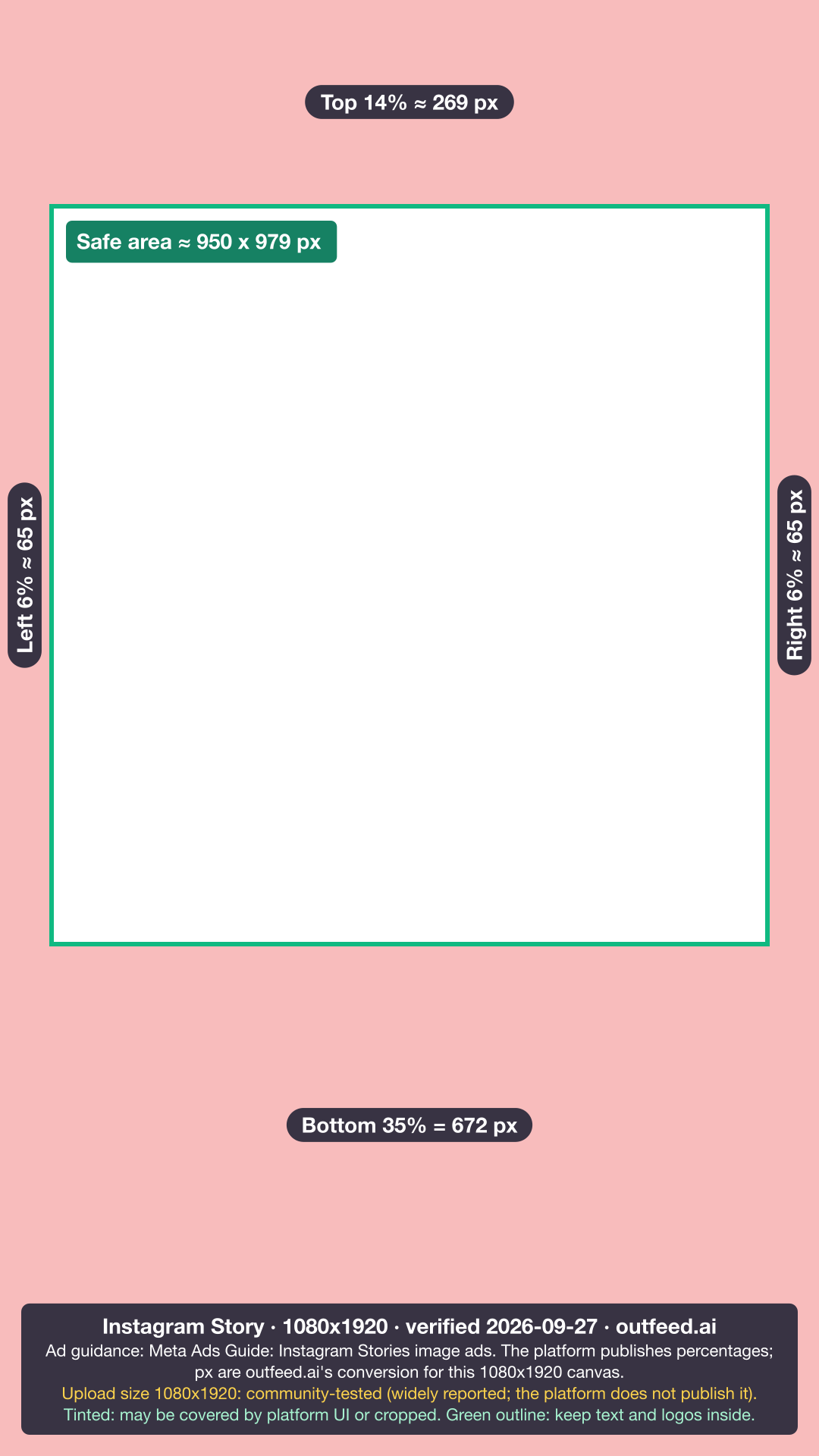
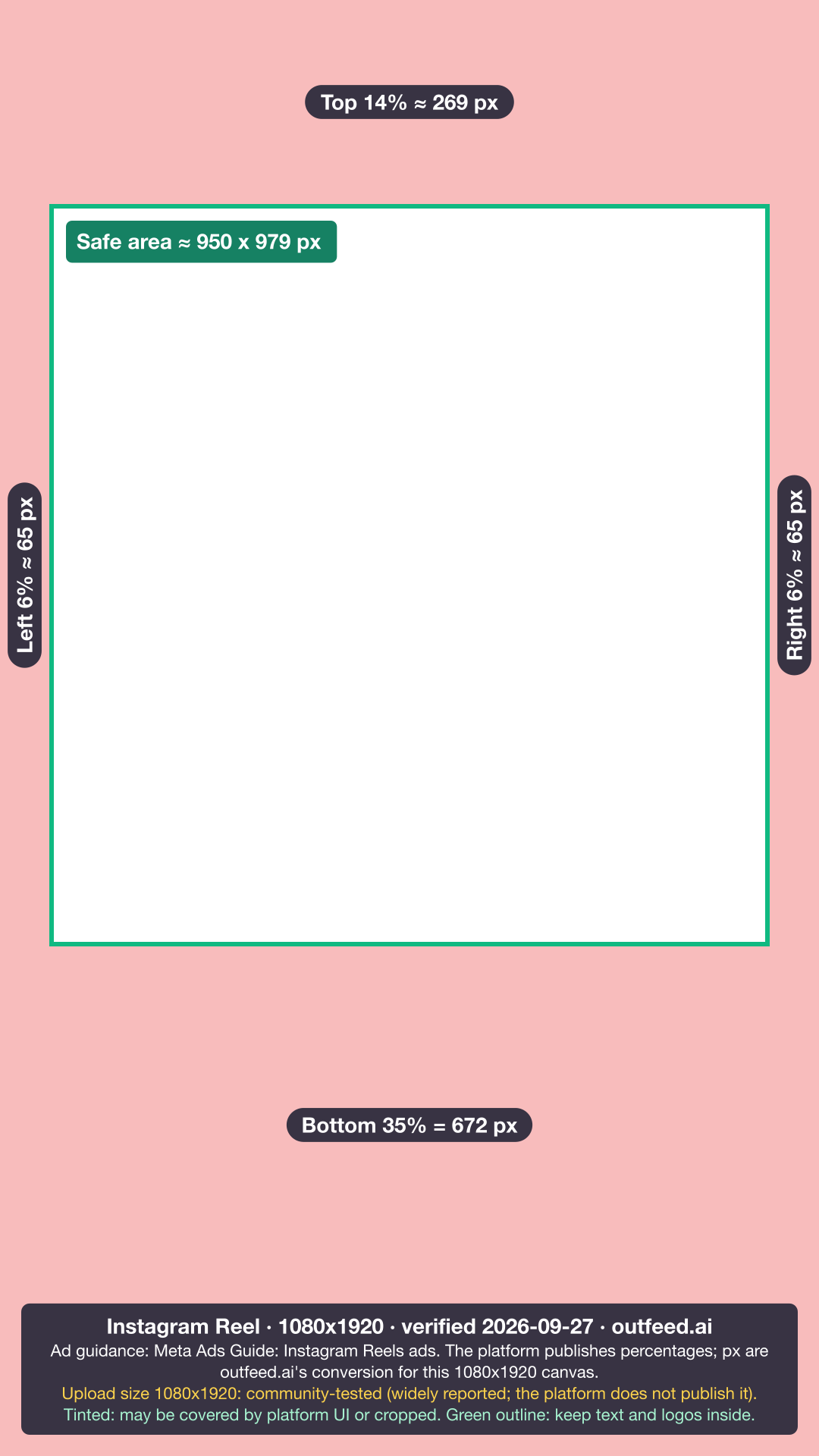
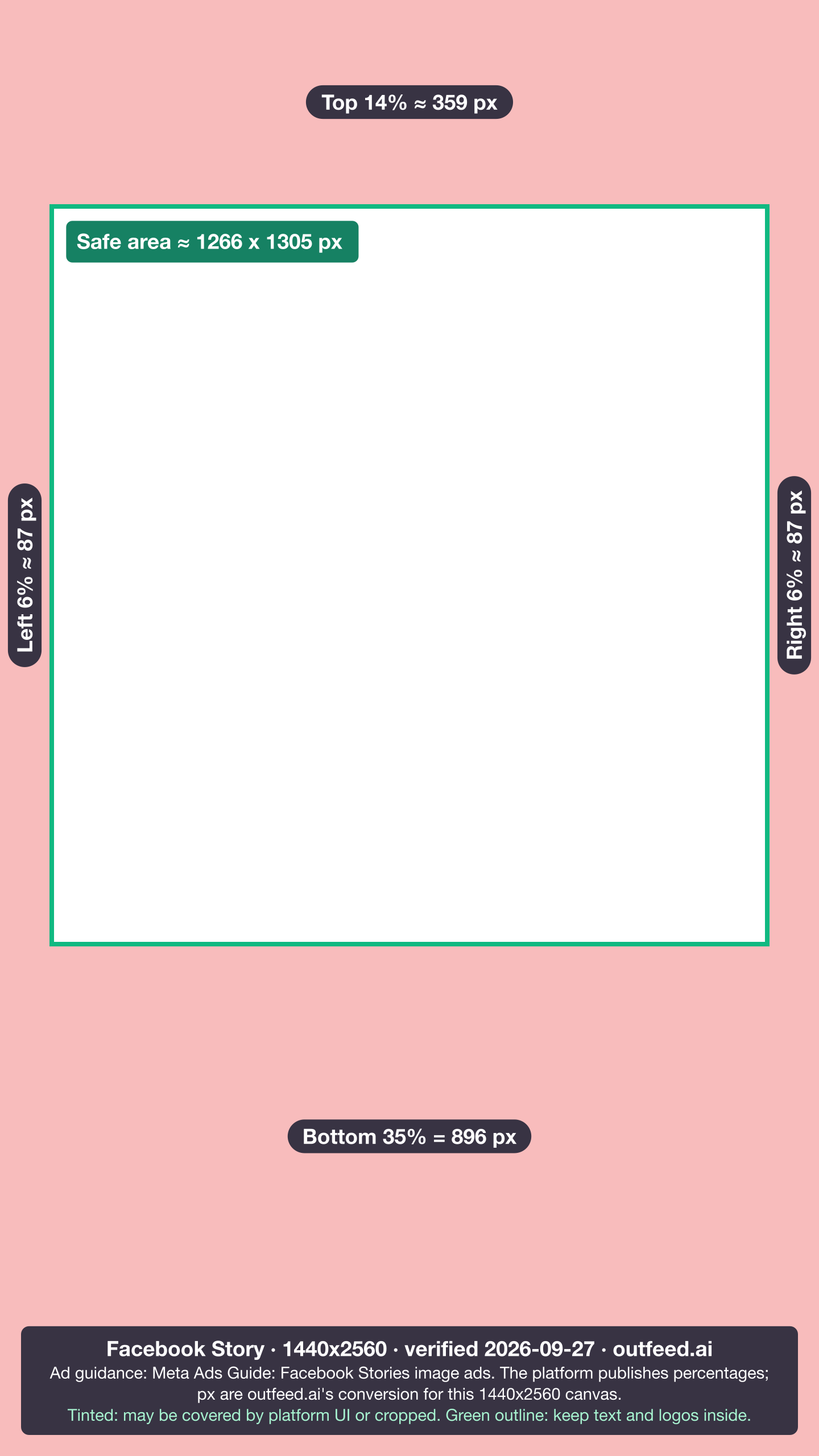
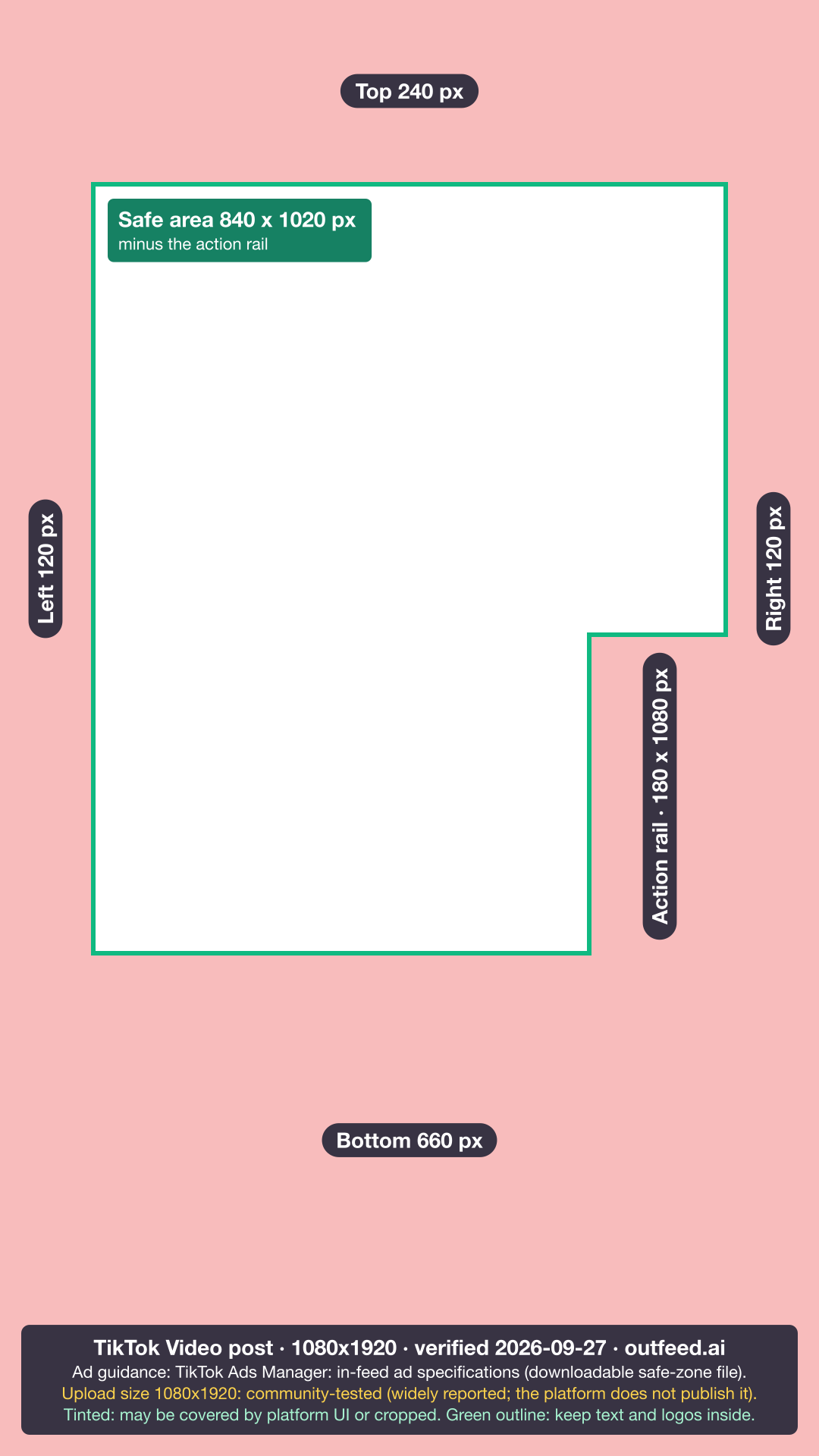
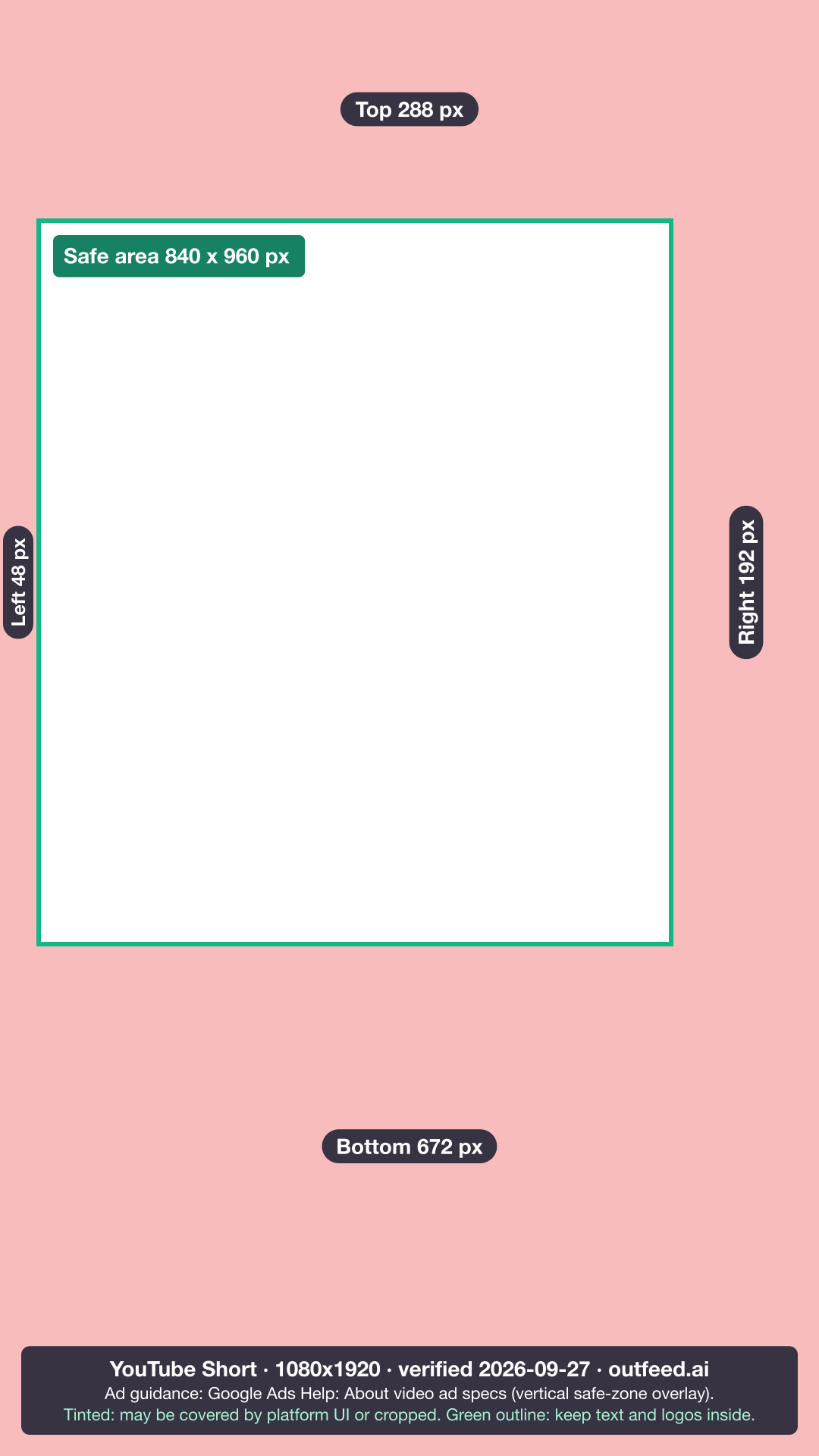
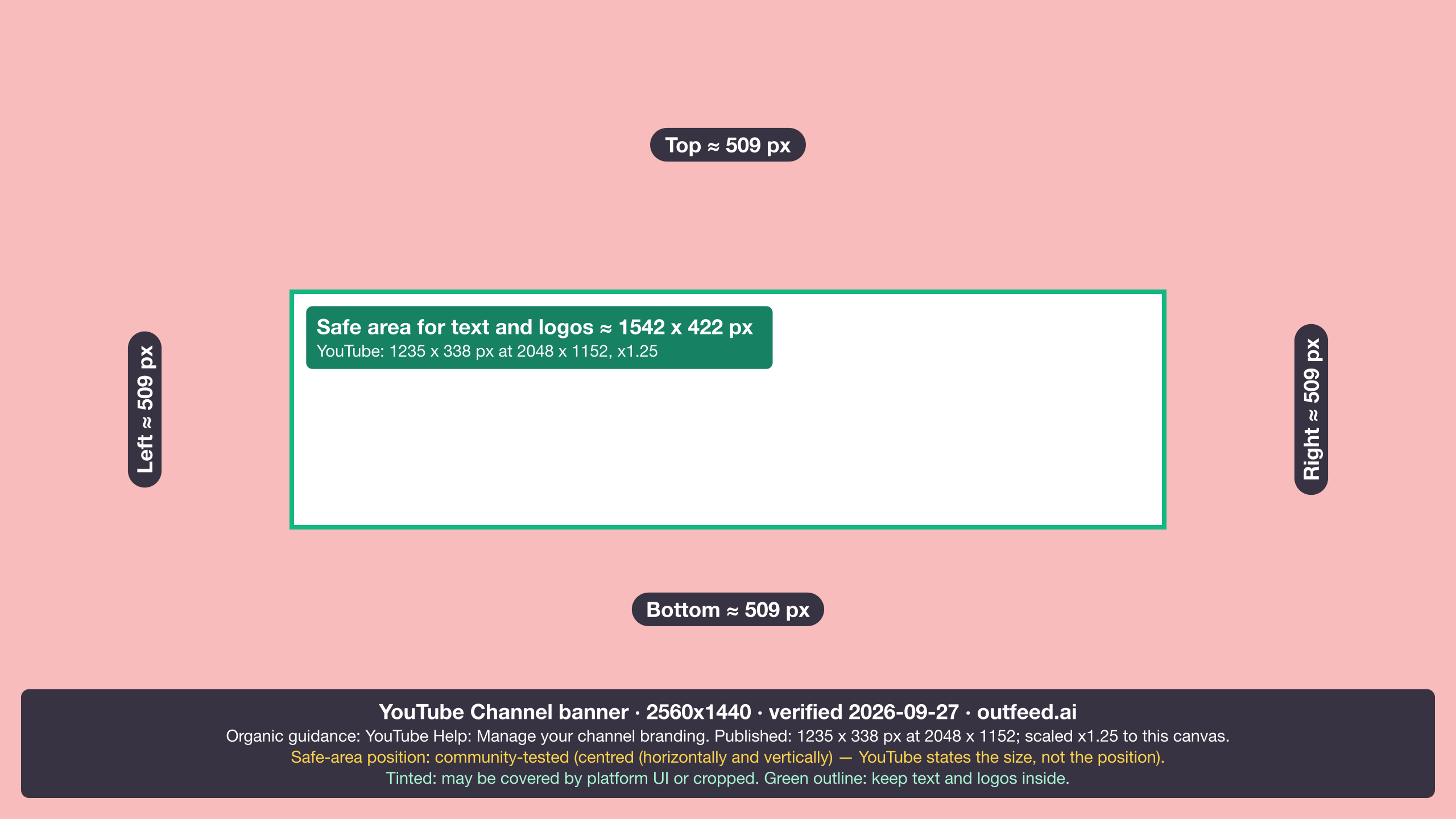
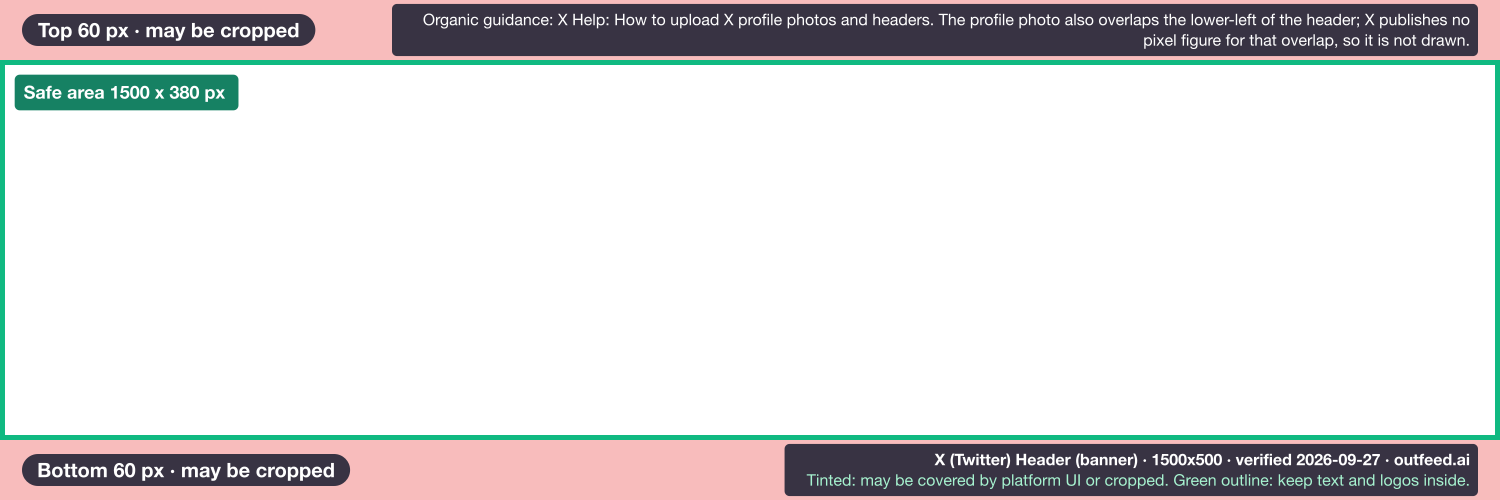
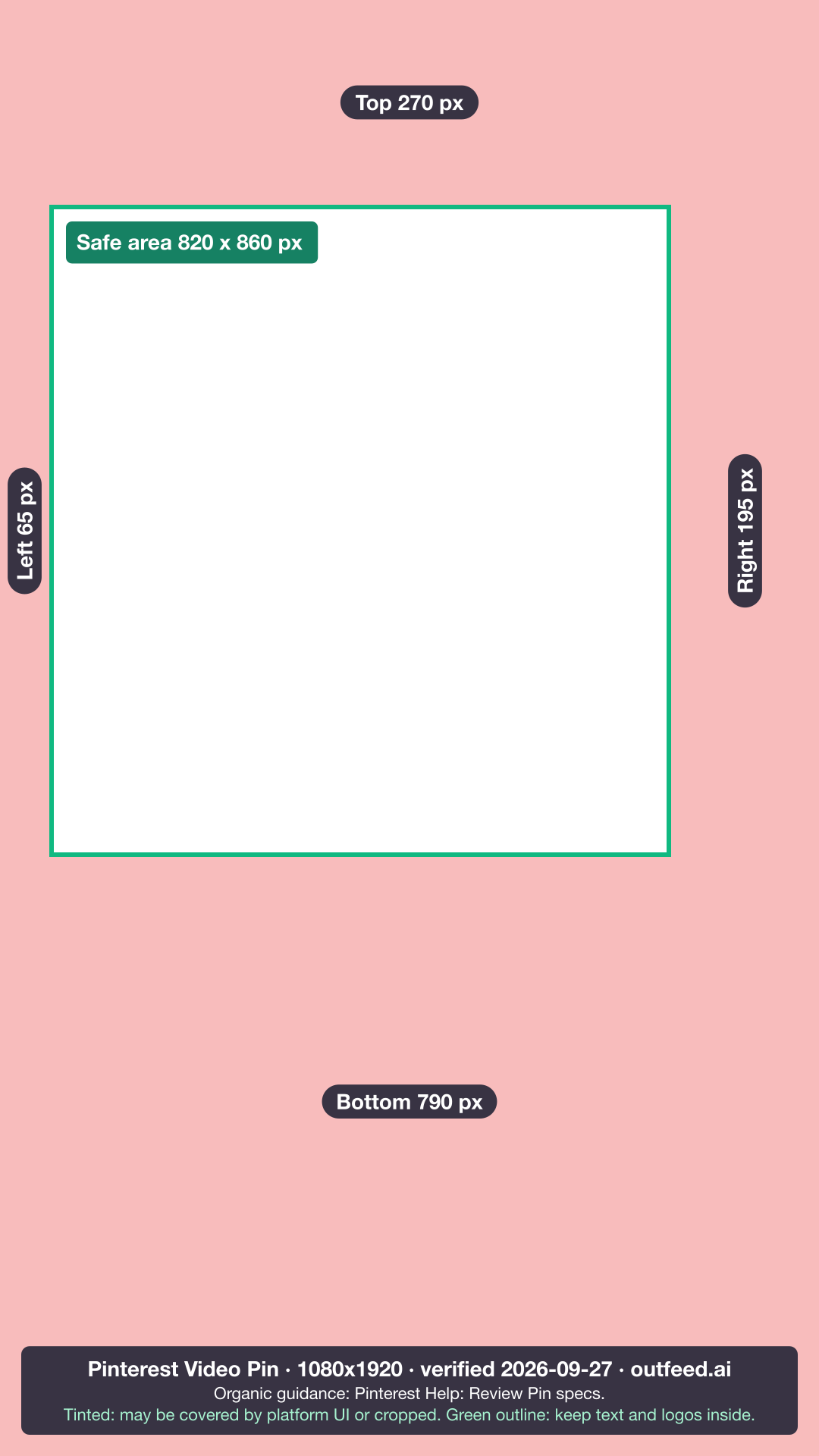
Five of the eight come from ad guidance, because that is the only place Meta, TikTok and Google publish numbers for Stories, Reels and vertical video. The X header, the YouTube banner and the Pinterest video Pin come from organic guidance.
What changed in 2025 and 2026?
Every dated change we could source since 2025 is listed below, newest first, with its source. The platform guides linked above carry the detail.
- 24 September 2026 (YouTube). New Shorts longer than one minute (but under three minutes) with an active Content ID claim are no longer automatically blocked and 'may remain playable on YouTube'. Source: YouTube Help: Understand three-minute YouTube Shorts.
- Between 20 July 2026 and 19 September 2026 (LinkedIn). LinkedIn's Page image table changed the cover image from 4200 x 700 to 1512 x 256 (both minimum and recommended). The page read 4200 x 700 on 2026-07-20 and 1512 x 256 on 2026-09-19, when it said 'Last updated: 1 month ago'. Source: LinkedIn Help (live page and Wayback Machine copies).
- 25 August 2026 (Bluesky). Bluesky raised the maximum video length to 10 minutes. Source: Bluesky (@bsky.app).
- 11 August 2026 (Bluesky). The AT Protocol video embed size limit was raised to 300 MB (300,000,000 bytes). Source: bluesky-social/atproto lexicon history.
- 8 April 2026 (Bluesky). Maximum image upload size raised from 1 MB to 2 MB (2,000,000 bytes) per image. Source: bluesky-social/atproto lexicon history.
- 8 December 2025 (YouTube). Three-minute Shorts extended to Official Artist Channels for videos uploaded on or after this date. Source: YouTube Help: Understand three-minute YouTube Shorts.
- June 2025 (Facebook). Facebook renamed the Videos tab to Reels; all videos posted to Facebook are now shared as reels, of any length or orientation. Source: Meta Business Help Center: Requirements for Facebook Reels.
- January 2025 (Instagram, widely reported). Instagram's profile grid switched from square to vertical rectangular thumbnails (reported 2025-01-19). Dated by a secondary source quoting Adam Mosseri; Instagram has no help page for it. Source: Social Media Today, quoting Adam Mosseri.
How are these sizes verified, and what do the labels mean?
Every number here comes from the platform’s own help centre, developer documentation, published asset files or app source code, read on the date in each table caption, and each row links to its source. When a platform publishes nothing, the row carries a label rather than passing another guide’s number off as official.
The labels mean:
- No label (official): the number is in the platform’s own documentation. Where that is an ad guide, the source name says so, as on Facebook’s feed and Story rows.
- Outfeed-enforced: a limit Outfeed’s own publishing code applies, stated as ours rather than the platform’s. No row in these image tables carries it; it marks limits such as Facebook’s post length, which Meta itself doesn’t publish.
- Widely reported: the platform publishes no figure; the number is the one most guides agree on, and the source column names where it comes from.
- Not verified: the platform publishes nothing and the reports disagree, so no number is given.
Help centres that only render in a browser (TikTok, X, Pinterest, Meta and Instagram) were loaded in one and read as text, and the TikTok and YouTube vertical safe zones were measured from the overlay files those platforms publish. This hub is re-checked monthly and after any platform layout announcement, and every change lands in the list above.
Where are the character limits and video lengths?
Character limits and video lengths have their own pages, because every platform counts them differently. For quick reference, an Instagram caption allows 2,200 characters, a LinkedIn post 3,000 characters, an X post 280 weighted characters, a Threads post 500 characters and a Bluesky post 300 characters (graphemes).
To check an Instagram, LinkedIn, Threads or Bluesky draft, paste it into the free Instagram character counter and pick the platform; for X, use the Twitter character counter. Styled bold or italic text eats into them faster than it looks, and the Unicode text converter shows how many characters each style costs. For the field-by-field version on one network, see the LinkedIn post character limit guide. Video length is split by platform: how long a video can be on Instagram covers Reels, Stories and feed video, and how long TikTok videos can be separates the in-app and upload limits.
How does Outfeed handle image sizes when it publishes?
Outfeed AI is a chat-first social media manager: you describe a post once, it drafts a version for each of the nine platforms, and you see a preview per platform before anything publishes. Its publisher also applies some of the media rules above in code, so a file that would fail is caught first.
Some of those rules, as the code states them: Outfeed sends Instagram a JPEG of at most 8 MB between 4:5 and 1.91:1, converting PNG, WebP and other formats to JPEG and padding, never cropping, an image outside that range. It blocks Instagram carousels of more than 10 items, which is the API limit. It currently publishes one media item per LinkedIn or Facebook post, and it doesn’t attach media to X posts yet. When your files are ready, start a post in Outfeed AI.
Frequently Asked Questions
What size should an image be for social media?
It depends on the placement, but two sizes cover most posts. Use 1080 x 1350 pixels (4:5) for feed images on Instagram and LinkedIn, and 1080 x 1920 pixels (9:16) for Stories, Reels, TikTok and YouTube Shorts. That vertical size is Google Ads’ recommendation and the widely used one elsewhere, because Instagram, TikTok and YouTube publish no organic pixel size. Profile photos are square, and banners differ on every platform.
Can I use the same image on every social media platform?
Only partly. A 4:5 image at 1080 x 1350 pixels suits the Instagram and LinkedIn feeds, and one 9:16 file suits vertical video, but banners never match: X headers are 1500 x 500, LinkedIn profile banners 1584 x 396, YouTube channel banners 2560 x 1440 and Facebook Page covers 851 x 315 pixels. Pinterest recommends 2:3, or 1000 x 1500 pixels, for Pins.
What size is a link preview image on Facebook, LinkedIn and X?
Meta asks for link-share images of at least 1200 x 630 pixels, and LinkedIn recommends 1200 x 627 pixels at a 1.91:1 ratio. X’s card documentation did not show its image rules when this page was verified, so no X size is given here; the 2:1 ratio many guides quote for X is not confirmed by X.
How often do social media image sizes change?
Several times a year across the nine platforms. LinkedIn changed its Company Page cover from 4200 x 700 to 1512 x 256 pixels between 20 July and 19 September 2026, and Bluesky raised its per-image upload limit from 1 MB to 2,000,000 bytes on 8 April 2026. Check the verification date on any size guide before you export.
What happens if you use the wrong image size on social media?
The platform crops or rescales it. Instagram, for example, crops photos outside its supported ratios, scales anything wider than 1080 pixels down to 1080 and enlarges anything narrower than 320 pixels up to 320. On covers and banners, the profile photo and different screen widths hide parts of the edges, so keep text and logos near the centre.
What is the Bluesky banner size?
Bluesky crops profile banners to a 3:1 ratio and accepts PNG or JPEG files up to 1,000,000 bytes. It publishes no recommended pixel size. 3000 x 1000 is the widely quoted upload, but Bluesky’s app compresses banners to at most 2,000 pixels on the long edge, so that file is stored no wider than 2,000 pixels.