
How to Delete My LinkedIn Account (or Hibernate It)
To delete your LinkedIn account, open Settings & Privacy, go to Account preferences > Account management > Close account, pick a reason, click Next, enter your password and confirm. Checked against LinkedIn Help: Close and delete your LinkedIn account Changed your mind? LinkedIn can usually reopen a closed account within 14 days, but not after that. Checked against LinkedIn Help: Reopen your account
The short answer to “how to delete my LinkedIn account” is above; steps for each device, a checklist to clear first and the hibernate option follow. For everything else about the network, see our guide on how to use LinkedIn.
Table of Contents
- How to delete my LinkedIn account (steps)
- What to do before you close your LinkedIn account
- Close or hibernate: which should you choose?
- What happens to your profile, posts and messages after you close it?
- Can you reopen a closed LinkedIn account?
- What about a LinkedIn Page, a duplicate account or one you can’t log in to?
- Want fewer emails, not no account?
- FAQ
How to delete my LinkedIn account (steps)
Close it from Settings & Privacy: under Account management, choose Close account, give a reason and confirm with your password. On LinkedIn, deleting your profile and closing your account are the same action: LinkedIn says closing your account means permanently deleting your profile and removing access to all your LinkedIn information. Checked against LinkedIn Help: Close and delete your LinkedIn account So if you want to delete a LinkedIn profile, this is the action. Clear the checklist below first.
On a computer
- Click the Me icon at top of your LinkedIn homepage.
- Select Settings & Privacy from the dropdown.
- Under Account management section of the Account preferences section, click Change next to Close account.
- Check the reason for closing your account and click Next.
- Enter your account password and click Close account.
Checked against LinkedIn Help: Close and delete your LinkedIn account.
In the iPhone or Android app
LinkedIn gives the same five steps, word for word, for its iOS and Android apps:
- Tap your profile picture > Settings > Account preferences.
- Tap Close account under Account management.
- Tap Continue to proceed with closing your account.
- Tap the reason for closing your account and tap Next.
- Enter your account password and tap Done.
Checked against LinkedIn Help: Close and delete your LinkedIn account.
In a mobile browser
- Tap the Profile icon in the navigation bar.
- Tap the Settings icon in the top right corner of your profile.
- Tap Close account under Account management.
- Tap Continue to proceed with closing your account.
- Tap the reason for closing your account and tap Next.
- Enter your account password and tap Done.
Checked against LinkedIn Help: Close and delete your LinkedIn account.
What to do before you close your LinkedIn account
Download your data, then clear the three things LinkedIn won’t close around: a Premium membership, a LinkedIn group you own and a premium account license. LinkedIn won’t close a basic account until those are resolved. Checked against LinkedIn Help: Close and delete your LinkedIn account
1. Download your data (computer only)
Request your archive on a computer before you close: once the account is closed, you can no longer get this data. You can pick specific categories or a larger archive, and LinkedIn emails a link that works for 72 hours. LinkedIn’s own page gives two timings, so expect minutes for some categories and up to a day or two for the full archive. Checked against LinkedIn Help: Download your data
- Click the Me icon at the top of your LinkedIn homepage.
- Select Settings & Privacy from the dropdown.
- Click Data Privacy on the left rail.
- Under the How LinkedIn uses your data section, click Download your data.
- Select the data that you're looking for and Request archive.
Checked against LinkedIn Help: Download your data.
2. Cancel Premium, or keep a free account
If you only want to stop paying, cancel Premium and keep a free Basic account instead of closing. Checked against LinkedIn Help: Close and delete your LinkedIn account LinkedIn offers a basic (free) account alongside its paid subscriptions. Checked against LinkedIn Help: Difference between free LinkedIn and LinkedIn Premium accounts Premium comes as Premium Career, Premium Business, Premium All-in-One and Premium Company Page. Checked against LinkedIn Help: Introduction to LinkedIn Premium Here’s what LinkedIn Premium Career includes.
A cancelled paid plan stays active to the end of the billing cycle (cancel at least one day before your billing date), while a cancelled free trial ends at once, and the account returns to Basic. Plans bought through the App Store are cancelled on the Apple device, and Google Play plans on LinkedIn or Google Play. Checked against LinkedIn Help: Cancel LinkedIn Premium subscription For a plan bought directly from LinkedIn:
Cancel Premium bought directly from LinkedIn (desktop):
- Click the Me icon at the top of your LinkedIn homepage.
- Select Premium features from the dropdown.
- Click Manage subscription on the left pane under Plan Details. You'll be redirected to LinkedIn Admin Center.
- Click Purchases on the left pane.
- Select your Active subscription.
- Click Cancel subscription under Actions.
- Click Confirm cancel.
Checked against LinkedIn Help: Cancel LinkedIn Premium subscription.
3. Hand over any group you own
Make another member the owner rather than deleting the group: deleting a LinkedIn group is permanent and it can’t be reopened. Checked against LinkedIn Help: LinkedIn Groups management FAQ
Make someone a group owner (desktop):
- Click Groups from the left pane of your LinkedIn homepage.
- Select the applicable group from the list under Your groups.
- Click Manage group in the left pane.
- In the Members section, find the member whose role you want to change.
- Click the More icon next to the member's name.
- Choose Make owner to assign the owner role (or Make manager to assign the manager role).
Checked against LinkedIn Help: Add or remove a group manager and owner (Group Management).
4. Check for an enterprise license
If your account is tied to a LinkedIn enterprise product such as Recruiter, Learning or Sales Navigator, its administrator (who may be a current or former employer) must remove you from the enterprise account before you can close it. Otherwise, contact LinkedIn support. Checked against LinkedIn Help: Next steps to close and delete a LinkedIn account
5. Unlink Google, Apple or Microsoft sign-in
If you signed up with Google, Apple or Microsoft credentials, LinkedIn asks you to also unlink that account from LinkedIn on the provider’s own site. Checked against LinkedIn Help: Close and delete your LinkedIn account
Close or hibernate: which should you choose?
Hibernate if you might come back; close if you want the account gone. Hibernation hides your profile from everyone, your connections included, and from LinkedIn search, and you can reactivate 24 hours later. Checked against LinkedIn Help: Hibernate your LinkedIn account
| Close your account | Hibernate your account | |
|---|---|---|
| Your profile | Stops being visible on LinkedIn | Hidden from everyone, connections included, and from LinkedIn search |
| Posts, messages, recommendations | Messages, connections, and recommendations and endorsements you gave or received are deleted | They stay, but show as “A LinkedIn member” with a generic icon |
| Premium | Must be resolved before you can close | Cancelled immediately when you hibernate; a plan bought through Apple must also be cancelled with Apple |
| Coming back | Usually possible within 14 days; connections return, but endorsements, recommendations, groups, followings and pending invitations don’t | Log in 24 hours or more after hibernating; counts may look off for up to 48 hours |
Checked against LinkedIn Help: Close and delete your LinkedIn account.
Checked against LinkedIn Help: Hibernate your LinkedIn account.
Checked against LinkedIn Help: Hibernate your LinkedIn account.
Checked against LinkedIn Help: Hibernate your LinkedIn account.
Checked against LinkedIn Help: Reopen your account.
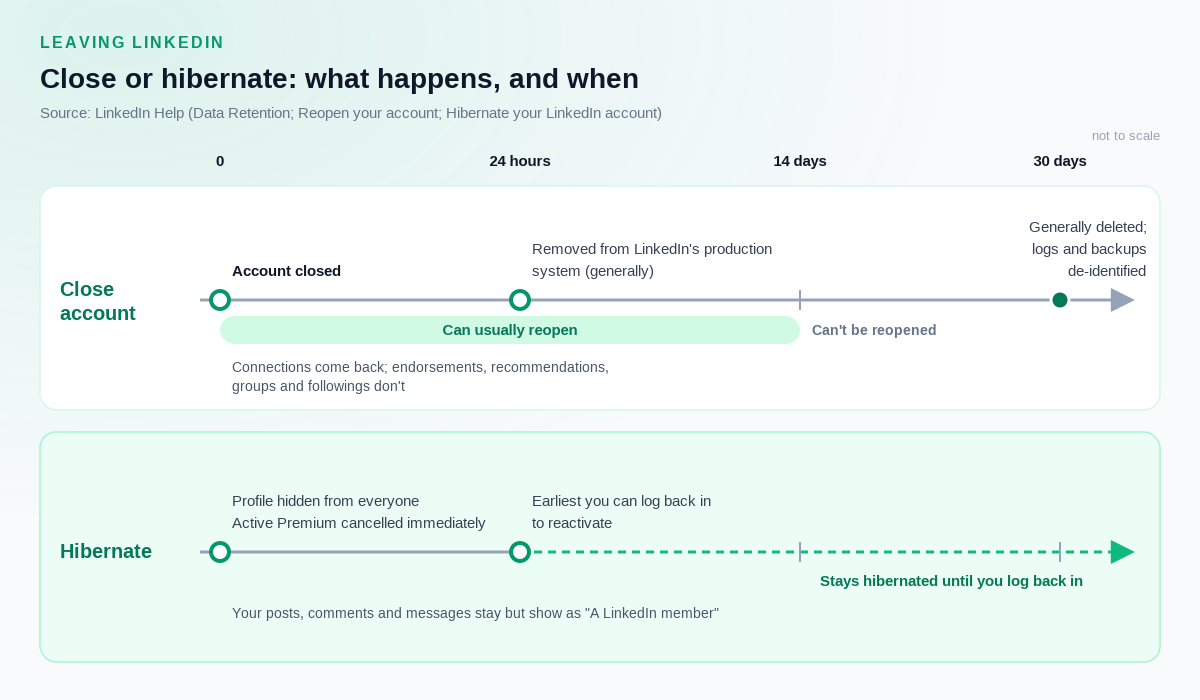
To hibernate, LinkedIn gives these steps for a computer. You may first have to pay balances, reassign group admin roles or deactivate a Learning or Recruiter license. Checked against LinkedIn Help: Hibernate your LinkedIn account
- Click your profile photo at the top of your LinkedIn homepage and select Settings & Privacy.
- Select Hibernate account under Account management.
- Select the option that describes why you're hibernating your account.
- Enter your password and click Hibernate account.
Checked against LinkedIn Help: Hibernate your LinkedIn account.
What happens to your profile, posts and messages after you close it?
Your profile stops being visible, and your connections, messages, and the recommendations and endorsements you’ve given or received are deleted; your purchase history is no longer accessible. Checked against LinkedIn Help: Close and delete your LinkedIn account
LinkedIn says your information is generally removed from its production system within 24 hours of closing, and closed-account information is generally deleted, with logs and backups de-identified, within 30 days, except as its Privacy Policy notes. Checked against LinkedIn Help: Data Retention
Search engines such as Google, Bing and Yahoo! may still show your information for a while, until they refresh their data. Checked against LinkedIn Help: Close and delete your LinkedIn account
Can you reopen a closed LinkedIn account?
Usually, if it has been closed for 14 days or less: LinkedIn can’t reopen accounts closed for longer. Checked against LinkedIn Help: Reopen your account
- On the login page, enter the email address registered to your LinkedIn account, enter your password, and click Sign In. You can also click the link in the original account closure email.
- Click Reactivate. LinkedIn sends an email where you confirm that you'd like to reopen your account.
Checked against LinkedIn Help: Reopen your account.
A reopened account gets its connections back, but not its group memberships, followings (Top Voices, companies and so on), ignored or pending invitations, or endorsements and recommendations. Checked against LinkedIn Help: Reopen your account
What about a LinkedIn Page, a duplicate account or one you can’t log in to?
A LinkedIn Page can’t be deleted, only deactivated by a super admin; a duplicate account is merged or closed; and if you can’t log in, recover access through LinkedIn first. Closing your personal account is a separate action from deactivating a Page. Checked against LinkedIn Help: Before and after you deactivate a LinkedIn Page or Showcase Page
A LinkedIn Page
Deactivating hides a Page from members and removes it from LinkedIn search; it isn’t possible to delete one completely. If the organization still exists and you’re just leaving, LinkedIn suggests removing yourself as an admin instead. Checked against LinkedIn Help: Before and after you deactivate a LinkedIn Page or Showcase Page Admin access goes automatically to a Page’s creator, and only super admins can edit a Page, add or remove admins and post. Checked against LinkedIn Help: LinkedIn Pages FAQs For the basics, see our guide to LinkedIn Company Pages.
To be deactivated, a Page must be active, you must be its signed-in super admin, and it must have no active Showcase Pages, Career Page, affiliated pages, published Product Pages, active or paused ad campaigns or required apps. It also needs fewer than 100 associated members and can’t belong to an acquired company. Checked against LinkedIn Help: Before and after you deactivate a LinkedIn Page or Showcase Page Deactivation works on desktop only; if you don’t see the option, the Page isn’t eligible. Checked against LinkedIn Help: Deactivate a LinkedIn Page or Showcase Page
- Go to your Page super admin view.
- Click Settings in the left menu and select Deactivate page or Deactivate showcase page.
- Click the checkbox to confirm the implications of deactivating the Page.
- Click Deactivate.
Checked against LinkedIn Help: Deactivate a LinkedIn Page or Showcase Page.
Afterwards, super admins get an email with a link to reactivate the Page, and its URL can be reused for another page. Checked against LinkedIn Help: Before and after you deactivate a LinkedIn Page or Showcase Page
A duplicate account
LinkedIn’s User Agreement asks for one account per person, in your real name. Checked against LinkedIn User Agreement (effective 3 Nov 2025) To find a duplicate, search your name: the profile without the You icon is the duplicate. Merging is done by contacting LinkedIn, needs confirmed primary emails and access to both accounts, moves only the closed account’s connections and email address, isn’t possible with zero or more than 30,000 connections, and loses all InMail credits. A duplicate with zero connections is simply closed. Checked against LinkedIn Help: Merge or close duplicate accounts
Close a duplicate account that has 0 connections (desktop):
- Sign in to the account you want to close with 0 connections.
- Click the Me icon at top of your LinkedIn homepage.
- Select Settings & Privacy from the dropdown.
- In Account management of the Account preferences section, click Change next to Close account.
- Follow the on-screen prompts to complete closing the duplicate account.
- Wait 48 hours after your account is closed, then add the email address from the closed account to your remaining account.
Checked against LinkedIn Help: Merge or close duplicate accounts.
An account you can’t log in to
Use LinkedIn’s own email-access or password-reset help to get back in first, then close the account as above. Checked against LinkedIn Help: Close and delete your LinkedIn account
Want fewer emails, not no account?
Turn the emails down instead: LinkedIn points to the Notifications section of Settings & Privacy to reduce emails, notifications, group digests and announcements. Checked against LinkedIn Help: Close and delete your LinkedIn account
Posting on LinkedIn for work rather than leaving? Where Outfeed AI, the tool behind this blog, stands:
Cleaning up other accounts too? Here’s how to delete a Facebook group, delete a Facebook business Page and delete a Pinterest account.
How to delete your LinkedIn account: FAQ
Can I reopen a closed LinkedIn account?
Usually, if it has been closed for 14 days or less: log in and click Reactivate, or use the link in the closure email. Your connections come back, but endorsements, recommendations, group memberships, followings and pending invitations do not.
Should I delete or hibernate my LinkedIn account?
Hibernate if you may come back: your profile is hidden from everyone and from LinkedIn search, and you can log back in after 24 hours. Note that hibernating cancels an active Premium subscription immediately. Close the account if you want it gone.
Does deleting LinkedIn remove me from Google?
Not straight away. LinkedIn says search engines such as Google, Bing and Yahoo may still show your information for a while until they refresh their data.
How do I download my LinkedIn data before deleting?
On a computer, go to Me, Settings and Privacy, Data Privacy, then Download your data. Choose specific categories or the larger archive; LinkedIn emails a link that works for 72 hours. It can’t be done in the mobile app.
Why can’t I close my LinkedIn account?
LinkedIn won’t close a basic account until you resolve any Premium membership, any LinkedIn group you own and any premium account license. If the account belongs to an enterprise product such as Recruiter or Sales Navigator, its administrator must remove you first.