
How to Delete Your Pinterest Account (or Deactivate It)
To delete your Pinterest account on the web, go to Settings > Account management > Delete account; in the app, open your profile, then settings > Account management > Delete your data and account. Checked against Pinterest Help: Delete or temporarily deactivate your account Confirm from the email Pinterest sends, and the account is permanently deleted 7 days later. Checked against Pinterest Help: Delete or temporarily deactivate your account If you’re staying and only want to tidy things up, our guide on how to use Pinterest covers boards, privacy and the rest of the settings.
Below: how to delete a Pinterest account on a computer or in the app, what happens during the 7 days after, and how to deactivate your Pinterest account instead if you only want a break.
Table of Contents
- How do you delete your Pinterest account?
- How to delete your Pinterest account on a computer
- Delete your Pinterest account in the iPhone or Android app
- Can you delete a Pinterest account without logging in?
- What happens after you delete your Pinterest account?
- Deactivate or delete: which one do you need?
- What to do before you delete your Pinterest account
- How to delete a Pinterest business account
- Want privacy without deleting? Other options
- Delete Pinterest account FAQ
How do you delete your Pinterest account?
On the web, go to Settings > Account management > Delete account. In the app, open your profile, then settings > Account management > Delete your data and account. Follow the prompts, then confirm from the email Pinterest sends to the address on your account. Checked against Pinterest Help: Delete or temporarily deactivate your account
Your public profile is deactivated straight away, and Pinterest permanently deletes the account and your personal data 7 days later. Some guides still say 14 days; Pinterest’s help center says 7. Checked against Pinterest Help: Delete or temporarily deactivate your account
How to delete your Pinterest account on a computer
Log in on the web, open Settings from the more-options icon, choose Account management and click Delete account. These are Pinterest’s web steps, in order:
On the web:
- Log in to your Pinterest account
- Click the more-options icon, then select Settings
- Click Account management from the left-side navigation
- Click Delete account
- Follow the prompts to delete your account
- Check the email on your account to confirm
Checked against Pinterest Help: Delete or temporarily deactivate your account.
Nothing is final until the last step: Pinterest asks you to confirm the deletion from the email on your account.
Delete your Pinterest account in the iPhone or Android app
The app uses the same Account management screen, but the option is called Delete your data and account. Pinterest gives one set of app steps and says the iPhone steps are the same as Android’s. Where you tap in step 3 depends on whether you have a personal or a business account.
In the Android app:
- Open the Pinterest app and log in
- Tap your profile picture at the bottom-right corner
- Personal account: tap your profile photo at the top-left; business account: tap the ellipsis icon at the top-right
- Tap Account management
- Scroll to the bottom and tap Delete your data and account
- Follow the prompts to delete your account
- Check the email on your account to confirm
Checked against Pinterest Help: Delete or temporarily deactivate your account.
Can you delete a Pinterest account without logging in?
Not by any route Pinterest documents: its delete and deactivate steps all start by logging in, and its help center offers no logged-out way to delete an account. Regain access first. If you can’t get in, reset your password, which needs access to the account’s email, or log in with Google or Apple if the account is linked to one. Checked against Pinterest Help: Can't log in to Pinterest
If you’ve lost the email and set up no Google or Apple login, Pinterest says it can’t verify the account is yours or give you access. Checked against Pinterest Help: Troubleshoot issues logging in with an email address
Not sure which account you’re in? If your Pins and boards seem to have vanished, Pinterest says you may have created a second account by mistake. Its fix is to log back in to your original account and deactivate the one you made by accident. Checked against Pinterest Help: Accidentally created a second account
What happens after you delete your Pinterest account?
Your public profile is deactivated at once, you have 7 days to change your mind by logging in, and then the account and your personal data are permanently deleted. Pinterest says users in California must contact it first to reactivate a deleted account. Checked against Pinterest Help: Delete or temporarily deactivate your account
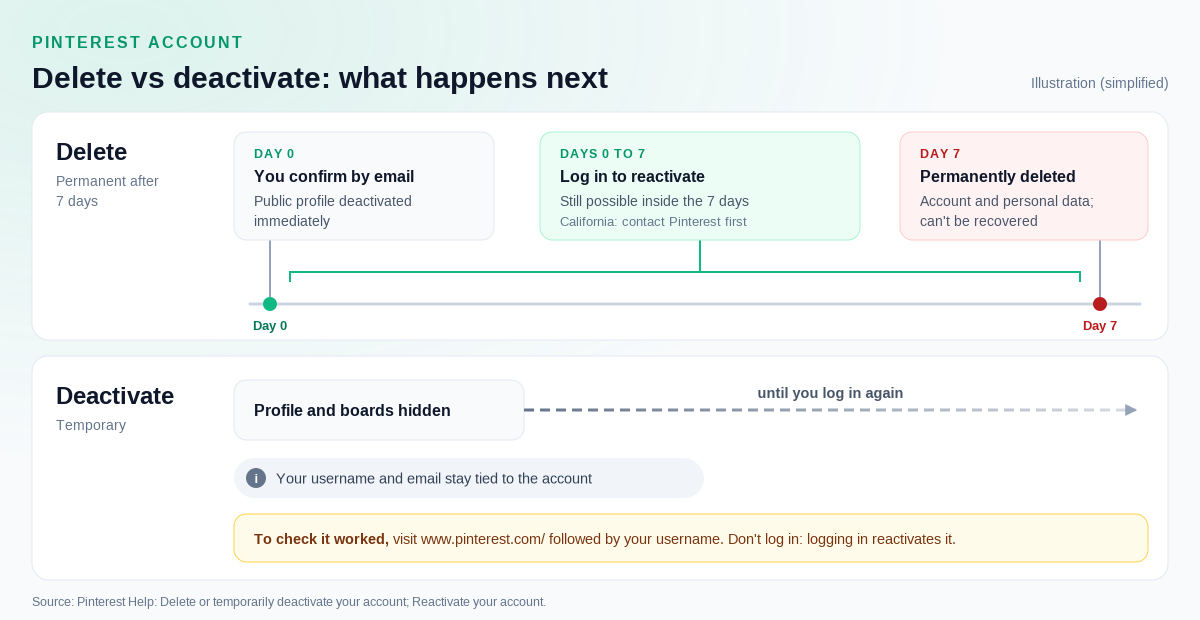
To reactivate within the window, log in, resetting your password if you need to; that requires access to the account’s email. After 7 days the account and data can’t be recovered. Checked against Pinterest Help: Reactivate your account
The 7 days isn’t new. An archived copy of the same help article from June 2024 already gave a 7-day window. Checked against Pinterest Help: Deactivate or close your account (Internet Archive, 2024-06-19)Archived copy, 19 June 2024
Deleting the account is also how Pinterest’s privacy help says to delete your personal data: your public profile and boards come off Pinterest immediately. Checked against Pinterest Help: Access, edit or delete personal data
Deactivate or delete: which one do you need?
Deactivate if you want a break: your profile and boards are hidden until you log in again. Delete if you want them gone: they come off Pinterest at once and the account is permanently deleted after 7 days. Checked against Pinterest Help: Delete or temporarily deactivate your account
| Deactivate | Delete | |
|---|---|---|
| Where | Account management > Deactivate account | Account management > Delete account (app: Delete your data and account) |
| What happens right away | Your profile and boards are hidden | Your public profile is deactivated |
| How to undo it | Log in again | Log in within 7 days (California: contact Pinterest first) |
| How long it lasts | Until you log in again | Permanent after 7 days |
Pinterest’s deactivate steps use the same screen:
On the web:
- Log in to your Pinterest account
- Click the more-options icon, then select Settings
- Click Account management from the left-side navigation
- Click Deactivate account
- Follow the prompts to deactivate your account
In the Android app:
- Open the Pinterest app and log in
- Tap your profile picture at the bottom-right corner
- Personal account: tap your profile photo at the top-left; business account: tap the ellipsis icon at the top-right
- Tap Account management
- Scroll to the bottom and tap Deactivate account
- Follow the prompts to deactivate your account
iOS steps are the same as Android.
Checked against Pinterest Help: Delete or temporarily deactivate your account.
Two details catch people out:
- Don’t log in to check it worked. Logging in reactivates the account. Pinterest says to visit www.pinterest.com/ followed by your username instead, which is your Pinterest profile URL. Checked against Pinterest Help: Delete or temporarily deactivate your account
- Your username and email stay taken. A deactivated account keeps both, so change your email or edit your username first if you want them for another account. Checked against Pinterest Help: Delete or temporarily deactivate your account Each email address can be linked to only one Pinterest account at a time. Checked against Pinterest Help: Troubleshoot issues logging in with an email address
What to do before you delete your Pinterest account
Download your data, clear any business bills, and move your email or username off the account if you want to reuse them. In order:
- Request a copy of your data. Go to Settings > Privacy and data > Request your data and select Start request. Pinterest may take up to 48 hours to email a download link. One Pinterest article says the request needs the web version while another lists app steps, so the web is the safer route. Checked against Pinterest Help: Download your Pinterest data
- Clear business bills. On a business account with outstanding bills, remove your payment information to clear them before you delete. Checked against Pinterest Help: Delete or temporarily deactivate your account
- Free up your email or username. A deactivated account keeps both, so if you want either for a new account, change your email or edit your username in settings first (see the deactivation notes above). Checked against Pinterest Help: Delete or temporarily deactivate your account
How to delete a Pinterest business account
Use the same Delete account path, but clear outstanding bills first by removing your payment information; any unsettled balance is charged to the card on file when the spend happened. Checked against Pinterest Help: Delete or temporarily deactivate your account
If you only want to stop being a business, convert back to a personal account instead, from Settings > Account management. Outstanding bills have to be paid first. Checked against Pinterest Help: Convert a business account to a personal account You keep the account and can carry on posting on Pinterest.
Pinterest no longer lets you link a personal account to a business account; accounts linked earlier stay connected unless you unlink them. Checked against Pinterest Business Help: Get a business account
To close a single ad account without touching your profile, Pinterest’s option is to archive it in Business Manager > Assets > Ad Accounts. Archiving stops its campaigns and keeps its reporting and billing history. Checked against Pinterest Business Help: Archive an ad account
Want privacy without deleting? Other options
You can make your profile private, turn on search privacy, archive boards or opt out of AI training, and keep your account.
- Private profile. Settings > Profile visibility > Private profile hides your profile, boards and Pins from Pinterest search and search engines. Business profiles are always public. Checked against Pinterest Help: Make your profile private or public
- Search privacy. It asks search engines such as Google, Bing and Yahoo to exclude your profile and boards, though results already indexed may remain. Checked against Pinterest Help: Update your search privacy
- Archive a board. An archived board leaves your public profile and takes no new saves, and you can unarchive it at any time. Checked against Pinterest Help: Archive or delete a board
- Opt out of AI training. Settings > Privacy and data > Use your data to train Pinterest Canvas. Checked against Pinterest Help: Manage GenAI settings
Cleaning up other apps too? See clearing your Instagram search history and hiding a Facebook profile.
Delete Pinterest account FAQ
What is the difference between deactivating and deleting a Pinterest account?
Deactivating pauses your account: your profile and boards are hidden until you log in again, and your username and email stay tied to the account. Deleting removes your profile and boards right away and permanently deletes the account and your personal data after 7 days.
How long does Pinterest take to delete an account?
Pinterest deactivates your public profile immediately and permanently deletes the account and your personal data 7 days later. Until then you can reactivate it by logging in; Pinterest says users in California must contact it first.
Can I recover a deleted Pinterest account?
Only within 7 days of deleting it. Log in to reactivate, resetting your password if needed, which requires access to the account’s email. After 7 days the account and its personal data are gone for good.
How do I download my Pinterest data before deleting?
Go to Settings > Privacy and data > Request your data and select Start request. Pinterest may take up to 48 hours to email you a download link, so request it before you delete.
How do I delete a Pinterest business account?
Use the same Settings > Account management > Delete account path, but clear any outstanding bills first by removing your payment information. If you only want to stop being a business, convert back to a personal account instead.