
How to Delete a Facebook Group You Created

Facebook has no one-click delete button for groups: a group can be deleted only when it has no members. Checked against Facebook Help Center: Delete a Facebook group you admin So how to delete a Facebook group comes down to this: remove every member (private group) or ban every member (public group), then leave as the last member and confirm Delete group. Only the group’s creator can do it, or any admin once the creator has left. Checked against Facebook Help Center: Difference between pausing and deleting a Facebook group you admin
If you might want the group back one day, pause it instead: deleting can’t be undone, and archiving no longer exists. This guide covers both, plus why the delete option sometimes won’t appear. For the rest of the network, start with our guide on how to use Facebook.
Table of Contents
- How to delete a Facebook group (steps)
- Delete or pause: which do you need?
- What happens to posts and members when a group is deleted?
- Why can’t I delete my Facebook group?
- How do you leave a group you didn’t create?
- FAQ
How to delete a Facebook group (steps)
Open the group, remove or ban every member one by one, then, as the last member, choose Delete group. Private groups use Remove member; public groups use Ban from group. You need to be the creator, or an admin of a group whose creator is no longer a member. Facebook’s steps for each device:
Delete a group (computer):
- Go to facebook.com/groups and select your group.
- Click Members (for private groups) or People (for public groups) at the top of the group. You might need to select More first.
- Click Options next to each member's name and select Remove member (for private groups) or Ban from group (for public groups).
- Click Next, then click Confirm to proceed.
- When you're the last group member, click Options next to your name and select Leave group. Click Delete group to confirm.
Delete a group (iPhone):
- Tap Menu in the top left of Facebook and tap Groups, then Your groups, then select your group. If you don't see Groups, tap See more.
- Tap Admin tools and select People.
- Tap each member's name and select Remove [name] from group (for private groups) or Ban [name] (for public groups).
- Tap Next, then tap Confirm to proceed.
- When you're the last group member, return to the main group page, tap Admin tools, scroll down and tap Delete Group.
- Tap Delete group.
Delete a group (Android):
- Tap Menu in the top left of Facebook and tap Groups, then Your groups, then select your group. If you don't see Groups, tap See more.
- Tap Admin tools and select People.
- Tap each member's name and select Remove member (for private groups) or Ban from group (for public groups).
- Tap Next to continue and tap Confirm.
- When you're the last group member, tap Admin tools then tap Delete Group.
- Tap Delete Group.
Checked against Facebook Help Center: Delete a Facebook group you admin.
Facebook also says that when no members remain in a group, it’s paused automatically. Checked against Facebook Help Center: Delete a Facebook group you admin So make sure you pick Delete group as you leave: a pause is reversible, and a paused group still shows in search. Checked against Facebook Help Center: Difference between pausing and deleting a Facebook group you admin
Remove or ban members first
Removing and banning both take a member out, but only a ban keeps them out. A removed member can ask to join again; a banned person can’t find the group or be invited back. When you remove or ban someone, you can also tick Delete recent activity to delete their last 7 days of posts, comments, reactions, polls and pending member invitations. Checked against Facebook Help Center: Remove, ban or unban someone in a Facebook group you manage In the iPhone and Android apps you’ll find this under Manage, then Members or People, and you can also ban a person’s future accounts. Checked against Facebook Help Center: Remove, ban or unban someone in a Facebook group you manage
Every flow Facebook documents removes members one at a time, so set aside time for a large group. Checked against Facebook Help Center: Remove, ban or unban someone in a Facebook group you manage A ban keeps someone out of this group; to cut contact across Facebook as well, see how to block someone on Facebook.
Delete or pause: which do you need? (archiving is gone)
Pause the group if there’s any chance you’ll want it back; delete it only if you’re sure. Facebook’s Help Center says archiving a group is no longer available, so the choice is now between two options. Checked against Facebook Help Center: Difference between pausing and deleting a Facebook group you admin Here’s how Facebook compares them:
| Pause | Delete | |
|---|---|---|
| Can you undo it? | Yes | No, it’s irreversible |
| Who can do it | Any admin | The creator, or any admin once the creator has left |
| Group in search | Stays findable | Removed from search |
| Members | Keep access to their information | Lose access |
| New posts, comments, members | Stopped | Group is gone |
| Source | Checked against Facebook Help Center: Difference between pausing and deleting a Facebook group you admin | Checked against Facebook Help Center: Difference between pausing and deleting a Facebook group you admin |
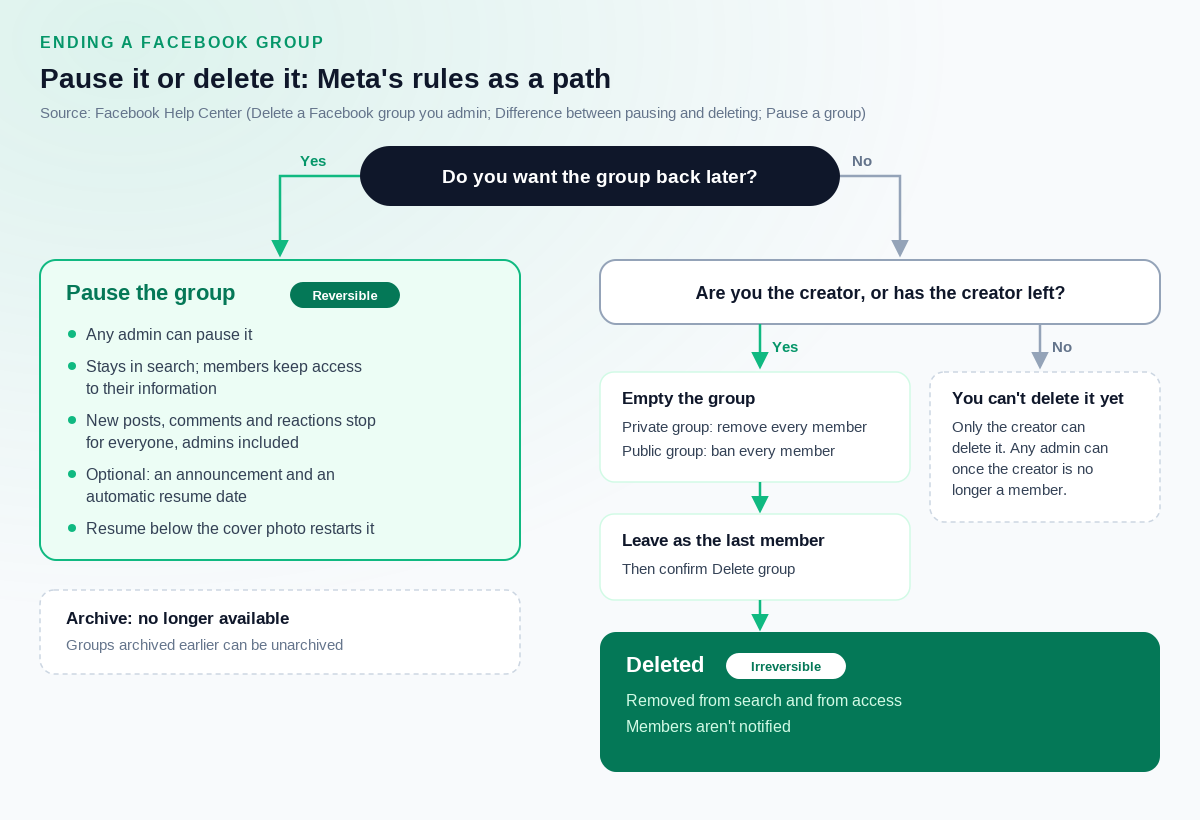
How to pause a Facebook group
Open the group’s Options (Admin tools in the app), choose Pause group, give a reason and confirm. You can post an announcement about the pause and schedule a date for the group to resume on its own. New posts, comments and reactions stop for everyone, admins included, until you resume it. Checked against Facebook Help Center: Pause a Facebook group you admin
Pause a group (computer):
- Go to facebook.com/groups and select your group.
- Click Options below the cover photo.
- Select Pause group.
- Select a reason for pausing the group, then click Continue. To confirm, click Continue again.
- Optionally write a group announcement about the pause, and schedule when the group will automatically resume.
- Click Pause Group at the bottom.
Resume a group (computer):
- Go to facebook.com/groups and select your group.
- Click Resume below the cover photo, then click Confirm.
Checked against Facebook Help Center: Pause a Facebook group you admin.
Pause a group (iPhone):
- Tap Menu in the top left of Facebook and tap Groups, then Your groups, then select your group. If you don't see Groups, tap See more.
- Tap Admin tools in the top right.
- Scroll down and select Pause group.
- Select a reason for pausing the group, then tap Continue. To confirm you want to pause your group, tap Continue again.
- You will then have the option to write a group announcement about the pause, and schedule when the group will automatically resume.
- Tap Pause Group at the bottom.
Pause a group (Android):
- Tap Menu in the top left of Facebook and tap Groups, then Your groups, then select your group. If you don't see Groups, tap See more.
- Tap Admin tools in the top right.
- Select Pause group.
- Select a reason for pausing the group, then tap Continue. To confirm you want to pause your group, tap Continue again.
- You will then have the option to write a group announcement about the pause, and schedule when the group will automatically resume.
- Tap Pause Group at the bottom.
Resume a paused group (iPhone and Android):
- Tap Menu in the top left of Facebook and tap Groups, then Your groups, then select your group. If you don't see Groups, tap See more.
- On the top right side of the page, tap Manage, then tap Resume activity in group.
Checked against Facebook Help Center: Pause a Facebook group you admin.
What if your group was archived before?
Groups archived before Facebook retired the feature can still be unarchived. The last admin, any invited admins, moderators or anyone Facebook suggests as an admin can do it:
Unarchive a group (computer):
- From your Feed, click Groups in the left menu and select the archived group.
- Click Unarchive Group at the top of the group and then click Confirm.
Checked against Facebook Help Center: Unarchive a Facebook group.
What happens to posts and members when a group is deleted?
The group disappears from search and nobody can get into it, and Facebook doesn’t tell members it’s gone. Checked against Facebook Help Center: Delete a Facebook group you admin Deleting is irreversible: Facebook removes the group from search and from everyone’s access, and there’s no way to bring it back. Checked against Facebook Help Center: Difference between pausing and deleting a Facebook group you admin
Because Facebook sends no notice, telling members is up to you. Post an announcement before you start removing people, or use the announcement option in the pause flow if you’re winding the group down gradually.
To keep a copy of your own activity, Facebook’s article on group activity points to Your information and permissions, where you can export a copy of your own Facebook information to a device or another service. Checked against Facebook Help Center: Access or download information about your activity in Facebook groups It covers your information, not the whole group’s.
Open Your information and permissions (computer):
- Click on your profile picture in the top right, then click Settings & privacy.
- Click Settings.
- Click Meta Account, then click Your information and permissions.
Checked against Facebook Help Center: Access or download information about your activity in Facebook groups.
Only trying to quiet a few comments rather than close the group? Our guide to what ‘hidden by Facebook’ means for comments covers the lighter-touch options.
Why can’t I delete my Facebook group?
Usually because you aren’t the creator, members are still in the group, or you’re acting as the wrong profile. Work through these:
- You didn’t create it, and the creator is still a member. Only the creator can delete the group until they leave; after that, any admin can. Checked against Facebook Help Center: Difference between pausing and deleting a Facebook group you admin Ask the creator to delete it, or to leave.
- Members remain. The Delete group option only comes when you’re the last member. Checked against Facebook Help Center: Delete a Facebook group you admin
- A Page runs the group. Any Facebook Page can create and join groups. Checked against Meta Business Help Center: Create or join Groups as a Facebook Page A Page can be the admin of up to 200 groups, and Facebook’s steps for creating one start by switching into the Page. Checked against Facebook Help Center: Create a Facebook group as your Facebook Page If your Page is the admin, switch into the Page before you look for admin tools.
- You’re the only admin and you left. If a group’s only admin leaves, deactivates or deletes their account, Facebook prompts them to invite new admins. The group is paused automatically if they don’t pick one, or if nobody accepts within 7 days. Checked against Facebook Help Center: Delete a Facebook group you admin
It helps to know what you’re dealing with: a profile represents a person, a Page is for businesses, brands and public figures, and a group is for people with shared interests. You need a profile to create or manage a Page or a group. Checked against Facebook Help Center: Differences between Profiles, Pages and Groups on Facebook
How do you leave a group you didn’t create?
Open the group, click Joined in the top right, choose Leave group and confirm. Members aren’t notified when you leave, and you stop getting the group’s notifications and posts in your Feed. Checked against Facebook Help Center: Leave a Facebook group
Leave a group (computer):
- Go to facebook.com/groups and select your group.
- Click Joined in the top right, then select Leave group.
- Click Leave Group to confirm.
Checked against Facebook Help Center: Leave a Facebook group.
Running groups for a brand rather than closing one? Here’s how to run a Facebook group for a brand. Tidying up other accounts too? See how to delete a Facebook business Page or close a LinkedIn account.
Where Outfeed AI, the tool behind this blog, fits:
How to delete a Facebook group: FAQ
Can you delete a Facebook group without removing all members?
No. Facebook deletes a group only when it has no members: an admin removes every member of a private group, or bans every member of a public group, and then leaves.
Can an admin delete a group they didn’t create?
Only once the group’s creator is no longer a member. Until then, only the creator can delete it.
Do members get notified when a Facebook group is deleted?
No. Facebook says group members aren’t notified when a group is deleted.
Can I archive a Facebook group instead?
No longer. Facebook’s Help Center says archiving a group is no longer available. The reversible option is to pause the group, which stops new posts and comments but keeps it findable.
Can a deleted Facebook group be recovered?
No. Facebook describes deleting a group as irreversible. If you might want it back, pause it instead.