
AI Content Assistant for Social Media Posts
An AI content assistant drafts and edits content when you ask it to. For social media, that means post text written for each network, which you check before anything goes out.
The app opens on a chat with Outfeed's assistant. Tell it what to post and it writes the draft and opens it in the composer for you to check; it schedules or publishes only after you confirm on a card in the chat.
Starter includes a 3-day free trial with 100 AI credits. Card required. Pro and Agency are billed from the first day.
What is an AI content assistant?
An AI content assistant is a generative AI tool that writes or edits content when you ask, while you make the decisions. Generative AI is AI that can produce text, images and so on, in the Cambridge Dictionary's definition. Checked against Cambridge Advanced Learner's Dictionary & Thesaurus: generative AI In social media work, the assistant's job is post text; it sits inside Outfeed's social media scheduler, and the wider category is covered in what an AI social media assistant does.
"Assistant" has a narrower meaning than "agent". Google Cloud separates the two, and both from bots:
| Type | How Google Cloud describes it |
|---|---|
| AI agent | Proactive and goal-oriented; can act independently |
| AI assistant | Reactive: responds to requests and can recommend actions, but the user makes the decisions |
| Bot | Follows pre-defined rules, with limited learning |
Checked against Google Cloud: What are AI agents?.
For tools that act on their own, see AI agents for social media. It works on social media tasks for your workspace only.
What does Outfeed's AI content assistant write?
The assistant writes the post text, can give each network its own version, writes the YouTube title and writes alt text for your images.
The media is yours. Drop an image or video into the chat to upload it and attach it to the post. For ideas before you start a chat, the free content idea generator gives you a list to pick from.
Can it write a different version for each network?
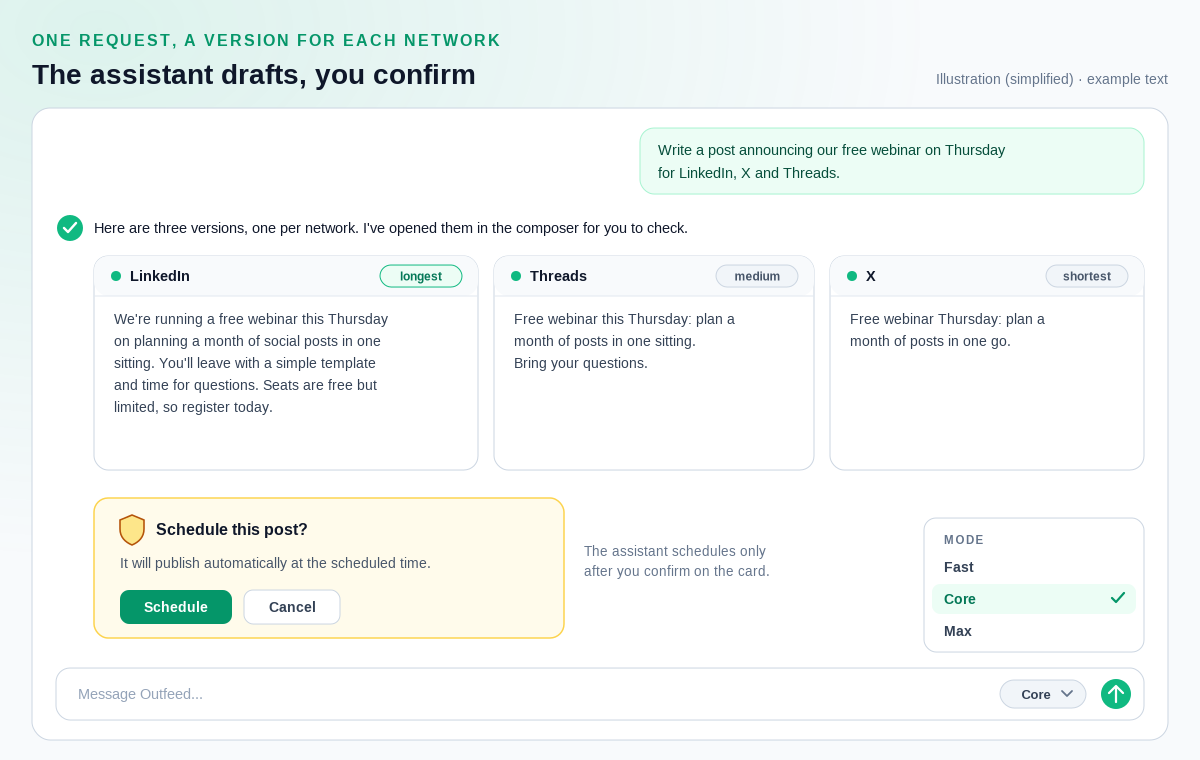
Before you confirm, you see each version as it will roughly appear:
- The composer shows a simplified preview of the post for each of the nine networks, in a phone-style frame, before you schedule it.
- As you type, the composer counts the text against the selected network's limit (in bytes for a YouTube description).
Can the assistant look things up before it writes?
A search is useful when a post depends on something current, such as an event date or a product launch. Check whatever it finds against the original source before the post goes out.
Does the AI post without asking me?
No. In chat, scheduling and publishing are confirmed by you before they happen; the assistant does not schedule silently.
Guidance from an AI developer and from a network points the same way. OpenAI's guide to building agents calls human intervention a critical safeguard and says sensitive, irreversible or high-stakes actions should trigger human oversight until confidence in the agent's reliability grows. Checked against OpenAI: A practical guide to building agents (PDF) LinkedIn's User Agreement says content from LinkedIn's own generative AI features might be inaccurate, incomplete, misleading or unsuitable, and asks members to review and edit it before sharing. Checked against LinkedIn User Agreement (effective 3 November 2025)
How do chat modes and AI credits work?
You choose Fast, Core or Max for the assistant. Each message uses AI credits from your plan: 1 on Fast or Core, 2 on Max, plus 1 when the assistant runs a web or X search for you.
The credits each plan includes are in the plans table below. A few more things about chats:
- A chat is private to you unless you share it with your workspace.
- Ask the assistant what is scheduled and it shows a calendar summary in the chat.
- Messages to the assistant are limited per hour for the whole workspace, by plan.
To use the same tools from an AI assistant outside the app, see the scheduling API and MCP server. MCP and API access come with every plan.
What doesn't the assistant do?
Read every draft before you confirm it: AI writing can be wrong. Google Search's guidance on generative AI content says all AI-generated content should be fact-checked by hand before publishing because models can hallucinate. Checked against Google Search Central: Google Search's guidance on using generative AI content on your website (last updated 1 October 2026) That guidance is written for website content, not social posts, but the habit carries over.
No automatic queue or best-time slots
There is no automatic posting queue or best-time slotting: you (or the assistant, on your instruction) choose the time.
- No. Outfeed does not generate images or video with AI. The assistant writes the post text, can give each network its own version, writes the YouTube title and writes alt text for your images. You bring the media: drop an image or video into the chat to upload it and attach it to the post.
- No. Outfeed has no analytics: it tracks no reach, engagement, conversions or attribution, and it has no UTM reporting. It publishes your own posts to the accounts you connect: you pick an exact date and time for one post that can target several accounts across networks, and Outfeed publishes it at that moment through each network's API. Read results in each network's own analytics. See the free UTM generator and the engagement rate calculator.
- No. Outfeed does not predict a post's reach or whether it will go viral, and it has no feature that changes how a network ranks or recommends a post. It publishes your own posts to the accounts you connect: you pick an exact date and time for one post that can target several accounts across networks, and Outfeed publishes it at that moment through each network's API. There is no automatic posting queue or best-time slotting: you choose the time.
Outfeed facts on this page were checked against the Outfeed app code on 2026-11-21.
How does it compare with another AI assistant for content creation?
Buffer and Hootsuite both build AI writing help into their own schedulers, and each describes it differently. What each vendor says about its own assistant:
- Buffer's AI Assistant writes a caption from a prompt of at least four words, can regenerate, rephrase, shorten or expand text and make it more casual or formal, and is channel-aware in the composer: for Instagram it keeps posts under the 2,200-character limit. Checked against Buffer Help: Using Buffer's AI AssistantVendor's own description It can also generate post ideas from a description of your business and audience, in Buffer's Create area only. Checked against Buffer Help: Using Buffer's AI AssistantVendor's own description Buffer lists it on every plan, including Free. Checked against Buffer: PricingVendor's own description
- Hootsuite's Wisdom was announced on 24 June 2026; Hootsuite calls it a social-first AI agent. Checked against Hootsuite press release: Hootsuite Rebuilds for the AI Era, Introducing WisdomVendor's own description Hootsuite's plans page lists an AI content and ideas generator, AI caption enhancements (spelling, length, tone) and AI hashtag suggestions on every plan, with 100 AI credits a month on Standard, Professional and Advanced. Checked against Hootsuite: Plans, Prices, and FeaturesVendor's own description
Buffer's assistant being on its free plan is a real advantage if you only need caption help. Outfeed's own assistant is described in the sections above, from what it writes to the confirmation step.
For standalone writers that only generate post text, see AI social media post generators compared.
Which plan includes the AI content assistant?
Starter
$29 per month, billed monthly
- Connected accounts
- 10
- Posts per month
- 100
- Team members
- 1
- AI credits per month
- 500
- Bulk scheduling
- No
Pro
$59 per month, billed monthly
- Connected accounts
- 25
- Posts per month
- Unlimited
- Team members
- 3
- AI credits per month
- 1,000
- Bulk scheduling
- Yes
Agency
$149 per seat/month, billed monthly
- Connected accounts
- 250
- Posts per month
- Unlimited
- Team members
- Unlimited
- AI credits per month
- 2,500 per seat
- Bulk scheduling
- Yes
Enterprise
Custom
- Connected accounts
- Unlimited
- Posts per month
- Unlimited
- Team members
- Unlimited
- AI credits per month
- Unlimited
- Bulk scheduling
- Yes
Starter and Pro are flat monthly prices, not billed per seat. Agency is billed per seat. Enterprise is custom.
Agency's 250 accounts is an organization-wide cap; it does not grow with seats.
Starter includes a 3-day free trial with 100 AI credits. Card required. Pro and Agency are billed from the first day.
Read the full Outfeed AI pricing breakdown or compare plans on the Outfeed AI homepage.
AI content assistant FAQ
Does the AI post without asking me?
No. In chat, scheduling and publishing are confirmed by you before they happen; the assistant does not schedule silently.
Can Outfeed's AI create images or videos?
No. Outfeed does not generate images or video with AI. The assistant writes the post text, can give each network its own version, writes the YouTube title and writes alt text for your images. You bring the media: drop an image or video into the chat to upload it and attach it to the post.
How many AI credits does each plan include?
AI credits per month, by plan: Starter 500; Pro 1,000; Agency 2,500 per seat; Enterprise unlimited. Each message uses AI credits from your plan: 1 on Fast or Core, 2 on Max, plus 1 when the assistant runs a web or X search for you.
Can I choose a chat mode for the assistant?
Yes. You choose Fast, Core or Max for the assistant.
Is Outfeed's AI content assistant free?
No. There is no free plan. Starter includes a 3-day free trial with 100 AI credits. Card required. Pro and Agency are billed from the first day.
AI guides and free tools
Draft your next post with Outfeed AI
Starter includes a 3-day free trial with 100 AI credits. Card required. Pro and Agency are billed from the first day.