
How to Use LinkedIn: Profile, Network, Posts and Jobs
How to use LinkedIn, in short: set up a profile that says what you do, connect with people you know and follow the ones you want to learn from, then post, message and look for work from the same account. A basic account is free and Premium is optional. Checked against LinkedIn Help: Difference between free LinkedIn and LinkedIn Premium accounts
This guide takes one task at a time, from your first profile to running a Company Page. Each rule cites its source inline, mostly LinkedIn’s own Help Center, User Agreement and Pressroom, and limits LinkedIn doesn’t publish are marked as widely reported. An index of every LinkedIn guide on this site closes the page.
Table of Contents
- What is LinkedIn, and what is it used for?
- How to use LinkedIn: set up a profile that gets found
- Should you connect or follow on LinkedIn?
- What can you post on LinkedIn?
- How do LinkedIn messages and InMail work?
- How do you use LinkedIn to find a job?
- How do you use LinkedIn for business?
- Is LinkedIn Premium worth it?
- What should you never automate on LinkedIn?
- Every LinkedIn guide, by task
- Frequently asked questions
What is LinkedIn, and what is it used for?
LinkedIn is a professional network: you keep a public work profile, build a network of colleagues, read and share work-related posts, message contacts and find jobs. As of November 2026, LinkedIn’s pressroom says it has more than 1.4 billion members and 71 million companies, and calls itself the world’s largest professional network. Checked against LinkedIn Pressroom: About Us (Statistics)
LinkedIn says it began in co-founder Reid Hoffman’s living room in 2002, launched officially on May 5, 2003, and was acquired by Microsoft in December 2016. Its stated mission is to “connect the world’s professionals to make them more productive and successful.” Checked against LinkedIn: About LinkedInVendor's own description
Who can join: LinkedIn’s User Agreement says the service isn’t for anyone under 16, with a higher minimum where local law requires one, and asks for one account per person, in your real name. Checked against LinkedIn User Agreement (effective 3 Nov 2025)
What a free account covers: with a basic account you can find and reconnect with colleagues and classmates, give and request recommendations, search for and view other members’ profiles, receive InMail and save up to three searches with weekly alerts. Checked against LinkedIn Help: Difference between free LinkedIn and LinkedIn Premium accounts
Pick the task you came for:
| If you want to… | Start here |
|---|---|
| Get found by recruiters and contacts | Set up your profile |
| Build a network | Connect or follow |
| Share your work and ideas | Post on LinkedIn |
| Reach someone you don’t know | Messages and InMail |
| Get hired, or hire | Find a job |
| Represent a company | LinkedIn for business |
How to use LinkedIn: set up a profile that gets found
Start with the profile: LinkedIn calls it “a professional landing page” and recommends a professional photo, a headline you write yourself, an About section of one or two paragraphs, your work and education, relevant skills, recommendations from connections and a look at the profile strength meter. Checked against LinkedIn Help: Create a good LinkedIn profile
Work through the parts in this order:
- Headline. LinkedIn creates it automatically when you add a position, but you can rewrite it in your own words. Checked against LinkedIn Help: Create a good LinkedIn profile It holds 220 characters (widely reported). The free LinkedIn headline generator drafts options from your role.
- About. One or two paragraphs, as LinkedIn recommends, within 2,600 characters (widely reported).
- Recommendations. There’s no limit to how many you can request, and one you accept is visible to your network by default. Checked against LinkedIn Help: Create a good LinkedIn profile
- Featured. This section showcases work samples, including documents, images, presentations and videos. Add it from Add profile section, then Recommended, then Add Featured. Source: LinkedIn Help: Manage featured samples of your work on your LinkedIn profile, checked ; page date: 'Last updated: 3 years ago' (shown 2026-10-03)
- Banner. The image behind your photo has its own size rules: see LinkedIn banner size.
- Profile URL. Your custom public profile URL can be 3 to 100 characters with no spaces, symbols, special characters or the word LinkedIn, and can be changed up to five times within six months; hyphens, which LinkedIn’s own auto-assigned URLs use, are widely reported to work. Checked against LinkedIn Help: Manage your public profile URL Sharing a profile link works much the same elsewhere; on Facebook, here is how to find your Facebook URL.
Who sees it: your profile is generally fully visible to signed-in members, your Contact Info only to 1st-degree connections, and, depending on your settings, a public version can appear in search engines such as Google and Bing. Checked against LinkedIn Help: What People Can See on Your Profile
What happened to Creator Mode?
You no longer need to switch it on. Social Media Today reported in February 2024 that LinkedIn was removing the option to turn on Creator Mode while keeping its creation tools available to members. Checked against Social Media Today: LinkedIn's Removing Its Creator Mode Option (5 Feb 2024)Press report LinkedIn Help now lists each tool with its own criteria: LinkedIn Live has separate eligibility criteria, the Follow link on your profile needs a history of following the Professional Community Policies and a record in good standing, and Newsletters are available to all members. Checked against LinkedIn Help: Sharing tools access criteria
Setting up several networks at once? Use our profile checklist for every network.
Should you connect or follow on LinkedIn?
Connect when you want a two-way relationship; follow when you only want someone’s posts. In LinkedIn’s words, “Following lets you learn from someone’s content, while connecting builds a two-way relationship.” Connecting makes you both 1st-degree connections who can message each other directly and see each other’s posts and updates; following shows you their public posts and articles without making you part of their network. Checked against LinkedIn Help: Follow and connect on LinkedIn
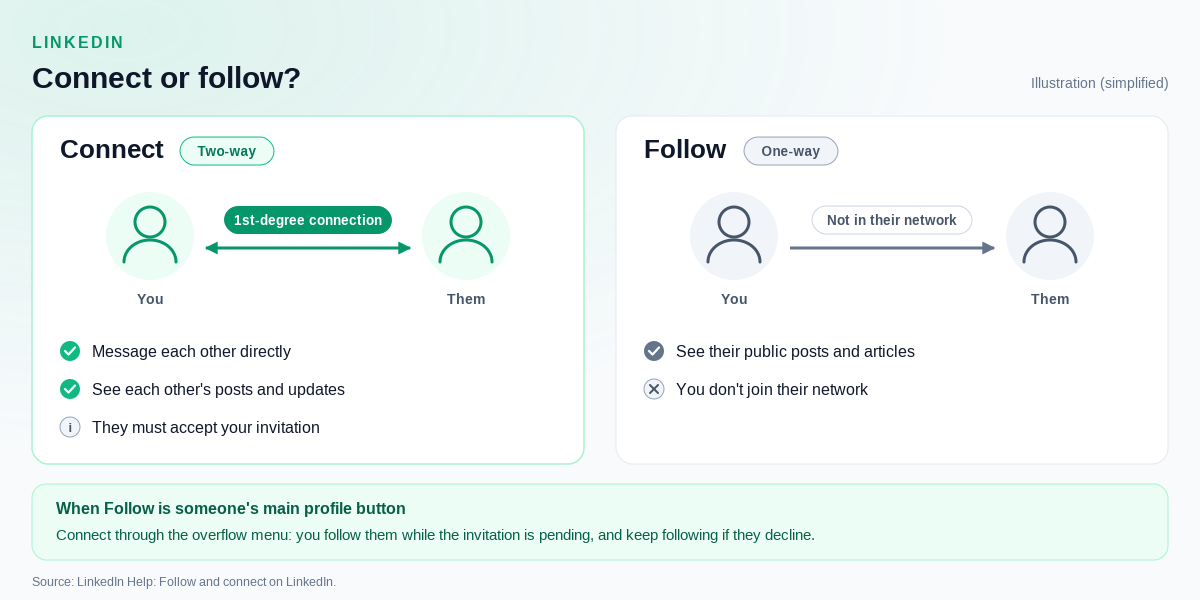
Some members set Follow as their main profile button. If you connect through the overflow menu instead, you follow them automatically while the invitation is pending, and you keep following them if they decline. Checked against LinkedIn Help: Follow and connect on LinkedIn
What 1st, 2nd and 3rd-degree mean
Your network is your 1st, 2nd and 3rd-degree connections, plus your followers and fellow group members; everyone else is “Out of Network.” 1st-degree means you’re directly connected because one of you accepted the other’s invitation, 2nd-degree means connected to your 1st-degree connections, and 3rd-degree means connected to your 2nd-degree connections. You can have at most 30,000 1st-degree connections. Checked against LinkedIn Help: Your Network and Degrees of Connection
Groups and Events
Groups are where people in the same industry or with shared interests swap insights and ask for advice; Events are professional gatherings, online, in person or hybrid. You can search for groups, view the ones you’ve joined or create your own, and members can join conversations and send message requests to each other. Checked against LinkedIn Help: LinkedIn groups membership To join one, search for a name or keyword, filter the results to Groups and select Request to join, or accept an invitation; whether you get in is entirely up to the group. Checked against LinkedIn Help: Find and Join a LinkedIn Group
Events can be created by a profile or a Page, and the organizer can’t be changed later. An online event is either a LinkedIn Live stream, which needs LinkedIn Live access and a third-party streaming tool, or a link to a broadcast somewhere else. Checked against LinkedIn Help: LinkedIn Events overview
What can you post on LinkedIn?
Click Start a post at the top of your homepage (in the mobile app, tap Post), write your text or paste a link, choose who can see it in Post settings and click Post. Checked against LinkedIn Help: Share articles or links Each post type has its own limits:
| Post type | What LinkedIn allows | Source |
|---|---|---|
| Text post | Up to 3,000 characters | LinkedIn Help: Post and share updates |
| Image post | Up to 20 photos, each at least 552 x 276 pixels and up to 5 MB | LinkedIn Help: Share photos on LinkedIn |
| Video post | Up to 15 min and 5 GB | LinkedIn Help: Video sharing troubleshooting |
| Document post | A PDF, PPT, PPTX, DOC or DOCX of up to 100 MB and 300 pages; readers page through it in the feed and can download it as a PDF | Checked against LinkedIn Help — Upload and share documents on LinkedIn |
| Article | Long-form, from Write article on desktop (not in the mobile app); can be scheduled; title up to 150 characters (widely reported) | Checked against LinkedIn Help: Write and publish articles on LinkedIn |
| Newsletter | LinkedIn says all members can create one; it starts from Write article, where the Create newsletter option appears only if you have access; subscribers are notified of each edition | Checked against LinkedIn Help — LinkedIn Newsletters |
| Poll | 2 to 4 options, a question of up to 140 characters and options of up to 30; runs a week by default; the author can see how each person voted | Checked against LinkedIn Help — LinkedIn Polls FAQ and Create LinkedIn Polls |
| Carousel | Native organic carousels were removed from December 14, 2023; carousel ads were not affected | Checked against LinkedIn Help — Carousels on LinkedIn (No longer available) |
You can schedule posts natively; our LinkedIn scheduling guide walks through both schedulers. From a personal profile, LinkedIn’s scheduler takes a time from 10 minutes to 3 months ahead, and it can’t schedule Events, Jobs and Services. Page admins can schedule from 1 hour to 3 months ahead, but not Events, Multiple photos, Reshares, Polls, Jobs and Service posts. Sources: LinkedIn Help: Schedule posts and LinkedIn Help: Schedule a LinkedIn Page post.
Go deeper:
- How often to post on LinkedIn, and when: our LinkedIn timing guide.
- How to schedule LinkedIn posts: both native schedulers step by step.
- LinkedIn character limits for every field, and where the “see more” cut falls.
- LinkedIn post ideas when you don’t know what to write.
- How the LinkedIn algorithm ranks posts, from LinkedIn’s own statements.
- Drafting tools: the free LinkedIn post generator and the LinkedIn text formatter for bold and italic text.
Schedule LinkedIn posts on your profile with Outfeed AI
How do LinkedIn messages and InMail work?
You can message your 1st-degree connections and LinkedIn Pages for free; to reach most other members you need InMail, which comes with paid products. Some non-connections may be reachable without it: Premium members with an Open Profile, people in the same Group and current coworkers. InMail comes with Premium, Recruiter, Sales Navigator and Campaign Manager. Checked against LinkedIn Help: Send messages on LinkedIn
InMail runs on monthly credits: 5 on Premium Career, 15 on Premium Business, 30 on Premium All-in-One, 50 on Sales Navigator Core and 30 on Recruiter Lite. You get a credit back for each InMail that is accepted, declined or answered within 90 days, and any balance drops to zero if you cancel Premium. Checked against LinkedIn Help: InMail message credits and renewal process
A message holds 8,000 characters (widely reported). Write each one yourself: LinkedIn’s User Agreement bans bots and other unauthorised automated ways of sending messages (see what never to automate).
How do you use LinkedIn to find a job?
Tell recruiters you’re open to work, then search and apply, using Easy Apply where a listing offers it. #OpenToWork can be shown to all members, which adds the #OpenToWork photo frame, to recruiters only, or kept to yourself. LinkedIn warns that it can’t guarantee complete privacy from recruiters at your own company. Checked against LinkedIn Help: Let recruiters know you're Open to Work
With Easy Apply you can attach a resume under Resume (optional). LinkedIn recommends a file under 2MB, accepts only Word or PDF, and won’t let you reopen an application you submitted without one. Source: LinkedIn Help: Upload your resume to LinkedIn, checked ; page date: 'Last updated: 6 months ago' (shown 2026-10-03) Our guide on how to upload a resume on LinkedIn covers saved resumes and the Featured section too.
Hiring instead? LinkedIn requires a job post to be a bona fide opening with truthful, complete details (title, responsibilities, qualifications, location and whether it’s unpaid), bans discrimination based on protected characteristics and doesn’t allow posts that only collect general resumes. Checked against LinkedIn Help: Quality job post guidelines
How do you use LinkedIn for business?
To use LinkedIn for business, create a LinkedIn Page: profiles represent individuals and Pages represent organizations. You need a profile to create a Page, and you can’t convert a profile into one. Running an organization as a profile can get you logged out, and repeated violations can restrict the account, so LinkedIn recommends renaming such a profile to your real name and creating a Page. Checked against LinkedIn Help: Differences between a LinkedIn profile and a LinkedIn Page
| Personal profile | LinkedIn Page | |
|---|---|---|
| Represents | You, as an individual | An organization |
| Cost | Basic account is free | Free to create |
| Who runs it | You | Admins; the creator becomes admin automatically |
| Native scheduling window | 10 minutes to 3 months ahead | 1 hour to 3 months ahead |
Creating a Page is free, the person who creates it becomes its admin automatically, and if LinkedIn has already made a placeholder Listing Page for your company, a current employee can claim it. Checked against LinkedIn Help: LinkedIn Pages FAQs LinkedIn lists seven Page types: Company Page (free, with an optional paid Premium Company Page), Career Page (a paid license), Showcase, Service, Product, University and Listing Pages. Career, Showcase and Product Pages need an existing Company or University Page. Checked against LinkedIn Help (Marketing Solutions): LinkedIn Page types and their functions Walk through the setup in set up a LinkedIn Company Page.
Posting as the Page: super and content admins can post text, images, videos and documents as the Page, choose Anyone or a Targeted Audience, turn comments on or off, save a draft or schedule the post, then see its analytics: impressions, members reached, click-through rate, reactions, comments, reposts and engagement rate. Checked against LinkedIn Help (Marketing Solutions): Post as your LinkedIn Page Page analytics are open to every admin role and also cover followers, visitors, search appearances, competitors, employer brand and newsletters. Checked against LinkedIn Help: LinkedIn Page analytics If the numbers are new to you, start with what LinkedIn impressions mean.
Paid reach: LinkedIn ads come in four families: Sponsored Content in the feed (single image, carousel, video, job, event and document ads), Sponsored Messaging, Dynamic Ads in the desktop right rail and desktop-only Text Ads. Checked against LinkedIn Help (Marketing Solutions): Ad Placement on LinkedIn
Is LinkedIn Premium worth it?
Premium is worth it if you will use what it adds; for posting, building a network and messaging your connections, a basic account already does the job. LinkedIn sells Premium Career (job search and growth, including who viewed your profile, InMail and LinkedIn Learning), Premium Business, Premium All-in-One (sales, marketing and hiring) and Premium Company Page, with a free trial for eligible users. Checked against LinkedIn Help: Introduction to LinkedIn Premium
In LinkedIn’s plan comparison, Premium Career includes LinkedIn Learning, private browsing, applicant insights, direct messaging, Who viewed your profile (365 days), 5 InMail credits, profile writing assistance and Top choice job; Premium Business has 15 InMail credits and Premium All-in-One 30. Source: LinkedIn Help: Difference between free LinkedIn and LinkedIn Premium accounts, checked
- Premium Career fits if you’re job hunting and want applicant insights, InMail credits and LinkedIn Learning courses.
- Premium Business or All-in-One fits if you contact people outside your network often enough to use 15 or 30 InMail credits a month.
- Skip it if you mostly post, read and message your connections, which a basic account covers.
Prices vary by country and billing period, so check them on LinkedIn’s Premium page. For the job-seeker tier in detail, read LinkedIn Premium Career, in detail.
What should you never automate on LinkedIn?
Never let a bot, scraper or browser extension act on LinkedIn for you. LinkedIn bans third-party software, including crawlers, bots, browser plug-ins and extensions, that scrapes, changes the look of or automates activity on its website, and tools that create fake engagement. Checked against LinkedIn Help: Prohibited software and extensions Its User Agreement also forbids bots and other unauthorised automated ways to add or download contacts, send messages, or create, comment on, like or share posts. Checked against LinkedIn User Agreement (effective November 3, 2025)
The risk is your account: LinkedIn says members who use prohibited tools break the User Agreement and risk having their accounts restricted or shut down, and the tools may stop working without notice. Checked against LinkedIn Help: Prohibited software and extensions In practice: write your own posts, messages and invitations, and never hand connecting, messaging or engaging to a bot or extension.
To grow your network the sanctioned way, LinkedIn introduced LinkedIn Business Cards on November 18, 2026, available to all members, for turning in-person introductions into connections. Checked against LinkedIn Pressroom: New Ways to Build and Stay Connected (18 Nov 2026) More dated changes across networks are in our latest social media updates.
Every LinkedIn guide, by task
Every LinkedIn guide and free tool on this site, grouped as above.
| Task group | Guide | What it answers |
|---|---|---|
| Profile | LinkedIn banner size | Background photo dimensions |
| Profile | LinkedIn headline generator | Headline drafts from your role |
| Post | How to schedule LinkedIn posts | Native scheduling, profile and Page |
| Post | LinkedIn character limits | Every text field’s limit |
| Post | LinkedIn post ideas | What to post about |
| Post | LinkedIn hashtags | How hashtags work on LinkedIn |
| Post | Best time to post on LinkedIn | When to publish |
| Post | How the LinkedIn algorithm ranks posts | What the feed favours |
| Post | AI tools for LinkedIn | AI help with posts and profiles, within LinkedIn’s rules |
| Post | LinkedIn post generator | Post drafts |
| Post | LinkedIn hashtag generator | Hashtag suggestions |
| Post | LinkedIn text formatter | Bold and italic post text |
| Jobs | Upload a resume on LinkedIn | Easy Apply, saved resumes, Featured |
| Jobs | LinkedIn Premium Career, in detail | What the job-seeker plan adds |
| Business | Set up a LinkedIn Company Page | Creating and running a Page |
| Business | What LinkedIn impressions mean | Reading post and Page numbers |
Frequently asked questions
What is LinkedIn used for?
LinkedIn is a professional network: as of November 2026 its pressroom calls it the world’s largest, with more than 1.4 billion members and 71 million companies. People use it to keep a professional profile, connect with colleagues, follow people and companies, post and read work-related updates, message contacts and find jobs.
Is LinkedIn free to use?
Yes. LinkedIn offers a basic account for free, which lets you find colleagues and classmates, give and request recommendations, search and view other members’ profiles, receive InMail and save up to three searches with weekly alerts. Premium subscriptions are optional and add features such as InMail credits for sending messages to people outside your network.
What is the difference between connect and follow on LinkedIn?
Following lets you see someone’s public posts and articles without joining their network. Connecting makes you both 1st-degree connections who can message each other directly and see each other’s posts and updates. If you connect with someone whose main profile button is Follow, you also follow them while the invitation is pending, and you keep following them if they decline.
How old do you have to be to use LinkedIn?
LinkedIn’s User Agreement says its services are not for anyone under 16, and the minimum is higher where local law requires. It also asks for one account per person, in your real name.
Is LinkedIn Premium worth it?
It depends on what you need. Premium Career adds InMail credits, Who viewed your profile and LinkedIn Learning for job seekers, while Premium Business and Premium All-in-One include more InMail credits, and All-in-One is aimed at sales, marketing and hiring. Eligible members can start with a free trial, and prices vary by country, so check LinkedIn’s Premium page.