
How Do I Delete a Facebook Business Page? Steps and Options
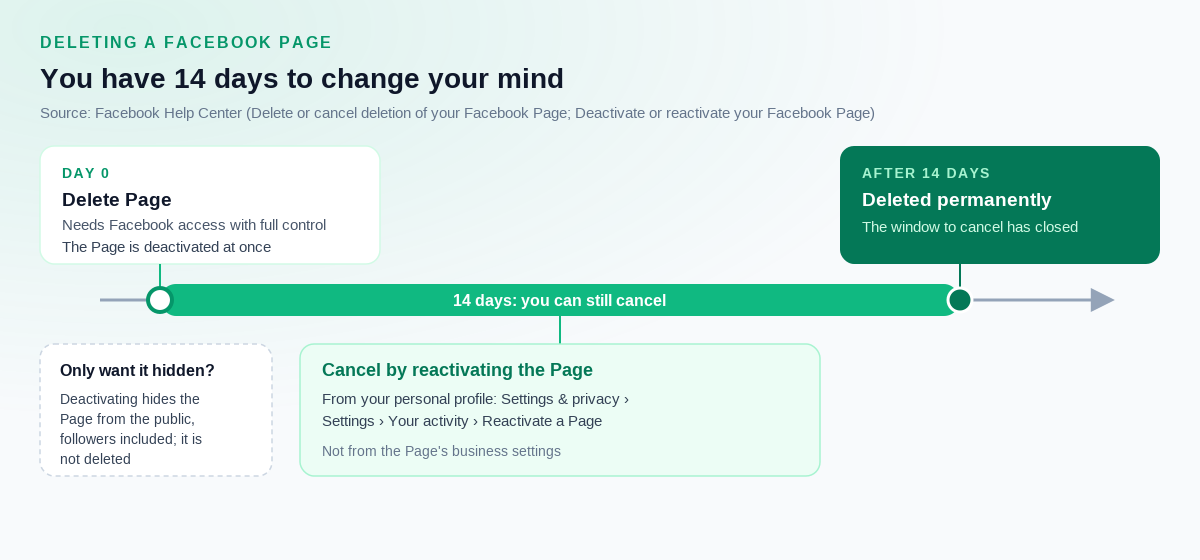
To delete a Facebook business Page, switch into the Page, open Settings & privacy > Settings > Access and control, and select Delete Page. You need Facebook access with full control. Facebook deactivates the Page straight away and deletes it permanently after 14 days. Checked against Facebook Help Center: Delete or cancel deletion of your Facebook Page
So if you’re asking “how do I delete a Facebook business Page?”, the steps are short, but the decision isn’t: deleting is only one of five things people mean by removing a Page, and two of them (deactivating and unpublishing) can be undone. The steps, the 14-day window, and when to deactivate, unpublish or merge instead are all below. Facebook beyond this one task has its own walkthrough: how to use Facebook.
Table of Contents
- How do I delete a Facebook business Page? (steps)
- Delete, deactivate, unpublish or merge: which do you need?
- What to do before you delete your Page
- Can you restore a deleted Facebook Page?
- How do you remove a Page from Meta Business Suite?
- Why can’t I delete my Facebook Page?
- Should you merge the Page instead?
- FAQ
How do I delete a Facebook business Page? (steps)
Switch into the Page, go to Settings & privacy > Settings > Access and control, select Delete Page and follow the prompts. Only someone with Facebook access with full control can do it; partial control, task access (which works only in tools like Meta Business Suite) and Community Manager access can’t. Checked against Facebook Help Center: Create and manage a Facebook Page Facebook’s steps for a computer and an iPhone:
On a computer:
- Log into Facebook, then click your profile photo in the top right.
- Click See all profiles, then select the Page you want to switch into.
- Click your Page photo in the top right.
- Click Settings & privacy, then click Settings.
- Click Access and control in the left menu.
- Select Delete Page, then click Continue and follow the steps. You may be asked to re-enter your password.
On iPhone:
- Tap Menu in the top left of Facebook or your profile picture.
- Tap Options, then select the Page you want to switch into.
- Tap Menu in the top left of Facebook.
- Tap Settings & privacy, then tap Settings.
- Tap Access and control in the left menu.
- Select Delete Page, then tap Continue and follow the steps. You may be asked to re-enter your password.
Checked against Facebook Help Center: Delete or cancel deletion of your Facebook Page.
Facebook’s Android steps:
Delete your Page (Android):
- Tap Menu in the top left of Facebook.
- Tap Options, then select the Page you want to switch into.
- Tap Menu in the top left of Facebook.
- Tap Settings & privacy, then tap Settings.
- Tap Access and control in the left menu.
- Select Delete Page, then tap Continue and follow the steps. You may be asked to re-enter your password.
Checked against Facebook Help Center: How to delete or cancel deletion of your Facebook Page.
Delete, deactivate, unpublish or merge: which do you need?
Delete only if you want the Page gone for good; deactivate or unpublish if you just want it hidden. If you only want to remove a business Page from Facebook’s public view for a while, both of those are reversible. Removing a Page from a business portfolio doesn’t delete it at all, and merging deletes one Page into another.
| Option | What it does | Can you undo it? | Source |
|---|---|---|---|
| Delete | Deactivates the Page at once, then deletes it permanently after 14 days | Only within the 14 days, by reactivating it | Checked against Facebook Help Center: Delete or cancel deletion of your Facebook Page |
| Deactivate | Hides the Page from the public, followers included, and blocks edits; nothing is deleted | Yes, by reactivating it | Checked against Facebook Help Center: Deactivate or reactivate your Facebook Page |
| Unpublish | Hides the Page from the public, but you can still edit it; edits go public when you publish again | Yes, by publishing it again | Checked against Facebook Help Center: Deactivate or reactivate your Facebook Page |
| Remove from a business portfolio | Takes the Page out of one portfolio; the Page isn’t deleted | Meta doesn’t say; another business can then add the Page | Checked against Meta Business Help Center: How to remove a Facebook Page from your business portfolio |
| Merge | Combines followers and check-ins into the Page you keep, and removes the other Page with its posts, photos, reviews, ratings and username | No | Checked against Facebook Help Center: Merge 2 Facebook Pages |
Meta gives no time limit on how long a Page can stay deactivated, and deactivating a parent Page also deactivates its child Pages. Checked against Facebook Help Center: Deactivate or reactivate your Facebook Page To deactivate rather than delete:
On a computer:
- Log into Facebook, then click your profile photo in the top right.
- Click See all profiles, then select the Page you want to switch into.
- Click your Page's profile picture in the top right of Facebook.
- Click Settings & privacy, then click Settings.
- In the left menu, click Access and control.
- Select Deactivate Page and click Continue, then follow the steps to deactivate your page. You may be asked to enter your password.
On iPhone:
- Tap Menu in the top left of Facebook or your profile picture.
- Tap Options, then select the Page you want to switch into.
- Tap Menu in the top left of Facebook.
- Tap Settings & privacy, then tap Settings.
- Tap Access and control.
- Select Deactivate Page then tap Continue, then follow the steps to deactivate your Page. You may be asked to re-enter your password.
Checked against Facebook Help Center: Deactivate or reactivate your Facebook Page.
What to do before you delete your Page
Download a copy of the Page, disconnect any linked Instagram account, and clear posts scheduled to it. Once the 14 days pass, nothing comes back.
- Download a copy. With full control, you can request a file of the Page and choose the format, media quality, date range and categories. The download link expires after 4 days. Checked against Facebook Help Center: Download a copy of your Facebook Page
- Log into Facebook, then click your profile photo in the top right.
- Click See all profiles, then select the Page you want to switch into.
- Click your Page's profile photo in the top right of Facebook.
- Click Settings & privacy, then click Settings.
- Click Download your information in the left column.
- Select file options: the format, the quality of photos, videos and other media, and a date range.
- Click the boxes on the right to add or remove categories of data.
- Click Request a download at the bottom to confirm.
Checked against Facebook Help Center: Download a copy of your Facebook Page.
-
Disconnect Instagram. The Page and an Instagram account are disconnected from Linked accounts > Instagram > Disconnect account. Checked against Facebook Help Center: Connect or disconnect an Instagram account and your Page Our guide shows how to unlink Instagram from the Page on each device.
-
Clear scheduled posts. If a scheduling tool has posts set to publish to the Page, change their accounts or cancel them before you delete. Where Outfeed AI, the tool behind this blog, stands:
Can you restore a deleted Facebook Page?
Yes, within 14 days: reactivate it from your personal profile, under Settings & privacy > Settings > Reactivate a Page. You can’t do it from the Page’s business settings. After 14 days the deletion is permanent. Checked against Facebook Help Center: Delete or cancel deletion of your Facebook Page Reactivating also brings back child Pages with the parent, unless they were deactivated separately. Checked against Facebook Help Center: Deactivate or reactivate your Facebook Page
On a computer:
- From your main profile click your profile photo in the top right of Facebook.
- Select Settings & privacy, then click Settings.
- Below Your activity, click Reactivate a Page.
- Find the Page you want to reactivate and click Reactivate.
On iPhone:
- From your main profile, tap Menu in the top left of Facebook.
- Scroll down, tap Settings & privacy, then tap Settings.
- Scroll down and tap Pages.
- Next to Reactivate Your Pages, tap View.
- Find the Page you want to reactivate and tap Reactivate.
Checked against Facebook Help Center: Delete or cancel deletion of your Facebook Page.
Cancel deletion by reactivating the Page (Android):
- From your main profile, tap Menu in the top left of Facebook.
- Scroll down, tap Settings & privacy, then tap Settings.
- Scroll down and tap Pages.
- Next to Reactivate Your Pages, tap View.
- Find the Page you want to reactivate and tap Reactivate.
Checked against Facebook Help Center: How to delete or cancel deletion of your Facebook Page.
How do you remove a Page from Meta Business Suite?
In Meta Business Suite, go to Settings > Accounts > Pages, select the Page and click Remove, but this does not delete it. Meta says that if you want to delete the Page, you delete it on Facebook. Once it’s removed, another business can add it, and you can’t transfer a Page to another portfolio. Checked against Meta Business Help Center: How to remove a Facebook Page from your business portfolio
A business portfolio brings an organization’s Pages, Instagram and Threads accounts, ad accounts, catalogs and the people who manage them into one place, run through tools like Meta Business Suite. Checked against Meta Business Help Center: About business portfolios You need full control of the portfolio, and you disconnect linked Instagram or WhatsApp accounts first:
- Disconnect the Facebook Page from other business assets such as an Instagram account or WhatsApp account.
- Go to Settings in Meta Business Suite for your business portfolio.
- Click Pages below Accounts in the left menu.
- Click the Page you want to remove from your business portfolio.
- Click Remove.
- Review the information on screen, then click Remove Page from business portfolio.
Checked against Meta Business Help Center: How to remove a Facebook Page from your business portfolio.
For more on the tools involved, see our guides to Meta Business Suite and business portfolios in Meta Business Manager.
Why can’t I delete my Facebook Page?
If Delete Page doesn’t appear, check that you have Facebook access with full control: that is the check Facebook’s own help points to. Checked against Facebook Help Center: Delete or cancel deletion of your Facebook Page Other causes:
- Your access is partial, task-only or Community Manager. Only full control manages settings, access and deletion. Ask someone with full control to delete the Page or give you that access. Checked against Facebook Help Center: Create and manage a Facebook Page
- Nobody has full control any more. Facebook automatically deactivates a Page with no one holding full control and schedules it for deletion. Meta’s route back is a Page admin dispute. Checked against Facebook Help Center: Deactivate or reactivate your Facebook Page
- You deactivated your personal account. That also deactivates Pages only you controlled. Reactivate your account first, then the Pages; if you deleted your account, you can cancel within 30 days and reactivate your Pages. Checked against Facebook Help Center: Deactivate or reactivate your Facebook Page
Should you merge the Page instead?
Merge when two Pages represent the same thing, such as a duplicate of your business Page. The Pages need the same name and, for a physical place, the same address, and must sit under the same Business Manager account. The Page you merge from can’t be that account’s primary Page, and Meta says the feature may not be available to everyone. Checked against Facebook Help Center: Merge 2 Facebook Pages
A merge can’t be undone: the Page you don’t keep loses its posts, photos, reviews, ratings and username, while its followers and check-ins move to the Page you keep. Checked against Facebook Help Center: Merge 2 Facebook Pages Requests are made on a computer, from the Page you want to keep:
On a computer:
- Log into Facebook, then click your profile photo in the top right.
- Click See all profiles, then select the Page you want to switch into.
- Click your Page's profile picture in the top right of Facebook.
- Click Settings & privacy, then click Settings.
- In the left menu, click Page setup.
- Next to Merge Pages, click View.
- Next to Merge multiple Pages, click Start request.
Checked against Facebook Help Center: Merge 2 Facebook Pages.
Our guide on how to merge two Facebook Pages goes through eligibility in detail. Rebranding rather than retiring the business? You can create a new Facebook Page before deleting the old one. Cleaning up more than one account? See how to delete a Facebook group or close a LinkedIn account.
How to delete a Facebook business Page: FAQ
How long does it take to delete a Facebook business Page?
Facebook deactivates the Page as soon as you delete it and deletes it permanently after 14 days. Until then you can cancel by reactivating it.
Who can delete a Facebook Page?
Only someone with Facebook access with full control of the Page. Partial control, task access and Community Manager access can’t delete it.
Can I recover a deleted Facebook Page?
Within 14 days, yes: from your personal profile go to Settings and privacy, Settings, then Reactivate a Page, and reactivate it. After 14 days the deletion is permanent.
What is the difference between deactivating and deleting a Facebook Page?
Deactivating hides the Page from the public, followers included, until you reactivate it; nothing is deleted. Deleting deactivates the Page at once and removes it permanently after 14 days.
Does removing a Page from Meta Business Suite delete it?
No. Removing a Page from a business portfolio only takes it out of that portfolio, and another business can then add it. You delete the Page itself on Facebook.