
Feature

Social Media Scheduler for Multiple Accounts

A social media scheduler for multiple accounts holds every profile you run, for one brand or for many clients, and publishes each post to the accounts you pick at the time you set.

You can connect more than one account on the same network, for example several Instagram accounts, up to your plan's account limit.

Starter includes a 3-day free trial with 100 AI credits. Card required. Pro and Agency are billed from the first day.

How does a social media scheduler for multiple accounts work in Outfeed?

You pick an exact date and time (in chat or the composer) for one post that can target several accounts across networks. Outfeed stores it and a timed trigger publishes it at that moment through each network's API. Outfeed does not hand posts to the networks' own schedulers.

That is the same engine as Outfeed's social media scheduler; this page covers what changes when a post goes to more than one account. A post to several accounts takes four steps:

  1. Connect each account. How each network connects is listed in the network cards further down.
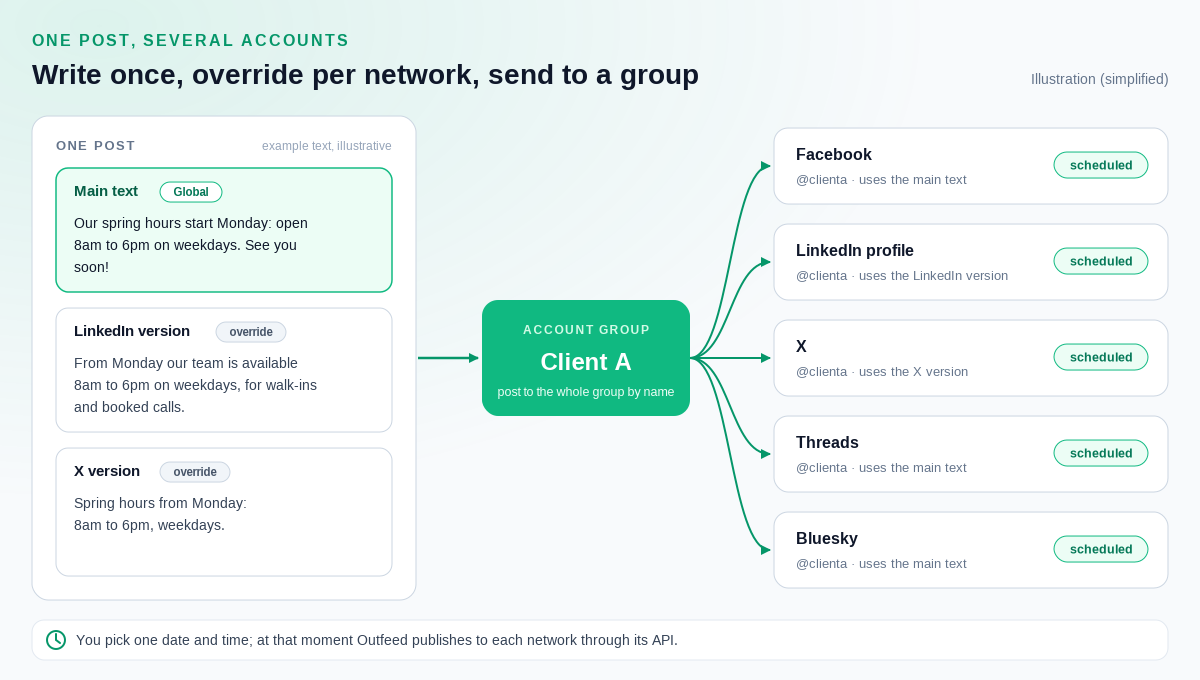
  2. Write a main version. One post can carry different text per network: write a main version and override it for specific networks.
  3. Pick the accounts and the time. Times are read in the time zone you give (any IANA zone, such as America/Toronto), with daylight saving handled. The time must be in the future.
  4. Confirm. In chat, scheduling and publishing are confirmed by you before they happen; the assistant does not schedule silently.

Without a scheduler, the alternative is logging in to each account and posting by hand. For that route, see the manual way to manage multiple accounts.

Is Outfeed a cross-posting app? Posting to multiple social networks

Simplified illustration of one Outfeed post going to several accounts: a main text, per-network text overrides and an account group named Client A
Illustration of Outfeed's per-network text and account groups (simplified).

Pasting one identical caption everywhere rarely fits. Networks differ in what a post must contain and how long its text can be, so a caption written for one can be cut off, refused or simply read oddly on another. In Outfeed: Before a post is accepted into the schedule, Outfeed checks that every account is still connected, the text fits each network's limit, the media passes each network's rules, and required fields (YouTube's made-for-kids answer) are set, along with TikTok's privacy setting for a post going straight to TikTok. Problems are reported then, not hours later.

What does each network accept from one post?

Each network takes different formats and text lengths, so one post reaches each account in the form that network accepts. The cards below list, for every network, what Outfeed publishes there, the text limit it checks and how the account is connected.

Instagram

Feed posts: a single image, a single video (published as a Reel), or a carousel of up to 10 images and/or videos. Every Instagram post needs at least one image or video.

Text limit
Captions are checked against 2,200 characters before the post can be scheduled.
How it connects
Connected through Instagram's own business login (the Instagram API with Instagram Login), with permission to read the profile and publish content. It does not go through a Facebook Page.

Facebook

Page feed posts: text only, text with one photo, or text with one video.

Text limit
Checked against 63,206 characters before the post can be scheduled.
How it connects
Connected with Facebook Login; you pick from the Facebook Pages you manage. Outfeed publishes to Pages only. It has no permission to post to a personal profile or to Groups.

TikTok

A video post, or a photo post of up to 35 JPEG or WebP images, sent through TikTok's Content Posting API: posted to TikTok directly, or sent to your TikTok drafts for you to finish and post in the TikTok app. Posts currently publish as private (visible only to the connected account), the only privacy level TikTok allows the Outfeed app for now. For now TikTok also accepts a direct post only to a private TikTok account: it refuses a direct post to a public TikTok account, so use Send to TikTok drafts for a public account instead.

Text limit
Checked against 4,000 characters before scheduling. For video posts the caption is cut to 2,200 characters when sent; photo posts keep up to 4,000 in the description.
How it connects
Connected with TikTok login, with TikTok's video-publish permission and its upload permission for sending posts to your TikTok drafts.

TikTok posts from Outfeed currently publish as private, visible only to the connected account, until TikTok approves the Outfeed app: you pick from the privacy levels TikTok offers, and until then that is private only. They do not reach followers yet. Until then TikTok also accepts a direct post only to a private TikTok account; it refuses a direct post to a public TikTok account, so use Send to TikTok drafts for a public account instead.

LinkedIn

Posts on your personal profile: text only, text with one image, or text with one video.

Text limit
3,000 characters.
How it connects
Connected with LinkedIn sign-in to your personal LinkedIn profile. Outfeed posts as you, the member; it does not post to LinkedIn Company Pages.

LinkedIn post scheduler

X (Twitter)

Text-only posts up to 280 characters as X counts them (links count 23, emoji and CJK count 2). Images and video cannot be sent to X yet.

Text limit
280 characters, weighted the way X weights them.
How it connects
Connected with X login (OAuth 2.0), with permission to read and write posts.

X posts are capped per billing period by plan. If the cap is reached, new X posts are refused until the next period or an upgrade.

Threads

Text posts, a single image or video, or a carousel of up to 20 images and/or videos.

Text limit
500 characters.
How it connects
Connected with Threads login, with permission to read the profile and publish.

YouTube

A video upload with a title (up to 100 characters), your text as the description, a Public, Unlisted or Private setting, and your answer to YouTube's made-for-kids question.

Text limit
Description checked against 5,000 bytes (UTF-8) before scheduling; the title is limited to 100 characters.
How it connects
Connected with Google sign-in, with upload and read-only YouTube permissions.

Pinterest

Image Pins to a board you pick. Video Pins are not supported yet.

Text limit
Pin description checked against 800 characters.
How it connects
Connected with Pinterest login, with permission to read your boards and create Pins.

Bluesky

Text posts up to 300 characters, with up to 4 images or one video. Links and @mentions in the text are made clickable automatically.

Text limit
300 characters, counted as visible characters (graphemes), the way Bluesky counts.
How it connects
Connected with your Bluesky handle and an app password you create in Bluesky's settings (Bluesky does not use the usual login redirect). The app password is stored encrypted and used to sign in each time a post is published.

Bluesky connects with an app password rather than a login redirect; Outfeed stores it encrypted. Use an app password, never your main Bluesky password.

Can you connect several accounts on the same network?

You can connect more than one account on the same network, for example several Instagram accounts, up to your plan's account limit.

The networks' own apps handle several accounts differently. Instagram, for example, lets you have up to 10 accounts logged in at one time and switch between them without logging out. Checked against Instagram Help Center: Add and switch between multiple Instagram profiles Switching still means posting from one account at a time; a scheduler is where one post goes to several of them at a set time. For the network's own rules, see how many Instagram accounts you can have.

How do account groups work for clients and brands?

Accounts can be put in named groups, by client or brand, and a post can go to a whole group by its name.

Name each group after the client or brand it belongs to, so the right set of accounts is one choice rather than a checklist you tick on every post. Who can do what in the workspace:

People in a workspace are admins or members. Admins manage billing, create and revoke API keys, and can disconnect accounts that other people connected.

How many accounts does each plan include?

How posts are counted when one post goes to several accounts:

One scheduled post counts as one post against the monthly post limit however many accounts it targets. X is counted separately, once per X account targeted, against the X cap.

Account caps and seats are two different ways to price a scheduler. If one person runs many clients, the account cap matters more than the seat count; see per-seat vs per-account pricing for how the two models compare.

Can one post go to a Facebook Page and Instagram?

Meta has its own setting that shares a Facebook post to a linked Instagram account. That is a separate route, covered in Meta's own Facebook-to-Instagram sharing. In Outfeed: Outfeed does not switch on or use Meta's own Facebook-to-Instagram sharing setting.

What doesn't multi-account posting do?

Multi-account posting has a few limits, listed below. One concerns batches: Bulk scheduling lays a batch of posts out on a pattern (daily, weekdays, weekly or chosen days, at a set time in your time zone). It is not on Starter; it is on Pro, Agency and Enterprise. For that, see bulk scheduling a batch of posts.

No automatic queue or best-time slots

There is no automatic posting queue or best-time slotting: you (or the assistant, on your instruction) choose the time.

  • No. Outfeed has no approval workflow or client review step before a post is scheduled. In chat, scheduling and publishing are confirmed by you before they happen; the assistant does not schedule silently.
  • No. Outfeed has no analytics: it tracks no reach, engagement, conversions or attribution, and it has no UTM reporting. It publishes your own posts to the accounts you connect: you pick an exact date and time for one post that can target several accounts across networks, and Outfeed publishes it at that moment through each network's API. Read results in each network's own analytics. See the free UTM generator and the engagement rate calculator.

Outfeed facts on this page were checked against the Outfeed app code on 2026-11-21.

Which plan do you need for multiple accounts?

For a multi-account setup, compare the plans on connected accounts first, then on team members. The accounts row is highlighted below.

Starter

$29 per month, billed monthly

Connected accounts
10
Posts per month
100
Team members
1
Bulk scheduling
No
X posts per month
75

Pro

$59 per month, billed monthly

Connected accounts
25
Posts per month
Unlimited
Team members
3
Bulk scheduling
Yes
X posts per month
150

Agency

$149 per seat/month, billed monthly

Connected accounts
250
Posts per month
Unlimited
Team members
Unlimited
Bulk scheduling
Yes
X posts per month
350

Enterprise

Custom

Connected accounts
Unlimited
Posts per month
Unlimited
Team members
Unlimited
Bulk scheduling
Yes
X posts per month
Unlimited

Starter and Pro are flat monthly prices, not billed per seat. Agency is billed per seat. Enterprise is custom.

Agency's 250 accounts is an organization-wide cap; it does not grow with seats.

Starter includes a 3-day free trial with 100 AI credits. Card required. Pro and Agency are billed from the first day.

Read the full Outfeed AI pricing breakdown or compare plans on the Outfeed AI homepage.

Multiple accounts and cross-posting FAQ

Can I schedule different captions for each platform in one post?

Yes. One post can carry different text per network: write a main version and override it for specific networks. Before a post is accepted into the schedule, Outfeed checks that the text fits each network's limit.

How many social media accounts can I connect?

Starter: 10 accounts and 1 team member; Pro: 25 accounts and 3 team members; Agency: 250 accounts and unlimited team members; Enterprise: unlimited accounts and unlimited team members. Agency's 250 accounts is an organization-wide cap; it does not grow with seats.

Does one post count once or once per account?

One scheduled post counts as one post against the monthly post limit however many accounts it targets. X is counted separately, once per X account targeted, against the X cap.

What happens if one network fails to publish?

Each network is published independently. If one fails, the others still go out and the post is marked partial, with the failing network named. Temporary failures (rate limits, network errors, the network being down) are retried automatically after about 1, 5 and 15 minutes, at most 4 attempts in all. Login and content problems are not retried; you are told what to fix. Before a retry that could double-post, Outfeed first checks whether the post already went live.

What is the best social media scheduler for multiple accounts?

The one whose limits match how you work. Compare three things: how many social accounts each plan allows, whether extra people are billed per seat, and whether one post can carry different text for each network. Account caps and seat pricing decide what the tool costs as you add accounts and people.

Per-seat vs per-account pricing explained

Can I schedule posts to multiple accounts for free with Outfeed?

No. There is no free plan. Starter includes a 3-day free trial with 100 AI credits. Card required. Pro and Agency are billed from the first day.

Free social media tools

Schedule one post to several accounts with Outfeed AI

Starter includes a 3-day free trial with 100 AI credits. Card required. Pro and Agency are billed from the first day.