
Social Media Manager App That Runs in Your Browser
A social media manager app keeps your social accounts in one place and lets you write, preview and schedule posts to them. Outfeed runs in your web browser at app.outfeed.ai. No iOS or Android app and no browser extension.
The app opens on a chat with Outfeed's assistant. Tell it what to post and it writes the draft and opens it in the composer for you to check; it schedules or publishes only after you confirm on a card in the chat.
Starter includes a 3-day free trial with 100 AI credits. Card required. Pro and Agency are billed from the first day.
What should a social media manager app do?
A social media manager app has to hold every account you post to, help you draft each post, show how it will look on each network, publish it at the time you set and keep a calendar of what is going out. Analytics, an inbox and listening are separate jobs, and social media manager apps differ most on those, so check which of them an app covers before you choose it. For scheduling alone, see Outfeed's social media scheduler; this page covers the whole app.
Here is where each of those jobs lives in Outfeed:
| Job | Where it lives | What Outfeed does there |
|---|---|---|
| Hold every account | Connected accounts | You can connect more than one account on the same network, for example several Instagram accounts, up to your plan's account limit. |
| Draft the post | Chat | The assistant writes the post text, can give each network its own version, writes the YouTube title and writes alt text for your images. |
| Preview each network's version | Composer | The composer shows a simplified preview of the post for each of the nine networks, in a phone-style frame, before you schedule it. |
| Publish at a set time | Chat or composer | You pick an exact date and time (in chat or the composer) for one post that can target several accounts across networks. |
| See what is going out | Calendar | The calendar shows your posts by month, week or day, and you can filter it by account. |
| Keep images and video in one place | Media library | Images and videos you upload stay in a media library: search it by file name, filter by type, sort it and star favourites; add alt text, see which posts use a file, add a file from a public link, and trim a video into a new copy. |
How does Outfeed work: chat, composer and calendar?
The app opens on a chat with Outfeed's assistant. Tell it what to post and it writes the draft and opens it in the composer for you to check; it schedules or publishes only after you confirm on a card in the chat. It works on social media tasks for your workspace only. For the background, read what Outfeed AI is and who makes it, or see how the AI content assistant drafts posts.
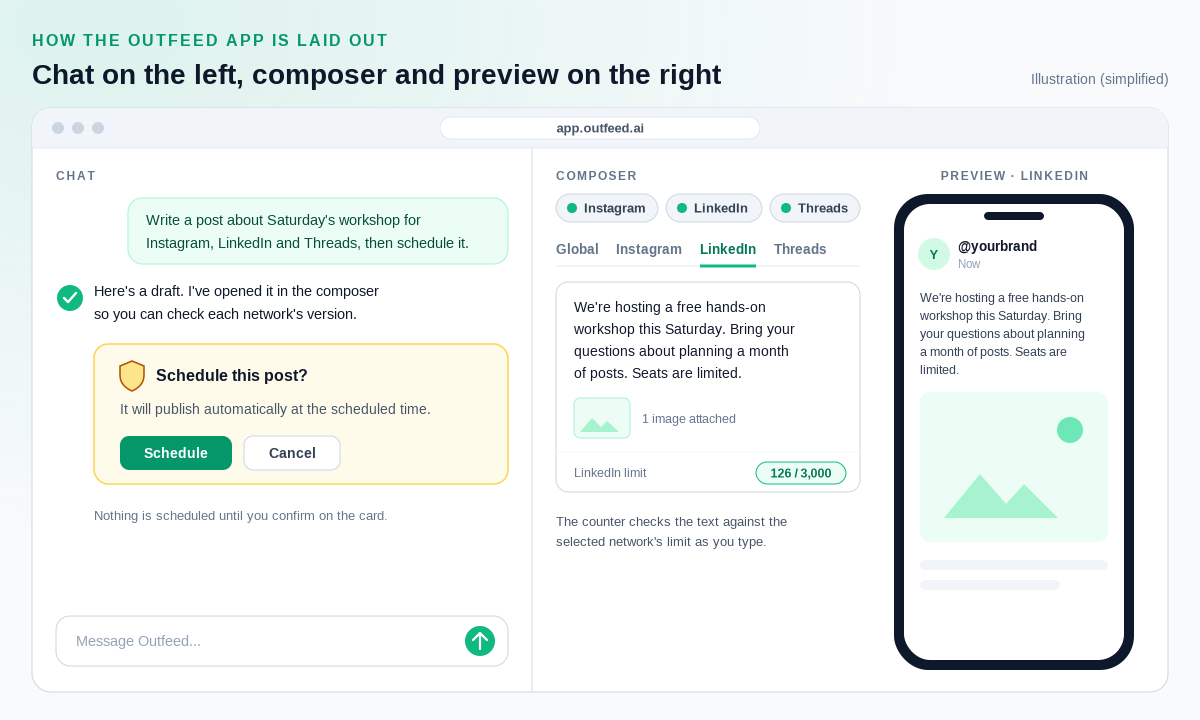
The composer
Two details matter when one post goes to several networks. As you type, the composer counts the text against the selected network's limit (in bytes for a YouTube description). One post can carry different text per network: write a main version and override it for specific networks.
The calendar and the posts list
- Open a post in the calendar to edit a draft or scheduled post, move a scheduled post to a new time, delete it, or retry the networks that failed.
- Ask the assistant what is scheduled and it shows a calendar summary in the chat.
- A list of your posts can be searched by text and filtered by status, network, account, scheduled date and created date. A post is a draft, scheduled, publishing, published, partial, failed or cancelled.
To see each screen in order, follow a step-by-step walkthrough of the app.
Is there a mobile app? Outfeed runs in your browser
No iOS or Android app and no browser extension. Outfeed runs in your web browser at app.outfeed.ai.
If you need to post from your phone, the networks' own apps can schedule some posts natively. Instagram's app, for example, schedules posts up to 30 days in advance, according to Instagram Help Center: How to create and manage scheduled posts and Reels on Instagram. That covers one network at a time; a social media management app earns its place when the same plan has to reach several networks and accounts.
Which networks and accounts can you manage in one app?
Beyond the networks themselves, two things keep a long list of accounts manageable:
- Accounts can be put in named groups, by client or brand, and a post can go to a whole group by its name.
- If a connected account's login expires or is revoked, a banner across the app names the account and links to reconnect it. Logins that can be refreshed are renewed before they expire by a daily check.
For how one post goes out to many accounts at once, read about scheduling one post to several accounts.
Can a team share one social media management app?
How people share the work:
- You can belong to more than one workspace and switch between them. Each workspace has its own connected accounts, posts and plan.
- People in a workspace are admins or members. Admins manage billing, create and revoke API keys, and can disconnect accounts that other people connected.
- A chat is private to you unless you share it with your workspace.
Teams that need a sign-off step before anything is scheduled should read the limits below first: a social media management system built around review queues is a different kind of tool.
What doesn't the Outfeed app do?
Know these limits before you choose a social media manager app. If one of these jobs matters to you, plan to cover it with another tool or in the network's own app.
No AI image or video generation. Posts are not dragged around the calendar; to move one, open it and pick a new time.
No automatic queue or best-time slots
There is no automatic posting queue or best-time slotting: you (or the assistant, on your instruction) choose the time.
- No. Outfeed has no analytics: it tracks no reach, engagement, conversions or attribution, and it has no UTM reporting. It publishes your own posts to the accounts you connect: you pick an exact date and time for one post that can target several accounts across networks, and Outfeed publishes it at that moment through each network's API. Read results in each network's own analytics. See the free UTM generator and the engagement rate calculator.
- No. Outfeed has no social inbox and reads or sends no direct messages on any network. It publishes your own posts to the accounts you connect: you pick an exact date and time for one post that can target several accounts across networks, and Outfeed publishes it at that moment through each network's API.
- No. Outfeed has no approval workflow or client review step before a post is scheduled. In chat, scheduling and publishing are confirmed by you before they happen; the assistant does not schedule silently.
Outfeed facts on this page were checked against the Outfeed app code on 2026-11-21.
Which plan do you need?
Compare the plans on the four limits that matter most in a social media manager app: accounts, posts a month, team members and AI credits. For the full breakdown, see plans and limits in the Outfeed AI pricing guide.
Starter
$29 per month, billed monthly
- Connected accounts
- 10
- Posts per month
- 100
- Team members
- 1
- AI credits per month
- 500
Pro
$59 per month, billed monthly
- Connected accounts
- 25
- Posts per month
- Unlimited
- Team members
- 3
- AI credits per month
- 1,000
Agency
$149 per seat/month, billed monthly
- Connected accounts
- 250
- Posts per month
- Unlimited
- Team members
- Unlimited
- AI credits per month
- 2,500 per seat
Enterprise
Custom
- Connected accounts
- Unlimited
- Posts per month
- Unlimited
- Team members
- Unlimited
- AI credits per month
- Unlimited
Starter and Pro are flat monthly prices, not billed per seat. Agency is billed per seat. Enterprise is custom.
Agency's 250 accounts is an organization-wide cap; it does not grow with seats.
Starter includes a 3-day free trial with 100 AI credits. Card required. Pro and Agency are billed from the first day.
Read the full Outfeed AI pricing breakdown or compare plans on the Outfeed AI homepage.
Social media manager app FAQ
Is there a social media manager app for iPhone or Android?
No iOS or Android app and no browser extension. Outfeed runs in your web browser at app.outfeed.ai.
Can I manage all my social media accounts in one app?
Yes. Starter: 10 accounts and 1 team member; Pro: 25 accounts and 3 team members; Agency: 250 accounts and unlimited team members; Enterprise: unlimited accounts and unlimited team members. Agency's 250 accounts is an organization-wide cap; it does not grow with seats.
Does the app choose the best time to post for me?
No. There is no automatic posting queue or best-time slotting: you (or the assistant, on your instruction) choose the time.
Can I change or cancel a post after the app has scheduled it?
Yes. A scheduled post can be edited (text, media, accounts, time) until it starts publishing. Changing the time replaces the old trigger. A scheduled post can be cancelled; it stays in Outfeed as cancelled and can be scheduled again later. A scheduled post can be published immediately instead; that cancels its scheduled time.
Is there a free version of the Outfeed app?
No. There is no free plan. Starter includes a 3-day free trial with 100 AI credits. Card required. Pro and Agency are billed from the first day.
Guides to the app and free tools
Manage your social media from one chat with Outfeed AI
Starter includes a 3-day free trial with 100 AI credits. Card required. Pro and Agency are billed from the first day.