
LinkedIn post scheduler

LinkedIn Post Scheduler for Personal Profiles

A LinkedIn post scheduler, or LinkedIn scheduling tool, lets you write a LinkedIn update when you have time and have it published to your profile later, at a date and time you set.

Posts on your personal profile: text only, text with one image, or text with one video.

Starter includes a 3-day free trial with 100 AI credits. Card required. Pro and Agency are billed from the first day.

How does the LinkedIn post scheduler work in Outfeed?

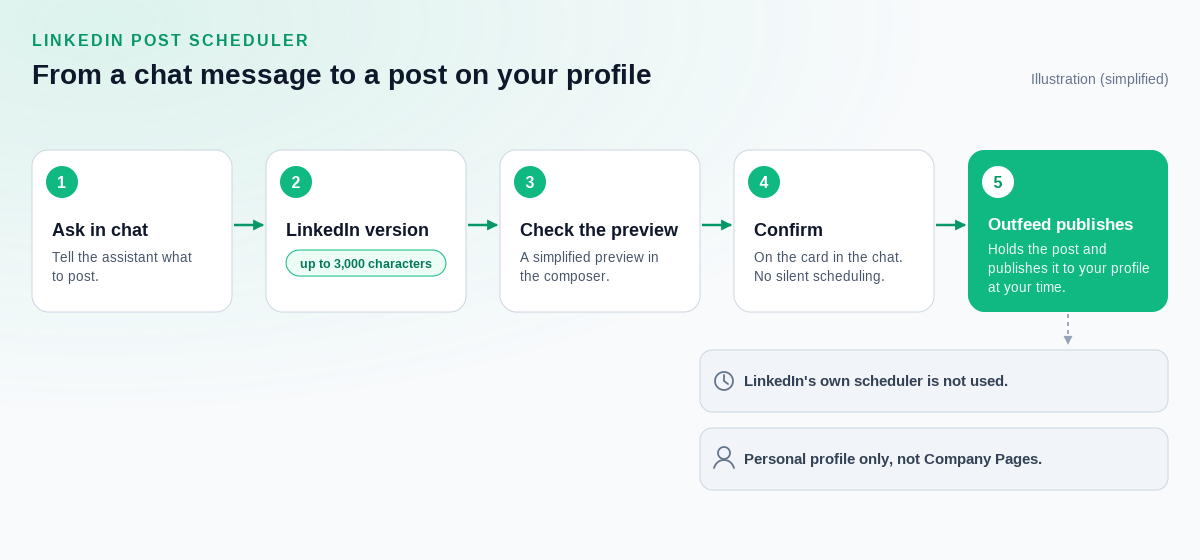
Outfeed holds the post and publishes it to LinkedIn at the chosen time; LinkedIn's own scheduler is not used. Connected with LinkedIn sign-in to your personal LinkedIn profile. Outfeed posts as you, the member; it does not post to LinkedIn Company Pages. Scheduling for every network is covered on Outfeed's social media scheduler page; a LinkedIn post takes four steps:

  1. Ask in chat. The app opens on a chat with Outfeed's assistant. Tell it what to post and it writes the draft and opens it in the composer for you to check; it schedules or publishes only after you confirm on a card in the chat.
  2. Get a LinkedIn version. The assistant writes the post text, can give each network its own version, writes the YouTube title and writes alt text for your images.
  3. Check the preview and the count. The composer shows a simplified preview of the post for each of the nine networks, in a phone-style frame, before you schedule it. As you type, the composer counts the text against the selected network's limit (in bytes for a YouTube description).
  4. Pick the time and confirm. Times are read in the time zone you give (any IANA zone, such as America/Toronto), with daylight saving handled. The time must be in the future. In chat, scheduling and publishing are confirmed by you before they happen; the assistant does not schedule silently.
Flow diagram of scheduling a LinkedIn post in Outfeed: draft in chat, a LinkedIn version within 3,000 characters, preview, confirm, Outfeed holds the post and publishes it to your personal profile at the chosen time
Illustration of how Outfeed schedules a LinkedIn post (simplified).

Which LinkedIn posts can Outfeed schedule?

Posts on your personal profile: text only, text with one image, or text with one video. The text limit is 3,000 characters. For how LinkedIn counts it, read how LinkedIn's character limit works. The card below lists every format, including the ones Outfeed does not send.

LinkedIn

Posts on your personal profile: text only, text with one image, or text with one video.

  • Supported: Text post.Published to your profile.
  • Supported: Single image.Uploaded to LinkedIn and attached; alt text you add is sent.
  • Supported: Single video.Uploaded in parts and published once LinkedIn has processed it (MP4, 3 seconds to 30 minutes).
  • Not supported: Multi-image post.Only the first media item is published to LinkedIn; the composer warns you when more are attached.
  • Not supported: Document / PDF carousel.Not published.
Text limit
3,000 characters.
How it connects
Connected with LinkedIn sign-in to your personal LinkedIn profile. Outfeed posts as you, the member; it does not post to LinkedIn Company Pages.
At the scheduled time
Outfeed holds the post and publishes it to LinkedIn at the chosen time; LinkedIn's own scheduler is not used.

Can Outfeed post to a LinkedIn Company Page?

No. Outfeed posts as you, the member; it does not post to LinkedIn Company Pages.

For a Page, LinkedIn's own Page scheduler is the built-in option: super admins and content admins of the Page can schedule a Page post 1 hour to 3 months ahead, according to LinkedIn Help: Schedule a LinkedIn Page post. To get the Page itself in shape, set up and run a LinkedIn Company Page.

Native LinkedIn scheduler or Outfeed: what's the difference?

Use LinkedIn's built-in scheduler when a post is for LinkedIn alone; use a separate scheduler when you write once and want the same idea on LinkedIn and your other networks. LinkedIn's scheduler sits in the post box you already use. The table shows where the two differ.

LinkedIn's own scheduler for a personal profile compared with Outfeed
What you need LinkedIn's scheduler (profile) Outfeed
How far ahead 10 minutes to 3 months from now The time must be in the future.
Time and time zone Scheduled time is standardised in UTC based on your device's time zone. Times come in 30-minute increments, or you can type an exact time. Times are read in the time zone you give (any IANA zone, such as America/Toronto), with daylight saving handled.
Changing a scheduled post Yes: Modify schedule, Edit post or delete. A scheduled post can be edited (text, media, accounts, time) until it starts publishing. Changing the time replaces the old trigger.
What it can schedule Posts; not Events, Jobs and Services Posts on your personal profile: text only, text with one image, or text with one video.
Where scheduled posts wait Start a post > Clock icon > View all scheduled posts (lower-left of the Schedule post window). Outfeed holds the post and publishes it to LinkedIn at the chosen time; LinkedIn's own scheduler is not used.
Other networks in the same post LinkedIn only You pick an exact date and time (in chat or the composer) for one post that can target several accounts across networks. One post can carry different text per network: write a main version and override it for specific networks.

LinkedIn column: LinkedIn Help: Schedule posts, verified 30 September 2026.

For LinkedIn's steps, read how to schedule posts in LinkedIn itself.

LinkedIn auto post: can you auto post on LinkedIn, and is it allowed?

Publishing a post you wrote at a time you set is a normal LinkedIn feature: LinkedIn's own scheduler does exactly that. The line LinkedIn draws is about bots and unauthorized automation. Section 8.2 of LinkedIn's User Agreement bans using bots or other unauthorized automated methods to access the Services, add or download contacts, send or redirect messages, create, comment on, like, share or re-share posts, or otherwise drive inauthentic engagement. Checked against LinkedIn User Agreement (effective 3 November 2025)

In Outfeed: Connected with LinkedIn sign-in to your personal LinkedIn profile. Outfeed posts as you, the member; it does not post to LinkedIn Company Pages. In chat, scheduling and publishing are confirmed by you before they happen; the assistant does not schedule silently.

What happens if a LinkedIn post fails to publish?

Temporary failures (rate limits, network errors, the network being down) are retried automatically after about 1, 5 and 15 minutes, at most 4 attempts in all. Login and content problems are not retried; you are told what to fix. Before a retry that could double-post, Outfeed first checks whether the post already went live.

For a failed or partly published post, Retry in the web app publishes again to the networks that failed only; networks that already published are skipped.

  • Checked before it is accepted

    Before a post is accepted into the schedule, Outfeed checks that every account is still connected, the text fits each network's limit, the media passes each network's rules, and required fields (YouTube's made-for-kids answer) are set, along with TikTok's privacy setting for a post going straight to TikTok. Problems are reported then, not hours later.

  • Each network on its own

    Each network is published independently. If one fails, the others still go out and the post is marked partial, with the failing network named.

What doesn't the LinkedIn scheduler do?

To choose a time, read when to post on LinkedIn; for how posts are shown once they are live, read how the LinkedIn feed ranks posts.

No automatic queue or best-time slots

There is no automatic posting queue or best-time slotting: you (or the assistant, on your instruction) choose the time.

  • No. Outfeed has no analytics: it tracks no reach, engagement, conversions or attribution, and it has no UTM reporting. It publishes your own posts to the accounts you connect: you pick an exact date and time for one post that can target several accounts across networks, and Outfeed publishes it at that moment through each network's API. Read results in each network's own analytics. See the free UTM generator and the engagement rate calculator.

LinkedIn

  • No LinkedIn Company Page posting.
  • No multi-image posts (first item only).
  • No document or PDF carousel posts.
  • No polls, articles or newsletters.

Outfeed facts on this page were checked against the Outfeed app code on 2026-11-21.

Which plan do you need to schedule LinkedIn posts?

Starter

$29 per month, billed monthly

Connected accounts
10
Posts per month
100
Team members
1
Bulk scheduling
No
X posts per month
75

Pro

$59 per month, billed monthly

Connected accounts
25
Posts per month
Unlimited
Team members
3
Bulk scheduling
Yes
X posts per month
150

Agency

$149 per seat/month, billed monthly

Connected accounts
250
Posts per month
Unlimited
Team members
Unlimited
Bulk scheduling
Yes
X posts per month
350

Enterprise

Custom

Connected accounts
Unlimited
Posts per month
Unlimited
Team members
Unlimited
Bulk scheduling
Yes
X posts per month
Unlimited

Starter and Pro are flat monthly prices, not billed per seat. Agency is billed per seat. Enterprise is custom.

Agency's 250 accounts is an organization-wide cap; it does not grow with seats.

Starter includes a 3-day free trial with 100 AI credits. Card required. Pro and Agency are billed from the first day.

Read the full Outfeed AI pricing breakdown or compare plans on the Outfeed AI homepage.

LinkedIn post scheduler FAQ

Can Outfeed post to a LinkedIn Company Page?

No. Outfeed posts as you, the member; it does not post to LinkedIn Company Pages.

Set up and run a LinkedIn Company Page

Can I schedule PDF carousels or several images on LinkedIn?

No. Document and PDF carousels: not published. With several images: only the first media item is published to LinkedIn; the composer warns you when more are attached.

Will my post show in LinkedIn's scheduled posts?

No. Outfeed holds the post and publishes it to LinkedIn at the chosen time; LinkedIn's own scheduler is not used.

How far ahead can Outfeed schedule a LinkedIn post, compared with LinkedIn's own scheduler?

In Outfeed: Times are read in the time zone you give (any IANA zone, such as America/Toronto), with daylight saving handled. The time must be in the future. In LinkedIn's own scheduler, a post on your profile can be scheduled 10 minutes to 3 months ahead, according to LinkedIn Help: Schedule posts.

How to schedule posts in LinkedIn itself

What is the best free LinkedIn post scheduler?

For posts on your own profile, LinkedIn's own scheduler is built into LinkedIn. Who can use it: any member posting from the homepage. That is according to LinkedIn Help: Schedule posts.

Schedule a post in LinkedIn, step by step

Is Outfeed's LinkedIn post scheduler free?

No. There is no free plan. Starter includes a 3-day free trial with 100 AI credits. Card required. Pro and Agency are billed from the first day.

Free LinkedIn post generator

Schedule your next LinkedIn post with Outfeed AI

Starter includes a 3-day free trial with 100 AI credits. Card required. Pro and Agency are billed from the first day.