
Pinterest SEO: How to Get Your Pins Found in Search
Pinterest SEO means writing your boards and Pins so Pinterest’s search and recommendations can match them to what people look for: keywords in board names and Pin text, original images, and links that match the pages they open. Pinterest calls itself a visual search engine and advises adding relevant keywords to the title and description of every Pin, and topic-specific keywords to board titles and descriptions. Checked against Pinterest Create blog: The best ways to grow on PinterestVendor's own description
If you are still learning the basics of boards and saving, start with how to use Pinterest. This guide keeps to what Pinterest itself publishes about search, and marks where popular advice goes further than Pinterest does.
Table of Contents
- What is Pinterest SEO?
- How does the Pinterest algorithm rank Pins?
- Where do keywords go on Pinterest?
- Optimize your boards for Pinterest search
- Write Pin titles and descriptions people search for
- Rich Pins and claimed websites
- Pinterest SEO best practices: what Pinterest says vs what is commonly claimed
- Does Pinterest help your website’s SEO?
- Write and schedule search-ready Pins with Outfeed
- Pinterest SEO FAQ
What is Pinterest SEO?
Pinterest SEO (SEO for Pinterest) is the work of making your Pins and boards easy for Pinterest to match to searches and recommendations, using the signals Pinterest says it reads. It is search optimization inside Pinterest, not on Google, and it rewards patience: Pinterest’s creator FAQ says content is shown by engagement signals and topics rather than in time order, and keeps reaching relevant people long after the day it is posted. Checked against Pinterest Create: Frequently asked questions from creatorsVendor's own description
Followers matter less than on most networks. Pinterest says content there does not rely primarily on followers to be discovered: topics, keywords and imagery influence when your Pins appear. Checked against Pinterest Create blog: The best ways to grow on PinterestVendor's own description
Pinterest’s 2025 general SEO guide for creators says to research keywords with Pinterest Trends, Google Trends or third-party keyword tools, and to write naturally first and add keywords afterwards, so they stay relevant. Checked against Pinterest Create blog: A creator's guide to SEOVendor's own description
How does the Pinterest algorithm rank Pins?
Pinterest names four elements of discoverability: relevance, uniqueness, content quality and user engagement. It says its algorithm matches Pins with people beyond your followers using signals such as keywords, original images and link quality. Checked against Pinterest Create blog: How to increase your discoverability on PinterestVendor's own description
Three more things Pinterest says about how Pins travel:
- Not in time order. Content is shown by engagement signals and topics, and Pinterest treats saves as the strongest sign that an idea resonates. Checked against Pinterest Create: Frequently asked questions from creatorsVendor's own description
- No set engagement window. A Pin can gain engagement hours, days, months or even years after it is published, affected by language, location, seasons, holidays, formats and trending topics. Checked against Pinterest Business Help: Pin performance and distribution
- Saves and follows compound. The more your ideas are saved or your account is followed, the more your content shows up across Pinterest. Checked against Pinterest Business Help: Pin performance and distribution
These are the signals Pinterest itself names, alongside the field-by-field advice below. If a checklist gives a longer list of “ranking factors”, look for a Pinterest source before acting on it. To compare Pinterest with other networks, see how social media algorithms work.
Where do keywords go on Pinterest?
Keywords go in your board names, board descriptions and board categories, and in each Pin’s title, description and tagged topics. Board names, descriptions and categories all affect how your content shows up in Pinterest search results and recommendations. Checked against Pinterest Create: How to create a board collection of PinsVendor's own description
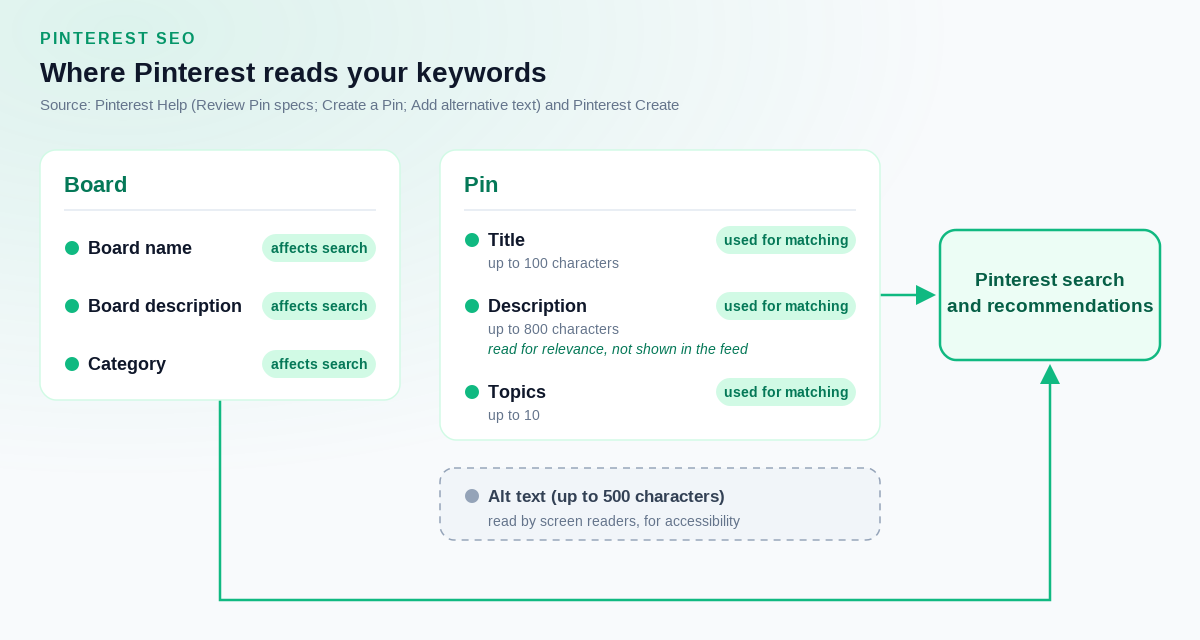
| Field | Limit | What Pinterest says about it |
|---|---|---|
| Board name, description and category | Not stated | All three affect search results and recommendations |
| Pin title | 100 characters | Depending on the device, the first 40 may show in feeds |
| Pin description | 800 characters | Not shown in the home or search feed, but used to judge relevance |
| Tagged topics | Up to 10 per Pin | Added when you create the Pin |
| Alt text | 500 characters | Read only to people using a screen reader |
Checked against Pinterest Create: How to create a board collection of Pins.Vendor's own description
Checked against Pinterest Help: Review Pin specs.
Checked against Pinterest Help: Create a Pin from an image or video.
Checked against Pinterest Business Help: Add alternative text to your Pins (en-GB).
The description matters more than it looks. Pinterest’s Pin specs say descriptions do not appear in the home or search feed but are used by its algorithm to determine relevance for delivery. Checked against Pinterest Help: Review Pin specs Pinterest also recommends filling in every Pin field each time, because some fields power recommendations without being shown, and always adding topics when offered. Checked against Pinterest Business blog: How to build your audience on Pinterest in 2025Vendor's own description
What about your profile? Pinterest’s creator site says a username can include relevant keywords and that keywords in your bio can help new people find your profile. Checked against Pinterest Create: How to get startedVendor's own description That is about people finding your profile; Pinterest does not say profile keywords help your Pins rank.
Optimize your boards for Pinterest search
Give each board a short, specific title with the words people search for, a description that matches its Pins, and a narrow theme. Pinterest Create’s board best practices are a short title with relevant keywords to avoid truncation, a description with keywords that match the content, a niche theme (its example is vegan breakfast recipes), sections where relevant, 20 to 100 Pins per board or section, the most representative Pins in the first two rows, and regular updates. Checked against Pinterest Create: Fundamentals and best practices for PinterestVendor's own description
- Name for a need. Pinterest advises specific, descriptive board names because they help your content appear in relevant searches, with themes that reflect a need, an interest, a product category or a season. Checked against Pinterest Create blog: How to make a Pinterest boardVendor's own description
- Break big boards up. Curate Pins into specific themed boards and split them further with board sections. Checked against Pinterest Create blog: The best ways to grow on PinterestVendor's own description
- Use boards that already work. Also save new Pins to existing relevant boards that already get engagement, so they appear where people are already looking. Checked against Pinterest Create blog: The best ways to grow on PinterestVendor's own description
For creating, sectioning and renaming boards step by step, see our guide to Pinterest boards.
Write Pin titles and descriptions people search for
Use the words people already type into Pinterest, put the clearest of them early in the title, and write the description as a plain explanation of the Pin.
Find the words. Pinterest Trends shows up to the last two years of top search, save and shopping trends by region, in a desktop or mobile browser rather than the app. Checked against Pinterest Business Help: Browse Pinterest Trends The search bar helps too: after a search, Pinterest may show suggested terms called guides, drawn from its most popular search terms. Checked against Pinterest Help: Search for ideas on Pinterest The words those guides add are the words other people search with.
Write the Pin. Pinterest Create’s creative best practices: a title and description with relevant keywords, well-lit and well-framed high-resolution visuals, a clear thumbnail, a relevant board, a vertical mobile-first format, text placed inside the safe zones, and bright but balanced colour and contrast. Checked against Pinterest Create: Fundamentals and best practices for PinterestVendor's own description Not every Pin needs text on the image, Pinterest adds. Checked against Pinterest Create: Fundamentals and best practices for PinterestVendor's own description Sizes and formats are in our guide to Pinterest image Pins.
Keep styled letters out of search fields. A Pinterest font generator produces “fancy fonts” from non-standard characters that look like letters but may be read differently, or skipped, by screen readers. Checked against Commonwealth of Massachusetts: Social media accessibility (Digital Accessibility training) Put plain words in your titles and descriptions, the fields Pinterest reads for relevance.
Write alt text for people. You add alt text of up to 500 characters under More options on the web or Advanced settings in the app, and Pinterest says it is read only to people using a screen reader. Checked against Pinterest Business Help: Add alternative text to your Pins (en-GB) Pinterest’s general SEO guide for creators does list alt text among places to work in keywords. Checked against Pinterest Create blog: A creator's guide to SEOVendor's own description Both fit: describe what is in the image, and a keyword will appear naturally when it describes what is there.
Rich Pins and claimed websites
Rich Pins and a claimed website connect your Pins to your site, so the details on the Pin stay accurate and the Pins are credited to you. Rich Pins automatically sync information from your website and come in three types: recipe, article and product Pins.
Checked against Pinterest Help: Types of Pins on Pinterest To enable article or product rich Pins you add Open Graph or Schema.org markup in the head of each page, and Pinterest says its system “should start to populate rich Pin content”; Pinterest’s current help page names no validator step.
Checked against Pinterest Business Help: Create rich Pins
Claiming your website links your profile to Pins saved from it: your profile picture appears alongside them, the Pins link to your profile, people see an option to follow you, and you see how often your content is shared. Checked against Pinterest Business Help: Claim your website Both setups are walked through in how to use Pinterest for business.
The landing page counts as well. When performance falls, Pinterest says to fix broken links, match a Pin’s image, text and keywords to its landing page, link to a clearly related page, keep the site loading in under 4 seconds and let Pinterestbot read your site. Checked against Pinterest Business Help: Pin performance and distribution
Pinterest SEO best practices: what Pinterest says vs what is commonly claimed
Most advice about SEO on Pinterest is reasonable, but several common claims go further than Pinterest’s own pages. Here is each one next to what Pinterest actually says:
| Topic | Commonly claimed | What Pinterest says |
|---|---|---|
| Hashtags | They boost reach, or they are dead | A description can include hashtags; Pinterest’s current help and creator pages don’t say they help or hurt distribution. Its advice is keywords and up to 10 tagged topics |
| Posting time | There is one best time to pin | There is no single best day or time; it differs by audience and topic |
| How often | A set number of Pins a day | Aim for original content weekly; do not anchor to a set number of Pins |
| Re-saving your own Pins | Re-pin the same Pin to many boards for reach | Repeatedly saving the same Pins or re-uploading existing content can get you flagged as spam and temporarily blocked from creating Pins |
| Keyword stuffing | Pack every keyword in | ”Stuffing” irrelevant keywords is prohibited by the Community Guidelines |
| Alt text | A hidden ranking field | Read only to people using a screen reader; Pinterest’s creator SEO guide does list alt text among places for keywords, so describe the image first |
| How long it takes | A fixed number of months | No published timeline; a Pin can gain engagement hours, days, months or years later |
Checked against Pinterest Help: Create a Pin from an image or video.
Checked against Pinterest Create: Frequently asked questions from creators.Vendor's own description
Checked against Pinterest Business Help: Pin performance and distribution.
Checked against Pinterest Business blog: How to build your audience on Pinterest in 2025.Vendor's own description
Checked against Pinterest Business Help: Pin performance and distribution.
Checked against Pinterest Policy: Community Guidelines.
Checked against Pinterest Business Help: Add alternative text to your Pins (en-GB).
Checked against Pinterest Create blog: A creator's guide to SEO.Vendor's own description
Checked against Pinterest Business Help: Pin performance and distribution.
The keyword-stuffing rule sits in a wider ban: Pinterest’s Community Guidelines also prohibit buying or selling engagement, generating inauthentic traffic and inflating metrics by automated, paid or incentivized means. Checked against Pinterest Policy: Community Guidelines For hashtags on other networks, see our hashtag strategy guide.
Does Pinterest help your website’s SEO?
Pinterest helps your website mainly by sending people to it, not through any search-engine benefit Pinterest documents. Outbound clicks, meaning clicks to a destination off Pinterest, are one of the main metrics Pinterest says to judge success by, alongside saves, impressions and Pin clicks. Checked against Pinterest Create blog: The best ways to grow on PinterestVendor's own description
Your Pinterest profile and boards can also show up in search engines. Pinterest’s search privacy setting, for people 18 and over, adds a tag asking search engines such as Google, Bing and Yahoo to exclude your profile and boards; it is on automatically for private profiles, and results already indexed may remain. Checked against Pinterest Help: Update your search privacy Leave it off if you want your business boards to be findable outside Pinterest.
Whether the links on your Pins pass link value to your site is a question Pinterest’s Help Center, Create and Business pages do not answer, so do not build a plan on it. Treat Pinterest as a source of visitors, and do the on-site work separately. For the same question on another network, see Instagram SEO.
Write and schedule search-ready Pins with Outfeed
If you post to Pinterest alongside other networks, here is what Outfeed does with a Pin and what stays in Pinterest.
For a Pin that has to rank and send clicks, add the title and the destination link in Pinterest after it is published: Pinterest lets you edit a published Pin’s title, description, link and board (depending on the Pin), but not its image. Checked against Pinterest Help: Edit or delete a Pin For Pinterest’s own builder and scheduler, see how to post on Pinterest.
Draft and schedule your next image Pins with Outfeed AI
Pinterest SEO FAQ
What is Pinterest SEO?
Pinterest SEO is writing your Pins and boards so Pinterest’s search and recommendations can match them to what people look for. Pinterest calls itself a visual search engine and advises relevant keywords in the title and description of every Pin and in board titles and descriptions.
Do hashtags still work on Pinterest?
You can still use them: Pinterest’s app Pin builder says a description can include hashtags. But Pinterest’s current help and creator pages don’t say hashtags help or hurt distribution. Pinterest’s own advice is keywords in titles and descriptions and up to 10 tagged topics per Pin.
Where should I put keywords on Pinterest?
In your board names, board descriptions and board categories, and in each Pin’s title, description and tagged topics. Pinterest says board text affects search and recommendations, and that Pin descriptions are not shown in the feed but are used to judge relevance.
Does Pinterest help my website’s SEO?
Mainly by sending visitors: outbound clicks to your site are one of the main metrics Pinterest tells you to watch. Profiles and boards can appear in search engines unless you turn on search privacy. Pinterest does not say whether links on Pins pass link value, so do not plan on it.
How long does it take for a Pin to show up in Pinterest search?
Pinterest gives no timeline. It says a Pin can gain engagement hours, days, months or years after it is published, and it advises creating original Pins weekly rather than aiming for a set number.