
Image in Pinterest: Image Pins, Visual Search and Design
Every image in Pinterest is posted as an image Pin: a Pin that shows a single image, ideally vertical at a 2:3 ratio such as 1000 x 1500 pixels. Checked against Pinterest Help: Types of Pins on Pinterest Pinterest recommends that vertical shape because most of its audience is on mobile. Checked against Pinterest Business Help: Pin performance and distribution If you’re new to the platform itself, start with our guide on how to use Pinterest.
Below: the size to make, design and text tips, the Pin editor, alt text, free graphic tools and searching with a photo, mostly from Pinterest’s own help pages; other sources are named where they’re used.
Table of Contents
- What is an image Pin on Pinterest?
- What size and shape should an image in Pinterest be?
- How to design a Pinterest image people save
- Text overlays and fonts on Pinterest images
- Free tools to make Pinterest graphics
- How to edit a photo on Pinterest before you publish
- How to add alt text to a Pinterest image
- How to search Pinterest with an image
- Publishing image Pins with Outfeed
- Pinterest image Pins FAQ
What is an image Pin on Pinterest?
An image Pin is the simplest Pin type: one still image, saved to a board. Pinterest calls Pins bookmarks that people use to save content they love, and a Pin can be an image, a video or a product. Checked against Pinterest Help: All about Pinterest
There are two ways to make one. You upload a photo from your computer or phone, or you save an image you find online, and Pinterest includes a link to that website so people know where the original came from. Checked against Pinterest Help: Types of Pins on Pinterest
Image Pins sit alongside a few other formats:
| Pin type | What it holds | Source |
|---|---|---|
| Image Pin | A single image | Checked against Pinterest Help — Types of Pins on Pinterest |
| Video Pin | A single video, or several videos and images in one Pin | Checked against Pinterest Help — Types of Pins on Pinterest |
| Collage | Whole Pins and cut-outs, including from your own photos, combined into one Pin; after publishing you can only edit minor details such as the title and whether others can remix it | Checked against Pinterest Help: Create a collage |
| Carousel | 2 to 5 cards; standard carousels use static images at 1:1 or 2:3 | Checked against Pinterest Business Help — Create a carousel |
Pinterest also lists rich Pins, which sync details such as a recipe, article or product from your website, and product Pins for items you can buy. Checked against Pinterest Help — Types of Pins on Pinterest
The line between image and video is thin: add motion elements to an uploaded image and it becomes a video Pin. Checked against Pinterest Help: Types of Pins on Pinterest Our guide to Pinterest video Pins covers that format’s specs and upload steps.
What size and shape should an image in Pinterest be?
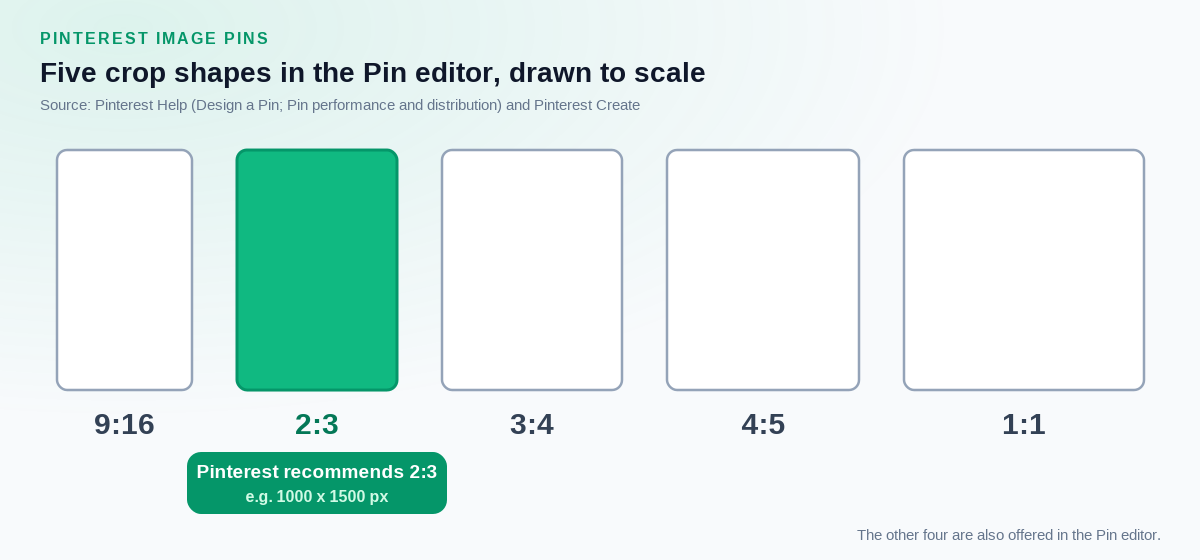
Pinterest recommends a vertical 2:3 image, for example 1000 x 1500 pixels (Pinterest Business Help: Review ad specs). Its distribution guidance gives the same 2:3 ratio and the reason: most of its audience browses on mobile. Checked against Pinterest Business Help: Pin performance and distribution Pinterest Create repeats 2:3 at 1000 x 1500 pixels for images you repurpose from other platforms. Checked against Pinterest Create: Fundamentals and best practices for PinterestVendor's own description
File types and size limits depend on where you upload. Pinterest’s Pin specs page lists BMP, JPEG, PNG, TIFF and WEBP, with a 20 MB maximum on the web and “1 GB recommended” on Android and iOS. Checked against Pinterest Help: Review Pin specs That app figure is Pinterest’s own wording, so treat it as guidance rather than a hard cap, and keep files well under 20 MB if you upload from a computer.
Design tools sometimes quote other numbers. Adobe Express’s Pinterest page recommends 735 x 1102 pixels, which is the same 2:3 shape at a smaller size. Checked against Adobe Express: Create Pinterest Pins online for freeVendor's own description When the figures disagree, use Pinterest’s.
Two images on your profile have different rules. Pinterest’s help pages explain how to change your profile photo and a board cover but give no pixel size for either. Checked against Pinterest Help: Edit your profile The one profile image Pinterest does size is the business profile cover: at least 800 x 450 pixels, ideally 16:9 (Pinterest Business Help: Add a profile cover). For every other network, see our social media image sizes guide.
How to design a Pinterest image people save
Pinterest’s own creative advice: a sharp, well-lit vertical image, text kept inside the safe zones, balanced colour and a clear thumbnail. The bold lines are Pinterest Create’s best practices; the note after each is ours: Checked against Pinterest Create: Fundamentals and best practices for PinterestVendor's own description
- Use well-lit, well-framed, high-resolution visuals. Shoot or export at full size rather than upscaling a small file.
- Design mobile-first, in a vertical format. Pinterest says most people browse on their phones, so keep important details easy to see on a small screen.
- Place text thoughtfully, inside the safe zones. Keep headlines away from the edges of the image.
- Keep colour and contrast bright but balanced. Strong enough to stand out in a busy feed, not so loud it hides the subject.
- Set a clear thumbnail. The first frame people see should show what the Pin is about.
- Add a keyword-rich title and description and save to a relevant board. The image gets the click; the words help Pinterest decide who sees it.
Not every Pin needs words on it: Pinterest says “Not all Pins need text on the image or video”. Checked against Pinterest Create: Fundamentals and best practices for PinterestVendor's own description
If you’re reusing a graphic made for another network, Pinterest Create advises removing other platforms’ watermarks and logos and keeping text overlays to headlines or hooks. Checked against Pinterest Create: Fundamentals and best practices for PinterestVendor's own description Repurpose only images you own or have rights to.
One quirk is worth designing around. Pinterest adds a faint colour layer to image Pins with white or black backgrounds in the home feed: a 4% black layer on near-white images in light mode and a 10% white layer on near-black images in dark mode. It applies to organic and paid image Pins, not to videos. Checked against Pinterest Help: Review Pin specs If a pure white product shot matters to you, preview the Pin in the feed after publishing, or choose a coloured background on purpose.
Stuck on what to make in the first place? Our Pinterest post ideas list starts there.
Text overlays and fonts on Pinterest images
Put your headline on the image, because the description doesn’t show in the feed. Pinterest says Pin descriptions, up to 800 characters, don’t appear in the home or search feed but are used by its algorithm to judge relevance. Its Pin specs also list a 250-character maximum for a “text box”, a label the page doesn’t define. Checked against Pinterest Help: Review Pin specs
So the words on the image do the selling and the description does the matching. Write the description for search; our Pinterest SEO guide covers where keywords go.
Pinterest’s Pin editor has its own Text tool. You can add several text boxes and change the font style, size, colour combination and position; on video Pins you can also set when the text appears. Checked against Pinterest Help: Design a Pin
A few overlay habits that follow from Pinterest’s advice above (our suggestions, not Pinterest rules):
- One idea per image. A short headline reads at thumbnail size; a paragraph doesn’t.
- High contrast between text and background, especially over photos.
- Plain, readable type for the headline. Save decorative lettering for a word or two.
If you want styled letters for a profile name or board title, try our Pinterest font generator, and keep plain words wherever search matters.
Free tools to make Pinterest graphics
You can start without paying: Pinterest’s Pin editor is part of the Pin builder, and if you want a free Pinterest graphic maker with templates, Adobe Express and Canva both have Free plans. Which fits depends on how much design you need; none of them is ranked here.
| Tool | Fits if | Pricing model |
|---|---|---|
| Pinterest Pin editor | Your image is ready and you only need to crop, add text, stickers or a filter inside Pinterest. You open it with the pencil icon in the Pin builder. Checked against Pinterest Help: Create a Pin from an image or video | Part of Pinterest’s own Pin builder |
| Adobe Express Pin maker | You want templates, animated Pins and preset or custom sizes. Adobe describes it as free to use with no credit card required. Checked against Adobe Express: Create Pinterest Pins online for freeVendor's own description | A Free plan, a paid Premium plan with a free trial, and business plans. Checked against Adobe Express: PricingVendor's own description Adobe Express pricing |
| Canva | You already design in Canva for other channels and want one editor for everything. | A Free plan for anyone, paid Pro and Business plans (Business billed per person) that can be tried free, and Enterprise through sales. Checked against Canva: PricingVendor's own description Canva pricing |
Adobe says features such as background removal and bulk resize need Premium. Checked against Adobe Express: PricingVendor's own description
Where Outfeed fits in this step:
How to edit a photo on Pinterest before you publish
Open the editor from the Pin builder (the pencil icon on the web), then crop, add text, stickers, drawings or a filter, and select Done. Checked against Pinterest Help: Create a Pin from an image or video Here’s what the editor offers:
- Crop to one of five shapes: 9:16, 2:3, 3:4, 4:5 and 1:1. Drag the highlighted area to reposition the crop. Checked against Pinterest Help: Design a Pin
- Text: several text boxes with your choice of font style, size, colours and position. Checked against Pinterest Help: Design a Pin
- Stickers: tag up to five people with an @mention, add up to five product stickers, one question sticker of up to 70 characters per Pin, plus photos, illustrations and GIFs. Checked against Pinterest Help: Design a Pin
- Draw and Filters: a drawing tool, and filters with custom exposure, contrast and vibrance. Checked against Pinterest Help: Design a Pin
- Background colour: for media smaller than the screen. Checked against Pinterest Help: Design a Pin
Edit before you publish, because the image is locked afterwards. Once a Pin is live you can still change its title, description, link, board, section and comment settings, depending on the Pin, but never its image, video or audio. To use a different image, create a new Pin. Checked against Pinterest Help: Edit or delete a Pin
How to add alt text to a Pinterest image
Add alt text of up to 500 characters under More options on the web or Advanced settings in the app, while you create the Pin. Pinterest’s steps:
On the web:
- Start a new Pin and add your image
- Fill in the Title, Description and other information
- Scroll down and open the drop-down next to More options
- Under Alt text, explain what people can see in the Pin (500 characters max)
- Click Publish
In the Android app:
- Tap the plus icon, then Pin, and select an image
- Tap Next and fill in the Title, Description and other information
- Scroll down and tap Advanced Settings
- Under Alt text, explain what people can see in the Pin (500 characters max)
- Tap the back arrow, then Create
iOS steps are the same as Android. Editing: open the Pin > ellipsis icon > Edit Pin > Alt text (business accounts: web only).
Checked against Pinterest Business Help: Add alternative text to your Pins (en-GB).
You can add or change it later from Edit Pin, and business accounts edit it on the web. Pinterest says alt text is read only to people using a screen reader. Checked against Pinterest Business Help: Add alternative text to your Pins (en-GB)
Treat alt text as accessibility, not a ranking trick. Describe what someone would see: “a white ceramic mug of coffee on a wooden table next to an open notebook” (an illustrative example) tells a screen-reader user far more than a list of keywords.
How to search Pinterest with an image
Use Lens: tap the camera icon in the search bar in the app, or upload an image in the search bar on the web. Pinterest documents three ways to search with a picture instead of words:
| Feature | How to use it | Where | Source |
|---|---|---|---|
| Lens | Point the Pinterest camera at something, or upload an image, to find related ideas | App (camera icon in the search bar) and web (upload in the search bar) | Checked against Pinterest Help: Pinterest Lens |
| Visual search | Select part of a Pin’s image (magnifying-glass-sparkle icon) to find similar or shoppable items, then refine with suggested keywords | Not available on ads or collage Pins | Checked against Pinterest Help: Use visual search features |
| Search with a Pin | Pick a Pin from your results and refine the search with that Pin in mind, adding your own words | Desktop and iOS only | Checked against Pinterest Help: Search for ideas on Pinterest |
In short: Lens for a real object in front of you, visual search for a detail inside a Pin, and Search with a Pin to narrow results that are close.
Publishing image Pins with Outfeed
Outfeed covers part of this job: what it sends to Pinterest, and what it leaves out, is below.
For a Pin that needs a destination link or a separate title, use Pinterest’s own builder and scheduler instead; our guide on how to post on Pinterest walks through both.
Schedule your next image Pin with Outfeed AI
Pinterest image Pins FAQ
What size should an image be for Pinterest?
Pinterest recommends a vertical 2:3 aspect ratio for image Pins, for example 1000 x 1500 pixels, because most people on Pinterest browse on their phones. Its Pin specs page accepts image files of up to 20 MB on the web.
What is an image Pin on Pinterest?
An image Pin is a Pin that shows a single image. You make one by uploading a photo from your computer or phone, or by saving an image you find online, in which case Pinterest keeps a link to the website it came from. Adding motion elements to an uploaded image turns it into a video Pin.
What file types can you upload as a Pinterest image?
Pinterest’s Pin specs page lists BMP, JPEG, PNG, TIFF and WEBP for image Pins, with a 20 MB maximum on the web and 1 GB recommended on Android and iOS.
Can you edit the image on a Pin after you publish it?
No. After publishing you can edit a Pin’s title, description, link, board, section and comment settings, depending on the Pin, but never its image, video or audio. To change the image, create a new Pin.
How do I search Pinterest with a photo?
Use Pinterest Lens: in the app, tap the camera icon in the search bar; on the web, upload an image in the search bar. To search from part of a Pin, use visual search to select that area and find similar or shoppable items. Visual search is not available on ads or collage Pins.