
Instagram Story Ads: Formats, Specs, Cost and Setup
Instagram Story ads are full-screen, vertical ads that show up between the Stories people tap through, and you buy them in Meta Ads Manager like any other Meta ad. This guide covers the formats, the specs and safe zones, the setup steps, how the cost is decided and when a boosted or organic Story is the better fit.
Story ads are one paid option in our small business social media marketing playbook. You won’t find average prices here: Meta doesn’t publish any, and the auction sets what you pay.
Table of Contents
- What are Instagram Story ads?
- Instagram Story ad formats
- Instagram Story ad specs and safe zones
- How to create an Instagram Story ad in Ads Manager
- How much do Instagram Story ads cost?
- Story ad, boosted Story or organic Story?
- Partnership ads in Stories
- Instagram Story ad tips Meta documents
- Instagram Story ads FAQ
What are Instagram Story ads?
Instagram Story ads are vertical image or video ads that appear between people’s organic Stories, the posts that disappear after 24 hours. You need an Instagram account to run them, they can use the Flexible, Single image or video, Carousel or Collection format, and Meta is gradually adding a call-to-action sticker at the bottom of each one. Checked against Meta Business Help Center: Create Instagram Stories ads in Meta Ads Manager
Instagram’s Stories ads feature is not a separate product. It is one placement in Meta’s ad system, which, depending on the objective, can run the same ad across Facebook, Messenger, Instagram, WhatsApp, Threads and Audience Network, in a placement group Meta calls Stories, Status and Reels. Meta says adding placements does not increase the cost of an ad. Checked against Meta Business Help Center: About ad placements across Meta technologies That is why one campaign can serve both Facebook and Instagram Stories ads.
Story ads are not Reels ads. Meta’s Reels placements are the Reels tabs on Instagram and Facebook, Facebook in-stream reels, and ads shown as people watch Facebook Reels. Checked against Meta Business Help Center: About ad placements across Meta technologies
On screen, these ads now carry an “Ad” label; ads once marked “Sponsored” on Facebook and Instagram show “Ad” instead. Checked against Meta Business Help Center: About AI info on ads created or edited with generative AI tools
Instagram Story ad formats
Story ads come in four formats: Flexible, single image or video, carousel and collection. What each one does in Stories:
| Format | What it does | Worth knowing in Stories |
|---|---|---|
| Flexible | You add up to 10 images and videos and Meta’s delivery system picks the media or combination to show per placement and person. Checked against Meta Business Help Center: About the flexible ad format | Only for Traffic, Engagement, Sales and App promotion campaigns. |
| Single image or video | One image or one video. | Stories templates turn a single image into a vertical, animated Stories ad with a background colour, royalty-free music and call-to-action effects; image ads only. Checked against Meta Business Help Center: Use Stories ad templates |
| Carousel | Up to ten images or videos. | A viewer may see one, two or three cards before the option to “Expand Story”; by default Meta varies how many cards show. Checked against Meta for Developers: Instagram Carousel Ads (Stories carousel) |
| Collection | A cover image or video above a grid of product images; tapping the cover opens a full-screen Instant Experience. | Runs only in mobile placements, Instagram Stories included. Checked against Meta Business Help Center: Supported objectives and placement options for collection ads |
Not every format runs in every placement. Carousels in Facebook Reels, Instagram Reels and WhatsApp Status take image cards only, and collection ads don’t run in the Threads feed or Messenger Stories. Checked against Meta Business Help Center: Available ad placements and ad formats by ad objectives in Meta Ads Manager For how the carousel format behaves on other networks, see carousel ads compared across networks.
Instagram Story ad specs and safe zones
Instagram Story ads are vertical: Meta recommends a 9:16 ratio for Stories, Status and Reels because most people hold their phones upright. Checked against Meta Business Help Center: Best practices for aspect ratios in Meta ads Then keep roughly the top 14% and the bottom 20% of the frame free of text, logos and key elements, because the call-to-action sticker sits at the bottom. You can adjust the sticker’s position, size and colour for 9:16 ads in Ads Manager, and Meta is still rolling the sticker out, so it may not be available to every advertiser yet. Checked against Meta Business Help Center: About the link sticker for Instagram Stories
The sizes, from our spec table:
- Meta’s ads guide, Facebook Stories image ads (pixels): 1440 x 2560 at 9:16, files up to 30 MB (Meta Ads Guide: Facebook Stories image ads).
- Instagram’s Story canvas (pixels): 1080 x 1920 (widely reported) at 9:16 (Instagram Graph API: IG User Media (story specs)).
Our social media image sizes table has every other placement, and the Instagram post size guide covers Story and feed sizes side by side.
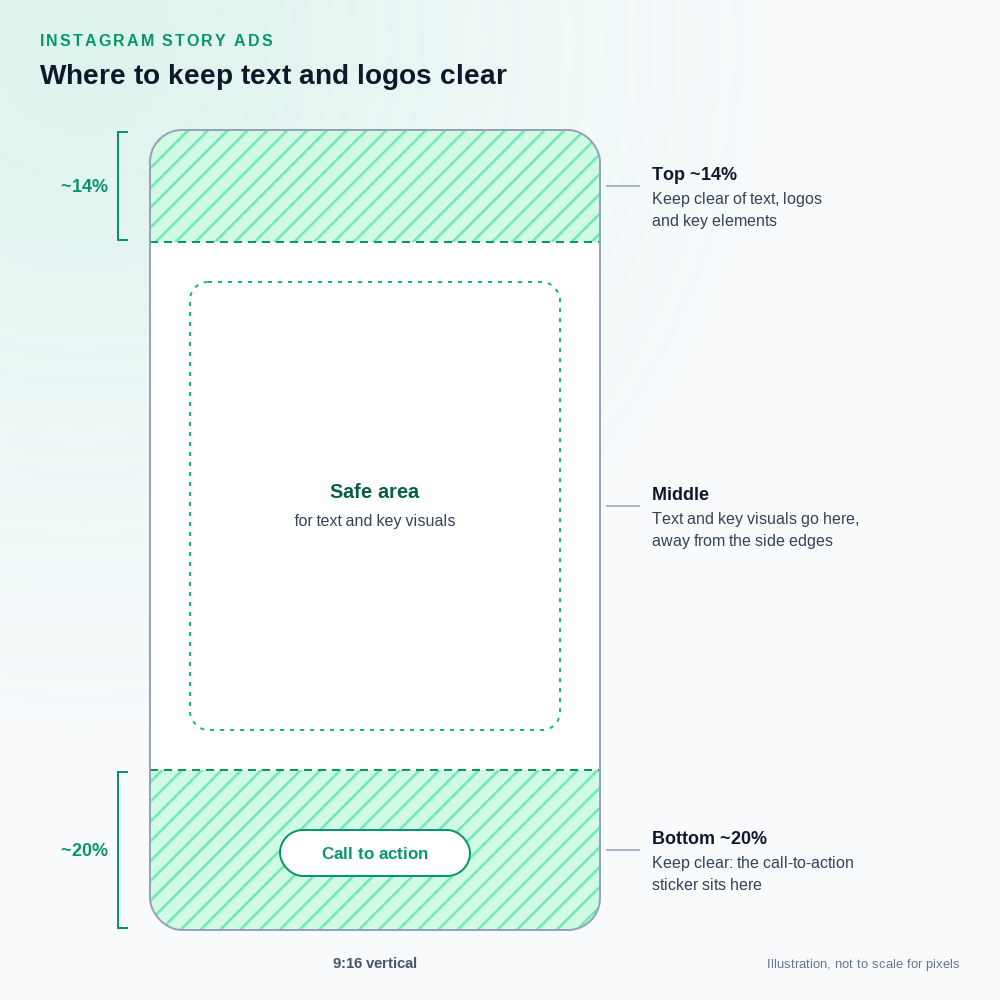
Meta’s ads guide for Facebook Stories image ads asks for a wider margin than the sticker article: 14% at the top, 35% at the bottom and 6% on each side (Meta Ads Guide: Facebook Stories image ads). Designing to the wider margin satisfies both. Meta’s text-overlay guidance makes the same point for 9:16 ads in Stories, Reels and Feed: keep text, logos and key elements clear of the top, bottom and side edges. Checked against Meta Business Help Center: About text overlays and the safe zone for ads in Stories and Reels
How long can an Instagram Story ad be?
Meta sets the video length for Story ads in its Ads Guide: check the Instagram Stories video ad specs before you export, as this guide hasn’t verified Meta’s current figure. For comparison, organic Story videos published through Instagram’s API run 3 s to 60 s (Instagram Graph API: IG User Media (story specs)). Every other format is in our guide to how long a video can be on Instagram.
How to create an Instagram Story ad in Ads Manager
Build the campaign in Meta Ads Manager, choose a format under Ad setup, then customise the creative for the Instagram Stories placement before you publish. Meta’s steps:
- Create a campaign in Meta Ads Manager.
- Choose an objective. Ads Manager has six: Awareness, Traffic, Engagement, Leads, App promotion and Sales. Checked against Meta Business Help Center: How to choose an ad objective in Meta Ads Manager
- Set the budget, schedule, audience and placements. Meta recommends Advantage+ placements. Checked against Meta Business Help Center: About ad placements across Meta technologies For audiences, see Instagram ad interest targeting.
- Pick a format under Ad setup: Flexible, Single image or video, Carousel or Collection.
- Add media, text and a destination in the Ad creative section.
- Customise for Stories. Click “Select a placement to edit” and choose Instagram stories to customise the creative for that placement.
- Publish.
Checked against Meta Business Help Center: Create Instagram Stories ads in Meta Ads Manager.
Meta says it is rolling out a new Ad setup experience in which the collection choice may move under Ad creative, so your screens may differ slightly.
Can you run Story ads without a Facebook Page?
Yes. A first-time booster can boost from Instagram without a Facebook Page or a Meta ad account; for Ads Manager ads, Meta lets you connect the Instagram account through a business portfolio instead of a Page. That option is limited to first-time boosters, payment is entered on Instagram, and you lose ad-account features such as saved audiences. Checked against Instagram Help Center: About Instagram Ads without a Meta Ad Account Connection Ads built in Ads Manager need an Instagram account connected for ads, through either a business portfolio setup or a Facebook Page. Checked against Meta for Developers: Set Up Instagram Accounts With Pages
How much do Instagram Story ads cost?
There is no price list: you decide how much to spend, and Meta shows estimated reach and results from your budget, bid and targeting before you publish. Meta publishes no average cost per click or per thousand impressions. Checked against Meta Business Help Center: How much do Meta ads cost?
What decides the price:
- The auction. The ad with the highest total value wins, where total value combines your bid, how likely the person is to engage or convert, and ad quality, so a more relevant ad can beat ads with higher bids. Checked against Meta Business Help Center: About ad auctions
- What you’re charged for. Usually the impressions your ad receives, unless you chose another charge when creating it. Checked against Meta Business Help Center: How Meta charges for ads
- The minimum budget. Meta sets a minimum per campaign or ad set that can vary by country and objective, and Ads Manager warns you when a budget is below it. Checked against Meta Business Help Center: Best practices for minimum budgets
- Card count in carousels. Fixing how many carousel cards show in the standalone Instagram Stories placement may increase the amount you pay for results, Meta warns. Checked against Meta for Developers: Instagram Carousel Ads (Stories carousel)
Are Instagram Story ads worth it? Judge each campaign by the social media KPIs that match its objective, such as link clicks for Traffic or purchases for Sales, not by reach alone.
Story ad, boosted Story or organic Story?
A Story ad is built in Ads Manager, a boosted Story is a Story you already posted and pay to promote, and an organic Story is free. Meta treats a boosted post as a paid ad, and it appears on your bill as one. Checked against Meta Business Help Center: The difference between boosted posts and Meta ads If the term is new, here is what a boosted post is.
| Story ad | Boosted Story | Organic Story | |
|---|---|---|---|
| Where you make it | Meta Ads Manager | Your Instagram profile, on a story you already shared | The Instagram app |
| Cost | Paid: your budget, through the auction | Paid: a budget and duration you pick | Free |
| Link | Call-to-action sticker; link stickers are organic-only Checked against Meta Business Help Center: About the link sticker for Instagram Stories | Only as an action button, and only if the story has no sticker or interactive element | Link sticker |
| Stickers | Call-to-action sticker | No polls, quizzes, music, link stickers or other complex creative tools; the story must be active, in a highlight or reposted from your archive Checked against Instagram Help Center: Boost an Instagram story | Any, including one product sticker per story tagging up to 5 products for eligible accounts Checked against Instagram Help Center: Shopping on Instagram (How to add product stickers to Instagram stories) |
A boosted story keeps running for the duration you set, even after the original expires from your profile. Checked against Instagram Help Center: Boost an Instagram story Because interactive stickers block boosting, our advice is to keep the poll or quiz in your organic Stories and post a separate clean frame if you may boost it. Checked against Instagram Help Center — Boost an Instagram story Our boost an Instagram post guide walks through the buttons.
For the organic side, here is what Outfeed does and doesn’t do on Instagram:
For organic Stories, see our guide to scheduling organic Instagram Stories.
Partnership ads in Stories
Partnership ads are ads an advertiser runs with a creator, brand or other business, with the partner’s account, the advertiser’s or both shown in the ad’s header; Meta renamed them from branded content ads. Checked against Instagram Help Center: About partnership ads on Instagram and Facebook In Stories there is one catch: you can’t make a partnership ad from a story that carries an organic link sticker. To link a website, add it in Ads Manager when you boost the existing content, or build the ad there with the creator’s ad-creation permission; either way it shows as the call-to-action sticker. Checked against Meta Business Help Center: About the link sticker for Instagram Stories
The organic version is the paid partnership label, which creators can add to stories as well as feed posts, reels and Live in the mobile app. The first time a creator tags a brand, the brand gets a request, and the label shows without the brand’s name until it approves. Checked against Instagram Help Center: How to use the paid partnership label to tag organic branded content on Instagram
Instagram Story ad tips Meta documents
Meta’s own guidance comes down to a few habits: leave room for the call-to-action sticker, use templates for image ads, let catalog products be tagged where you sell them, and don’t plan around poll-sticker ads.
- Leave the sticker room. Keep the top 14% and bottom 20% clear, and adjust the sticker’s position, size and colour in Ads Manager for 9:16 ads. Checked against Meta Business Help Center: About the link sticker for Instagram Stories
- Animate still images with a template. Stories templates add motion, music and call-to-action effects to a single image ad. Checked against Meta Business Help Center: Use Stories ad templates
- Check product tagging. Meta’s developer guide says automated tagging, on by default, tags best-matched catalog products on single-image and carousel Instagram ads unless you set tags yourself or opt out. Checked against Meta for Developers: Add Interactive Elements (Instagram ads API)
- Don’t count on poll stickers. If you have read about poll-sticker Story ads, note that Meta’s former help article on them now redirects to its general Instagram ads guide Checked against Meta Business Help Center: Create Instagram Polling Sticker Ads (redirects to How to create Instagram ads in Meta Ads Manager), and its developer guide offered a polling sticker in a December 2024 copy but documents only product tags today. Checked against Meta for Developers: Add Interactive Elements (Internet Archive capture, 4 Dec 2024, compared with the live page)Archived copy, 4 December 2024
Need creative to test? Our Instagram Story ideas work as starting points for ads as well as organic Stories.
Instagram Story ads FAQ
How much do Instagram Story ads cost?
There is no fixed price. You set a budget and Meta’s ad auction decides what each result costs, weighing your bid, how likely people are to respond and the ad’s quality, so a more relevant ad can beat a higher bid. Meta publishes no average cost, and minimum budgets vary by country and objective; Ads Manager shows yours.
How do I create an Instagram Story ad?
In Meta Ads Manager, create a campaign and choose an objective, set the budget, schedule, audience and placements, pick Flexible, Single image or video, Carousel or Collection under Ad setup, and add media, text and a destination. Then use Select a placement to edit to adjust the creative for Instagram Stories, and publish.
Can you add a link to an Instagram Story ad?
Yes, through the call-to-action sticker Meta adds at the bottom of Stories ads, which sends people to your destination. The link sticker works only in organic Stories. Keep roughly the top 14% and bottom 20% of the creative clear so the sticker doesn’t cover text, logos or other key elements.
Can you boost an Instagram Story?
Yes, if the story is active, featured in a highlight or reposted from your archive, and has no polls, quizzes, music, link stickers or other complex creative tools. A boosted story is a paid ad, and it keeps running for the duration you set even after the original story expires.
What is the difference between Instagram Story ads and Reels ads?
They are different placements. Story ads appear between people’s Stories, while Reels ads appear in the Reels tab on Instagram and Facebook and in other Facebook Reels surfaces. Both are vertical, and Meta recommends a 9:16 ratio for Stories and Reels.