
Instagram Post Size 2026: 4:5, 3:4 and Every Format
Last verified: 27 September 2026
The best Instagram post size in 2026 is 1080 x 1350 pixels, a 4:5 ratio, because it is the tallest shape that works both in the Instagram app and through the publishing API that scheduling tools use. Posting straight from the app, you can go taller: 1080 x 1440 pixels (3:4), the upper bound Instagram Help lists for photos.
So the right file depends on how the post reaches Instagram, and on whether your profile grid matters. If the grid tile is 3:4, as widely reported, a 3:4 post fills it, a 4:5 post loses a sliver from each side and a square loses a quarter of its width. For durations rather than pixels, see how long an Instagram video can be.
Table of Contents
- What is the best Instagram post size in 2026?
- Should you post 4:5 or 3:4 on Instagram?
- How does a 4:5 post crop in the 3:4 profile grid?
- What are the Instagram square and landscape sizes?
- What aspect ratios does Instagram accept?
- What size are Instagram Stories and Reels?
- What size is an Instagram profile picture and Reel cover?
- How Outfeed handles Instagram image sizes
- Frequently asked questions
What is the best Instagram post size in 2026?
Default to 1080 x 1350 pixels (4:5). Instagram keeps it at full resolution, the publishing API accepts it, and it takes up more of the feed than a square. Use 1080 x 1440 (3:4) only when you post from the app itself. Stories, Reels, carousels, covers and profile photos each get their own row in the table below, with the source for each.
| Placement | Upload size (px) | Aspect ratio | Safe zone | Max file size | Source |
|---|---|---|---|---|---|
| Feed photo post | 1080 x 1350 4:5 → 1080 x 1350 · 1:1 → 1080 x 1080 · 3:4 → 1080 x 1440 · 1.91:1 → 1080 x 566 | 4:5, 1:1, 3:4, 1.91:1 In the app: between 1.91:1 and 3:4 (1080 wide, 566 to 1440 tall). Via the publishing API: 4:5 to 1.91:1. | Not recorded | 8 MB Publishing API limit (JPEG). The app publishes no file-size cap. | Instagram Help: Image resolution of photos you share on Instagram |
| Profile grid thumbnail Widely reported | Not recorded | 3:4 | Not recorded | Not recorded | Social Media Today (2025-01-19), quoting Adam Mosseri |
| Carousel post | 1080 x 1350 | 4:5, 1:1, 3:4, 1.91:1 | Not recorded | Not recorded | Instagram Help: Share a post with multiple photos or videos |
| Story | 1080 x 1920 Widely reported | 9:16 | Top 14% · Right 6% · Bottom 35% · Left 6%, on 1080 x 1920 Ad guidance: Meta Ads Guide: Instagram Stories image ads | 100 MB Video, via the publishing API. Images: 8 MB JPEG via the API. The app publishes no cap. | Instagram Graph API: IG User Media (story specs) |
| Reel | 1080 x 1920 Widely reported | 9:16 Between 1.91:1 and 9:16 (Instagram Help). | Top 14% · Right 6% · Bottom 35% · Left 6%, on 1080 x 1920 Ad guidance: Meta Ads Guide: Instagram Reels ads | 300 MB Publishing API limit. The app publishes no cap. | Instagram Help: Reel size & aspect ratios on Instagram |
| Reel cover photo | 420 x 654 | 1:1.55 | Not recorded | Not recorded | Instagram Help: Reel size & aspect ratios on Instagram |
| Profile photo Widely reported | 320 x 320 | 1:1 | Not recorded | Not recorded | Hootsuite social media image sizes guide (updated 2026-09-02) |
Widely reported: the platform does not publish it.
Resize this image to the exact spec. The free Instagram image resizer resizes a photo to these Instagram sizes in your browser. Nothing is uploaded and there is no sign-up.
Upload size, display size and safe zone are three different numbers
Most confusion about Instagram sizes comes from treating these three as one.
- Upload size is the file you export. Instagram keeps photos between 320 and 1080 pixels wide at their original resolution. It enlarges narrower photos to 320 and scales wider ones down to 1080. Exporting wider than 1080 gains nothing, and Instagram’s only published minimum is that 320-pixel width.
- Display size is what Instagram draws on a given screen, and it changes with the phone. The Instagram Help pages cited here give no on-screen display size for feed posts, which is why the table has no display column. The display effect that matters most is the profile grid crop, covered below.
- Safe zone only applies to full-screen formats, Stories and Reels, where the account name, caption and buttons sit on top of your image. Meta publishes it as percentages, in its ads guidance.
Should you post 4:5 or 3:4 on Instagram?
Post 3:4 (1080 x 1440) if you publish from the Instagram app, and 4:5 (1080 x 1350) if a scheduling tool publishes for you. In the app, Instagram accepts photos from 1.91:1 to 3:4. Meta’s publishing API, which scheduling tools use, accepts 4:5 to 1.91:1. A 3:4 file has to be cropped or padded to 4:5 before a tool that publishes through that API can post it.
The two first-party sources genuinely disagree, and both are current. Instagram’s help page on the resolution of photos you share describes the app. Meta’s content publishing API reference describes the automated route. Side by side:
In the app: between 1.91:1 and 3:4 (1080 wide, 566 to 1440 tall). Via the publishing API: 4:5 to 1.91:1.
So if a guide tells you 4:5 is the tallest Instagram accepts, it is describing the API, not the app. If it tells you to post 1080 x 1440 without qualification, it has left out that the publishing API can’t take that file as it is. (Some tools instead send you a reminder to post from the app yourself, and that route follows the app’s rules.)
The decision comes down to how you post:
- App only, and the profile grid matters to you: export at 3:4. The post fills its grid tile with nothing trimmed, and it takes a little more vertical space in the feed than 4:5 at the same width.
- Published by a tool through the API: export at 4:5. It is the tallest shape the API accepts, and the grid trim is small (see the next section).
- Both: keep a 3:4 master and export a 4:5 version for scheduling. Cropping 1080 x 1440 down to 1080 x 1350 removes 90 pixels of height, so keep headlines and faces clear of the top and bottom 45 pixels of the master.
How does a 4:5 post crop in the 3:4 profile grid?
A 4:5 post loses a thin strip from each side. In a 3:4 tile, a 1080 x 1350 image shows about 1012 of its 1080 pixels of width, so roughly 34 pixels come off the left and right edges if the crop is centred. Instagram has not published the tile ratio. 3:4 is the widely reported figure, and the maths below assumes it.
The vertical grid itself is well dated. Instagram switched profile grids from squares to vertical rectangles in January 2025. Social Media Today reported it on 19 January 2025, quoting Adam Mosseri: “most photos and videos that are uploaded to Instagram at this point are vertical and rectangles do a better job showing off those photos and videos”. Guides that date the change to late 2025 have the date wrong. Guides that still describe a square grid are out of date.
Here is what each feed shape keeps when it’s shown in a 3:4 tile at full height:
- 3:4, 1080 x 1440: fills the tile. Nothing is trimmed.
- 4:5, 1080 x 1350: about 1012 x 1350 visible. Around 34 pixels come off each side, about 6% of the width in total.
- 1:1, 1080 x 1080: 810 x 1080 visible. 135 pixels come off each side, a quarter of the width in total.
- 1.91:1, 1080 x 566: about 425 x 566 visible. Roughly 61% of the width never appears in the grid.
The practical rule for 4:5: keep text, logos and faces at least 34 pixels in from the left and right edges, and the grid tile will show everything that matters. Squares and landscapes lose far more, so if your profile grid is part of your brand, they are a poor fit for anything with text near the edges.
Planning a puzzle-style layout that spans several posts? The free Instagram grid maker splits one photo into tiles you post in order. Keep the crop maths above in mind, because the profile grid shows each tile through its vertical frame.
What are the Instagram square and landscape sizes?
Square posts are 1080 x 1080 pixels (1:1) and landscape posts are 1080 x 566 pixels (1.91:1). Both use Instagram’s 1080-pixel width. 1.91:1 is the widest shape Instagram accepts, in the app and through the API, and 1080 x 566 is the exact lower bound Instagram Help gives.
Square is the old default and still the safest shape for anything built on a centred composition, such as quote cards, product shots on a plain background and logos. Landscape suits wide scenes, but it pays twice. It takes the least vertical space of any shape in the feed, and it shows the smallest slice in the profile grid.
Two limits apply to both:
- Width: anything between 320 and 1080 pixels wide keeps its resolution. Wider files are scaled down to 1080, so there is no benefit in exporting at 2160.
- File size: photos published through the API must be JPEGs of 8 MB or less. Instagram publishes no cap for photos uploaded in the app.
What aspect ratios does Instagram accept?
Instagram accepts photo ratios from 1.91:1 (landscape) to 3:4 (portrait) in the app, and from 1.91:1 to 4:5 through the publishing API. The four standard shapes are 1.91:1, 1:1, 4:5 and 3:4, all at a width of 1080 pixels. Instagram Help says photos outside the supported range are cropped, so an extreme panorama or a very tall screenshot won’t post as it is.
If your original is an unusual shape, work out the target pixels first. The free aspect ratio calculator converts any ratio to pixels and back, so you can see how much of a photo survives at 4:5 before you crop it. A scheduler faced with an out-of-range image has two choices, crop it or pad it. Outfeed pads, as the section below explains.
Carousel slides use the same sizes; item limits and the other carousel rules are in what an Instagram carousel is and how it works.
What size are Instagram Stories and Reels?
Stories and Reels are both 9:16, and the widely reported upload size is 1080 x 1920 pixels. Instagram’s API documentation and Meta’s ads guide give the 9:16 ratio but no organic pixel size; 1080 x 1920 is simply Instagram’s 1080-pixel width at 9:16. For ads, Meta’s guide recommends 1440 x 2560 instead.
Reels have a wider accepted range than Stories. Instagram Help allows Reels between 1.91:1 and 9:16, so a landscape clip can post as a Reel, but only 9:16 fills the screen. Instagram Help also asks for Reels of at least 720 pixels resolution and 30 frames per second, and the publishing API caps horizontal resolution at 1920 pixels.
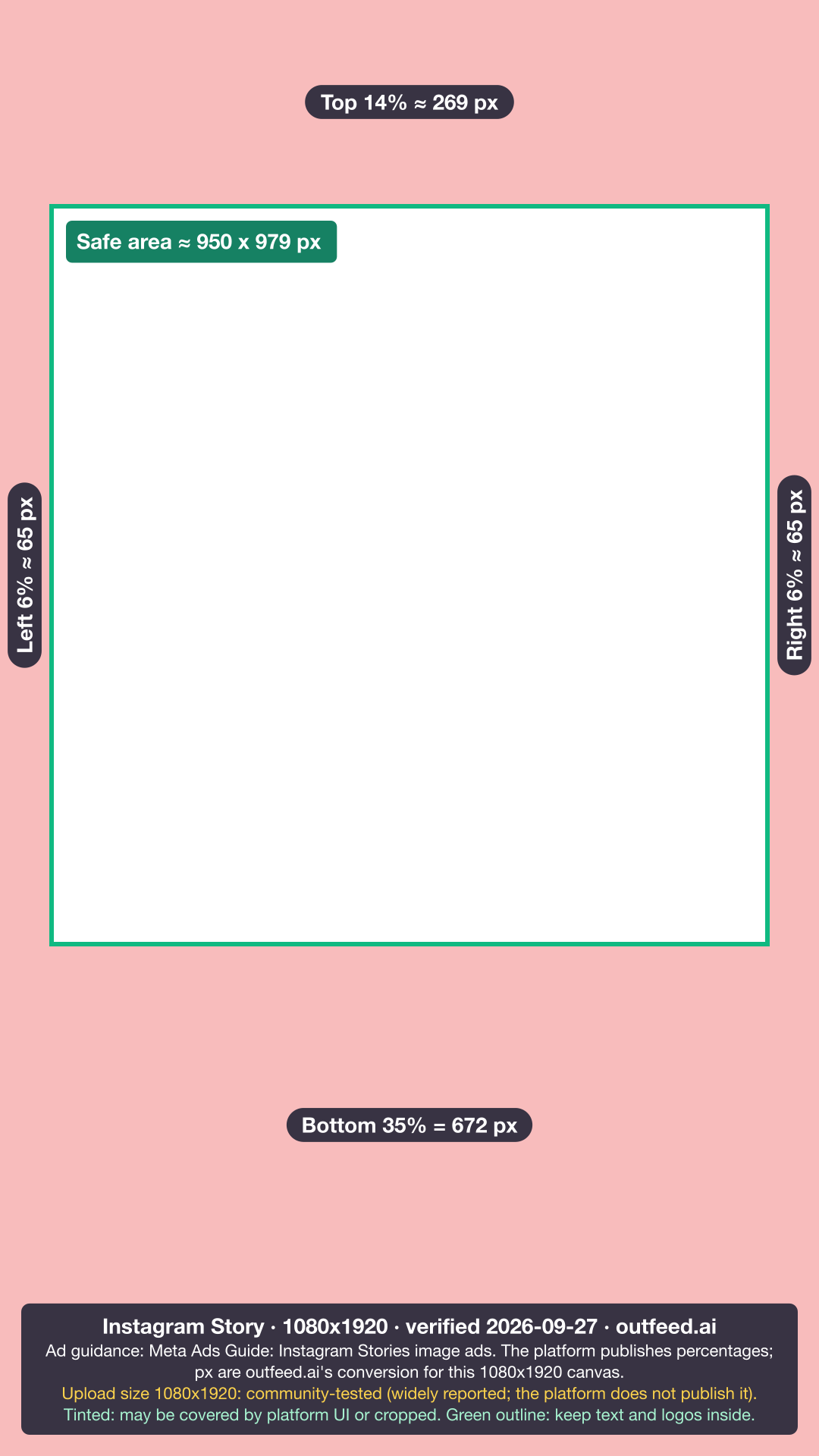
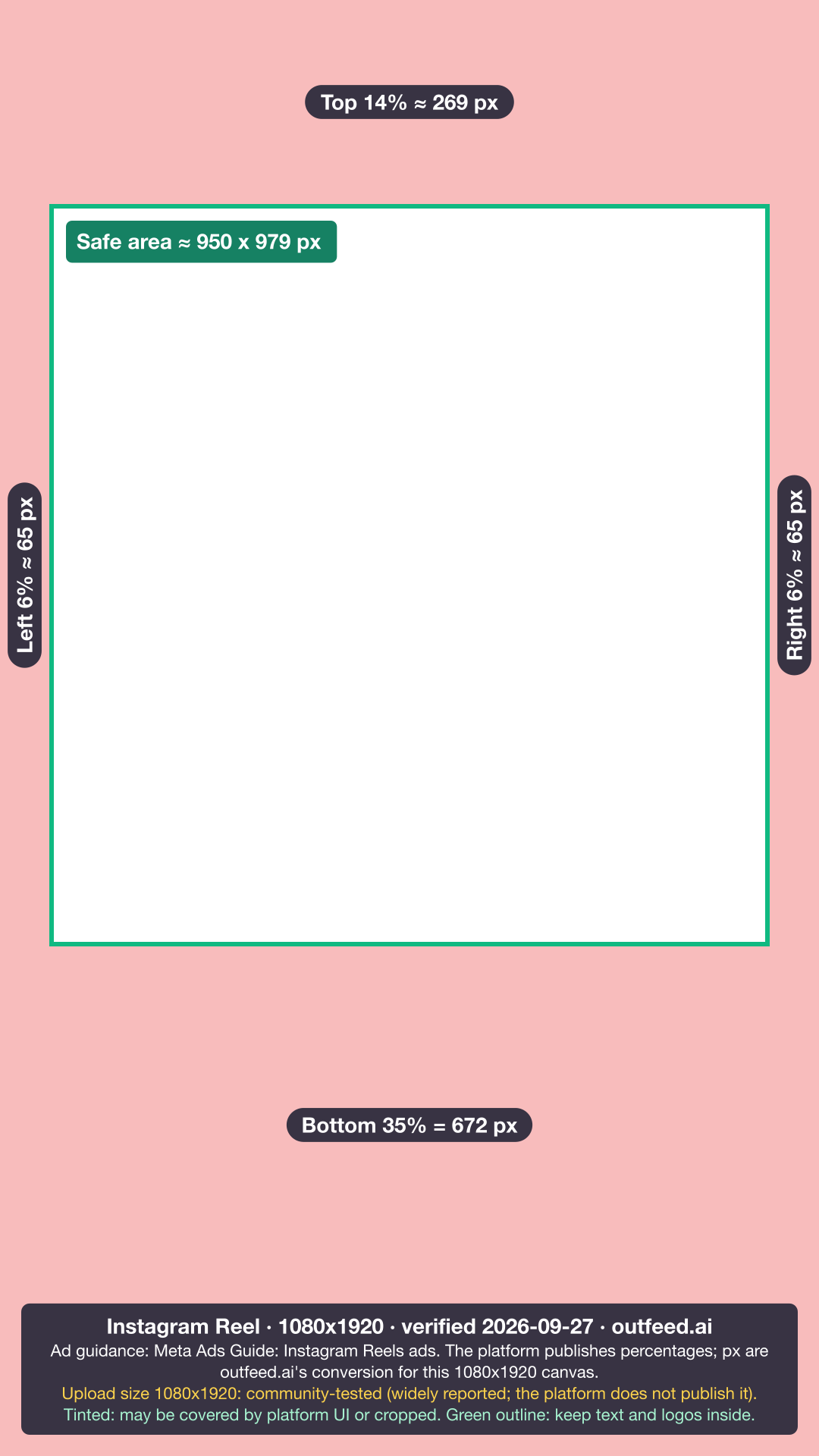
The upload size and the safe zone are separate questions. The widely reported canvas is 1080 x 1920 pixels, but the account name, caption and buttons cover parts of it. Meta publishes its safe zone as percentages, in its ads guidance: keep the top 14%, the bottom 35% and 6% on each side free of text, logos and key elements. Meta publishes no separate organic figure. On organic posts the account name, caption and buttons sit near the same edges, so the ad guidance is a sensible margin there too.
Designing over the frame? Download the free Instagram Story safe-zone overlay or the Instagram Reel safe-zone overlay as a PNG and lay it over your design. How long those Stories and Reels can run is a separate set of limits, covered in how long Instagram Reels and Stories can be.
What size is an Instagram profile picture and Reel cover?
Upload a profile picture at 320 x 320 pixels, a widely reported size, and a Reel cover at 420 x 654 pixels. The profile figure is not an Instagram number: Instagram’s help centre gives no profile-photo dimensions. The Reel cover size does come from Instagram Help, which recommends 420 x 654, a 1:1.55 ratio.
Profile picture. You upload a square, and Instagram displays it as a circle. The corners never show, so keep faces and logos centred with some space around them. A logo that touches the edges of the square will be clipped at the corners.
Reel cover. Instagram’s help page on Reel sizes and aspect ratios recommends 420 x 654 and notes that you can’t edit the cover after upload, so choose it before you publish. Scheduled Reels are different. The publishing API takes a cover as a JPEG of up to 8 MB and recommends 9:16, a different shape for the same asset. Use 420 x 654 when you post from the app, and a 9:16 cover when a scheduler publishes the Reel.
How Outfeed handles Instagram image sizes
Outfeed is a chat-first social media manager. You describe a post in a conversation, it shows a preview for each platform, and it publishes to Instagram, TikTok, LinkedIn, X, Facebook, Threads, YouTube, Pinterest and Bluesky. It publishes to Instagram through the same API as other scheduling tools, so it is bound by the API’s 4:5 ceiling. Here is exactly what its publishing code does with your images:
- Format and size: Outfeed’s publisher sends Instagram a JPEG of at most 8 MB. A PNG, WebP, GIF, AVIF or TIFF is converted to JPEG first.
- Shape: an image outside the 4:5 to 1.91:1 range is padded, never cropped, to the nearest bound. A 3:4 photo gets space added at the sides to reach 4:5 instead of losing its top and bottom.
- Carousels: an Instagram carousel of more than 10 items is blocked, because that is the API limit.
Plan your Instagram posts with Outfeed AI
Once the size is settled, the caption and the timing are what’s left. Draft the caption with the free Instagram caption generator, then check the best time to post on Instagram for your audience. Posting the same image to other networks? Every platform’s sizes sit in one table in our guide to image sizes for every social platform.
Frequently asked questions
What is the best Instagram post size in 2026?
1080 x 1350 pixels, a 4:5 ratio. It is the tallest size that both the Instagram app and the publishing API behind scheduling tools accept. If you post from the app, you can go taller, to 1080 x 1440 pixels (3:4), which Instagram Help lists as the upper bound for photos.
Is the Instagram grid 4:5 or 3:4 now?
The profile grid is widely reported to be 3:4, though Instagram has not published the tile ratio on a help page. The grid switched from squares to vertical rectangles in January 2025. A 4:5 post shows in a 3:4 tile with a thin strip trimmed from its left and right edges.
Should I post 1080x1350 or 1080x1440 on Instagram?
Post 1080 x 1440 if you publish from the Instagram app and want posts to fill the profile grid tile, widely reported as 3:4, without trimming. Post 1080 x 1350 if a scheduling tool publishes for you, because Instagram’s publishing API accepts ratios only from 4:5 to 1.91:1 and rejects the taller 3:4 file.
What size is an Instagram Story and Reel?
1080 x 1920 pixels at 9:16 is the widely reported upload size for both. Instagram’s API documentation and Meta’s ads guide give the 9:16 ratio but no organic pixel size. For text placement, Meta’s ad guidance keeps the top 14%, the bottom 35% and 6% on each side free of text and logos.
What size is an Instagram profile picture?
320 x 320 pixels is the widely reported upload size. Instagram’s help centre gives no profile-photo dimensions, and the picture displays as a circle, so keep faces and logos centred and away from the corners of the square you upload.