
Higher Education Social Media: A Playbook for Colleges
Higher education social media is how colleges and universities recruit students, welcome admitted ones, keep current students informed, celebrate research and athletics, raise money from alumni and reach everyone fast in an emergency. Each of those audiences needs its own content and often its own network. This playbook takes them one at a time, then covers the rules that are easiest to get wrong: when a student photo needs consent under FERPA, which accessibility deadlines apply, and how to run dozens of department accounts.
For goals, budgets and a posting rhythm that apply to any organization, start with our social media marketing playbook. The rule notes here are general information, not legal advice; check with your general counsel, registrar or compliance team.
Table of Contents
- How can universities use social media?
- Which social media platforms reach students, parents and alumni?
- Content for each audience: prospects, admitted students, current students and alumni
- FERPA, student privacy and photo consent
- Accessibility: captions, alt text and the ADA Title II rule
- Running higher education social media across many campus accounts
- A semester social media calendar for colleges
- How to measure higher education social media
- School social media: a note for K-12 districts
- Frequently asked questions
How can universities use social media?
Universities use social media for six jobs: recruitment, admitted-student yield, current-student information, research and athletics news, alumni giving, and emergency updates. Social media in higher education works when each account knows which of those jobs it does.
- Recruitment: show prospective students what life on campus looks like.
- Yield: help admitted students picture themselves there and know what to do next.
- Current students: deadlines, events, services and campus changes.
- Reputation: research, faculty and athletics news.
- Alumni and giving: news, reunions and giving days.
- Emergencies: fast, accurate updates. The CDC’s Crisis and Emergency Risk Communication manual (2018 update) names six principles: be first, be right, be credible, express empathy, promote action and show respect, and it notes that the first source of information often becomes the one people prefer. Checked against U.S. Centers for Disease Control and Prevention: CERC Introduction chapter (2018 update, PDF)
Which social media platforms reach students, parents and alumni?
Prospective students are on YouTube, TikTok, Instagram and Snapchat; parents and alumni are easier to reach on YouTube, Facebook and, for career news, LinkedIn. In Pew Research Center’s fall 2025 survey of U.S. teens ages 13 to 17, 92% said they ever use YouTube, 68% TikTok, 63% Instagram, 55% Snapchat and 31% Facebook. Checked against Pew Research Center: 2025 Teens Survey topline, Teens & Technology (Sept. 25–Oct. 9, 2025; published 9 Dec 2025) Pew surveyed 1,458 teens from 25 September to 9 October 2025, with a margin of error of ±3.3 percentage points. Checked against Pew Research Center: Teens, Social Media and AI Chatbots 2025 (9 Dec 2025) Among U.S. adults, Pew’s 2026 survey of 5,511 people found 84% use YouTube, 70% Facebook, 51% Instagram, 37% TikTok and 31% LinkedIn. Checked against Pew Research Center: Americans' Use of Social Media in 2026 (fact sheet, 19 Oct 2026)
| Audience | Networks to start with | Why |
|---|---|---|
| Prospective students (high school) | YouTube, TikTok, Instagram | The three most used by U.S. teens in Pew’s 2025 survey |
| Admitted and current students | Instagram, TikTok, plus your official channels | Quick updates, events and community |
| Parents | Facebook, YouTube | The two most used by U.S. adults in Pew’s 2026 survey |
| Alumni and donors | Facebook, LinkedIn, YouTube | Class news, careers and giving appeals |
| Researchers, media and partners | LinkedIn, YouTube | Research news and talks |
These are national figures for teens and adults in general, not surveys of applicants. If you are choosing between short-video networks, compare Instagram Reels vs TikTok, and for a TikTok account built for students, see our TikTok strategy guide.
Content for each audience: prospects, admitted students, current students and alumni
Prospects want to picture student life, admitted students want next steps and belonging, current students want deadlines and events, and alumni want news and a reason to give. Plan a different post type for each. The social media ideas for colleges below are illustrative.
Prospective students
- A day in the life of a current student, filmed by that student.
- Residence hall and dining tours.
- “Ask a student” question-and-answer videos.
- Program spotlights told through a student project.
For longer formats, borrow from these YouTube video ideas.
Admitted students
- Countdown posts to deposit and orientation deadlines.
- Welcome videos from faculty and current students.
- A short checklist of next steps, linked to the admissions portal.
Current students
- Registration, financial aid and housing deadlines.
- Event roundups for the week.
- Service reminders: counseling, tutoring, library hours.
- Midterm and finals support posts.
Alumni and giving
- Alumni career stories and class notes.
- Reunion and homecoming coverage.
- Giving-day countdowns that show what earlier gifts paid for.
Athletics
Athletics accounts follow extra rules. The College Sports Commission, set up after a federal court approved the House v. NCAA settlement on 6 June 2025, enforces its rules on NIL, revenue sharing and roster limits. Checked against College Sports Commission (home page: Mission & Mandate) Division I athletes must report third-party NIL deals worth $600 or more to NIL Go within five business days. Checked against College Sports Commission: Student-Athlete NIL Deals (NIL Go) Under the rules adopted after the settlement, a school may help athletes with NIL deals and act as a marketing agent for third-party deals. Checked against College Sports Commission (resource library): NCAA Overview of House v. NCAA Settlement Rules (April 2025) Those rules do not say whether official accounts may promote or repost an athlete’s sponsor content, so ask your compliance office before you do. For the rest, see our guide to running a sports team’s social media.
FERPA, student privacy and photo consent
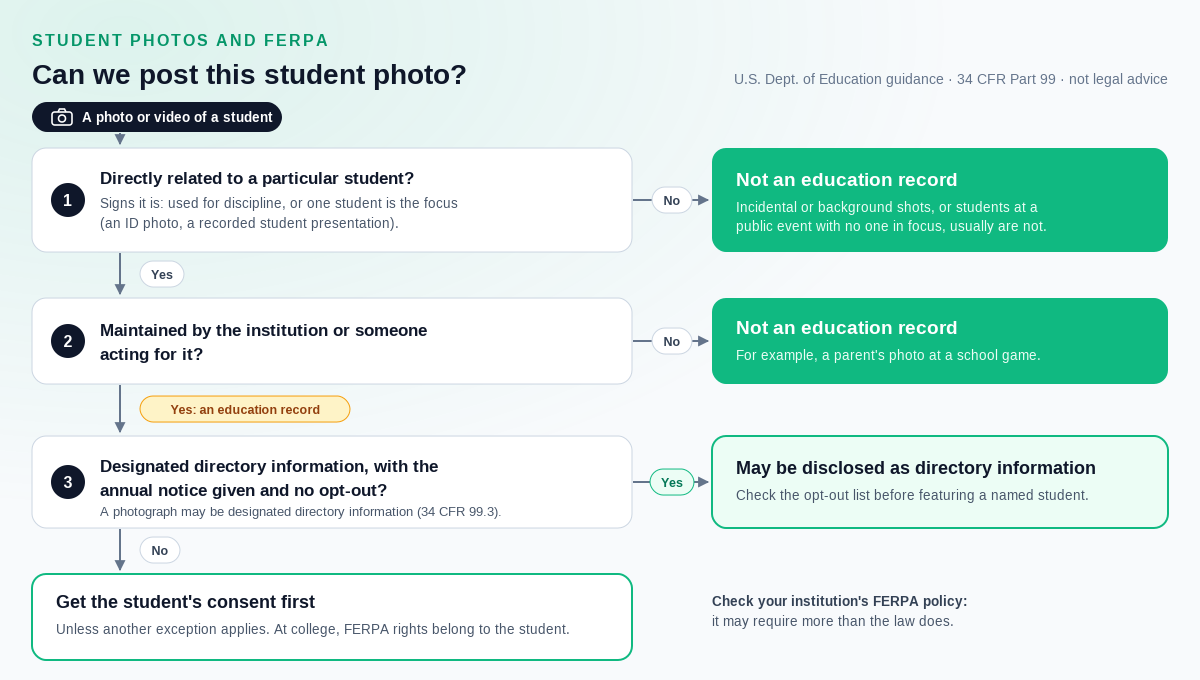
A photo or video is a FERPA education record only if it is directly related to a student and kept by the institution; students shown in the background or at public events usually aren’t the focus, and “photograph” can be designated directory information, subject to opt-outs. When in doubt, get written consent.
FERPA is the federal law on education records. Its rights pass from parents to the student at 18 or when the student enters a postsecondary institution at any age, so at college, consent comes from the student. Checked against U.S. Department of Education, Protecting Student Privacy: What is FERPA? The regulations apply to institutions that receive funds under any program the U.S. Secretary of Education administers. Checked against eCFR: 34 CFR Part 99 — Family Educational Rights and Privacy, § 99.1
The Department of Education’s guidance on photos and video works in two steps:
- Is it directly related to a student? Factors include use for discipline or another official purpose, showing an injury, a health emergency or a law violation, or making a specific student the focus, such as an ID photo or a recorded presentation. Checked against U.S. Department of Education, Student Privacy Policy Office: FAQs on Photos and Videos under FERPA A photo is not directly related to a student who is incidental, in the background, or taking part in a school activity open to the public with no focus on any individual. Checked against U.S. Department of Education, Student Privacy Policy Office: FAQs on Photos and Videos under FERPA
- Does the institution maintain it? A parent’s photo at a football game is not an education record, because the school does not keep it, unless the school later stores a copy, for example in a disciplinary file. Checked against U.S. Department of Education, Student Privacy Policy Office: FAQs on Photos and Videos under FERPA
Directory information is the main route for featuring students. It can include a student’s name, photograph, major, participation in recognized activities and sports, athletes’ height and weight, and honors. Checked against eCFR: 34 CFR Part 99 — Family Educational Rights and Privacy, § 99.3 (definition of directory information) An institution may disclose it only after a public notice of what it designates and of the right to opt out, and opt-outs made while enrolled must be honored after the student leaves. Checked against eCFR: 34 CFR Part 99 — Family Educational Rights and Privacy, § 99.37 Check the opt-out list before you name a student in a post.
Privacy is not the only question. Whoever takes a photo is its author and owner Checked against U.S. Copyright Office: What is Copyright?, and Instagram’s terms say you must own or have the rights to what you post. Checked against Instagram Help Center: Terms of Use Ask before you repost a student’s or parent’s picture. Your institution’s own policy may also require more than FERPA does; follow it.
Accessibility: captions, alt text and the ADA Title II rule
Public colleges and universities must meet WCAG 2.1 Level AA under the ADA Title II web rule, now due on 26 April 2027 or 26 April 2028 depending on population. Posts made before that date are exempt, but a person who asks must still get effective communication, such as a text description of an image. Add alt text, captions and camel-case hashtags to every post now.
The Justice Department’s rule, published on 24 April 2024, sets WCAG 2.1 Level AA as the standard for web content and mobile apps that state and local governments provide, public universities and community colleges included, and covers content contractors make for them. Checked against U.S. Department of Justice (ada.gov): Fact Sheet: New Rule on the Accessibility of Web Content and Mobile Apps Provided by State and Local Governments An interim final rule of 20 April 2026 moved the compliance date to 26 April 2027 for governments with a population of 50,000 or more, and 26 April 2028 for smaller ones and special districts. Checked against U.S. Department of Justice (ada.gov): Fact Sheet: New Rule on the Accessibility of Web Content and Mobile Apps Provided by State and Local Governments A public university uses the population of the government it belongs to.
What the rule means for posts:
- Older posts are exempt. Social media posts made before the compliance date need not meet WCAG 2.1 AA. Checked against U.S. Department of Justice (ada.gov): Fact Sheet: New Rule on the Accessibility of Web Content and Mobile Apps Provided by State and Local Governments But a person who asks must still get effective communication, such as an alt-text description of an old photo. Checked against U.S. Department of Justice (ada.gov): Fact Sheet: New Rule on the Accessibility of Web Content and Mobile Apps Provided by State and Local Governments
- Third-party content. Content members of the public post on the institution’s own website or app is exempt; third-party content the institution itself posts, or a contractor posts for it, is not. Checked against U.S. Department of Justice (ada.gov): Fact Sheet: New Rule on the Accessibility of Web Content and Mobile Apps Provided by State and Local Governments
- Why alt text matters. Without a text description, screen-reader users may have no way to know what an image shows. Checked against U.S. Department of Justice (ada.gov): Fact Sheet: New Rule on the Accessibility of Web Content and Mobile Apps Provided by State and Local Governments
Private colleges are not covered by the Title II rule. They are public accommodations under Title III, whose regulation lists private undergraduate and postgraduate schools. Checked against eCFR: 28 CFR 36.104 Definitions (ADA Title III), 'Place of public accommodation' The Justice Department’s 2022 guidance says the ADA applies to what public accommodations offer on the web, sets no detailed web standard, and points to WCAG and the Section 508 Standards as helpful guidance. Checked against U.S. Department of Justice (ada.gov): Guidance on Web Accessibility and the ADA (18 March 2022)
Section508.gov’s social media advice works for any campus:
- Keep alt text concise and don’t repeat the caption; on Facebook, replace the automatic alt text with your own. Checked against Section508.gov (U.S. General Services Administration): Social media (reviewed/updated October 2026)
- Capitalize each word in a multiword hashtag, as in #FourthOfJuly, so screen readers read it correctly. Checked against Section508.gov (U.S. General Services Administration): Social media (reviewed/updated October 2026)
- Caption every video and add audio description for visuals the narration doesn’t cover. Checked against Section508.gov (U.S. General Services Administration): Social media (reviewed/updated October 2026)
- Limit emojis, avoid animated GIFs and special characters, and keep text contrast at least 4.5:1 (3:1 for large text). Checked against Section508.gov (U.S. General Services Administration): Social media (reviewed/updated October 2026) Checked against W3C: Understanding WCAG 2.2 Success Criterion 1.4.3 Contrast (Minimum)
| Network | Alt text and captions | Source |
|---|---|---|
| Alt text for image posts through the publishing API since 24 March 2025 (not Reels or stories) | Checked against Meta for Developers: Instagram Platform, Content Publishing | |
| TikTok | Alt text up to 300 characters per photo in a photo post; automatic captions you can edit | Checked against TikTok Help Center: Accessibility for your videos Checked against TikTok Help Center: Accessibility for your videos |
| Pin alt text up to 500 characters | Pinterest API v5 OpenAPI description | |
| Bluesky | The official app allows up to 2,000 characters of alt text | Checked against Bluesky social-app source on GitHub: constants.ts (MAX_ALT_TEXT) |
Running higher education social media across many campus accounts
Keep an inventory of every official account with an owner, a backup admin and a purpose, retire the dead ones, and write one social media policy that covers posting, comments, records and handover. Approval and review rules belong in that policy.
An account inventory (vendor-neutral checklist):
- Account: network, handle and link.
- Owner and backup admin: two named staff, never one student worker alone.
- Purpose and audience: which of the six jobs it does.
- Last post date: anything silent for months is a candidate to merge or close.
- Login recovery: an institutional email, not a personal one.
- Records: who keeps what, and for how long.
Records rules can apply to public institutions. In New York, for example, the State Archives says government social media records have no single retention schedule because retention depends on content: a school district’s post announcing a new superintendent may count as a press release with potentially permanent retention. Checked against New York State Archives: Understanding the Importance of Managing Social Media Records (advisory, January 2021, PDF) Officials’ personal accounts raise another question: in Lindke v. Freed the Supreme Court held that a public official who blocks someone from commenting acts for the state only if the official had actual authority to speak for the state on the matter and claimed to use it in the posts. Checked against Supreme Court of the United States: Lindke v. Freed, No. 22-611 (decided 15 March 2024), slip opinion Leaders at public universities should keep personal and official accounts clearly apart.
Put all of this in a campus social media policy, and use our guide to social media team structure to decide who owns what. The social media manager skills guide helps when you hire for a central role.
Grouping department accounts is where a scheduling tool helps:
Review still happens outside the tool, in your policy:
A semester social media calendar for colleges
Map posts to the academic year: application deadlines and admitted-student events in spring, orientation and move-in in late summer, welcome week, midterms and finals support, giving day and commencement. Batch each month in one sitting and schedule it. Institutions set their own dates, so treat the table as a template.
| When | Main audience | Post ideas |
|---|---|---|
| January to March | Prospects, admitted students | Application deadline reminders, admit-day welcomes, campus visit invitations |
| April to May | Admitted students, seniors | Deposit countdowns, finals support, commencement coverage |
| June to August | Incoming students, parents | Orientation, move-in checklists, housing tips |
| September | Current students | Welcome week, club fairs, service reminders |
| October to November | Alumni, current students | Homecoming, midterm support, giving-day countdowns |
| December | Everyone | Finals support, year-in-review, holiday closure notices |
Plan the month in a free content calendar template. Emergencies are the exception: publish them as they happen, following the CDC principles above, and pause scheduled posts that could read badly alongside them.
Schedule your campus posts with Outfeed AI
How to measure higher education social media
Measure higher education social media by what each audience does next, not by likes: inquiries and visit sign-ups from prospects, deposits and orientation sign-ups from admitted students, and giving-day clicks from alumni. These are our suggested measures, not sector benchmarks:
- Prospective students: tag every link to an inquiry form, virtual tour or campus-visit page with the free UTM generator, so each sign-up traces back to one post and network. In Google Analytics 4, visits from non-ad links on social sites count as Organic Social and visits from social ads as Paid Social. Checked against Analytics Help: [GA4] Default channel group
- Admitted students: count clicks from yield content (admitted-student days, housing and orientation reminders) to the pages where students take the next step.
- Current students: watch how often questions in comments and DMs repeat; a question asked every week belongs in a post or a pinned FAQ.
- Alumni and giving: give giving-day posts their own tagged links and compare gifts that arrive through them with the previous campaign.
Read reach and engagement in each network’s own insights, and compare each term with the same term last year rather than with another school.
School social media: a note for K-12 districts
Schools and districts that receive U.S. Department of Education funds follow the same FERPA rules, and public districts fall under the ADA Title II web rule, with DOJ’s own population rule for school districts. The difference at K-12 level is that FERPA rights stay with parents until the student turns 18. Checked against U.S. Department of Education, Protecting Student Privacy: What is FERPA?
- Accessibility: a school district is not a special district government; a city district uses the city’s population, a county district the county’s, and an independent district the population estimate in the Census Bureau’s most recent Small Area Income and Poverty Estimates. Checked against U.S. Department of Justice (ada.gov): Fact Sheet: New Rule on the Accessibility of Web Content and Mobile Apps Provided by State and Local Governments
- Student accounts: Instagram requires users to be at least 13, or the minimum legal age in their country. Checked against Instagram Help Center: Terms of Use COPPA sets requirements for online services directed to children under 13 and for services that knowingly collect their personal information. Checked against FTC: Children's Online Privacy Protection Rule ("COPPA")
- Records: the New York superintendent example above is a school district’s post. Checked against New York State Archives: Understanding the Importance of Managing Social Media Records (advisory, January 2021, PDF)
Public schools share much with other public bodies; see our guide to government social media rules.
Frequently asked questions
Why is social media important for higher education?
It reaches the age group colleges recruit: in Pew Research Center’s fall 2025 survey of 1,458 U.S. teens, 92% said they use YouTube, 68% TikTok and 63% Instagram. Colleges also use it to inform current students, engage alumni and reach everyone quickly in an emergency.
Can a college post photos of students without consent?
Sometimes. Under FERPA a photo is an education record only if it is directly related to a student and kept by the institution. A photo is not directly related to a student who is incidental, in the background or taking part in a public school event with no focus on any one person, and a photograph can be designated directory information unless the student opts out. Check your institution’s policy and get consent when in doubt.
Do university social media posts have to be accessible?
For public colleges and universities, yes: the ADA Title II web rule makes WCAG 2.1 Level AA the standard, with compliance due on 26 April 2027 or 26 April 2028 depending on population. Posts made before that date are exempt, but a person who asks must still get effective communication, such as a text description of an image.
How can universities manage social media across many departments?
Keep an inventory of every official account with an owner and a backup admin, close inactive ones and follow one campus social media policy that sets posting, comment, records and handover rules.