
Pinterest URL: How to Find and Share Your Profile Link
Your Pinterest URL is www.pinterest.com/ followed by your username, and a board’s URL adds the board’s name after it. Find the username on your profile, or copy your Pinterest URL link from the share option in the app.
This page covers every URL for Pinterest you might share: finding and copying your profile, board and Pin links, changing the URL by changing your username, and the other kind of Pinterest links: the website link on your own Pins. For the basics of the app itself, start with how to use Pinterest.
What is your Pinterest URL?
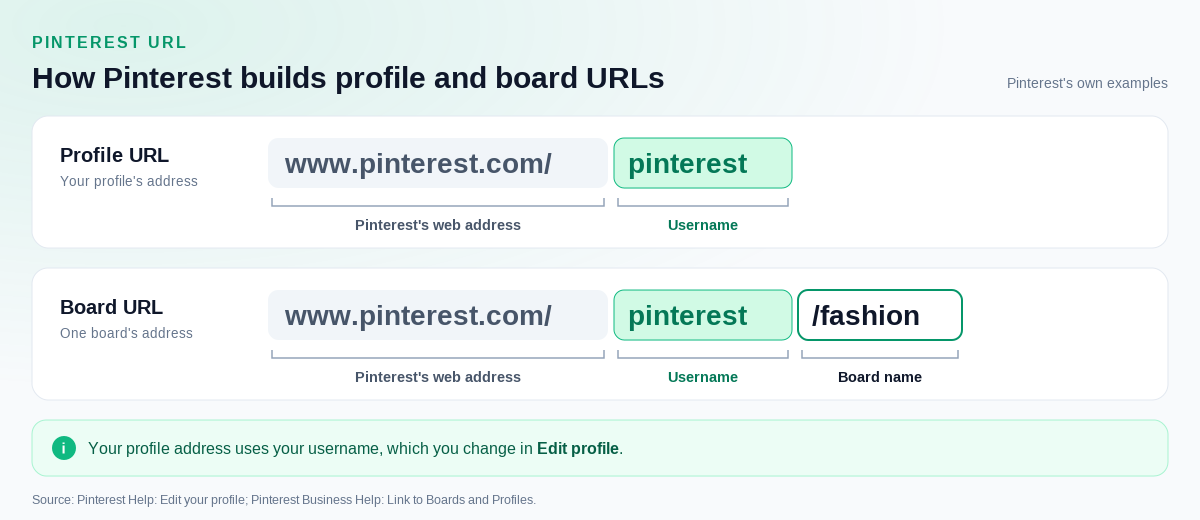
It’s www.pinterest.com/ followed by your username; a board’s URL adds the board name, as in Pinterest’s own example www.pinterest.com/pinterest/fashion. Pinterest says your username gives your profile its unique web address, so its own account, with the username “Pinterest”, lives at www.pinterest.com/Pinterest. Checked against Pinterest Help: Edit your profile Pinterest’s examples show a profile URL as https://www.pinterest.com/pinterest and a board URL as that address plus the board’s name. Checked against Pinterest Business Help: Link to Boards and Profiles
A single Pin has its own pattern: Pinterest’s developer documentation shows a Pin’s full URL as www.pinterest.com/pin/ followed by the Pin’s number and a trailing slash. Checked against Pinterest Developers: Widgets If you’re used to vanity URLs elsewhere, on Pinterest the username is the custom part of the address.
How do you find your Pinterest profile URL?
Your username sits under your name on your profile; add it to www.pinterest.com/ and you have your URL. On the web, select your profile picture at the top right. In the app, tap your profile picture at the bottom right, then your profile picture at the top left. Checked against Pinterest Help: Edit your profile
To copy it instead of typing it, use the app: the share option on your profile has Copy link, or you can pick another app to send it to. On the web, the share option sends a profile to people on Pinterest by name or email. Checked against Pinterest Help: Share Pins, boards, and profiles If you want to share your own profile straight to another social network, Pinterest says to do it on a desktop. Checked against Pinterest Help: Share Pins, boards and profiles to social networks
How do you copy the link to a board or a Pin?
Open the board or Pin, select Share and choose Copy link in the app; on the web, a board’s URL is your profile URL plus the board name. The same share sheet works for Pins, boards and profiles. Checked against Pinterest Help: Share Pins, boards, and profiles
Two privacy settings change who a link works for:
- Private boards. Only you and people you invite can see a private (secret) board, so a copied link won’t open it for anyone else. Checked against Pinterest Help: Private boards
- Private profiles. If your profile is private, you share a unique invite link from your profile’s Share option instead. Each one expires after three days or after five people use it. Checked against Pinterest Help: Invite people to follow you
How do you change your Pinterest username and URL?
Change your username in Settings > Edit profile > Username on the web, or Edit profile > Username in the app; Pinterest builds your profile URL from the username. Pinterest’s steps:
On the web:
- Log in to your Pinterest account
- Click the more-options icon at the bottom left of your screen
- Click Settings
- Click Edit profile at the left of the screen
- Scroll down to Username and enter your new username
- Click Save
In the Android app:
- Tap your profile picture at the bottom-right of your screen
- Tap your profile photo at the top-left of your screen
- Tap View profile
- Tap Edit profile
- Under Username, enter your new username
- Tap Done
iOS steps are the same as Android. Business accounts in the app: profile photo (bottom-right) > Edit profile > Username > Done.
Checked against Pinterest Help: Edit your profile.
A Pinterest username is 3 to 30 characters of letters, numbers and underscores, with at least one letter. Checked against Pinterest Help: Edit your profile Pinterest’s help doesn’t say whether links with your old username keep working, so update your profile link wherever you’ve posted it.
Two rules to know before you change it. If you deactivate your account, your email address and username stay tied to it; to free them, change your email or edit your username first. Checked against Pinterest Help: Delete or temporarily deactivate your account Our guide explains how to deactivate or delete your Pinterest account. And Pinterest’s Community Guidelines forbid buying or selling access to accounts, boards or usernames. Checked against Pinterest Policy: Community Guidelines
How do you add a website link to a Pin?
Add it in the optional link field when you create the Pin, or later in Edit Pin; you can only change the link on Pins you created, not on Pins you saved. Pinterest’s Pin builder says to add a link, if you have one, to give people a place to learn more. Checked against Pinterest Help: Create a Pin from an image or video The full creation steps, with the title, description, link and board fields, are in our guide to how to post on Pinterest. Checked against Pinterest Help: Create a Pin from an image or video
After publishing, you can edit a Pin’s title, description, link and board, but never its image or video. Checked against Pinterest Help: Edit or delete a Pin To change the link on a Pin you created:
On the web:
- Click on a Pin to open it
- Click the edit icon
- Edit the website link in the Website field
- Click Save
In the Android app:
- Tap on a Pin to open it
- Tap the ellipsis icon
- Tap Edit Pin
- Edit the website link in the Website field
- Tap Done
iOS steps are the same as Android.
Checked against Pinterest Help: Fix a broken link.
Link straight to the page. Pinterest says it doesn’t allow certain redirects or URL shorteners and may block links that redirect or lead to misleading or spammy content. Checked against Pinterest Help: Fix a broken link Its “no surprises” principle asks that people can anticipate where a link goes. Checked against Pinterest Policy: Community Guidelines Before you paste a short link, read what a URL shortener does and why it doesn’t help here. Pinterest also advises matching the Pin’s image, text and keywords to the landing page, avoiding broken links and keeping the site loading in under 4 seconds. Checked against Pinterest Business Help: Pin performance and distribution
Where should you share your Pinterest link?
In your other profiles’ link fields and on your website; add your website to your Pinterest profile too, and claim it. Your public Pinterest profile can show a photo, name, bio, pronouns, a website and your username. Checked against Pinterest Help: Access, edit or delete personal data To add the website:
On the web:
- Log in to your Pinterest account
- Click the more-options icon at the bottom left of your screen
- Select Settings
- Click Edit profile, scroll down and enter your website URL below Website
- Click Save
In the Android app:
- Tap your profile picture at the bottom-right of your screen
- Tap your profile photo at the top-left of your screen
- Tap View profile
- Tap Edit profile
- Below Website, enter your website link
- Tap Done
iOS steps are the same as Android.
Checked against Pinterest Help: Add your website to your profile.
Claiming the site goes further: your profile picture appears alongside Pins saved from it, those Pins link to your profile, people see an option to follow you, and you get insight into how often your content is shared. Checked against Pinterest Business Help: Claim your website You can claim only a domain, subdomain or subpath you own and can edit, so most marketplace shops can’t be claimed, and each website can be claimed by just one Pinterest account. Checked against Pinterest Business Help: Claim your website
Elsewhere, your Pinterest URL goes in a profile’s website or link in bio field. On TikTok, check whether you can add a link to your TikTok bio first.
Schedule image Pins in Outfeed AI
Frequently asked questions
How do I find my Pinterest URL?
Your profile URL is www.pinterest.com/ followed by your username. Find the username under your name on your profile, or use Share and Copy link on your profile in the Pinterest app.
How do I change my Pinterest URL?
Change your username: Settings, Edit profile, Username on the web, or Edit profile, Username in the app. Pinterest builds your profile’s web address from your username, so the new username is what appears in it.
Can I edit the link on a Pin I saved?
No. Pinterest only lets you edit the website link on Pins you created yourself, not on Pins you saved from Pinterest or with the browser button.
Why did Pinterest block my link?
Pinterest may block links that redirect deceptively or lead to spammy or misleading content, and it doesn’t allow certain URL shorteners. Link straight to the page the Pin shows.