
Link Tree: What Linktree Is and How to Make One
A link tree is a single web page that holds several links as buttons, shared through the one link spot in a social media bio. Linktree (one word) is a company that makes these pages. Tap the link in a creator’s bio and you land on a short page of buttons: a shop, a newsletter, the latest video.
This guide covers Linktree’s own setup steps, where to paste the link on each network, and whether you need one at all, as part of how you set up your social media profile.
Table of Contents
- What is a link tree (and what is Linktree)?
- How does Linktree work?
- How to make a Linktree in 5 steps
- How to add your Linktree to Instagram, TikTok and other profiles
- Is Linktree free? Plans and limits
- Other link-in-bio options, and when you don’t need one
- Is a link tree safe to tap?
- Can Outfeed build a link tree for you?
- Link tree FAQ
What is a link tree (and what is Linktree)?
A link tree is the page; Linktree is a brand. So what is a Linktree? It’s a link tree made with Linktree’s own service, at a linktr.ee address. Linktree is a brand name of Linktree Pty Ltd, which publishes the Linktree app; Outfeed isn’t affiliated with it, and on this page “link tree” (two words) means any page of this kind. A link tree turns one profile link into a menu of many; here’s what ‘link in bio’ means if the phrase is new.
Linktree describes itself as a link in bio tool that gathers every important link, product and piece of content you share into one customizable page, which you then add to Instagram, TikTok, YouTube or any other platform. Checked against Linktree Help Center: About LinktreeVendor's own description
Linktree says it was founded in Melbourne, Australia, in 2016 by brothers Alex and Anthony Zaccaria and Nick Humphreys, who ran a digital agency and kept swapping the single link in clients’ bios. Checked against Linktree: About LinktreeVendor's own description Its About page claims more than 70 million users, 70,000 new profiles a day and 1.3 billion monthly profile views; these are its own, unaudited figures. Checked against Linktree: About LinktreeVendor's own description
How does Linktree work?
You get one address made from your username, linktr.ee/yourusername, and whatever you change in the Linktree Admin shows up on that page right away. Checked against Linktree Help Center: About LinktreeVendor's own description
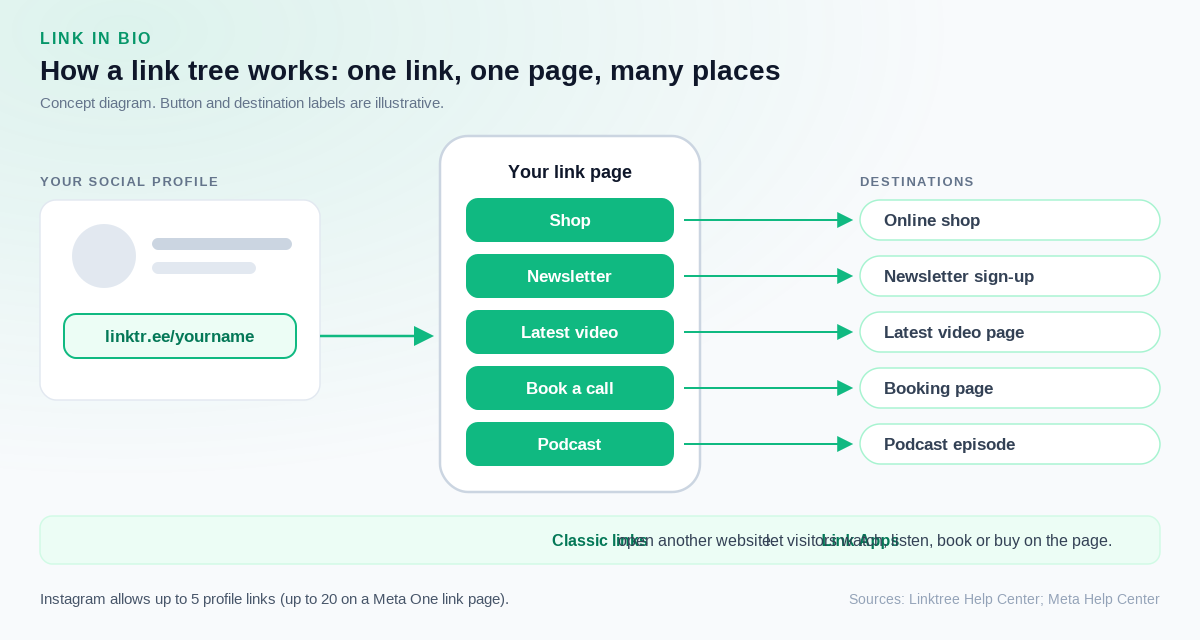
What people put on one varies with what they do. Illustrative examples (ours, not from Linktree):
- An online shop or a single product page
- A newsletter sign-up form
- The latest video or podcast episode
- A booking or appointment page
- A media kit for brand partnerships
- A tip jar or donation page
Linktree has two kinds of links. Classic links are buttons that send visitors to another website; Link Apps are embedded blocks that let visitors watch, listen, book or buy without leaving your Linktree. Both are added from + Add in the Links tab. Checked against Linktree Help Center: About links and Link AppsVendor's own description
Linktree’s advice: links near the top usually get more clicks, aim for around 7 to 10 key items, and group longer lists under headers. Checked against Linktree Help Center: About links and Link AppsVendor's own description Linktree Pty Ltd also publishes a Linktree app on the App Store and Google Play. Checked against Apple App Store: Linktree: Link in Bio Creator (Linktree Pty Ltd)Vendor's own description
How to make a Linktree in 5 steps
To create a Linktree, sign up at linktr.ee/register or in the Linktree app, enter your email, choose a username, select a plan, then follow the prompts to add your first links and pick a theme. Linktree’s Help Center gives these steps:
- Go to Sign up.
- Enter your email address. Double-check it for typos, because you'll need it to verify your account.
- Choose a username that represents you or your brand. It becomes part of your Linktree URL, linktr.ee/yourusername.
- Select a plan. You can compare plans before you choose.
- Follow the prompts to add your first links and pick a theme.
Checked against Linktree Help Center: How to create your first Linktree.Vendor's own description
Then add buttons from + Add in the Links tab, most important first. Tag each button’s URL with the free UTM generator so your own analytics show which network sent each visit.
How to add your Linktree to Instagram, TikTok and other profiles
Copy your full Linktree URL into each profile’s link field; each network sets its own rule, and TikTok asks for 1,000 followers or a Verified Business Account first.
| Network | Where the link goes | The network’s rule | Source |
|---|---|---|---|
| Edit profile > Links | Up to 5 websites, visible to anyone on or off Instagram | Checked against Instagram Help Center: Add a website to your Instagram profile | |
| Instagram (Meta One) | Edit profile > Links | Up to 20 links on a link page with an eligible Meta One plan; teens can’t use it | Checked against Meta Help Center: How to add a link page to your Instagram bio with Meta One |
| TikTok | Profile > Edit profile > Links > Add | 1,000+ followers or a Verified Business Account; no links that open or log you into other social apps | Checked against TikTok Help Center: How to add a link to your TikTok profile |
| YouTube | YouTube Studio > Customization > Profile > Links | Up to 14 links; the first sits near Subscribe | Checked against YouTube Help: Manage your YouTube channel's profile (Computer) |
| Threads | Profile bio links | Up to 5 links (TechCrunch, 15 May 2025) | Checked against TechCrunch: Threads now lets creators add up to 5 links to profiles, track clicks (15 May 2025)Press report |
| Settings > Edit profile > Website | One Website field; claim the site to see its analytics | Checked against Pinterest Help: Add your website to your profile | |
| X | Edit profile > Website | A Website field, edited with your name, bio and location | Checked against X Help: How to customize your profile |
| Bluesky | Edit Profile > profile links | Profile links since 22 October 2026, shown at the top of the profile | Checked against Bluesky blog: Introducing Profile Links (22 Oct 2026) |
| Add custom button (introduction section) | Select Premium Business, Sales Navigator and Recruiter Lite subscribers only | Checked against LinkedIn Help: Add or remove a custom button from your profile | |
| Linktree suggests sharing it on Facebook | Facebook’s help pages give no rule we could confirm | Checked against Linktree Help Center: Sharing your LinktreeVendor's own description |
Linktree for Instagram: Linktree’s own steps (paste the full URL, including https://):
Instagram app:
- In the Instagram app, go to your Instagram profile and tap Edit Profile.
- Tap Links and add your full Linktree URL, for example https://linktr.ee/yourusername.
- Save your changes.
Checked against Linktree Help Center: How to add your Linktree URL to your Instagram bio.Vendor's own description
Since Instagram holds five links on its own, see how to add up to five links to your Instagram bio first. For TikTok, follow the steps to add a link to your TikTok bio. Linktree also suggests an email signature or business card, and its Share menu lets you copy the URL or download a QR code. Checked against Linktree Help Center: Sharing your LinktreeVendor's own description
Is Linktree free? Plans and limits
Yes: Linktree has a Free plan and three paid plans, Starter, Pro and Premium, billed monthly or annually, with a 7-day free trial on Pro and Premium. Separate team plans for agencies (Workspaces) come with a 14-day free trial, and Agency and Enterprise plans are custom. Checked against Linktree: Pricing (Free, Starter, Pro and Premium)Vendor's own description Prices are on Linktree’s pricing page, linked in the note.
| Plan | What Linktree lists for it |
|---|---|
| Free | Unlimited basic links, email and phone sign-ups |
| Starter | A personalized Linktree, unlimited featured links, basic analytics |
| Pro | Remove Linktree branding, custom designs, selling with 0% fees, mailing-list integrations |
| Premium | Link rules and routing, AI integrations, all-time analytics, data export, social media scheduling, unlimited Instagram auto-replies |
Checked against Linktree: Pricing.Vendor's own description
Checked against Linktree: Pricing.Vendor's own description
Linktree says you can also sell courses and downloads and earn affiliate commissions, with some earning features US-only and a fee per payout. Checked against Linktree: Pricing (FAQ)Vendor's own description
Its Insights page counts views, clicks, click rate, subscribers and traffic sources as totals, not names, with 28 days of history on Free, 90 on Starter, 365 on Pro and lifetime on Premium. Checked against Linktree Help Center: Understanding your InsightsVendor's own description
Other link-in-bio options, and when you don’t need one
The main other options are hoo.be, Stan, Beacons and Bitly Pages, plus Instagram’s own profile links or a page on your own website; the right one depends on whether you sell, how many links you need and whether a seller fee matters. Listed in no order.
| Option | What it is | Pricing model | Fits if |
|---|---|---|---|
| hoo.be | A link-in-bio page with links, videos, music, products and tips; what hoo.be is | Free forever plus Pro and Premium; seller fee of 9%, 5% or 0% by plan | You want a free page with a shop and tips |
| Stan | A mobile storefront for downloads, courses, webinars and coaching; more on Stan Store | No free plan | You mainly sell digital products |
| Beacons | A link in bio with a store, media kit, Smart Reply and email sends | Free plus three paid plans; 9% seller fee on Free and Creator, 0% above | You want a media kit and store in one place |
| Bitly Pages | Template landing pages marketed for link in bio; see Bitly and its Pages feature | Free plan (with ads) plus paid plans; see Bitly’s pricing page | You already shorten links with Bitly |
| Instagram’s own links | Up to 5 profile links, or 20 on a Meta One link page | Free; the link page needs Meta One | Instagram is your main network |
Checked against hoo.be: Pricing (FAQ 'What can I do with hoo.be?').Vendor's own description
Checked against hoo.be: Pricing.Vendor's own description
Checked against hoo.be: Pricing (feature table).Vendor's own description
Checked against Apple App Store: Stan: Link in Bio for Creators (FindCommunity, Inc.).Vendor's own description
Checked against Stan Store Help Center: Creator vs. Creator Pro vs. Creator Max.Vendor's own description
Checked against Beacons: Pricing (plans and FAQ).Vendor's own description
Checked against Beacons: Pricing (plans and FAQ).Vendor's own description
Checked against Bitly Support: What are Bitly Pages?.Vendor's own description
Checked against Bitly: Pricing.Vendor's own description
Checked against Meta Help Center: How to add a link page to your Instagram bio with Meta One.
Older roundups still list Koji, but Linktree acquired it and sunset it on 31 January 2024. Checked against Linktree blog: Linktree acquires link-in-bio platform Koji (15 Dec 2023)Vendor's own description
Can you make a link tree without an app? Yes: a single page on your own website with a list of links does the same job, and you control the address and the design. Do you need one at all? It depends on the job:
| What you need | Native profile links | A link tree | A page on your own site |
|---|---|---|---|
| More than 5 links | YouTube (up to 14) or Instagram’s Meta One link page (up to 20) | Yes | Yes |
| Click totals | Instagram: one total for all bio links, no names | Yes (Linktree Insights, history by plan) | Your own analytics |
| One page for every network | No, set per network | Yes | Yes |
| Selling from the page | No | Yes (Linktree, hoo.be, Stan, Beacons) | If your site has a store |
| Your own domain | No | On some paid plans (hoo.be Premium, Stan Creator Max) | Yes; pair it with a vanity URL |
Checked against Meta for Developers: Instagram Media Insights (Instagram Platform reference).
Checked against hoo.be: Pricing.Vendor's own description
Checked against Stan Store Help Center: Creator vs. Creator Pro vs. Creator Max.Vendor's own description
Is a link tree safe to tap?
A link tree is an ordinary web page, so judge it by where its buttons lead; the warning screen some people see comes from the app, not from the link page. Linktree says the warnings Instagram and TikTok sometimes show are those platforms checking links for security, can appear on any link, and can only be looked into by the platform that shows them. Checked against Linktree Help Center: Why is Instagram or TikTok warning me about my Linktree?Vendor's own description
In April 2023 Meta told TechCrunch that bio links are scanned to make sure they are not harmful and that it did not plan to block Linktree or other link-in-bio links. Checked against TechCrunch (18 Apr 2023)Press report
Running one? Meta’s spam policy bans deceptive URLs, including cloaking, links that promise one thing and deliver another, and deceptive redirects, so label each button with where it really goes. Checked against Meta Transparency Center: Spam (Community Standards)
Can Outfeed build a link tree for you?
Schedule the posts that send people to your link tree with Outfeed AI
Link tree FAQ
What is a link tree?
A link tree is a single web page that lists several links as buttons, which you share through the one link spot in a social media bio. Linktree is a company that makes these pages; it says it was founded in Melbourne, Australia, in 2016.
Is Linktree free?
Yes. Linktree has a Free plan with unlimited basic links, and three paid plans, Starter, Pro and Premium, billed monthly or annually. Pro and Premium come with a 7-day free trial.
How do I make a Linktree?
Sign up at linktr.ee/register or in the Linktree app, enter your email, choose a username (it becomes linktr.ee/yourusername), select a plan, then follow the prompts to add your first links and pick a theme.
How do I add my Linktree to TikTok?
TikTok lets you add a website link to your profile if you have at least 1,000 followers or a Verified Business Account. In the app, tap Profile, then Edit profile, then Add next to Links, and follow the steps.
Do I still need a link tree on Instagram?
Not always. Instagram lets you add up to 5 links to your profile without a subscription, and an eligible Meta One plan adds a link page of up to 20 links. A link tree still helps when you want more links, click totals or one page to share on every network.