
Facebook Ads (Meta Ads): A Beginner's Guide to Running Them
Facebook ads, now sold as Meta ads, are paid placements you build in Meta Ads Manager and run on Facebook and, depending on the objective, on Instagram, Messenger, WhatsApp, Threads and Meta’s Audience Network. Checked against Meta Business Help Center: About ad placements across Meta technologies You pick a goal, an audience and a budget, Meta’s auction decides when your ad shows, and Meta reviews each ad against its Advertising Standards.
This guide covers one network in depth; for how Meta compares with LinkedIn, TikTok, X and Pinterest, start with social media advertising across networks. Every Meta rule and mechanic below comes from Meta’s own Business Help Center, Advertising Standards or announcements, with the date we checked it. Where Meta publishes no number, such as an average cost per click, we say so instead of borrowing one.
Table of Contents
- What are Facebook ads (Meta ads)?
- How do Facebook ads work? Campaigns, ad sets and ads
- What do you need before you run Facebook ads?
- How to run Facebook ads, step by step
- Types of Facebook ads and where they appear
- How much do Facebook ads cost?
- Boost a post or build a campaign in Ads Manager?
- Facebook ad rules, review and Special Ad Categories
- Your Meta ads toolkit: targeting, Advantage+ and AI creative
- How organic posts and paid ads work together
- Facebook ads FAQ
What are Facebook ads (Meta ads)?
Facebook ads are paid ads you create and manage in Meta Ads Manager, the tool Meta describes for running ads on Facebook, Instagram and its other apps, with every campaign, ad set and ad viewable and editable in one place. Checked against Meta Business Help Center: About Meta Ads Manager Because one ad account buys space across all of Meta’s apps, “Facebook ads”, “Meta ads” and “fb ads” name the same system; “Facebook advertising” usually means the same thing.
Where an ad can appear depends on the campaign objective. Meta groups its placements as feeds; Stories, Status and Reels; in-stream ads for reels; search results; and apps and sites, and says adding placements does not increase the cost of an ad. Checked against Meta Business Help Center: About ad placements across Meta technologies On Threads, ads appear between posts in the feed, and the Threads feed is selected by default when you use Advantage+ placements. Checked against Meta Business Help Center: About ads on Threads
People see these ads marked as ads: Meta says ads previously labelled “Sponsored” on Facebook and Instagram now show an “Ad” label instead. Checked against Meta Business Help Center: About AI info on ads created or edited with generative AI tools
For scale, Meta reported in October 2026 that its Family daily active people (unique people using at least one of Facebook, Instagram, Messenger or WhatsApp each day) averaged 3.64 billion in September 2026, up 3% year over year. Checked against Meta Investor Relations: Meta Reports Third Quarter 2026 Results (21 October 2026) That is a company-reported estimate across the family of apps, not a Facebook-only figure.
How do Facebook ads work? Campaigns, ad sets and ads
Every Facebook ad sits in a three-level structure: a campaign holds one or more ad sets, and each ad set holds one or more ads. Checked against Meta Business Help Center: About Meta Ads Manager
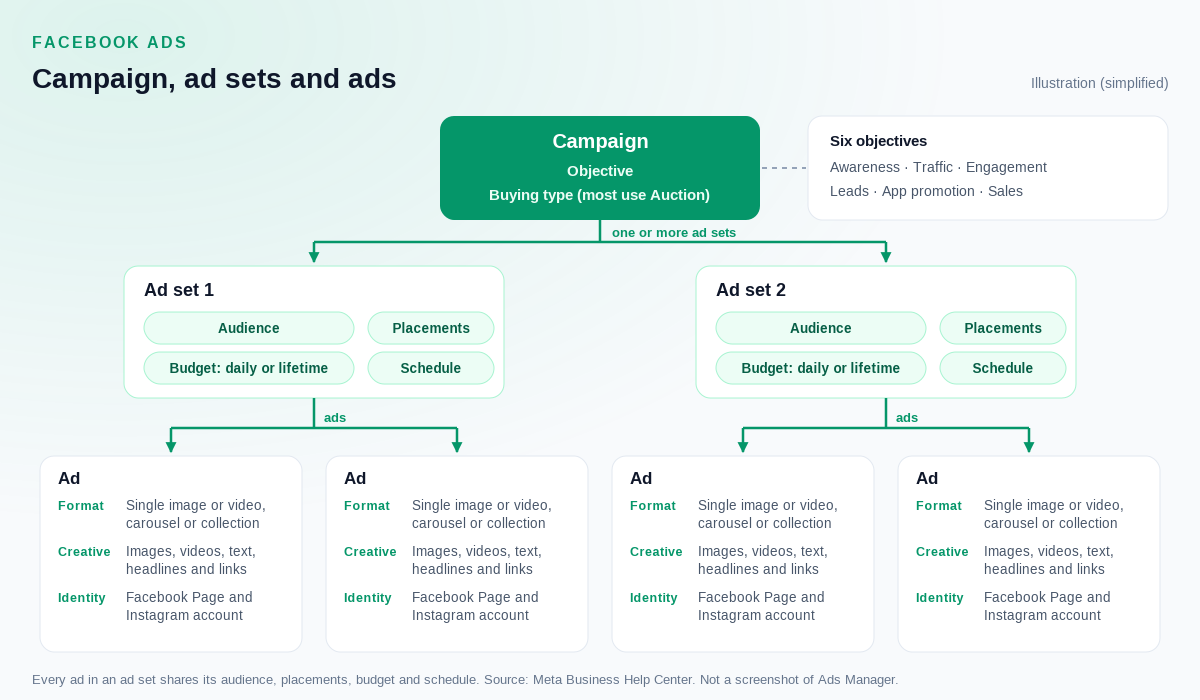
- Campaign: you choose the objective and the buying type; Meta says most advertisers use the Auction buying type. Checked against Meta Business Help Center: What are the advertising levels in Meta Ads Manager?
- Ad set: you define the audience, placements, budget (daily or lifetime) and schedule, and every ad inside the ad set shares those settings. Checked against Meta Business Help Center: What are the advertising levels in Meta Ads Manager?
- Ad: you choose the format (single image or video, carousel or collection), the creative (images, videos, text, headlines and links) and the identity, meaning the Facebook Page and Instagram account that represent your business. Checked against Meta Business Help Center: What are the advertising levels in Meta Ads Manager?
How the ad auction decides who sees your ad
Meta runs an auction every time there is a chance to show someone an ad, and only ads whose target audience includes that person compete. Checked against Meta Business Help Center: About ad auctions The winner is the ad with the highest total value, which combines your bid, Meta’s estimate of how likely the person is to engage or convert, and ad quality, so a more relevant ad can beat ads with higher bids. Checked against Meta Business Help Center: About ad auctions
Ad quality comes from signals such as people hiding the ad and from checks for low-quality traits like withheld information, sensational language and engagement bait. Meta says lower-quality ads tend to cost more and get fewer results; the quality ranking in ad relevance diagnostics shows where yours stands. Checked against Meta Business Help Center: About ad quality for Meta ads
What do you need before you run Facebook ads?
You need a Facebook Page, an ad account, a place to buy the ads and a payment method.
- A Facebook Page. Meta’s advertising-restrictions article says every advertiser needs a Facebook Page before they can advertise. Checked against Meta Business Help Center: About advertising restrictions The exception is Instagram’s in-app boost: if your professional account has no linked Page, you’re prompted to connect one but can tap Skip. Checked against Instagram Help Center: Boost ads on Instagram with Meta Ad Account options
- An ad account in a business portfolio. You create, claim or request access to one from Settings > Ad accounts; a new portfolio can create one ad account, rising to 3 after a campaign delivers and a payment is made. Checked against Meta Business Help Center: Add an ad account to your business portfolio in Meta Business Suite If you haven’t built the portfolio yet, set up Meta Business Manager first.
- A place to buy. Meta names four: your Facebook Page, your Instagram profile, Ads Manager and Meta Business Suite. Checked against Meta Business Help Center: How much it costs to advertise on Meta technologies Meta suggests Meta Business Suite for simple ads and scheduled boosts, and Ads Manager for multi-ad-set campaigns, custom audiences, A/B tests and retargeting. Checked against Meta Business Help Center: When to use Meta Business Suite and when to use Meta Ads Manager
- A payment method, and how billing works. With automatic billing, Meta charges you each time your accrued ad costs reach your payment threshold; the threshold starts small and may rise after successful payments, so you can be charged several times a month, or after your ads have stopped. Checked against Meta Business Help Center: About payment thresholds for Meta ads
- Tagged links. Google Analytics says to always use the utm_source, utm_medium and utm_campaign parameters Checked against Google Analytics Help: URL builders: Collect campaign data with custom URLs, so your analytics can tell ad visits from other traffic. The free UTM generator builds them.
How to run Facebook ads, step by step
Meta’s own desktop steps are: click + Create, choose an objective, set the budget, schedule, audience and placements, add the ad’s identity, destination and creative, preview it and submit it for review; the ad appears once approved. Checked against Meta Business Help Center: How to create Instagram ads in Meta Ads Manager Meta notes a new “recommended setup” is rolling out to the Traffic, Awareness and Engagement objectives, so your screens may differ. The Ads Manager mobile app follows the same order but cannot save drafts. Checked against Meta Business Help Center: How to create an ad using the Meta Ads Manager app
Here is how to advertise on Facebook as seven decisions, each with the rule behind it.
Step 1: Choose one objective
Pick the objective that matches the result you want, because it shapes the rest of the setup. Ads Manager has six: Awareness, Traffic, Engagement, Leads, App promotion and Sales, which replaced older names such as Reach, Video views, Conversions and Catalog sales. Checked against Meta Business Help Center: How to choose an ad objective in Meta Ads Manager If you choose Sales, App promotion or Leads, Ads Manager opens with the Advantage+ setup, which applies AI across the campaign; Meta says manual campaign features are all still available. Checked against Meta Business Help Center: About the Advantage+ campaign experience
Step 2: Declare any Special Ad Category
If the ad is about housing, employment, financial products and services, or social issues, elections or politics, you must say so when you create the campaign. You select Special Ad Categories, the category and the countries in Ads Manager; the old Credit category has been replaced by financial products and services. Checked against Meta Business Help Center: How to choose a Special Ad Category The rules section below covers what changes when you do.
Step 3: Set the budget
Choose a campaign budget or ad set budgets, then daily or lifetime. A campaign budget always uses Advantage+ campaign budget; ad set budgets give you more control over delivery within each ad set. Checked against Meta Business Help Center: About budgets Advantage+ campaign budget moves one central budget to the ad sets with the best opportunities, and Meta says it suits campaigns with at least 2 ad sets. Checked against Meta Business Help Center: About Advantage+ campaign budget
A daily budget is an average over a Sunday-to-Saturday week: Meta may spend up to 75% over it on a good day (a change Meta is introducing gradually), but never more than 175% of it in a day or 7 times it in a week. Checked against Meta Business Help Center: About daily budgets Checked against Meta Business Help Center: About budgets A lifetime budget is the total you’ll spend over the whole run, and Meta suggests it when you don’t want to exceed a set amount. Checked against Meta Business Help Center: About lifetime budgets
Step 4: Describe your audience
Start from your target audience, then either describe it in your own words or browse Meta’s detailed targeting. In the ad set you can type a description so Meta’s AI generates matching demographics, interests and behaviours, or use original detailed targeting to search or browse Demographics, Interests and Behaviors. The options you add are suggestions by default, not hard limits. Checked against Meta Business Help Center: Use detailed targeting To pick interests, find interests for Instagram and Facebook ads with our interest guide.
Step 5: Leave placements broad unless you have a reason
Meta is moving the Leads, App promotion and Sales objectives to Advantage+ placements with no option to pick placements in the ad set; Awareness, Traffic and Engagement campaigns still let you choose. Checked against Meta Business Help Center: About Advantage+ placements The change is rolling out gradually, so your account may still show the choice.
Step 6: Build the ad: format, creative and identity
Pick a format, add the creative and choose the Page and Instagram account the ad runs as. Checked against Meta Business Help Center: What are the advertising levels in Meta Ads Manager? Keep text, logos and key elements inside Meta’s safe zone, clear of the edges on 9:16 Stories, Reels and Feed ads, and leave the bottom 40% of a Reels ad free when it carries a disclaimer. Checked against Meta Business Help Center: About text overlays and the safe zone for ads in Stories and Reels
Ignore the old “20% text” rule: Meta’s current text-overlay guidance sets safe zones and best practices, not a percentage limit. Checked against Meta Business Help Center: About text overlays and the safe zone for ads in Stories and Reels
Step 7: Publish and wait for review
Publish, and Meta reviews the ad automatically before it runs, typically within 24 hours. Checked against Meta Transparency Center: Introduction to the Advertising Standards The review is mainly automated, can cover images, video, text, targeting and the ad’s destination, and its status shows in Ads Manager’s Delivery column. Checked against Meta Business Help Center: About ads in review
Types of Facebook ads and where they appear
The main types of Facebook ads are image, video, carousel and collection ads, and each runs only in the placements that support it.
| Format | What it is | Where it can run |
|---|---|---|
| Image | A single image, or a carousel of two or more images, chosen under Format in Ad setup. Checked against Meta Business Help Center: How to create an image ad in Meta Ads Manager | Depends on the campaign objective. Checked against Meta Business Help Center: About ad placements across Meta technologies |
| Video | A single video, built in Ads Manager or by boosting a Page post with a video. | Facebook Feed, Marketplace, Stories, in-stream reels and search results; the Threads feed; Instagram Feed, Explore, Stories and Reels; Messenger Stories; WhatsApp Status; Audience Network. Checked against Meta Business Help Center: Supported objectives and placements for video ads |
| Carousel | Two or more images or videos in one ad, each card with its own headline, description, link and call to action. | Facebook, Messenger, Instagram and Audience Network. Checked against Meta Business Help Center: About carousel ads across Meta technologies |
| Collection | A cover image or video above a grid of product images; a tap opens a full-screen Instant Experience. | Mobile only: Facebook Feed, Marketplace, Stories and Reels; Instagram Feed, Stories, Reels and Explore home. Checked against Meta Business Help Center: Supported objectives and placement options for collection ads |
Stories and Reels are placements, not formats. Instagram Stories ads sit between people’s organic Stories and can use the Flexible, Single image or video, Carousel or Collection format. Checked against Meta Business Help Center: Create Instagram Stories ads in Meta Ads Manager Reels placements cover Instagram and Facebook Reels, Facebook in-stream reels and banner or video ads shown while people watch Facebook Reels. Checked against Meta Business Help Center: About ad placements across Meta technologies Card limits and examples for every network are in our guide to carousel ads.
Not every format runs everywhere: collection ads don’t run in the Threads feed or Messenger Stories, and carousels in Facebook Reels, Instagram Reels and WhatsApp Status support image cards only. Checked against Meta Business Help Center: Available ad placements and ad formats by ad objectives in Meta Ads Manager Advantage+ placements let Meta look across all its apps for the most cost-effective opportunities, and Meta says that in its own experiment ad sets using it had a lower average cost per action than ad sets using manual placements. Checked against Meta Business Help Center: About Advantage+ placementsVendor's own description Flexible media may also send one image or video to extra placements; it can be on by default and you can turn it off. Checked against Meta Business Help Center: About flexible media in Meta Ads Manager
For shape, Meta recommends 4:5 for single-image ads in Facebook Feed, 1:1 in Instagram Feed and 9:16 for Stories, Status and Reels. Checked against Meta Business Help Center: Best practices for aspect ratios in Meta ads We could not confirm Meta’s pixel dimensions and file limits from its Ads Guide, so we don’t list them here. Checked against Meta Ads Guide (not readable through the reader on 2026-11-21)Not verified Our social media image sizes guide and the aspect ratio calculator help you crop to a ratio.
How much do Facebook ads cost?
Facebook ads cost what you decide to spend: you set the budget, and the auction decides how many results it buys. Meta’s “How much do Meta ads cost?” page publishes no average cost per click, cost per thousand impressions or typical price; it shows estimated reach and results for your budget, bid and targeting before you publish. Checked against Meta Business Help Center: How much do Meta ads cost? We found no Meta-published average, so any “average CPC” you read elsewhere is someone else’s dataset. For what CPC measures and how to work it out from your own results, see what CPC means.
- What you’re charged for. Usually the impressions your ad receives, unless you set another charge when creating it; some places add location fees. Checked against Meta Business Help Center: How Meta charges for ads
- Budget vs bid strategy. The budget controls total spend and the bid strategy controls cost per result. Checked against Meta Business Help Center: How much it costs to advertise on Meta technologies Meta offers spend-based, goal-based and manual bidding. Checked against Meta Business Help Center: About Meta bid strategies With a cost per result goal, Meta recommends a daily budget of at least 5 times the goal. Checked against Meta Business Help Center: Best practices for minimum budgets
- Minimum budget. There is no single figure: minimums vary by country and objective and depend on factors including currency and optimisation, and Ads Manager alerts you if a budget is too low. Checked against Meta Business Help Center: Best practices for minimum budgets Minimums are calculated per day and also apply to lifetime budgets. Checked against Meta Business Help Center: Best practices for minimum budgets For small-business budgets, see our social media marketing playbook for small business.
- Short campaigns. If a campaign runs for less than 7 days, total spend won’t exceed the daily budget multiplied by the number of days. Checked against Meta Business Help Center: About budgets
- Expensive-looking placements. Meta aims for the lowest average cost per result across all placements combined, so switching off a placement that looks expensive can make the whole campaign less efficient. Checked against Meta Business Help Center: How the Meta delivery system works using Advantage+ placements
Boost a post or build a campaign in Ads Manager?
Boost when you want to put money behind a post you already published; build in Ads Manager when you need other objectives, placements or audiences. Meta defines a boosted post as an ad made from an existing Facebook Page or Instagram post, Story or Reel, with fewer targeting and customisation options; Ads Manager adds objectives such as leads, app promotion and sales, more placements and advanced audiences. Checked against Meta Business Help Center: The difference between boosted posts and Meta ads Both routes lost detailed targeting exclusions in 2025, though you can still exclude custom audiences. Checked against Meta Business Help Center: Updates to detailed targeting For the Facebook steps, see how to boost a post on Facebook; for the Instagram side, see how to boost an Instagram post.
Facebook ad rules, review and Special Ad Categories
Every ad must follow Meta’s Community Standards and Advertising Standards, and Meta reviews each one against them. The standards rest on four principles: protecting people from unsafe and discriminatory practices, protecting them from fraud or scams, promoting positive experiences and promoting transparency. Checked against Meta Transparency Center: Introduction to the Advertising Standards
What restarts a review
Editing an ad’s targeting, creative, optimisation or billing event starts a new review; changing the bid, budget or ad set schedule does not. Checked against Meta Business Help Center: About ads in review If you believe an ad was wrongly rejected, Meta’s routes are to request another review in Account Quality or to edit the ad, which is then reviewed as a new one. Checked against Meta Transparency Center: Introduction to the Advertising Standards
What Meta prohibits or restricts
Some products can’t be advertised at all and others need Meta’s written permission. Prohibited examples include tobacco and nicotine products, weapons and ammunition, illicit or recreational drugs, and shocking or excessively violent content. Checked against Meta Transparency Center: Introduction to the Advertising Standards Dating services, online gambling and games, and cryptocurrency trading platforms need prior written permission. Checked against Meta Transparency Center: Introduction to the Advertising Standards Ads for health, weight-loss and cosmetic products or procedures must target people 18 or older. Checked against Meta Transparency Center: Advertising Standards, Health and Wellness
Special Ad Categories
Ads about housing, employment and financial products and services run with fewer audience options. For advertisers based in or reaching the US, and those reaching Canada and certain European countries, Meta limits or removes age, gender, ZIP code, exclusion targeting, lookalike audiences and saved audiences. Checked against Meta Business Help Center: How to Choose a Special Ad Category Financial products and services replaced Credit in October 2024, and from 21 January 2025 US-facing advertisers must select it. Checked against Meta Business Help Center: Special Ad Categories have expanded and now include financial products and services
In select countries, ads about social issues, elections or politics may need authorisation and a “Paid for by” disclaimer, stay in the public Ad Library for seven years, and are disapproved if Meta finds them without the category selected. Checked against Meta Business Help Center: How to choose a Special Ad Category In the European Union, Meta says advertisers can no longer create or edit such ads, in response to the EU’s TTPA regulation. Checked against Meta Business Help Center: How to choose a Special Ad Category
Ads that reach teens
When an audience includes people under 18, detailed targeting, gender, custom and lookalike audiences are all off, and ads with EU, EEA or Swiss locations can’t reach under-18s at all. Checked against Meta Business Help Center: About advertising to teens Advertisers who break the standards can face spend limits, loss of features or loss of the ability to advertise. Checked against Meta Business Help Center: About advertising restrictions
See what other brands are running
The Meta Ad Library is the official way to see other advertisers’ ads: it shows every ad currently active across Meta’s products, plus political and issue ads kept for 7 years. Checked against Facebook Help Center: What is the Meta Ad Library and how do I search it?
Your Meta ads toolkit: targeting, Advantage+ and AI creative
Meta Advantage+ is Meta’s suite of AI products that optimise campaigns in real time and match ads to the people most likely to act. Checked against Meta Business Help Center: About Meta Advantage+ These are the tools you’ll meet first, and where to go deeper.
| Tool | What Meta says it does | Go deeper |
|---|---|---|
| Detailed targeting | Demographics, interests and behaviours you add as audience suggestions, or generate from a description. Checked against Meta Business Help Center: Use detailed targeting | Find interests for Instagram and Facebook ads |
| Advantage+ audience | Meta’s AI finds the audience from signals such as past conversions; Meta reports lower cost per result with it and doesn’t recommend it for retargeting. Checked against Meta Business Help Center: About Advantage+ audienceVendor's own description | Step 4 above |
| Advantage+ creative | Adjusts your images, videos and text into versions people are more likely to interact with; some enhancements are on by default and can be turned off. Checked against Meta Business Help Center: About Advantage+ creative | AI tools for Facebook and Instagram ad creatives |
| Opportunity score | A 0-100 score for how optimised your campaigns are, with recommendations; Meta says it does not reflect or guarantee performance. Checked against Meta Business Help Center: About Meta Ads Manager | Ads Manager |
What changed in 2025 and 2026
Most beginner guides predate these changes, so check them first.
- Advantage+ shopping became Advantage+ sales. Meta announced the rename in February 2025 Checked against Meta Newsroom (Brazil edition, in Portuguese), and the streamlined setup reached advertisers gradually from 29 May 2025. Checked against Meta for Developers blog: Advantage+ Campaign Experience for Sales and App
- Targeting exclusions are gone from Ads Manager and boosts (2025, above).
- Placements by objective: Leads, App promotion and Sales are moving to automatic placements (above).
- “Ad” replaced “Sponsored” as the label on Facebook and Instagram ads. Checked against Meta Business Help Center: About AI info on ads created or edited with generative AI tools
- Threads ads: Meta says that from September 2026 businesses without an Instagram profile can advertise from a Threads profile, rolling out gradually. Checked against Meta Business Help Center: About ads on Threads
- EU political ads stopped under the TTPA regulation (above).
How organic posts and paid ads work together
Test ideas as organic posts first, then put budget behind the ones people react to. A boost is built from a post you already published Checked against Meta Business Help Center: The difference between boosted posts and Meta ads, so a steady stream of organic posts is the raw material for your ads, and the profile an ad sends people to should look active when they arrive. Our Facebook marketing strategy guide covers the organic plan, and how to schedule Facebook posts covers keeping it consistent. For when each one fits across networks, see organic vs paid social media.
Facebook ads FAQ
How much do Facebook ads cost?
You set the budget. Meta runs an auction and usually charges for impressions Checked against Meta Business Help Center: How Meta charges for ads, publishes no single minimum budget (minimums vary by country, currency and objective) Checked against Meta Business Help Center: Best practices for minimum budgets and publishes no average cost per click or per thousand impressions. Checked against Meta Business Help Center: How much do Meta ads cost? See the cost section for budgets, bid strategies and billing.
Do I need a Facebook Page to run Facebook ads?
For ads built in Ads Manager, yes: Meta says every advertiser needs a Facebook Page before they can advertise. Checked against Meta Business Help Center: About advertising restrictions Instagram’s in-app boost flow is the exception, as it lets you skip connecting a Page. Checked against Instagram Help Center: Boost ads on Instagram with Meta Ad Account options
How long do Facebook ads take to get approved?
Meta says ad review starts automatically, relies mainly on automated tools and is typically completed within 24 hours. Checked against Meta Transparency Center: Introduction to the Advertising Standards Editing an ad’s targeting, creative or optimisation starts a new review. Checked against Meta Business Help Center: About ads in review
What is the difference between boosting a post and running a Facebook ad?
A boosted post is an ad made from an existing Facebook or Instagram post, with fewer targeting and customisation options. An ad built in Ads Manager adds more objectives, placements and audience options. Checked against Meta Business Help Center: The difference between boosted posts and Meta ads
What is Meta Advantage+?
Meta Advantage+ is Meta’s suite of AI tools that optimise campaigns in real time Checked against Meta Business Help Center: About Meta Advantage+, including Advantage+ audience, placements, campaign budget and creative. For Sales, App promotion and Leads campaigns, Ads Manager opens with the Advantage+ setup, and manual options remain available. Checked against Meta Business Help Center: About the Advantage+ campaign experience