
TikTok Creator Search Insights: How to Find Video Ideas

Creator Search Insights is a tool inside the TikTok app that shows you what people are searching for on TikTok, so you can make videos for searches that already exist. You open it from the search bar, browse suggested and trending topics, and use the Content gap filter to find searches that don’t have enough good videos yet. Below: each label, read from TikTok’s own pages, and a five-step workflow from topic to posted video.
It’s one of many app features explained in our guide to social media apps, and if you’re new to the app itself, start with how to use TikTok.
Table of Contents
- What is Creator Search Insights?
- How do you open Creator Search Insights?
- How do you read the labels in Creator Search Insights?
- How to turn a search topic into a TikTok video
- Does Creator Search Insights affect Creator Rewards earnings?
- Turn one topic into posts for other networks
- Creator Search Insights: FAQ
What is Creator Search Insights?
Creator Search Insights is TikTok’s list of topics people search for, introduced on 13 March 2024 so creators could make videos people are already looking for. At launch TikTok described topics you could sort by category or “For You”, plus a filter for content-gap topics: searches that come up often but aren’t featured in many videos. Checked against TikTok Newsroom: Get inspired with Creator Search Insights (13 Mar 2024)
What are creator search insights made from? TikTok says the topics come from the behaviour of users on TikTok, are filtered and ranked by popularity and relevance, and are personalised to your content niche and to what your followers search for. Checked against TikTok Creator Academy: Creator Search Insights
How do you open Creator Search Insights?
Search for “Creator Search Insights” in the TikTok app and tap View at the top of the results. These are TikTok’s steps:
In the app:
- In the TikTok app, tap the Search button at the top.
- Search "Creator Search Insights" and tap View at the top of the search results.
Checked against TikTok Help Center: Creator Search Insights.
Why can’t I see Creator Search Insights?
Check where you are first: TikTok’s Creator Academy says the tool can be accessed in English in 40 listed countries, not everywhere. Checked against TikTok Creator Academy: Creator Search Insights The listed countries: United States, Canada, Brazil, Andorra, Argentina, Bolivia, Chile, Colombia, Costa Rica, Dominican Republic, Ecuador, Spain, Guatemala, Honduras, Mexico, Nicaragua, Panama, Peru, Puerto Rico, Paraguay, El Salvador, Uruguay, Great Britain, France, Germany, Ireland, Australia, New Zealand, Singapore, Japan, South Korea, Indonesia, the Philippines, Vietnam, Thailand, Malaysia, Turkey, South Africa, Kenya and Nigeria.
If the tool is missing, check in this order:
- Your country and app language. You need to be in a listed country, using the app in English.
- Your app version. Update TikTok from your app store, then search for the tool again.
- The search itself. Type the full name, “Creator Search Insights”, in the app’s search bar and look for View at the top of the results.
- Your follower count, for one filter. Searches by followers needs more than 1,000 followers. TikTok states no follower minimum for the rest of the tool.
TikTok’s pages give no age, account-type or TikTok Studio web requirement for the tool, so don’t take any such rule on trust. Checked against TikTok Creator Academy: Creator Search Insights (updated 18 Aug 2026) and TikTok Newsroom (13 Mar 2024)Not verified They don’t call it free either: it is built into the app with no fee named on TikTok’s own pages, but it isn’t offered in every country and one filter needs more than 1,000 followers. Checked against TikTok Creator Academy: Creator Search InsightsNot verified Don’t use a VPN or other region workaround to reach it.
How do you read the labels in Creator Search Insights?
Each part of Creator Search Insights answers one question: what to make, what is rising, and where viewers aren’t finding good videos yet. Here is what each label means, from TikTok’s Creator Academy (updated 18 August 2026) and its 2024 launch post:
| Label or section | What it shows |
|---|---|
| Suggested topics | Where the tool opens: topics picked for you |
| Trending | What is rising now |
| Category filters | Trending ideas within a niche |
| Content gap | Searches without sufficient results: too few videos, or plenty of videos but not enough quality ones |
| Searches by followers | What your own followers search for (more than 1,000 followers) |
| Popularity score and Recommended Topic | How popular a topic is (label names from the 2024 launch post) |
| Topic details | Tap a topic: its popularity trend over the past week, related videos and connected search terms |
| AI tips | Suggested video ideas and keywords, with a camera icon to start filming |
Sources for the table: suggested topics, Trending, categories and AI tips Checked against TikTok Creator Academy: Creator Search Insights; content gap Checked against TikTok Creator Academy: Creator Search Insights; Searches by followers Checked against TikTok Help Center: Creator Search Insights; personalisation to your followers’ searches Checked against TikTok Creator Academy: Creator Search Insights; popularity labels Checked against TikTok Newsroom: Get inspired with Creator Search Insights (13 Mar 2024); topic details. Checked against TikTok Creator Academy: Creator Search Insights
Start with Content gap. A topic with almost no videos is an open field; a topic with plenty of weak videos needs a better video, not another one.
Popularity is relative, not a count. TikTok’s pages describe a popularity score, labels and a past-week trend; they never describe a number of searches. Checked against TikTok Creator Academy: Creator Search Insights and TikTok Newsroom (13 Mar 2024)Not verified
Topics don’t last. TikTok says you’ll see between 100 and 500 topics depending on the category, and topics can expire or be replaced by newer, more popular or more relevant ones. Checked against TikTok Creator Academy: Creator Search Insights Make the video while the topic is still listed.
AI suggestions need a check. AI-generated creation topics may also appear on your profile banner, and TikTok says it doesn’t endorse AI outputs and can’t guarantee their accuracy. Checked against TikTok Creator Academy: Creator Search Insights To give feedback, press and hold a topic and tap Flag; banner topics have a Feedback option with “Not interested” or “Report”. Checked against TikTok Creator Academy: Creator Search Insights
How to turn a search topic into a TikTok video
Pick a topic in Creator Search Insights, build the video around the exact search term, then check in your analytics whether search brought viewers in. Steps 1 and 5 use TikTok’s own tools; steps 2 to 4 are our suggested workflow.
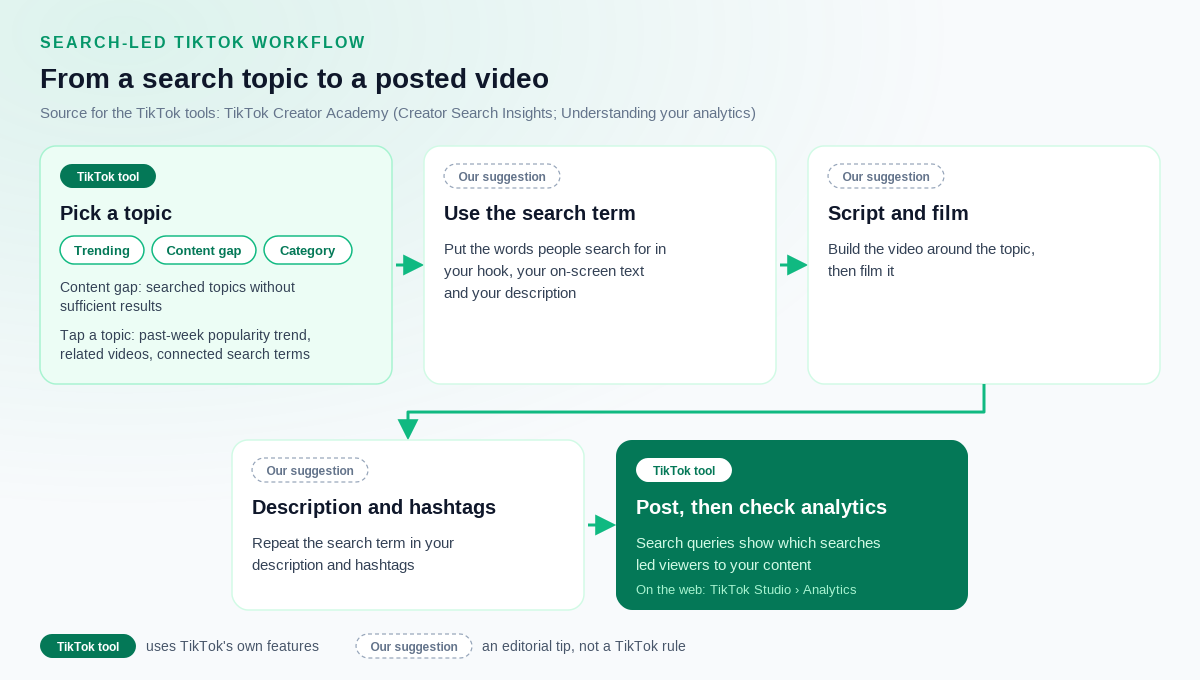
- Pick a topic. Start in Trending or Content gap, filter by your category, and tap the topic to see its past-week trend, related videos and connected search terms. Skip anything you can’t make well.
- Use the search term word for word. Say it in the hook, put it in the on-screen text and repeat it in the description, so the video matches what people typed. Our guide to TikTok SEO covers where words count.
- Script and film. Answer the search in the first seconds and cover what the weak videos on that topic miss. Then edit the video in TikTok with its built-in tools. Short of an angle? Our list of TikTok video ideas pairs each idea with an opening line.
- Write the description and hashtags. Lead with the search term, then add a few related tags; the TikTok hashtag generator gives you a starting set.
- Post, then check Search queries. TikTok’s analytics show a Traffic source breakdown and the Search queries that led viewers to your content. Here is where to find them:
In the app:
- Go to your profile, tap the menu bars, select TikTok Studio, find Analytics and click View all.
On a computer:
- In TikTok Studio on the web, head to the Analytics tab on the left side of your screen.
Checked against TikTok Creator Academy: Understanding your analytics.
TikTok’s Search Analytics also reports search views, search view percentage, search impressions, average click-through rate and average search ranking for your content. Checked against TikTok Creator Academy: Creator Search Insights If a video ranks for a term, make the next one on a connected search term from the same topic.
Can Creator Search Insights make a video go viral? No tool can promise that. What it gives you is demand you can see: you’re answering a search people already make, which is a steadier start than guessing. For the wider picture, read how to go viral.
Does Creator Search Insights affect Creator Rewards earnings?
Only indirectly: TikTok says search value, the value given to content that covers in-demand search topics, is one of four key areas in its Creator Rewards Program model. TikTok’s 2024 launch post also said that making content on in-demand search topics increases a video’s search value. Checked against TikTok Creator Academy: Creator Search Insights (and TikTok Newsroom, 13 Mar 2024)
TikTok’s newsroom, Help Center and Creator Academy pages describe no separate “Creator Search Insights incentive”; on those pages the only official link between the tool and earnings is that search value. Checked against TikTok Creator Academy: Creator Search Insights and TikTok Newsroom (13 Mar 2024)Not verified
Search value only counts if you’re in the program, and the program has its own rules. TikTok requires a Personal Account, an age of at least 18 (19 in South Korea), at least 10,000 followers and 100,000 video views in the last 30 days. Checked against TikTok Help Center: Creator Rewards Program Rewarded videos must be original and over 1 minute long, with at least 1,000 For You feed views, and Duets, Stitches, Photo Mode posts and ads don’t count. Checked against TikTok Creator Academy: Creator Rewards Program The Creator Academy lists the program as open in the United States, United Kingdom, Germany, Japan, South Korea, France, Mexico and Brazil. Checked against TikTok Creator Academy: Creator Rewards Program Our guide to TikTok monetization requirements covers every program side by side.
Turn one topic into posts for other networks
Creator Search Insights finds the topic, and that research stays in TikTok. Can Outfeed find trending topics for you?
For TikTok’s other research site, see our guide to the TikTok Creative Center. Once you have the topic and a finished video, can Outfeed help with the post text?
Keep the search term near the start of the TikTok caption, because that is the phrase TikTok users typed into search.
Creator Search Insights: FAQ
What is Creator Search Insights?
A TikTok tool, introduced on 13 March 2024, that shows creators the topics people search for on TikTok. It has suggested topics, a Trending tab, category filters and a Content gap filter for searches that don’t have enough good videos; TikTok’s 2024 launch post also described a popularity score.
How do I access Creator Search Insights on TikTok?
Search for “Creator Search Insights” in the TikTok app and tap View. TikTok’s Creator Academy says the tool is available in English in 40 listed countries, and its Searches by followers filter needs more than 1,000 followers.
What does content gap mean in Creator Search Insights?
TikTok says the Content gap filter shows topics people search for that don’t have sufficient results. That can mean there aren’t enough videos on the topic, or there are plenty of videos but not enough good ones.
Does Creator Search Insights help with the Creator Rewards Program?
Indirectly. TikTok says its Creator Rewards Program model weighs four areas, one of which is search value, a value given to content that covers in-demand search topics. TikTok’s pages describe no separate Creator Search Insights incentive programme, and the Rewards Program has its own eligibility rules.
Does Creator Search Insights show how many people searched?
TikTok doesn’t describe a count of searches. Its 2024 launch post described a popularity score and a Recommended Topic label, and tapping a topic now shows its popularity trend over the past week.