
Content Repurposing: Turn One Idea Into a Week of Posts
Content repurposing is turning one piece of content you made, such as a blog post, a long video or a podcast episode, into new formats for other networks: a carousel, a short video, a text post, a Pin. Done well, one idea becomes a week of posts.
Below: a five-step workflow, a format map for nine networks with each format’s specs, an illustrative one-week plan, and the originality rules that decide whether reworked posts get recommended. It’s one part of day-to-day social media management.
Table of Contents
- What is content repurposing?
- Why repurpose content for social media
- How to repurpose content: a 5-step workflow
- What to repurpose into what: a format map by network
- Repurposing rules on each network
- Content repurposing tools, including AI
- Content repurposing FAQ
What is content repurposing?
Repurposing content means giving your own work a new form for a new place, with new editing and new text, not just sharing it again. Cambridge defines “repurpose” as to find a new use for an idea, product or building Checked against Cambridge Dictionary: repurpose; here, the idea is your post, video or talk, and the new use is a format that suits each network.
Two neighbours get confused with it:
- Crossposting shares the same post to a second app. In the Instagram app for Android and iPhone you can tap “Also share on…” before posting and toggle on a Facebook Page Checked against Instagram Help Center: Share your Instagram posts to Facebook, or switch on automatic sharing of all future Instagram posts to Facebook in Accounts Center. Checked against Instagram Help Center: Share your Instagram posts to Facebook Meta documents which formats cross-post where across Facebook, Instagram and Threads. Checked against Meta Business Help Center: About cross-posting to Facebook, Instagram and Threads in Meta Business Suite Our guide on how to share a Facebook post to Instagram walks through it.
- Reposting shares someone else’s post: curation, which the originality rules below treat very differently.
| Repurposing | Crossposting | Reposting | |
|---|---|---|---|
| Whose content | Yours | Yours | Someone else’s |
| What changes | Format, length, text and editing for each network | Nothing, or very little | Nothing; the original creator is credited |
| Best for | Getting a week of native posts from one idea | Saving time on Meta’s own apps | Spotlighting others’ work with their credit |
Why repurpose content for social media
Repurposing gets more from work you already made, and networks reward original work, so reworking your own material is the safe way to post more often. Facebook says Pages and profiles get the greatest distribution when they consist mostly of original content you filmed or created, and that you can share the same content across any of your own Pages or profiles. Checked against Facebook for Creators blog: Combating unoriginal content (14 Jul 2025)
Instagram said in April 2026 that 75% of recommendations in the U.S. now come from original posts. Checked against Instagram for Creators blog: Rewarding original creators on Instagram (30 Apr 2026) Pinterest advises creating Pins frequently and consistently, aiming for original content weekly, and publishing your own Pins rather than only saving other people’s. Checked against Pinterest Business Help: Pin performance and distribution
Repurposing content for social media lets you post more often while every post stays yours.
How to repurpose content: a 5-step workflow
Pick one strong source, pull out its standalone points, map each point to a format, rewrite it natively for each network, then schedule the set across the week. This content repurposing strategy works for a team of one and slots into a wider social media workflow.
- Pick a source worth reusing. Something you made that will still be true in six months: a how-to, a webinar, an interview. Your content pillars say which topics deserve it.
- Pull out 5 to 10 standalone points. A tip, a quote, a mistake, a before-and-after, each clear without the original.
- Map each point to a format. A list becomes a carousel, a tip a short video, an opinion a text post (see the format map).
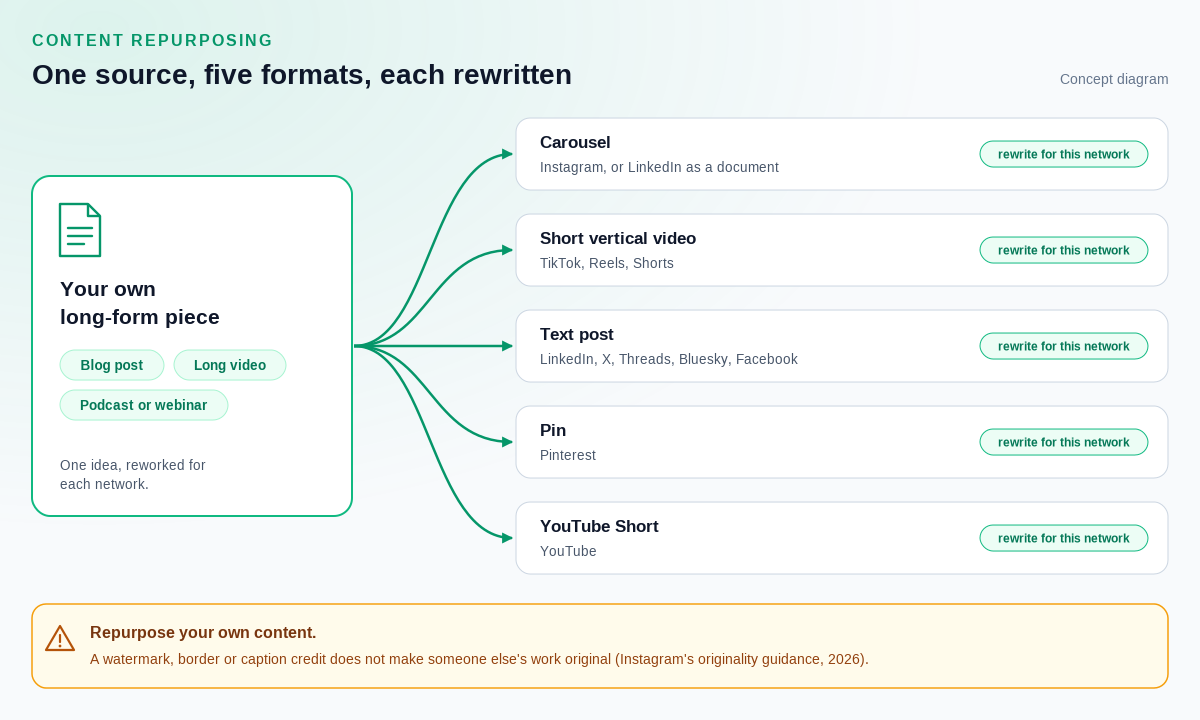
- Rewrite natively for each network. Write each version for the network’s limits and habits. Facebook’s 2025 creator guidance, for example, says captions with no links, minimal capital letters and no more than five hashtags perform best, and advises against very short videos that offer viewers little value. Checked against Facebook for Creators blog: Combating unoriginal content (14 Jul 2025)
- Schedule across the week and log what you reused. Plan the pieces in your social media planner, noting each one’s source. Running several brands? See how to manage multiple social media accounts.
Steps 4 and 5 are where a scheduler helps. What Outfeed AI, which publishes this guide, does here:
What to repurpose into what: a format map by network
Articles become carousels and text posts, long videos become short vertical clips, and audio becomes quotes and short videos. This is a general map of formats, not a list of what any one tool publishes.
| Source you made | Turn it into | Networks |
|---|---|---|
| Blog post or article | Carousel of the key steps; text post with one takeaway; a Pin pointing to the article | Instagram, LinkedIn (as a document), TikTok (photo post); LinkedIn, X, Threads, Bluesky, Facebook; Pinterest |
| Long video or webinar | Short vertical clips of single moments | TikTok, Instagram Reels, YouTube Shorts, Facebook |
| Podcast or interview | Quote posts; short video of the strongest answer | X, Threads, Bluesky, LinkedIn; TikTok, Instagram, YouTube Shorts |
| Newsletter | One idea per text post; a list as a carousel | LinkedIn, X, Threads, Bluesky, Facebook; Instagram, LinkedIn |
Each destination has limits, from each network’s own documentation:
| Destination | What to fit |
|---|---|
| Instagram carousel | Up to 20 items; ratios 4:5, 1:1, 3:4 and 1.91:1 |
| Instagram Reel | 9:16 vertical; up to 20 min |
| TikTok video | 9:16 vertical; uploads up to 60 min |
| TikTok photo post | Up to 35 photos; description up to 4,000 characters |
| LinkedIn post | Text up to 3,000 characters |
| LinkedIn document | PDF, PPT, PPTX, DOC and DOCX, up to 100 MB |
| X post | Up to 280 weighted characters |
| Threads post | Up to 500 characters |
| Facebook reel | File format MP4 (recommended) |
| YouTube Short | 9:16 and 1:1; up to 3 min |
| Pinterest Pin | 2:3, or 1000 x 1500 pixels |
| Bluesky post | Up to 300 characters (graphemes) |
One caption rarely fits every limit. For short video, Instagram Reels vs TikTok compares the two formats.
An illustrative one-week plan from one source
One blog post could become seven days of posts like this. Illustrative only, with no results implied.
| Day | Piece | Network |
|---|---|---|
| Monday | Text post with the main takeaway | |
| Tuesday | Carousel of the five steps | |
| Wednesday | Short video on step one | TikTok, then Reels and Shorts from the original file |
| Thursday | One tip as a short text post | X, Threads, Bluesky |
| Friday | Pin with the title image | |
| Saturday | Question post: which step is hardest? | |
| Sunday | Log what you posted and what people asked | Your sheet |
Repurposing rules on each network: originality and reposts
The rules below target reposting other people’s work with nothing new added, not reworking your own; Facebook says outright that you can share the same content across your own Pages and profiles. The habit that keeps you on the right side of all of them: repurpose your own content only, and edit it meaningfully for each place.
| Network | What its rules say |
|---|---|
| On 30 April 2026 Instagram extended the originality protections it introduced for Reels in 2024 to photos and carousels: accounts that mainly post unoriginal content are no longer shown in recommendations, though followers still see them. Checked against Instagram for Creators blog: Rewarding original creators on Instagram (30 Apr 2026) A border, watermark, subtitles or caption credit on someone else’s work does not make it original. Checked against Instagram for Creators blog: Rewarding original creators on Instagram (30 Apr 2026) | |
| On 14 July 2025 Facebook said accounts that repeatedly reuse someone else’s videos, photos or text posts without permission or meaningful enhancement lose monetization for a period and get reduced distribution. Checked against Facebook for Creators blog: Combating unoriginal content (14 Jul 2025) Stitching clips or adding a watermark is not enough; avoid visible third-party watermarks. Checked against Facebook for Creators blog: Combating unoriginal content (14 Jul 2025) | |
| TikTok | Copied content, content largely repurposed without creative edits, low-value compilations and videos with someone else’s visible watermark count as unoriginal and may be removed from the For You feed. Checked against TikTok Creator Academy: Understanding TikTok's Originality Policy |
| YouTube | Reused content without significant original commentary, modification or value can remove monetization from the whole channel, even with the original creator’s permission. Checked against YouTube Help: YouTube channel monetization policies |
| Pinterest asks for original content weekly and for your own Pins, not only saves of other people’s. Checked against Pinterest Business Help: Pin performance and distribution | |
| LinkedIn’s Professional Community Policies treat “gratuitously repetitive” content as spam and ask members to make the effort to create original content. Checked against LinkedIn: Professional Community Policies | |
| X | X’s automation rules ban duplicate or substantially similar posts, on one account or across several accounts you run. Checked against X Help Center: Automation rulesArchived copy, 1 October 2026 View the archived copy |
We have no official originality rule on record for Threads or Bluesky, so none is listed. Details worth knowing:
- Instagram recovery. An aggregator account that lost recommendation eligibility can regain it once a significant share of its posts over a rolling 30-day period are original, and it can check its standing and appeal in Account Status. Checked against Instagram for Creators blog: Rewarding original creators on Instagram (30 Apr 2026) Instagram’s Recommendations Guidelines already kept unoriginal content repurposed with only minor edits out of recommendations. Checked against Instagram Help Center: Recommendations on Instagram
- Featuring others’ work on Instagram. Use collabs, remix, the paid partnership label, Story shares or reposts so the creator is credited. Checked against Instagram for Creators blog: Rewarding original creators on Instagram (30 Apr 2026) Originality rules are separate from intellectual property: you are responsible for getting permission before using someone else’s work. Checked against Instagram for Creators blog: Rewarding original creators on Instagram (30 Apr 2026)
- Facebook enforcement. Facebook said that in the first half of 2025 it took action on around 500,000 accounts engaged in spammy behaviour or fake engagement and took down around 10 million profiles impersonating large content producers. Checked against Facebook for Creators blog: Combating unoriginal content (14 Jul 2025) In July 2025 it also said it was testing links on duplicate videos that point to the original. Checked against Facebook for Creators blog: Combating unoriginal content (14 Jul 2025)
- TikTok’s guidelines. Content is ineligible for the For You feed if it includes unoriginal or reused material without anything new. Checked against TikTok Community Guidelines: Integrity and Authenticity (effective 24 September 2026)
- YouTube’s 2025 rename. On 15 July 2025 YouTube renamed its “repetitious content” policy to “inauthentic content” to cover repetitive or mass-produced content, and said its reused content policy was unchanged. Checked against YouTube Help: YouTube channel monetization policies (changelog, 15 Jul 2025)
Watermarks: to reuse your own TikTok or Reels video elsewhere, export the clean file from your editor or camera roll, not a watermarked copy, and never use downloaders on other people’s posts.
On your own website: is repurposing bad for SEO?
No: reworking your own content is not what Google’s spam rules target. Google says some duplicate content on a site is normal and not a violation of its spam policies; it picks one URL from a set of duplicates and usually shows that one. Checked against Google Search Central: What is canonicalization (last updated 2026-08-20) What its spam policies call scraping is republishing content from other sites without adding original content or value. Checked against Google Search Central: Spam policies for Google web search (last updated 2026-11-23) If you republish a whole article on another site, Google’s Publisher Center guidance says the other site should add a noindex tag to the copy, and that a canonical link is not recommended for syndication partners. Checked against Google Publisher Center Help: Avoid article duplication in Google News
Content repurposing tools, including AI
A content repurposing tool cuts long media into short pieces, drafts text versions for each network, or publishes the set on a schedule. Listed alphabetically from each vendor’s own pages; “fits if” is our reading, not a ranking.
| Tool | What the vendor says it does | Fits if |
|---|---|---|
| Canva | Magic Studio puts Canva’s AI tools in one place, including Magic Resize for resizing a design to other formats and Magic Write. Checked against Canva: Magic Studio (Internet Archive capture)Archived copy, 10 April 2026 View the archived copy Scheduling from Canva’s Content Planner or editor is available on Pro, Business, Education and Nonprofits plans, so the Free plan cannot schedule. Checked against Canva Help Centre: Schedule posts on Facebook, Pinterest, and moreVendor's own description | You already design your carousels and Pins in Canva |
| Descript | Text-based editing of audio and video from a transcript in 25 languages, its AI co-editor Underlord, and tools such as Studio Sound, Remove Filler Words and Create Clips. Checked against Descript: PricingVendor's own description | Your source is a podcast or talking-head video |
| HubSpot | Its social tool can share blog content automatically as it is published, and an AI social post generator (which HubSpot labels beta) drafts posts for LinkedIn, Facebook, Instagram, TikTok, Reddit and X. Checked against HubSpot: Social media management softwareVendor's own description Content Hub combines AI content creation with a CMS to create, repurpose and manage content. Checked against HubSpot: Content HubVendor's own description | Your blog already runs on HubSpot |
| OpusClip | Turns long footage into short clips with animated captions and AI reframing for vertical formats, and can publish the clips. Checked against OpusClip: homepageVendor's own description | You have long videos you own the rights to |
| Postiz | Lists monthly allowances of AI images, AI videos and minutes of AI video clipping on each paid plan. Checked against Postiz: PricingVendor's own description | You want clipping and scheduling in one paid plan |
Use clipping tools only on video you made or have rights to.
AI content repurposing works best as a first draft. AI can shorten, reformat and draft a version for each network, but it can’t make the result original, and it can be wrong: OpenAI says ChatGPT can produce incorrect or misleading answers while sounding confident, including fabricated quotes and citations, so check anything important against a reliable source. Checked against OpenAI Help Center: Does ChatGPT tell the truth? Add your own edit and point of view. For the wider category, see AI content creation tools.
When your versions are written, try Outfeed AI to schedule your repurposed posts.
Content repurposing FAQ
What is content repurposing?
Content repurposing is turning one piece of content you made, such as a blog post, video or podcast, into new formats for other channels, for example a carousel, a short video and a text post, instead of creating each from scratch.
Is repurposing content the same as reposting or crossposting?
No. Crossposting shares the same post to a second app, and reposting shares someone else’s post. Repurposing reworks your own content into a new format that suits each network, with new text and editing.
Does Instagram penalise reposted content?
Instagram no longer recommends accounts that mainly post unoriginal content, though their followers still see them. Since 30 April 2026 this covers photos and carousels as well as Reels, and adding a border, watermark, subtitles or a caption credit does not make someone else’s work original.
Can you post the same video on TikTok, Instagram Reels and YouTube Shorts?
You can reuse your own video, but upload the original file rather than a copy with another app’s watermark, and edit it for each network. TikTok treats videos with someone else’s visible watermark as unoriginal, and Facebook advises avoiding visible third-party watermarks.
Can AI repurpose content for you?
AI can shorten, reformat and draft a version of your content for each network, but you still need to check facts and add your own editing and point of view. The tools section lists what each kind of tool does.