
Social Media Workflow: From Idea to Published Post

A social media workflow is the fixed order of steps a post goes through from idea to published, with one owner for each step: who drafts it, who approves it and when it goes out. Without one, posts wait in someone’s inbox and nobody knows whose turn it is.
This guide gives a copyable stage table, how a content approval workflow works and what each tool’s approvals actually do, three worked workflows (solo, in-house team and agency) and ways to speed the whole thing up. It covers one part of social media management: getting posts out the door.
Table of Contents
- What is a social media workflow?
- The stages of a content workflow, with owners
- How does a content approval workflow work?
- Social media workflow examples: solo, in-house team and agency
- Content workflow management tools
- How to speed up your social media workflow
- Social media workflow FAQ
What is a social media workflow?
A social media workflow is the order of stages a post moves through, from idea to published post, with a named owner and a finish line for each stage. The word itself is general: Cambridge defines workflow as the way a particular type of work is organized, or the order of the stages in a particular work process. Checked against Cambridge Dictionary: workflow
Applied to social media, that means writing down three things for every stage: who owns it, what has to be true before it starts, and what “done” looks like. A team of one needs this too; it just has a shorter list of names.
The stages of a content workflow, with owners
A content workflow can be written as seven stages: idea, brief, draft, review and approval, schedule, publish and learn. The flow is the same for a team of one and a team of ten; what changes is how many people hold the stages.
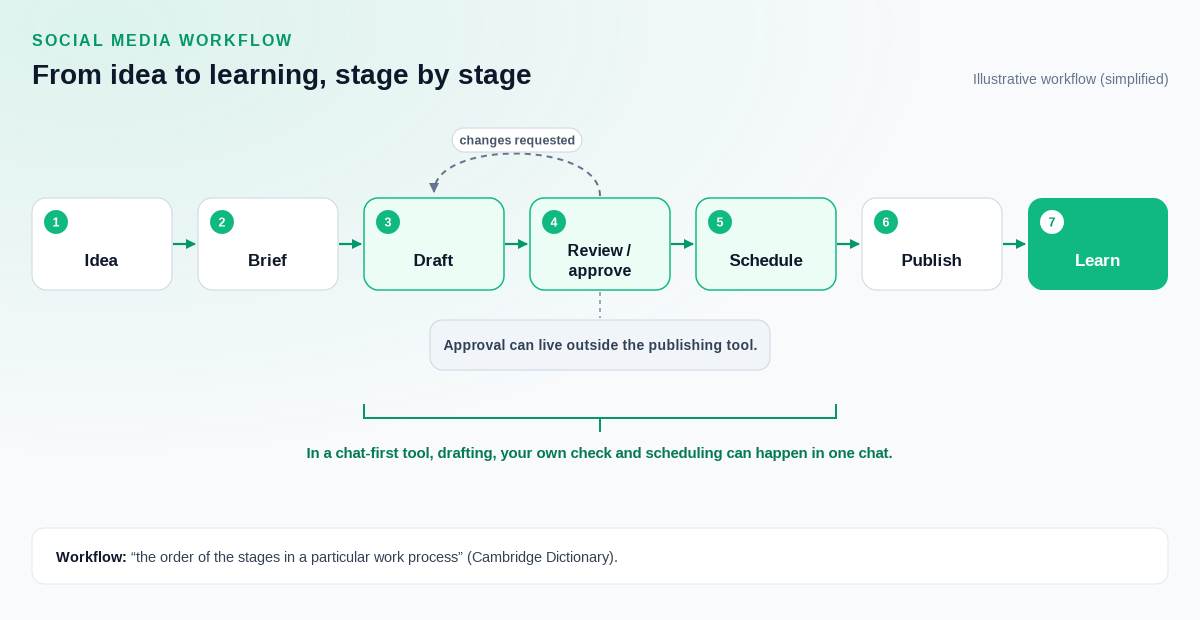
Copy this table into your own document and replace the owners with names. For who usually holds each role, see who does what on a social media team.
| Stage | Owner | Starts when | Done when |
|---|---|---|---|
| Idea | Anyone; the manager decides | Someone logs an idea in the shared list | It has a date and a network on the calendar |
| Brief | Manager or strategist | The idea is accepted for a date | Goal, audience, networks, format, assets and deadline are written down |
| Draft | Content creator | The brief is agreed | Copy and media for each network are attached to the calendar entry |
| Review and approve | The named approver(s) | The draft is marked ready | Approved, or sent back to Draft with the changes listed |
| Schedule | Coordinator | The post is approved | It is scheduled for an exact time on each network |
| Publish | The scheduler, watched by the coordinator | The scheduled time arrives | It is live on each network and any failure is re-sent |
| Learn (report) | Manager or analyst | About a week after publishing | One note on what to repeat or change goes into the next brief |
Template (our editorial example), not a standard.
The Learn stage is the reporting workflow: on a schedule, someone pulls each network’s numbers, compares them with the goal in the brief, and writes down what to repeat or change, so the report feeds the next round of ideas.
The calendar is where the stages meet. MarketingProfs defines an editorial calendar as a strategic tool content marketers use to plan and organize content creation and distribution, setting out the topics, formats and publishing dates of all planned content. Checked against MarketingProfs: What is an Editorial Calendar? (FAQ)Press report In this guide we use “editorial calendar” and “content calendar” for the same thing. For how to set one up, see how a content calendar works, or start from our free content calendar template.
How does a content approval workflow work?
A content approval workflow decides who signs off on a post, in what order, by when, and what happens when they say no. It sits between Draft and Schedule, and without written rules it’s a stage where posts can stall.
There are three common levels:
- Single approver: one person, usually the manager, approves everything. Simple and fast, as long as that person is reachable.
- Multi-step: a post passes two or more reviewers in order, for example the manager, then legal for claims or offers. Sprout Social, for one, says its Message Approval Workflows on the Professional and Advanced plans can require “Any” or “All” of a step’s reviewers to sign off. Checked against Sprout Social Help Center: Message Approval WorkflowsVendor's own description
- External approver: a client or stakeholder who doesn’t use your tool approves by email or link. Sprout Social says people without a Sprout account can approve or reject content by email on its Advanced plan only, up to three per account at no extra cost. Checked against Sprout Social Help Center: How do I enable the External Approvers workflow?Vendor's own description
Whichever level you pick, write four rules down: which kinds of post need approval, who approves each kind, how fast they must reply, and what happens on a rejection (back to Draft with notes, never a silent edit). The rules for what staff may post at all belong in a social media policy.
Where approvals sit in each tool, by plan
Approval features are almost always tied to a plan, so check the plan, not just the tool. The table lists what each vendor’s own pricing or help pages say, in alphabetical order. It’s not a ranking.
| Tool | Where approvals are | Related team features the vendor lists |
|---|---|---|
| Agorapulse | Simple approval workflows; multi-step approval workflows on its Custom plan | A unified content calendar; shared calendars capped at five on one tier and unlimited higher up Checked against Agorapulse: Pricing PlansVendor's own description |
| Buffer | Content approval workflows on the Team plan | Unlimited team members and access levels on Team; Free and Essentials include one user Checked against Buffer: PricingVendor's own description |
| Hootsuite | Post approval workflows on Advanced and Enterprise only, not Standard or Professional | Internal comments and suspending scheduled posts, on the same plans Checked against Hootsuite: Plans, Prices, and FeaturesVendor's own description |
| Later | Approval requests on Growth and Scale, not Starter | Post comments, calendar notes and share-by-link feedback from people without a Later account, on the same plans Checked against Later: PricingVendor's own description |
| Loomly | Custom roles and workflows on Beyond | Starter covers 3 users; Beyond has unlimited users Checked against Loomly: Pricing & PlansVendor's own description |
| Pallyy | Approvals from Pro; not on Pallyy Free | Free also excludes the shared calendar Checked against Pallyy Help: Pallyy FreeVendor's own description |
| Planable | Each workspace can have its own approval flow | Post version history kept for 1 week, 30 days or without limit, by plan Checked against Planable: PricingVendor's own description |
| Publer | Collaboration and approval workflows when you add members | Priced by social accounts and additional members Checked against Publer: PlansVendor's own description |
| SocialBee | Post approval on the Accelerate plan | Pro adds up to 3 users per workspace across 5 workspaces Checked against SocialBee: PricingVendor's own description |
| Sprout Social | Message Approval Workflows on Professional and Advanced, multi-step and multi-user | Messages awaiting approval appear in Publishing under the Calendar, Drafts and Needs Approval tabs Checked against Sprout Social Help Center: Message Approval WorkflowsVendor's own description |
If none of these fits your budget, an approval stage can live outside the publishing tool: a “Ready for review” column on a task board, a comment thread in a shared document, or a weekly sign-off meeting. What matters is that the rule is written down and that nothing moves to Schedule until it’s met.
Social media workflow examples: solo, in-house team and agency
The same seven stages work for a single person, an in-house team and an agency; what changes is who holds each one and where sign-off comes from. The three tables below are illustrative examples of a social media management workflow, not benchmarks.
Solo: one person, one weekly batch
For a team of one, approval is a self-check, and drafting, review and scheduling can happen in one sitting.
| Stage | What happens |
|---|---|
| Idea and brief | Keep one running list of ideas; on Monday pick the week’s posts and write a one-line goal for each |
| Draft and review | Write the week’s captions in one sitting, then reread them the next morning against a short checklist: facts, links, tone, disclosures |
| Schedule and publish | Set an exact time for each post, then check each one went out |
| Learn | Once a month, check each network’s own analytics and note one thing to repeat |
In-house team: one reviewer before scheduling
| Stage | Owner | Rule |
|---|---|---|
| Brief | Manager | Next week’s briefs ready by Wednesday |
| Draft | Content creator | Drafts on the calendar by Thursday noon |
| Review | Manager; legal for claims, offers or regulated topics | Reply within one working day |
| Schedule | Coordinator | Everything approved is scheduled by Friday |
| Learn | Manager | A 30-minute review every two weeks |
Agency: client sign-off per client
| Stage | Owner | Rule |
|---|---|---|
| Brief | Account manager | Monthly plan agreed with each client |
| Draft | Creators | One workspace or calendar per client, so posts never cross |
| Internal review | Account lead | Before anything goes to the client |
| Client sign-off | One named approver per client | A fixed weekly cut-off; the contract says what happens if they don’t reply |
| Schedule | Coordinator | Only approved posts are scheduled |
| Learn | Account manager | A monthly summary for the client |
Keeping clients apart is most of the work. Our guide to running several accounts or clients covers naming, access and calendars for that setup.
Content workflow management tools
You can run content workflow management with three kinds of tool: a calendar or spreadsheet, a task board for briefs and reviews, and a scheduler that publishes. Many teams use one of each; some suites cover two or three.
- Spreadsheet or calendar template: the simplest shared view of what goes out when. Our free content calendar template is a starting point.
- Task boards: Trello organizes to-dos with an Inbox, Boards for tracking work from to-dos to done, and a Planner. Checked against Trello home pageVendor's own description Asana describes itself as a work management platform where people and AI agents run workflows on the same plan. Checked against Asana: ProductVendor's own description Notion describes itself as a workspace where teams capture knowledge in one system of record, find answers with AI and automate tasks with agents. Checked against Notion: ProductVendor's own description
- Meta Business Suite: its Planner is a week or month calendar of published and scheduled posts, stories, reels and ads, filterable by content type and by destination. Checked against Meta Business Help Center: Use Planner in Meta Business Suite on desktop For Facebook Page posts, Meta publishes a scheduling window of 20 minutes to 29 days ahead; it publishes no window for Instagram content scheduled in the Suite. Checked against Facebook Help Center: Schedule a post and manage scheduled posts for your Facebook Page
- A scheduler: a tool that holds approved posts and publishes them at the time you set, across networks. See how to schedule social media posts and our roundup of social media planner tools.
How to speed up your social media workflow
To speed up a workflow, batch similar work, reuse the same brief and checklist every week, and write one main version of a post before adapting it per network. Time each stage for a few weeks first; the stage where posts wait longest is the one to fix.
Batch by the week
Write a week of captions in one sitting and schedule them together, instead of starting from a blank page every day. Scheduling a batch is quicker when the tool lays posts out on a pattern. In Outfeed, for example:
Reuse briefs and checklists
Keep one brief template and one review checklist (facts, links, tone, disclosures, alt text). A reviewer who checks against the same list every week answers faster, and a creator who sees it before drafting needs fewer rounds.
Write one main version, then adapt
Draft the main caption once, then adjust length, hashtags and links for each network. That keeps the message consistent and makes review faster, because the approver reads one idea, not seven.
Where Outfeed fits in the workflow
Here is what Outfeed AI, which publishes this guide, does in the Draft, Schedule and Publish stages.
If your workflow needs a second reviewer, keep that stage outside the tool, before the post is scheduled:
For a walk-through, see how a chat-first workflow runs in Outfeed.
Try Outfeed AI for drafting and scheduling your posts
Social media workflow FAQ
What are the steps of a social media workflow?
Idea, brief, draft, review or approval, scheduling, publishing and a short review of what worked, each with one owner. The stage table gives a start and finish line for each.
How do you set up a social media content approval process?
Decide who approves which kind of post, in what order, how fast they must respond and what happens on a rejection, then put those rules where drafts live. If your tool has approvals, they’re usually tied to a plan; see the approvals table.
What tools do you need to manage a social media workflow?
A shared calendar or spreadsheet, a task board for briefs and a scheduler. Approval features differ by tool and plan.
How do agencies manage social media workflows for multiple clients?
One workspace or calendar per client, one named approver per client and a fixed weekly cut-off for sign-off before posts are scheduled. See the agency example.
How do you improve a social media workflow?
Time each stage for a few weeks, remove the step where posts wait longest, and batch similar work, such as writing a week of captions in one sitting.