
What Is Discord Used For? Servers, Channels and Calls
Discord is a communication platform where people talk by text, voice and video in communities called servers. What is Discord used for? Mostly group conversation: friends, gamers, study groups, clubs and creator communities each get a server of their own. To compare it with other networks, see our list of social media apps.
Table of Contents
- What is Discord used for?
- How does Discord work? Servers, channels, roles and DMs
- Is Discord social media?
- Is Discord free, and what does Nitro add?
- How do creators and brands use Discord?
- Is Discord safe? Age rules and parent tools
- FAQ
What is Discord used for?
Discord is used for group conversation: friends, gamers, study groups, clubs and creator communities talk there by text, voice and video, each group in its own server. Discord’s Beginner’s Guide describes it as a communication platform where you can join or create communities organised around topics, interests or gaming groups. Checked against Discord Support: Beginner's Guide to Discord
Discord describes itself as the communications platform that lets you build connections around playing games through voice, video and text, and its company timeline lists a May 2015 launch. Checked against Discord: Company (Our Mission and Story)Vendor's own description Its home page widens the pitch: Discord says it is “great for playing games and chilling with friends, or even building a worldwide community”. Checked against Discord: home pageVendor's own description
What is the Discord app used for day to day? These are the uses Discord’s own pages name, and the feature that serves each:
| What people use it for | Discord feature that serves it | Source |
|---|---|---|
| Hanging out with close friends and gaming | A server just for your group, with voice channels you drop into without calling | Checked against Discord Support: Beginner's Guide to Discord; Checked against Discord Support: Beginner's Guide to Discord |
| Study groups, book clubs and hobby groups | A server for the group, with one text channel per topic | Checked against Discord Support: Beginner's Guide to Discord; Checked against Discord Support: Beginner's Guide to Discord |
| AMAs, fireside chats, town halls and reading groups | Stage channels, where some people speak and the rest listen (Community servers only) | Checked against Discord Support: Stage Channels FAQ |
| Organised questions and discussions | Forum channels, where each discussion is a separate post members can tag and search (Community servers only) | Checked against Discord Support: Forum Channels FAQ |
| Fan and creator communities | A server where fans share, discuss and create together, not just follow | Checked against Discord Creator Portal: Audience versus CommunityVendor's own description |
How does Discord work? Servers, channels, roles and DMs
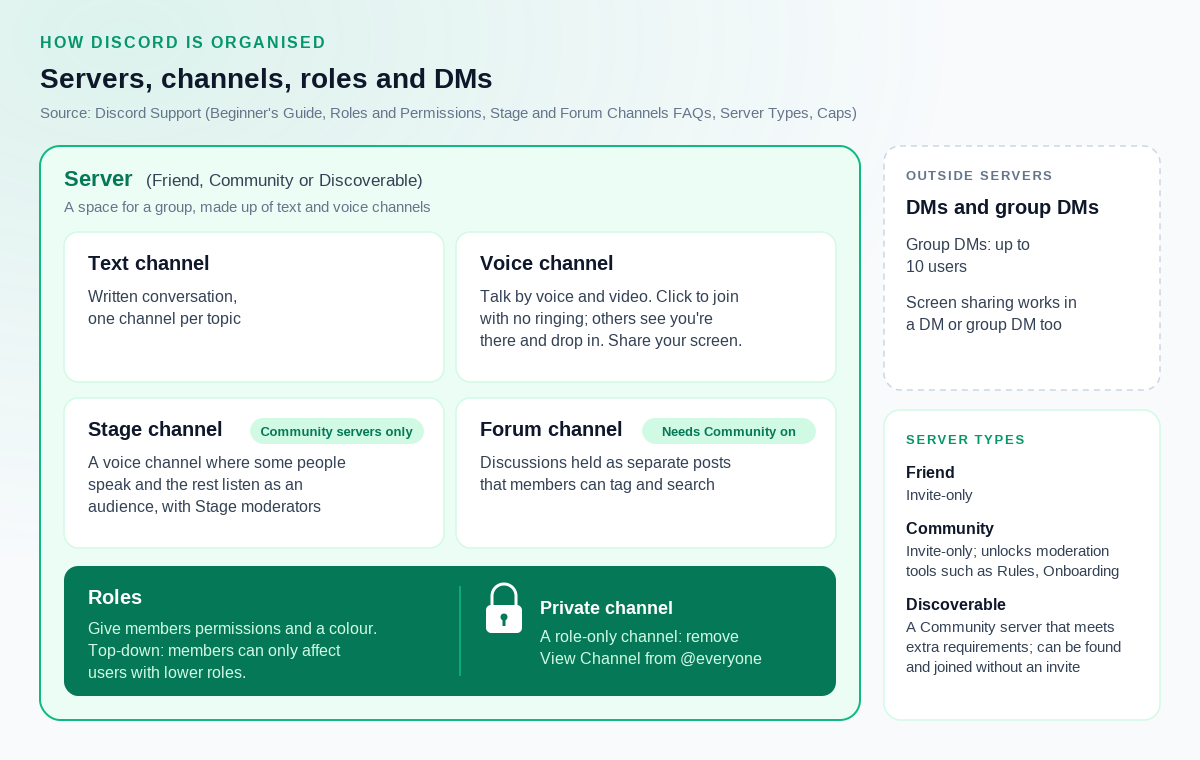
Discord works in servers: mostly invite-only spaces for a group of friends or a community, each made up of text and voice channels, with roles deciding who can see and do what. You can join existing servers or create your own for almost any group. Checked against Discord Support: Beginner's Guide to Discord
Servers and server types
A Discord server is a space for one group, and Discord sorts every server into one of three types: Friend, Community or Discoverable. Friend and Community servers are invite-only. Turning on Community unlocks moderation tools such as Server Insights, Raid Protection, Rules and Onboarding. Discoverable servers are Community servers that meet extra requirements, including 1,000 or more members, and can be found and joined without an invite. Checked against Discord Support: Clarifying Server Types Discord’s older Server Discovery feature was an experiment that has ended; its help article now points to the Discover tab instead. Checked against Discord Support: Server Discovery For named invites such as discord.gg/yourserver, see our guide to custom Discord invite links.
Channels
Text channels hold written conversation, one topic each; voice channels are rooms you join with a click, with no calling or ringing. Others can see you’re in a voice channel and drop in, and you can share your screen there or in a DM or group DM. Checked against Discord Support: Beginner's Guide to Discord Community servers can add two more kinds: Stage channels for a few speakers and a listening audience Checked against Discord Support: Stage Channels FAQ, and forum channels where inactive posts move to “Older Posts” after a set time, 3 days by default. Checked against Discord Support: Forum Channels FAQ
Chat text is formatted with Markdown: you add a few characters before and after the words you want to change. Checked against Discord Support: Markdown Text 101 (Chat Formatting: Bold, Italic, Underline) Our guide to Discord text formatting covers the codes.
Roles
Roles give members permissions and a colour, and they work top-down: members can only affect people whose roles sit below their highest role. Administrator grants every permission, and Discord advises assigning it with extreme caution. Role-exclusive channels make private spaces: you remove View Channel from @everyone. Checked against Discord Support: Discord Roles and Permissions
DMs and group DMs
Outside servers, you can message people directly or in a group DM of up to 10 users. Checked against Discord Support: Discord Account Caps, Server Caps, and More People see you by your username and display name; here is how Discord usernames and display names work.
Getting started
- Download Discord free on a computer, from Google Play or from the Apple App Store, or use the web client in a browser. Create an account with an email address and verify it to claim the account; a phone number is optional. Checked against Discord Support: Getting Started
- Verify that email early: an unverified new account gets 5 random digits added to its username after 7 days. Checked against Discord Support: New Usernames & Display Names
- Join a server from an invite link, or find a Discoverable server that needs no invite. Checked against Discord Support: Clarifying Server Types
- Open the text channel for the topic you want, or click a voice channel to join the conversation. Checked against Discord Support: Beginner's Guide to Discord
Is Discord social media?
By the dictionary definitions, yes: people use Discord to form online communities and share messages and content. But Discord was designed for conversation, not a public feed.
- The Cambridge Dictionary defines social media as forms of media that allow people to communicate and share information using the internet or mobile phones. Checked against Cambridge Advanced Learner's Dictionary & Thesaurus: social media
- Merriam-Webster defines it as forms of electronic communication through which users create online communities to share information, ideas, personal messages and other content such as videos. Checked against Merriam-Webster: social media
In a June 2020 post, Discord’s founders wrote that they designed Discord for talking, with no endless scrolling, no news feed, no tracking likes and no algorithms deciding what you see, and that many users wanted it to be about more than gaming. Checked against Discord blog: Your Place to Talk (Jason Citron and Stan, 30 Jun 2020)Vendor's own description That is a 2020 description: Discord has since added the Discover tab. Checked against Discord Support: Server Discovery
| What the definitions describe | How Discord does it | Source |
|---|---|---|
| Communicating over the internet | Text, voice and video | Checked against Discord Support: Beginner's Guide to Discord |
| Creating online communities | Servers for friends or communities, from book clubs to gaming groups | Checked against Discord Support: Beginner's Guide to Discord |
| Sharing messages and content | Messages up to 2,000 characters and file uploads up to 10MB on a standard account | Checked against Discord Support: Discord Account Caps, Server Caps, and More |
| A public feed | None in the founders’ 2020 description: no news feed and no algorithms deciding what you see | Checked against Discord blog: Your Place to Talk (Jason Citron and Stan, 30 Jun 2020)Vendor's own description |
| Being found by strangers | Only Discoverable servers can be joined without an invite | Checked against Discord Support: Clarifying Server Types |
So is Discord considered social media? It meets the dictionary sense, but it works more like group chat than a feed network. Some pages quote Discord as saying it isn’t social media; we found no current Discord page that says so. Checked against Discord Safety Center (live page did not carry the line in the reader) and unofficial mirror not citedNot verified
Is Discord free, and what does Nitro add?
Yes, Discord is free to download and use; Nitro and the entry-level Nitro Basic are optional paid subscriptions. Checked against Discord Support: Getting Started Both are sold monthly or yearly, with local pricing in some countries. Checked against Discord Support: What are Nitro & Nitro Basic?
| Limit | Standard account | With Nitro |
|---|---|---|
| Servers you can be in | 100 | 200 |
| Message length | 2,000 characters | 4,000 characters |
| File uploads | 10MB | 50MB with Nitro Basic, 500MB with Nitro |
Checked against Discord Support: Discord Account Caps, Server Caps, and More.
Nitro’s profile perks include an animated avatar, a banner, a profile theme and Display Name Styles; Nitro Basic doesn’t include them. Checked against Discord Support: What are Nitro & Nitro Basic? Another Nitro perk, per-server profiles, lets you set a different avatar, banner and About Me in each server while your main profile stays the same. Checked against Discord Support: Per-Server Profiles
How do creators and brands use Discord?
Creators and brands use Discord when they want members talking to each other, not just following. Discord’s creator guide calls an audience a one-to-many relationship and a community a many-to-many one, where fans share, discuss and create together. Checked against Discord Creator Portal: Audience versus CommunityVendor's own description
A server fits if:
- You’ll judge it by activity, not size. Discord’s guide says that for a community the metric that matters most is engagement (how active the server is, how many new members stay, how many attend events), not member or follower count. Checked against Discord Creator Portal: Audience versus CommunityVendor's own description
- You’ll run it as a Community server, which unlocks Rules, Onboarding, Raid Protection and Server Insights. Checked against Discord Support: Clarifying Server Types
- You host live Q&As. Stage channels are built for AMAs and town halls. Checked against Discord Support: Stage Channels FAQ
- You need searchable threads for support or feedback, which forum channels provide. Checked against Discord Support: Forum Channels FAQ
- You want member tiers. Roles carry permissions and a colour, and role-only channels make private spaces. Checked against Discord Support: Discord Roles and Permissions
- You can set expectations. Discord’s guide advises telling members when you’ll be around (a weekly “ask me anything” or scheduled Events), working with moderators to cover your time away, and reusing content you already make, such as podcast snippets, to start conversations. Checked against Discord Creator Portal: Fitting Community in your Content StrategyVendor's own description
Look elsewhere if you need public reach: Friend and Community servers are invite-only. Checked against Discord Support: Clarifying Server Types For community spaces inside a public network, compare X Communities and Facebook groups for business.
Automating a server? Use a separate bot account. Discord forbids automating normal user accounts (“self-bots”) outside its OAuth2/bot API and says doing so can get the account terminated. Checked against Discord Support: Automated User Accounts (Self-Bots)
Is Discord safe? Age rules and parent tools
You must be at least 13 to use Discord, and as old as 16 in some countries; Discord uses your age group to decide access to adult content and settings. Checked against Discord Support: Why is Discord asking for my birthday? Apple’s US App Store rates the Discord app 13+. Checked against Apple App Store (US) listings: Instagram 389801252, TikTok 835599320, YouTube 544007664, Facebook 284882215, X 333903271, LinkedIn 288429040, Pinterest 429047995, Snapchat 447188370, Threads 6446901002, Bluesky 6444370199, Reddit 1064216828, Discord 985746746, Twitch 460177396, Tumblr 305343404, BeReal 1459645446, VSCO 588013838, Glass 1528446339, Mastodon 1571998974, Lemon8 1498607143
Discord places users into an age group with an age-estimation model. Accounts in the teen group (13 to 17) automatically get these protections Checked against Discord Support: What Protections Do You Get in the Teen Age Group?:
- flagged images and videos are blurred, or blocked in DMs from strangers
- no access to age-restricted servers
- DMs from people who aren’t friends go to message requests
- alerts about friend requests
- profile and activity visible only to friends and small servers
- listening, but not speaking, on Stage channels
Protections vary by region under local rules. For parents, Family Center shows a connected teen’s recent Discord activity in an in-app dashboard and weekly email summaries; both accounts complete setup on the Discord mobile app with a QR code. Checked against Discord Support: What is Family Center?
Setting up your profile? Our Discord font generator turns a display name into styled Unicode text you can paste.
If you plan Discord alongside other networks, here is where Outfeed AI, the tool behind this blog, stands on Discord:
Discord FAQ
What is Discord mainly used for?
Talking by text, voice and video in communities called servers, organised around friends, games, hobbies, study groups or creators.
Is Discord considered social media?
By dictionary definitions it fits, because people build communities and share content there, but it is built around group conversation rather than a public feed. Its founders said in 2020 it has no news feed, no tracking likes and no algorithms deciding what you see.
How old do you have to be to use Discord?
At least 13, and as old as 16 in some countries. Accounts Discord places in the teen group (13 to 17) get extra protections by default.
What is a Discord server?
Usually an invite-only space for a group of friends or a community, made up of text and voice channels (Discoverable servers can be joined without an invite). Anyone can create one.
What does Discord Nitro add?
Higher limits and profile extras: 4,000-character messages instead of 2,000, larger file uploads, more servers, and perks such as per-server profiles and an animated avatar.