
Content Calendar: What It Is and What Goes in One
A content calendar is a shared schedule of everything you plan to publish: what each piece is, which channel it goes to, in what format, who owns it, where it stands and the date it goes live. It is the planning layer of social media management and of content marketing in general: one view the whole team reads before anything is written or scheduled.
Below: a field list to copy into any tool, how one row becomes one post per network, and where teams keep their calendars, per each tool’s own help or pricing page.
Table of Contents
- What is a content calendar?
- What goes in a content calendar?
- Content calendar vs editorial calendar vs social media calendar
- Why do teams use a content calendar?
- Content calendar ideas: themes, series and recurring dates
- How does a marketing or SEO content calendar differ?
- Where should you keep a content calendar: spreadsheet, project tool or scheduler?
- How do you start a content calendar this week?
- Content calendar FAQ
What is a content calendar?
A content calendar is a dated plan of your content: one row per piece, with the channel, format, owner and status beside each date. Teams also call it an editorial calendar or a marketing calendar. It is not the content itself, and it does not publish anything; it records what will go out, where, when and who is responsible.
MarketingProfs describes an editorial calendar as a strategic tool content marketers use to plan and organise content creation and distribution, setting out the topics, formats and publishing dates of all planned content. Checked against MarketingProfs: What is an Editorial Calendar? (FAQ)Press report The two names are often used for the same document; the section below covers the cases where teams split them.
What goes in a content calendar?
Eight fields cover almost every team: date, channel, format, owner, status, asset, link and notes. Copy these as column headers into a spreadsheet, a project board or the free content calendar template.
| Field | What it records | Example value (illustrative) |
|---|---|---|
| Date | Publish date and time, with the time zone | 3 March, 09:00 ET |
| Channel | Where it goes: one network, the blog, the newsletter | |
| Format | The type of piece on that channel | Carousel |
| Owner | One person accountable for getting it out | Priya |
| Status | Idea, draft, ready, scheduled or published | Draft |
| Asset | Link to the draft, image or video file | Shared drive folder |
| Link | The final URL once live, or the page the piece promotes | Product page |
| Notes | Campaign, theme, approvals, anything else | Spring launch, how-to theme |
Working alone? Start with four fields: date, channel, format and status. That is enough to see gaps and avoid repeats. Add the owner column when a second person joins, and the asset and link columns when you start losing files.
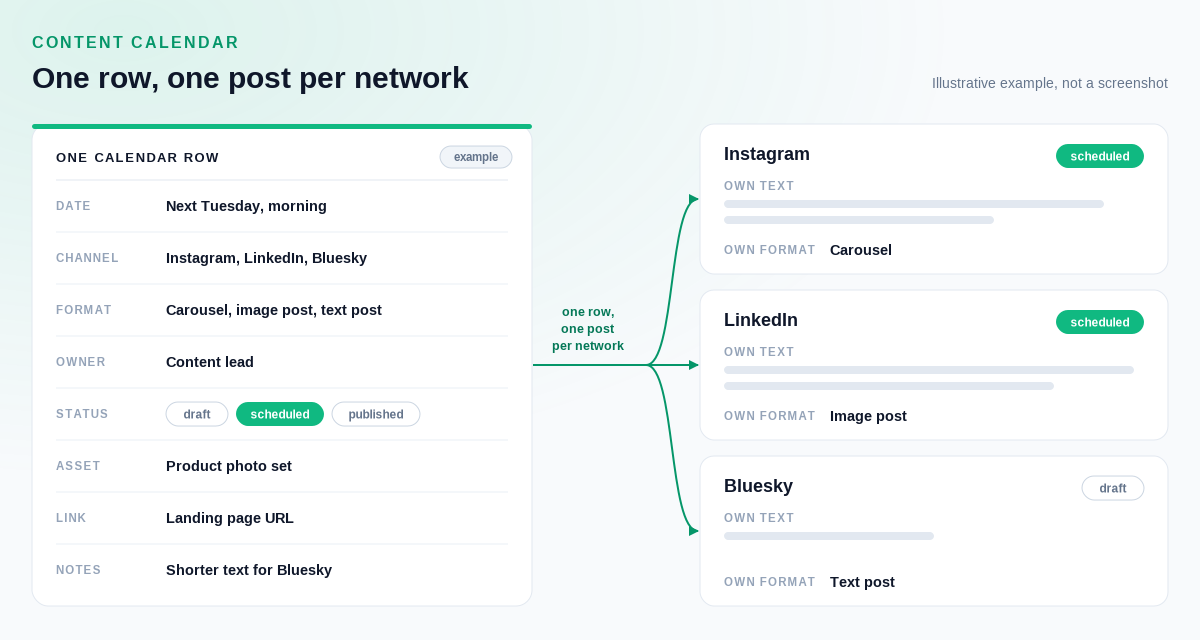
One row, one post per network
A single idea in the calendar usually becomes several posts, because each network takes different text and formats. LinkedIn allows 3,000 characters in a post (LinkedIn Help: Post and share updates), while X’s standard limit is 280 weighted characters (X Developer Platform: Counting characters). So keep the idea as one row, then give each network its own post entry with its own text, format and status. That way a post that slips on one network does not hide the others.
Content calendar vs editorial calendar vs social media calendar
The three names describe different scopes of the same kind of plan. These are working distinctions teams use, not formal definitions:
| Calendar | Scope | Typical row |
|---|---|---|
| Content calendar | Everything published, on every channel | One piece of content on one date |
| Editorial calendar | The writing pipeline for longer pieces: pitch, draft, edit, publish | One article moving through stages |
| Social media calendar | Posts on each social network | One post on one network at one time |
A social media calendar is often built into the tool that publishes the posts. Meta’s Planner in Meta Business Suite, for example, is a week or month calendar of published and scheduled posts, stories, reels and ads, which you can filter by content type and by Facebook Page, Facebook Groups or Instagram account. Checked against Meta Business Help Center: Use Planner in Meta Business Suite on desktop
Why do teams use a content calendar?
A content calendar turns “we should post more” into dated work with an owner. Teams keep content calendars for practical reasons:
- One shared view. Everyone reads the same plan, not lists scattered across chats.
- Owners and deadlines. Every row has a person and a date.
- Gaps and clashes show up early. An empty week or two launches on one day are visible a month ahead.
- Balance across themes. Tagging each row with one of your content pillars shows whether one topic is crowding out the rest.
- Easier reviews. With every live URL in the link column, the monthly review takes minutes.
Content calendar ideas: themes, series and recurring dates
The easiest calendar to fill is one built on repeating patterns: themes that rotate, series that recur and dates you already know. Some starting points (the examples are illustrative):
- Pillar rotation. Give each weekday a pillar, such as how-to on Monday, customer questions on Wednesday and behind the scenes on Friday.
- Recurring series. A weekly format with a fixed name (“Tuesday tip”, “Friday FAQ”) is quicker to write and easier for followers to recognise.
- Monthly themes. One theme a month, such as onboarding, a product area or a season, gives every post a common thread.
- Fixed dates first. Mark launches, events, sales, your company’s own anniversaries and industry dates before you add anything else.
- Reactive slots. Leave one or two open slots a week for news, replies and trends.
- Repurposing. Plan each long piece (an article, a webinar, a video) with the shorter posts it will become.
For a step-by-step way to fill a month, follow the monthly social media planning routine.
How does a marketing or SEO content calendar differ?
A marketing content calendar adds campaign fields; an SEO content calendar adds search fields. The eight core fields stay the same.
The Content Marketing Institute defines content marketing as a strategic marketing approach focused on creating and distributing valuable, relevant and consistent content to attract and retain a clearly defined audience and, ultimately, to drive profitable customer action. Checked against Content Marketing Institute: What Is Content Marketing?Press report A calendar built for that job ties each row to a campaign and a result:
- Marketing content calendar: campaign name, goal, audience, call to action and the tracked link used for that row.
- SEO content calendar: target query, the page URL, the publish date, a planned refresh date and the internal links the page should get.
For the SEO columns, Google Search Console is a free Google service that shows how often a site appears in Google Search, which queries show it and how often searchers click. Checked against Search Console Help: About Search Console Its query data can help you decide which pages to refresh.
Where should you keep a content calendar: spreadsheet, project tool or scheduler?
Keep it where your team already works: a spreadsheet for one or two people, a project tool when several people hand work to each other, and a scheduler when the rows need to go out as posts. What each option offers, according to its own help or pricing page:
| Option | What it offers for a calendar | Pricing model |
|---|---|---|
| Google Sheets | A grid you set up yourself with the eight fields | Anyone with a Google Account can create in Sheets; some Gemini features need a Workspace plan. Checked against Google Workspace: Google SheetsVendor's own description |
| Google Calendar | Share a calendar you own and control what each person can see and do; on work or school accounts the administrator decides whether sharing is allowed. Checked against Google Calendar Help: Share your calendarVendor's own description | — |
| Trello | Calendar view shows the dates on cards and checklist items on a board, for Premium and Enterprise customers. Checked against Trello Support (Atlassian): Calendar viewVendor's own description | Free plan for up to 10 collaborators per Workspace; per-user prices for Standard, Premium and Enterprise. Checked against Trello: PricingVendor's own description |
| Notion | A calendar view needs a database with a Date property, shows months or weeks, and lets you drag cards to other days. Checked against Notion Help Center: CalendarsVendor's own description | Free, Plus, Business and Enterprise plans. Checked against Notion: PricingVendor's own description |
| Airtable | A base you set up yourself | Free plan for individuals or very small teams; Team and Business charged per seat; Enterprise Scale through sales. Checked against Airtable: PricingVendor's own description |
| Meta Business Suite | Planner: a week or month calendar of Facebook and Instagram posts, stories, reels and ads. Checked against Meta Business Help Center: Use Planner in Meta Business Suite on desktop The Suite also covers creating and scheduling posts, Insights and Inbox. Checked against Meta Business Help Center: How Meta Business Suite works | free |
| Hootsuite | A social content calendar in calendar or list view on every plan, exportable as a .csv or .pdf file. Checked against Hootsuite: Plans, Prices, and FeaturesVendor's own description | From $99 per user/month, billed annually (Standard) |
| Later | A drag-and-drop visual calendar on every plan; approvals, post comments and colour-coded calendar notes on Growth and Scale. Checked against Later: PricingVendor's own description | From $25 per month, billed monthly (Starter) |
| Loomly | Unlimited calendars on every plan. Checked against Loomly: Pricing & PlansVendor's own description | From $65 per month, billed monthly (Starter) |
| CoSchedule | Plans covering social publishing, a calendar, analytics, AI tools and campaign planning. Checked against CoSchedule: PricingVendor's own description | Published prices for Starter and Professional, each with a 14-day free trial; Suite through sales |
Prices verified on facebook.com/business/help/205614130852988, hootsuite.com/plans, later.com/pricing and loomly.com/pricing.
A spreadsheet or project board holds the plan but publishes nothing; a scheduler turns dated rows into scheduled posts. For a wider view of the software, see social media management tools grouped by job.
Outfeed’s social media scheduler has the details.
How do you start a content calendar this week?
Start small: one tool, four to eight fields and two weeks of rows. Five steps:
- Copy a template. The free content calendar template runs in your browser with no signup and exports a CSV for Google Sheets or Excel and an .ics file for your calendar app.
- Pick three to five themes. Use the social media strategy template to name your audience, goals and content pillars on one page.
- Mark the fixed dates. Add next month’s launches, events and holidays that matter to your customers before anything else.
- Fill two weeks. One row per piece, then one post entry per network, each with an owner and a status.
- Review it weekly. Fifteen minutes on the same day each week: update statuses, move what slipped, paste in live links and add the next week’s rows.
Schedule your calendar’s posts with Outfeed AI
Content calendar FAQ
What should be included in a content calendar?
At minimum a publish date, the channel, the format and a status. Teams add an owner, the asset or draft link, the final URL and notes. The field table above lists all eight with an example row.
How far in advance should you plan a content calendar?
Plan themes a month or a quarter ahead and fill in individual posts a week or two ahead, so there is room for news and reactive posts. Pick a horizon your team can actually keep up to date.
What is the difference between a content calendar and an editorial calendar?
People often use the two names for the same thing. When teams separate them, the editorial calendar tracks the writing pipeline for longer pieces, while the content calendar shows everything that will be published, on every channel, by date.
How often should you update a content calendar?
Every week. Spend fifteen minutes on the same day each week updating statuses, moving what slipped, pasting in live links and adding the next week’s rows. A calendar nobody updates stops being the plan the team works from.
Is there a free content calendar template?
Yes. Outfeed’s free content calendar template runs in the browser with no signup and exports to CSV or a calendar file. A spreadsheet in Google Sheets also works, since anyone with a Google Account can create one. Checked against Google Workspace: Google SheetsVendor's own description