
Edits App: How to Use Instagram's Video Editor for Reels

The Edits app is Instagram’s own video editor: you sign in with your Instagram account, build a video on a timeline with text, music, effects and captions, then keep it as a draft, download it, or share it to Instagram or Facebook as a reel. Checked against Instagram Help Center: About Edits
This guide covers what Instagram Edits is, how to set it up on a phone or a Mac, how to use it step by step, what changed in 2026, how it compares with CapCut, and how to post what you make. For the wider picture, see our guide to social media apps; if you’re new to Instagram itself, start with how to use Instagram.
Table of Contents
- What is the Edits app?
- How do you get started with Edits?
- How to use Instagram Edits, step by step
- What’s new in Edits?
- Edits vs CapCut: which should you use?
- How do you post an Edits video to Instagram?
- Edits app FAQ
What is the Edits app?
Edits is a video creation app from Instagram that puts ideas, projects, editing and watermark-free exporting in one place. Instagram’s “Introducing Edits” post lists a frame-accurate timeline, cutouts, AI-powered animation, and an inspiration feed of reels with trending audio and performance insights. Checked against Edits blog: Introducing Edits: Make Great Videos on Your Phone
The Edits app Instagram launched on 22 April 2025 turned one in April 2026, when Meta’s “One Year of Edits” post opened with “One year ago today, we launched Edits”. Checked against Meta Newsroom: One Year of Edits: Built For and With Creators (22 Apr 2026) 9to5Mac reported the App Store release the same day. Checked against 9to5Mac: Instagram's new 'Edits' app now available on App Store following two month delay (22 Apr 2025)Press report
Where you can get it:
- iPhone and iPad. Apple’s US App Store lists “Edits: Video Editor” from Instagram, Inc., free with in-app purchases and rated 4+. That store rating isn’t Instagram’s minimum age: you still need an Instagram account. Checked against Apple App Store (US): Edits: Video Editor
- Android. Google Play lists the same app from Instagram, with in-app purchases. Checked against Google Play (US): Edits: Video Editor (com.instagram.basel)
- Mac. A desktop version for Macs with Apple silicon arrived on 5 November 2026 (details below). Checked against Edits blog: Edits on desktop is here (5 Nov 2026)
How do you get started with Edits?
Download Edits and sign in with your Instagram account: on a phone, tap Continue with Instagram, review the terms and tap Join the App; on a Mac, log in by scanning a QR code with your phone or through your browser. If you don’t have an Instagram account, you can create one, and logging out of Edits doesn’t log you out of Instagram. Checked against Instagram Help Center: How to start using Edits
Four things to know before you start:
- The Mac app is Apple silicon only. Instagram’s desktop FAQ says Edits on desktop runs only on macOS, on Macs with M1 or later, is free to download and isn’t available for Windows. Checked against Edits: Edits on desktop (FAQ)
- Mac and phone projects don’t sync yet. Projects in the Mac app are separate from projects on Android or iPhone; Instagram says editing one project across devices is being worked on. Checked against Instagram Help Center: How to start using Edits
- Edits is part of your Instagram account. It uses your Instagram information (login, username, followers, accounts you follow, account status) under Meta’s Privacy Policy. You can delete Edits videos at any time, but deactivating Instagram also deactivates Edits, and deleting the rest of your Edits activity means deleting your Instagram account. Checked against Instagram Help Center: About Edits
- It’s free, with an optional paid tier. Edits Plus is a paid monthly subscription, bought only in the phone app, that adds cloud storage (Instagram lists 200GB) and more AI usage. Instagram says it’s in limited testing, not available everywhere, only for people 18 or older, may start with a one-month free trial, and can’t be held alongside Instagram Plus in the same Accounts Center. Checked against Instagram Help Center: About Edits Plus (+ How to subscribe to Edits Plus)
How to use Instagram Edits, step by step
To use Instagram Edits, record or import clips, arrange them on the timeline, add audio and captions, export or share, then check how the reel did. First, the toolbox, as Instagram’s App Store description puts it:
| Area | What Instagram says Edits offers |
|---|---|
| Export | 4K with no watermark, to share to any platform |
| Capture | Clips up to 10 minutes long |
| Timeline | Editing with single-frame precision |
| AI | Animating images with AI |
| Effects | Green screen, cutout and video overlay |
| Audio | Audio enhancement and background-noise removal |
| Captions | Automatic captions |
| Inspiration | Reels with trending audio |
| Insights | A live insights dashboard |
Checked against Apple App Store (US): Edits: Video Editor (description).Vendor's own description
Recent release notes on the same listing add trimming before import, background captions, Edits on iPad, and LUT import and log conversion, labelled “Labs”, meaning experimental. Checked against Apple App Store (US): Edits: Video Editor (description)Vendor's own description
1. Record or import your clips
Start a project and either film in the Edits camera or bring in clips from your phone. Instagram’s Edits help describes a camera with flash, retouch, resolution, music, green screen, timer, speed, teleprompter and filters, and doesn’t mention Boomerang. Checked against Instagram Help Center: About Edits (+ Record a video with Edits) — no BoomerangNot verified Instagram says you can capture clips up to 10 minutes long; it doesn’t publish a maximum length for a finished project. Checked against Apple App Store (US) and Google Play (US) listings for Edits: Video Editor (description) and Instagram Help Center Edits articles (no length rule)Not verified
2. Arrange everything on the timeline
Every piece you add (media, audio, text, captions) becomes its own clip on the timeline at the bottom of the editing view. On a phone, tap and hold a clip to move it, or tap and hold either end to change its length. On a Mac, drag clips and edit the selected clip’s options in the right-hand panel. Checked against Instagram Help Center: About editing your video on Edits
3. Add trending audio
Tap the play icon at the bottom of Edits to see reels that are trending on Instagram, then tap Use audio to bring a reel’s sound into your project. Each trending reel shows its view, like and share counts. Checked against Instagram Help Center: View trending reels on Edits Our guide to trending Instagram audio covers finding and saving sounds inside Instagram itself.
4. Add captions
Edits generates captions for you, and the Mac app makes automatic captions unlimited. Instagram’s App Store description lists automatic captions among the phone app’s tools Checked against Apple App Store (US): Edits: Video Editor (description)Vendor's own description, and its 5 November 2026 desktop post lists unlimited automatic captions for the Mac. Checked against Edits blog: Edits on desktop is here (5 Nov 2026) Captions sit on the timeline as their own clip, so you can move or trim them like any other. Checked against Instagram Help Center: About editing your video on Edits
5. Check insights after you post
Edits shows insights for reels you’ve published, covering the last 60 days. In Edits, Views counts every time your reel starts to play or replays, and Reach counts unique views. Instagram Insights words its unique-viewer count differently, so compare like with like. Checked against Instagram Help Center: View insights of your published reels on Edits
What’s new in Edits?
Since 30 September 2026 Edits has added an AI assistant, a carousel editor, a Mac app, Effect Builder and new music effects. Newest first, with the status Instagram gave each one:
- 24 November 2026 · music and sound effects. Beat-synced video effects that move in time with licensed music, clip volume up to 150%, and audio links that let viewers tap through to a track’s Audio Page in the Reels viewer. Beat syncing doesn’t work with original audio or subject effects. Checked against Edits blog: Now on Edits: more music and sound editing effects (24 Nov 2026)
- 9 November 2026 · Effect Builder (US, over 18). A free web tool at edits.com/effectbuilder that creates AI effects for Instagram Stories from a text prompt. Each effect passes a safety review before it appears in the Stories effects browser, credited to your profile. Checked against Edits blog: Introducing Effect Builder: Turn your idea into an Instagram Stories effect (9 Nov 2026)
- 5 November 2026 · Edits for Mac. A first desktop version with a multi-track timeline, keyframes, audio waveforms, colour wheels, curves and log conversion, your own LUTs and fonts, Instagram’s licensed and royalty-free audio, multiple aspect ratios, 4K watermark-free export, and direct publishing to Instagram with tags, location and trial reels. Checked against Edits blog: Edits on desktop is here (5 Nov 2026)
- 7 October 2026 · carousel editor (iOS first, Android “coming soon”). Lay out photos, videos and text across slides with layouts, cutout stickers and filters, then share the carousel to Instagram or download it. Start from Projects, tap (+) and choose Carousel. Checked against Edits blog: New to Edits: An editor for your carousels (7 Oct 2026)
- 30 September 2026 · Edits assistant (US, rolling out). A chat inside Edits that uses your Instagram metrics, comments and trends to suggest ideas, hooks, captions and scripts, free with a daily prompt limit. Checked against Edits blog: Meet the Edits assistant, the one that knows your Instagram (30 Sep 2026)
- 22 April 2026 · one year of Edits (announced plans). Meta said it plans upgrades to captions (including bilingual captions), advanced colour adjustments, speed curves, pinned favourite tools, more insights about followers and more complex templates. These were plans, not releases; keyframes have since shipped on the Mac. Checked against Meta Newsroom: One Year of Edits: Built For and With Creators (22 Apr 2026)
Edits isn’t the only part of the app changing: we keep a dated log of every recent Instagram update.
Edits vs CapCut: which should you use?
Edits fits if your videos end up as Instagram or Facebook reels; CapCut fits if you’d rather keep your editor separate from Instagram. Here is what each company’s own listings and help pages say:
| Edits | CapCut | |
|---|---|---|
| Developer on Apple’s App Store | Instagram, Inc. | Bytedance Pte. Ltd |
| Devices in the listings read | iPhone, iPad, Android, Mac (Apple silicon) | iPhone, iPad, Mac (only Apple’s App Store listing checked) |
| Apple age rating | 4+ (Instagram account needed) | 13+ |
| Pricing model | Free to download; optional paid Edits Plus in limited testing, 18+ | Free with in-app monthly subscriptions |
| 4K export without a watermark | Instagram says Edits exports in 4K with no watermark | Listed as a subscriber benefit (up to 4K at 60 fps) |
| Branding on the result | A reel shared from Edits shows an Edits icon | CapCut says most exports carry no watermark; a template ending clip, a branded stock asset or the default outro can add one |
Sources: Checked against Apple App Store (US): Edits: Video Editor; Checked against Google Play (US): Edits: Video Editor (com.instagram.basel); Checked against Edits: Edits on desktop (FAQ); Checked against Instagram Help Center: About Edits Plus (+ How to subscribe to Edits Plus); Checked against Apple App Store (US): Edits: Video Editor (description)Vendor's own description; Checked against Instagram Help Center: How to download and share your video from Edits; Checked against Apple App Store (US): CapCut: Video & Photo Editor; Checked against Apple App Store (US): CapCut: Video & Photo Editor (description)Vendor's own description; Checked against CapCut Help Center: How Can I export a Video from CapCut without a Watermark? (18 Mar 2026)Vendor's own description
Neither subscription price is printed here: check each app’s store listing for your region.
- Edits fits if your finished video is an Instagram or Facebook reel, you want Instagram’s trending audio inside the editor, and on a Mac you want to set the cover, caption, tags and trial reel without leaving the app.
- CapCut fits if you want an editor from outside Instagram, with a paid subscription whose listed benefits include exclusive templates, monthly AI credits and more cloud storage.
Making videos for TikTok as well? Our guide to how to edit TikTok videos covers TikTok’s own editor.
How do you post an Edits video to Instagram?
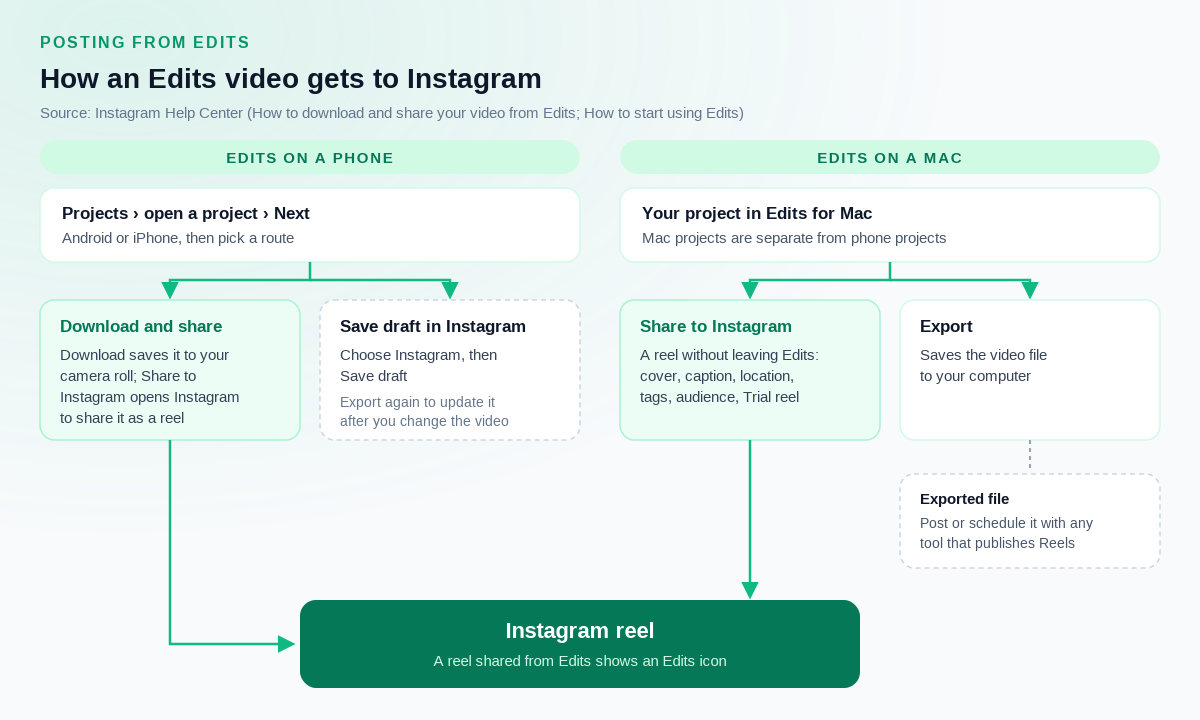
On a phone, download the finished video and tap Share to Instagram, which opens Instagram to post it as a reel; on a Mac, choose Share to Instagram to post without leaving Edits, or Export to save the file. If you’re unsure what format that lands in, here is what Instagram Reels are.
On a phone
Tap Projects, open your project, tap Next, then Download to save the video to your camera roll, and tap Share to Instagram. Set resolution, frame rate and colour first with the resolution button at the top right of the project. The downloaded file is separate from the project: later edits don’t change it, and deleting the project doesn’t delete it. Checked against Instagram Help Center: How to download and share your video from Edits
Not ready to post? On Android and iPhone, tap Next, choose Instagram and tap Save draft. The draft stays linked to the Edits project, but after you change the video you have to export it to Instagram again to update the draft. Checked against Instagram Help Center: How to download and share your video from Edits
On a Mac
Click Share to Instagram to post the video as a reel without leaving Edits, or Export to save it to your computer. Sharing from the Mac lets you edit the cover, write a caption, add a location, tag people, choose your audience and turn on Trial reel. Checked against Instagram Help Center: How to download and share your video from Edits If you haven’t used that last option, our guide to trial reels explains how they work.
A reel you share from Edits carries an icon showing it was made with Edits; Instagram’s article doesn’t say that Edits reels get more reach. Checked against Instagram Help Center: How to download and share your video from Edits
Scheduling an exported Edits video
A downloaded Edits video is a normal file, separate from the project, so you can schedule it like any other reel. Instagram’s own scheduler handles reels up to 30 days in advance (Instagram Help Center: How to create and manage scheduled posts and Reels on Instagram); our guide to how to schedule Instagram posts walks through it.
Can Outfeed AI publish an exported Edits video? Here is what it does and doesn’t do for reels:
Schedule your exported Edits reels with Outfeed AI
Edits app FAQ
What is the Edits app?
Edits is Instagram’s video editing app for creators. You sign in with your Instagram account, edit on a timeline with text, music, effects and captions, and share the finished video to Instagram or Facebook as a reel. It runs on iPhone, iPad and Android, and since 5 November 2026 on Macs with Apple silicon.
Is the Edits app free?
Edits is free to download, and Instagram says the Mac app is free too. There is an optional paid monthly subscription, Edits Plus, with more cloud storage and AI usage; Instagram says it is in limited testing, not available everywhere and only for people 18 or older.
Does Edits add a watermark?
No. Instagram says Edits exports videos in 4K with no watermark. A reel you share from Edits does carry a small icon showing it was created with Edits.
Is Edits better than CapCut?
It depends on the job. Edits is made by Instagram, needs an Instagram login and shares straight to Instagram or Facebook as a reel. CapCut, listed on Apple’s App Store by Bytedance Pte. Ltd, is a video and photo editor for iPhone, iPad and Mac that is free with in-app monthly subscriptions; it lists watermark-free 4K export at 60 fps among its subscriber benefits. The table on this page compares them.
Do you need an Instagram account to use Edits?
Yes. On Android, iPhone and Mac you sign in with your Instagram account, and Instagram says Edits uses your Instagram information, such as your login, username and followers, under Meta’s Privacy Policy.