
Trial Reels on Instagram: Who Gets Them and How
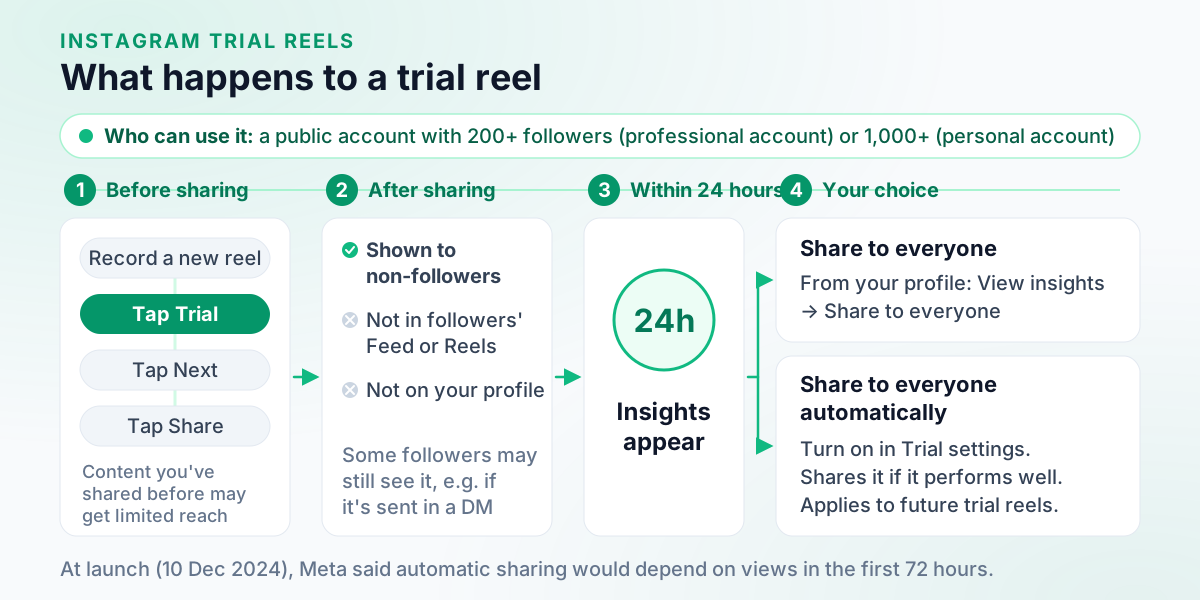
Trial reels are reels Instagram shows to people who don’t follow you first, so you can test an idea before your followers see it. You need a public account with at least 200 followers if it’s professional, or 1,000 if it’s personal. Tap Trial before sharing a new reel, read its insights within 24 hours, then share it with everyone or leave it.
Those thresholds are where many guides go wrong, still saying trial reels are for professional accounts only, at 1,000 followers. Instagram’s Help Center gives the lower professional figure and includes personal accounts. New to the format? Read what reels are first. Everything else in the app, task by task, sits in our hub of Instagram how-tos.
Table of Contents
- What are trial reels on Instagram?
- Who can use trial reels? (eligibility)
- Why don’t I have trial reels?
- How to post a trial reel on Instagram
- Do my followers see trial reels?
- How long until trial reel results show?
- How to share a trial reel with everyone, manually or automatically
- Can you post a trial reel through a scheduling tool?
- Trial reels: FAQ
What are trial reels on Instagram?
A trial reel is shared with accounts that don’t follow you instead of with your followers. Your followers won’t see it in Feed or Reels, and it stays off your profile unless you share it to everyone. Instagram evaluates trial reels separately in its ranking, so they don’t affect how your standard reels perform.
Two more details from Instagram’s article shape how you use one:
- Views can come slowly. Trial reels may take longer to get views because they’re shown to people who don’t follow you.
- It has to be new. A trial reel may get limited reach if Instagram detects that you’ve shared the same content before.
Checked against Instagram Help Center: About trial reels on Instagram.
Meta introduced trial reels on 10 December 2024, rolling out that day and “globally available to all eligible creators in the coming weeks”. Checked against About Meta newsroom: Test Content With Non-Followers Using Trial Reels (10 December 2024) Still weighing a reel against a photo post or carousel? See Instagram reels vs posts. Or weighing Instagram against TikTok? See how Reels compares with TikTok, trial reels included.
Who can use trial reels? (eligibility)
Instagram’s Help Center sets three conditions: a public account; at least 200 followers for a professional (business or creator) account, or at least 1,000 for a personal one; and an account that’s eligible to appear in recommendations. An account that can’t appear in recommendations loses access to trial reels, and gets it back once it’s eligible again and meets the other conditions.
| Condition | Professional account (business or creator) | Personal account |
|---|---|---|
| Account visibility | Public | Public |
| Minimum followers | 200 | 1,000 |
| Recommendations | Must be eligible to appear in recommendations | Must be eligible to appear in recommendations |
Checked against Instagram Help Center: About trial reels on Instagram.
To see whether your account has limits on its reach, Instagram points you to Account Status in your settings.
Why don’t I have trial reels?
Check Instagram’s conditions in order: is the account public, does it meet the follower minimum for its type, and can it appear in recommendations? If all three hold, the gap may be Reels itself, which Instagram says isn’t currently available to everyone.
- The account is private. Trial reels need a public account.
- You’re under the minimum for your account type: 200 followers on a professional account, 1,000 on a personal one. If a personal account sits between those two numbers, note that the lower minimum is for professional accounts. Switching to a professional account changes more than this one feature, so read what it involves first.
- The account can’t appear in recommendations. That removes access until it’s eligible again. A professional account can check in Account Status whether its content may be recommended to people who don’t follow it; if it isn’t eligible, none of its content is recommended, though followers still see it. Account Status shows samples of content that goes against the Recommendations Guidelines and may offer a review request. Checked against Instagram Help Center: Recommendation eligibility on Instagram
- Reels isn’t available on your account. In Instagram’s words: “Reels isn’t currently available to everyone. Some accounts may be able to see reels, but won’t be able to record them.” Checked against Instagram Help Center: How do I post a video? (serves "Record a reel on Instagram")
- You’re looking at a reel you’ve already shared. Instagram’s steps put Trial before you share a new reel. They don’t describe turning a shared reel into a trial. Checked against Instagram Help Center: About trial reels on Instagram (no steps for an already-shared reel)Not verified
Don’t try to buy your way past the minimum. Among the accounts Instagram’s Recommendations Guidelines avoid recommending are those that “Repeatedly engaged in misleading practices to build followings, such as purchasing ‘likes’”, and an account that can’t appear in recommendations loses trial reels anyway. Checked against Instagram Help Center: Recommendations on Instagram
How to post a trial reel on Instagram
Record a new reel, tap Trial before you share it, then tap Next and Share. Instagram publishes one set of steps for the app on every phone. The reel needs to be genuinely new: Instagram warns that a trial reel may get limited reach if it detects you’ve shared the same content before.
In the Instagram app:
- Follow the steps to record a reel. Make sure to create a new reel: your trial reel may get limited reach if Instagram detects that you've previously shared the same content.
- Before you share your reel, tap Trial.
- Tap Next, then tap Share.
Checked against Instagram Help Center: About trial reels on Instagram.
The recording itself, from Create to the final screen, is in our guide to how to post on Instagram. Two general reel rules matter more than usual here, because a trial reel is aimed at people who don’t follow you. Instagram says reels over 3 minutes won’t be recommended to new audiences (length limits are in how long an Instagram video can be). Checked against Instagram Help Center: How do I post a video? (serves "Record a reel on Instagram") It also shows reels less often when they’re muted, blurry or low resolution, carry borders, logos or watermarks, are mostly covered by text, or aren’t original. Checked against Instagram Help Center: What kind of reels you may see on Instagram
Do my followers see trial reels?
Not in Feed or Reels, and not on your profile, while it stays a trial. A follower may still come across it if someone shares it with them in a direct message, on a page that shows reels with the same audio, or in search engine results. Once you share it to everyone, it appears on your main grid and Reels tab and may reach followers in Feed and Reels. Checked against Instagram Help Center: About trial reels on Instagram
So treat a trial reel as a test, not a secret.
How long until trial reel results show?
Within 24 hours of sharing, according to Instagram’s Help Center, which names Views, Likes, Comments and Shares among the insights you can view. Checked against Instagram Help Center: About trial reels on Instagram (insights) Expect a slower start than a standard reel: Instagram says trial reels may take longer to get views because they’re shown to people who don’t follow you.
You open the results from the reel itself: go to the reels on your profile, tap the trial reel, then tap View insights, the same screen that holds Share to everyone. Standard reel insights also include Watch time, Average watch time and Follows. Checked against Instagram Help Center: View insights on your Instagram reels Our Instagram insights guide explains how to read each one.
How to share a trial reel with everyone, manually or automatically
Open the trial reel from your profile, tap View insights, then Share to everyone. Or turn on Share to everyone automatically under Trial settings while you record: Instagram then shares the reel if it’s performing well soon after you publish it, based on signals like views and engagement. The automatic setting applies to future trial reels too. A strong trial is a signal, not a promise that the reel will go viral.
In the Instagram app: share a trial reel to everyone:
- Go to your Instagram profile, then tap the reels icon to see your reels.
- Tap the reel you want to share.
- Tap View insights.
- Tap Share to everyone.
In the Instagram app: share trial reels automatically:
- Follow the steps to record a trial reel.
- Below Trial, tap Trial settings.
- Turn on Share to everyone automatically.
- Tap Got it, then tap Share.
Checked against Instagram Help Center: About trial reels on Instagram.
Sharing by hand lets you read the insights before deciding; the automatic setting hands that decision to Instagram.
What changed since the December 2024 launch
Meta’s launch post of 10 December 2024 said Instagram could share a trial reel with followers automatically “based on the views it receives within the first 72 hours”. Instagram’s Help Center now says “soon after you publish it”, judged on signals like views and engagement. Go by the current wording; the 72-hour figure describes the feature at launch.
Checked against About Meta newsroom: Test Content With Non-Followers Using Trial Reels (10 December 2024).
Can you post a trial reel through a scheduling tool?
Instagram’s publishing API allows it, so it depends on the tool. Meta’s developer documentation lets an app publish a reel as a trial, with sharing to everyone done by hand in the Instagram app or automatically if the reel performs well. Checked against Meta for Developers: Publish Content using the Instagram Platform (Trial reels) Whether a given scheduler offers that is up to the scheduler. For our own, Outfeed AI:
Schedule a standard Instagram Reel in Outfeed AI
Trial reels: FAQ
How do I turn on trial reels?
You choose it reel by reel. Record a new reel, tap Trial before you share it, then tap Next and Share. Instagram’s Help Center says the option needs a public account with at least 200 followers if it’s a professional (business or creator) account, or 1,000 if it’s personal, and an account that’s eligible to appear in recommendations.
Why don’t I have trial reels?
Instagram’s Help Center gives three conditions: a public account, at least 200 followers for a professional account or 1,000 for a personal one, and eligibility to appear in recommendations. An account that can’t appear in recommendations loses access until it’s eligible again. Instagram also says Reels isn’t currently available to everyone.
Do my followers see trial reels?
Not in Feed or Reels, and a trial reel stays off your profile unless you share it to everyone. Instagram says some followers may still see it, for example if it’s shared with them in a direct message, on a page showing reels with the same audio, or in search engine results.
How long do trial reels take to get views?
Instagram’s Help Center says you’ll see insights within 24 hours of sharing. Views can build more slowly than on a standard reel: Instagram says trial reels may take longer to get views because they’re shown to people who don’t follow you.
Do trial reels hurt your account?
Instagram says trial reels are evaluated independently in its ranking and don’t impact the performance or ranking of your standard reels. It does warn that a trial reel may get limited reach if Instagram detects you’ve shared the same content before, so post something new.