
How Do I Go Live on TikTok? Follower and Age Rules
To go LIVE on TikTok you need to be at least 18 and have 1,000 followers (TikTok says the number may vary by region); then tap Add post +, tap LIVE, set a title and settings, and tap Go LIVE. Checked against TikTok Help Center: About TikTok LIVE TikTok may also ask you to confirm your age first.
So if you’re asking “how do I go live on TikTok?” because the LIVE option isn’t there, the answer is usually eligibility, not a hidden menu. This page lists TikTok’s requirements as TikTok words them, the phone and computer routes, and the official reasons LIVE can be missing. Everything else about the app is in our guide on how to use TikTok.
Table of Contents
- What do you need to go live on TikTok?
- How do I go live on TikTok from my phone?
- How do you go live on TikTok from a computer?
- Why can’t I go live on TikTok?
- How do LIVE gifts and subscriptions work?
- How to plan and announce a TikTok LIVE
- Going live on TikTok: FAQ
What do you need to go live on TikTok?
You need to be 18 or older, have 1,000 followers (the number may vary across regions), live somewhere LIVE is available and confirm your age if TikTok asks. Those are the requirements to go live on TikTok as TikTok states them; it also says LIVE and Gift features aren’t available everywhere. Checked against TikTok Help Center: About TikTok LIVE Checked against TikTok Help Center: Age requirements for TikTok LIVE
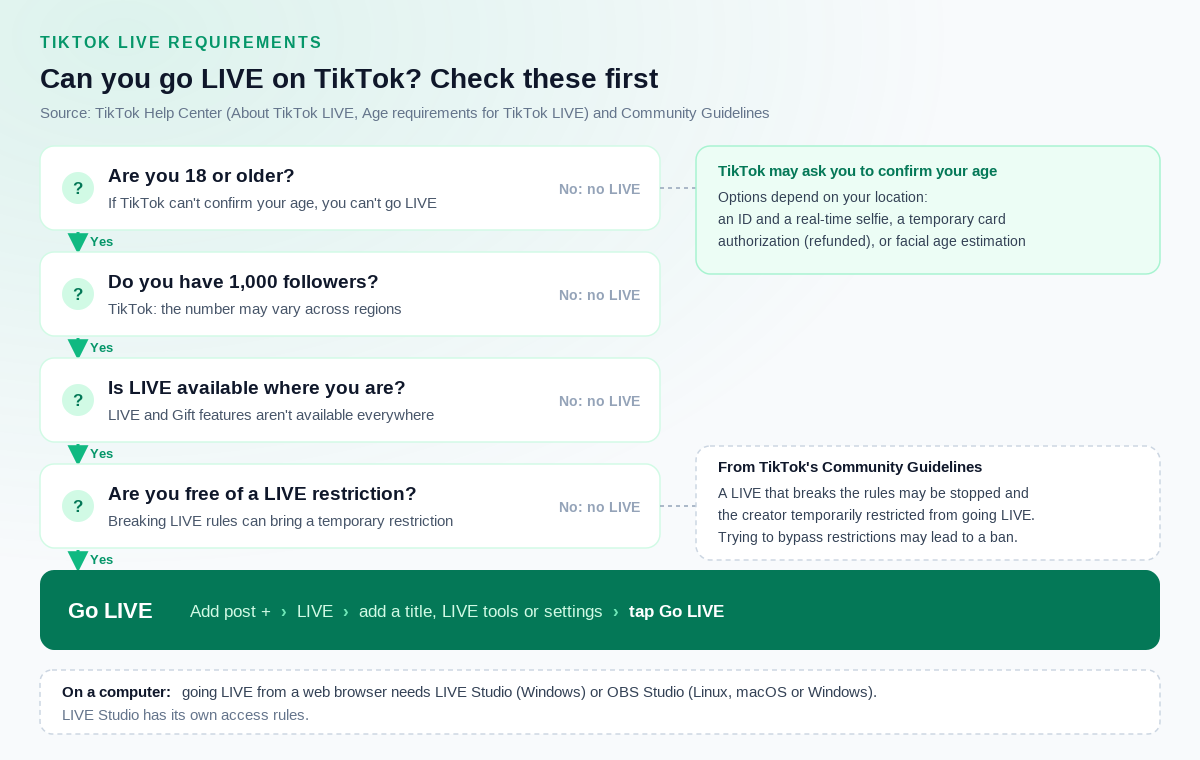
So can anyone go live on TikTok? No. Under 18, below the follower number for your region, or in a place without LIVE, the option stays closed, and this page covers no way around those rules.
How does TikTok confirm your age?
When you start a LIVE, TikTok may ask you to confirm you’re 18 or older, and if it can’t confirm your age you can’t go LIVE. Checked against TikTok Help Center: Age requirements for TikTok LIVE Whether it asks depends on factors such as your location and whether you’ve confirmed before. The methods also depend on location: an ID and a real-time selfie through TikTok’s partner Incode, a temporary credit card authorization that is refunded, or facial age estimation from a real-time selfie. Checked against TikTok Help Center: Age requirements for TikTok LIVE (How to confirm your age to go LIVE)
TikTok says it starts deleting the ID photos and selfies as soon as confirmation is complete, keeps a record of your date of birth and how and when you confirmed it while you have an account, and doesn’t show the photos on TikTok. Checked against TikTok Help Center: Age requirements for TikTok LIVE (How we retain your information)
Do new LIVE creators get every feature?
Not always: TikTok’s LIVE Safety Guide says new LIVE creators may not have every feature at first and gain the full LIVE experience over time if they follow its safety policies. Checked against TikTok Safety Center: LIVE Safety Guide
How do I go live on TikTok from my phone?
Tap Add post +, tap LIVE, set it up and tap Go LIVE. This is how to stream on TikTok from the app, in TikTok’s four steps:
In the app:
- In the TikTok app, tap the Add post + button at the bottom.
- Tap LIVE at the bottom. You may need to scroll across.
- Add a title, use LIVE tools, or adjust your LIVE settings.
- Tap Go LIVE to start your LIVE.
Checked against TikTok Help Center: About TikTok LIVE.
During the LIVE, More > Settings holds your LIVE tools and safety settings; End LIVE at the top, then End now, finishes it.
Change settings during a LIVE:
- Tap More... at the bottom.
- Tap Settings.
End a LIVE:
- Tap the End LIVE button at the top.
- Tap End now.
Checked against TikTok Help Center: What is TikTok LIVE? (How to go LIVE on TikTok).
You or a moderator can also pin a comment to the top of the LIVE chat for a short time, in the app only. Checked against TikTok Help Center: Comments on TikTok LIVE Our guide to pin comments on TikTok covers pinning on regular videos too.
How do you go live on TikTok from a computer?
TikTok says that to go LIVE from a web browser you need LIVE Studio (Windows) or OBS Studio (Linux, macOS or Windows). Checked against TikTok Help Center: Comments on TikTok LIVE Who gets LIVE Studio is less clear, because two TikTok pages give different rules:
| TikTok page | Dated | Who gets LIVE Studio |
|---|---|---|
| LIVE creator site | 4 September 2024 | Gaming creators with 1,000 followers who post game videos or stream games; non-gaming creators need 10,000 followers; creators who stream elsewhere can apply |
| LIVE Studio operation manual | Updated 19 January 2024 | A 14-day trial for accounts at least 30 days old: outside the US with 1,000+ followers and a LIVE over 25 minutes in the past 180 days; in the US with 10,000+ followers and one in the past 30 days. Windows only |
Checked against TikTok LIVE Creators: Go LIVE from Your Desktop Computer with LIVE Studio Today!.
Checked against TikTok LIVE Studio Operation Manual.
TikTok hasn’t reconciled the two, so we show both with their dates rather than pick one. The manual’s download steps:
Download LIVE Studio:
- Go to www.tiktok.com and log in.
- After logging in, hover over the profile photo in the upper right corner and click LIVE Studio to go to the download page.
- Click Free download for Windows to get the TikTok LIVE Studio.
Checked against TikTok LIVE Studio Operation Manual.
Why can’t I go live on TikTok?
TikTok’s pages point to four causes, which it publishes separately rather than as one list. Check each one:
- You’re under 18, or TikTok couldn’t confirm your age. A confirmed under-18 loses LIVE access. Checked against TikTok Help Center: Age requirements for TikTok LIVE
- You have fewer followers than your region requires. TikTok’s figure is 1,000, and it may vary across regions. Checked against TikTok Help Center: About TikTok LIVE
- LIVE isn’t available where you are. TikTok says LIVE and Gift features aren’t available everywhere. Checked against TikTok Help Center: About TikTok LIVE
- You’re restricted from LIVE. A LIVE that breaks TikTok’s policies may be stopped and the creator temporarily restricted from going LIVE; repeated or serious violations, including attempts to bypass restrictions, may lead to a ban. Checked against TikTok Community Guidelines: Accounts and Features — TikTok LIVE
When can you go live on TikTok, then? Once all four are clear. If followers are the gap, our guide on how to get more TikTok followers covers the organic route.
Once you’re on, the Community Guidelines make you responsible for everything in your session, including what third-party tools such as real-time translation or on-screen comment displays do, and commercial content on LIVE must be disclosed with the commercial disclosure toggle. Checked against TikTok Community Guidelines: Accounts and Features — TikTok LIVE and LIVE Commercial Content
How do LIVE gifts and subscriptions work?
Going LIVE and earning from LIVE have separate rules: to turn on LIVE Gifts you must be at least 18 (19 in South Korea), be eligible to go LIVE and live where Gifts are available. Government, politician, political party and other public-interest accounts can’t collect Diamonds through Gifts. Checked against TikTok Help Center: What is LIVE Gifts on TikTok?
Paid memberships are covered in our guide to TikTok LIVE subscriptions, and the earning programs in TikTok monetization requirements.
How to plan and announce a TikTok LIVE
Create a LIVE Event so viewers can register and get notifications about it. TikTok says LIVE Events announce a LIVE in advance and show the time in each viewer’s local time; you can also create one from TikTok Studio. Checked against TikTok Help Center: TikTok LIVE Events
- In the TikTok app, tap the Add post + button at the bottom.
- Tap LIVE at the bottom. You may need to scroll across.
- Tap LIVE Center.
- Tap LIVE Events.
- Tap Create an event, then follow the steps to create an event.
Checked against TikTok Help Center: TikTok LIVE Events.
Viewers register from your profile (LIVE Event > Register), can add it to their phone’s calendar, and can share it. Checked against TikTok Help Center: TikTok LIVE Events Outside events, people find LIVEs under LIVE at the top of the app, in the For You and Following feeds, the inbox, search and creators’ profiles. Checked against TikTok Help Center: What is TikTok LIVE? (How to watch a LIVE on TikTok)
Our suggestion: post a short video a day or so ahead that says when you’ll go LIVE and what you’ll cover. Our guides show how to edit a short announcement video and schedule the TikTok post that announces your LIVE. Running a stream on Instagram too? See how to go live on Instagram.
What Outfeed can and can’t do around a LIVE:
Going live on TikTok: FAQ
How many followers do you need to go live on TikTok?
TikTok’s Help Center says 1,000 followers, and that the number may vary by region. You also have to be at least 18, and TikTok may ask you to confirm your age before you go LIVE.
How old do you have to be to go live on TikTok?
18 or older. Depending on where you live, TikTok may ask you to confirm your age with an ID and a selfie, a temporary card authorization or facial age estimation, and you can’t go LIVE if it can’t confirm you are 18. Turning on LIVE Gifts also needs 18 (19 in South Korea).
How do I go live on TikTok from my computer?
TikTok says going LIVE from a computer needs LIVE Studio, which runs on Windows, or OBS Studio. TikTok’s own pages state different follower rules for LIVE Studio access at different dates; the table on this page shows both with their sources.
Why can’t I go live on TikTok?
TikTok’s pages point to four causes: you are under 18 or TikTok could not confirm your age, you have fewer followers than your region requires, LIVE is not available where you are, or you were restricted from LIVE for breaking the Community Guidelines. TikTok does not publish them as one checklist.