
How to Get More Followers on TikTok (Organically)
Four habits do most of the work, and TikTok recommends all of them: post original videos regularly, hook viewers in the first few seconds, reply to comments, and keep your account public so people can follow without waiting for approval. Bought followers are the shortcut that backfires: TikTok’s Community Guidelines ban the trade of services that artificially boost engagement, and it removes fake followers it detects.
Followers also unlock features at thresholds TikTok publishes (1,000, 10,000 and 50,000), so this guide to how to get more followers on TikTok maps the organic route onto them, using TikTok’s own pages. For the rest of the app, see our beginner’s guide to every TikTok feature.
Table of Contents
- How to get more followers on TikTok: what TikTok recommends
- Does follower count matter to the TikTok algorithm?
- What unlocks at 1,000, 10,000 and 50,000 followers?
- Why am I getting views but no followers?
- Is it safe to buy TikTok followers?
- How do you keep posting regularly?
- TikTok followers FAQ
How to get more followers on TikTok: what TikTok recommends
Give people videos worth finishing and a reason to come back. TikTok’s Help Center growth tips are to upload high-quality content regularly, create content longer than one minute, use TikTok Studio and monetization tools, and collaborate with similar creators. Checked against TikTok Help Center: How to grow your audience
TikTok’s Creator Academy fills in the craft:
- Hook, then respond. The first few seconds of a video are the most critical for hooking viewers, and TikTok’s hook ideas are to open with a question, tease the finished result, set a timer or create FOMO. Reply to comments with videos, text replies or likes, and use analytics to see where viewers drop off. Checked against TikTok Creator Academy: Understanding and engaging with your audience
- Hold attention. Longer watch times signal compelling content, so trim lulls and use quick cuts. Trends can boost visibility if you balance them with original posts, and sparking conversation encourages comments, shares and likes. Checked against TikTok Creator Academy: Understanding the Recommendation System
- Stay original. TikTok’s originality policy treats copied content, largely repurposed content without creative edits, low-value compilations and videos with someone else’s visible watermark as unoriginal, and unoriginal content may be removed from the For You feed. Checked against TikTok Creator Academy: Understanding TikTok's Originality Policy
To turn that advice into a plan, see our TikTok creator strategies, with examples.
Does follower count matter to the TikTok algorithm?
Not directly. TikTok said in 2020 that neither follower count nor a history of high-performing videos is a direct factor in its recommendation system, though accounts with more followers are likely to get more views. Checked against TikTok Newsroom: How TikTok recommends videos #ForYou (18 June 2020)
Today’s Help Center doesn’t list follower count among For You factors either. It names user interactions (what people like, share, comment on, watch in full or skip), content information (sounds, hashtags, views, country of posting) and user information (device, language, location, time zone), with interactions such as watch time generally weighted most. Checked against TikTok Help Center: How TikTok recommends content
So your follower count isn’t scored directly, but what viewers do with each video is. One limit no strategy changes: TikTok’s Creator Academy says content created by users under 16 is not eligible for recommendation. Checked against TikTok Creator Academy: Understanding the Recommendation System For the full For You picture, see our guide to getting more views on TikTok.
What unlocks at 1,000, 10,000 and 50,000 followers?
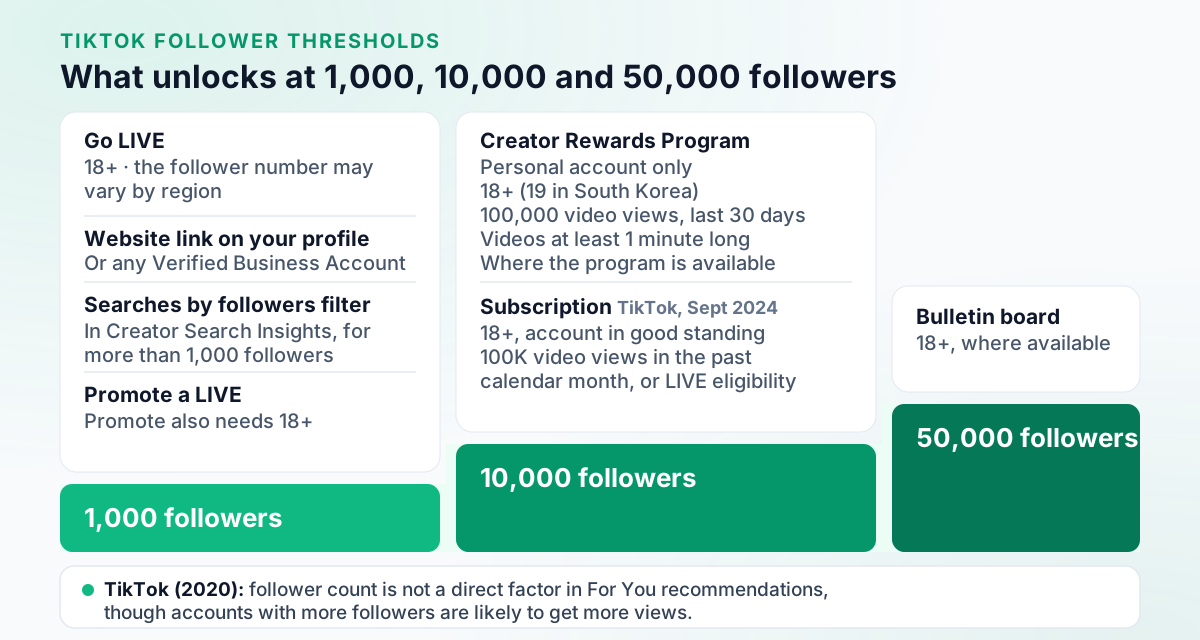
At 1,000 followers you can go LIVE if you’re 18 or older and add a website link to your profile. At 10,000, the Creator Rewards Program opens, with view, age and account-type conditions, and Subscription opened at 10,000 when TikTok expanded it in 2024. At 50,000, creators 18 or older get bulletin board, where it’s available.
| Followers | What it unlocks | Other conditions | Source |
|---|---|---|---|
| 1,000 | Going LIVE | 18 or older; the number may vary by region, and LIVE isn’t available everywhere | Checked against TikTok Help Center: About TikTok LIVE |
| 1,000 | A website link on your profile | Or a Verified Business Account; no links that open or log you into other social media apps | Checked against TikTok Help Center: How to add a link to your TikTok profile |
| 1,000 | Promoting a LIVE with Promote (paid) | Promote also needs you to be 18 or older, with public content that uses original or commercially usable sound | Checked against TikTok Help Center: Use Promote to grow your TikTok audience |
| More than 1,000 | The Searches by followers filter in Creator Search Insights | Open it by searching “Creator Search Insights” in the app | Checked against TikTok Help Center: Creator Search Insights |
| 10,000 | Creator Rewards Program | Personal Account; 18 or older (19 in South Korea); 100,000 video views in the last 30 days; videos at least one minute long | Checked against TikTok Help Center: Creator Rewards Program |
| 10,000 | Subscription (2024 rules) | When it expanded in 2024: 18 or older, an account in good standing and 100,000 video views in the past calendar month, or specific LIVE eligibility requirements | Checked against TikTok Newsroom: Subscription Expansion (23 September 2024) |
| 50,000 | Bulletin board | 18 or older, where the feature is available in your region | Checked against TikTok Creator Academy: Engaging your followers with the bulletin board feature (last updated Aug 18, 2026) |
Read the ladder as a plan. Below 1,000, everything rides on the videos themselves. From 1,000, LIVE and a profile link give viewers more ways to stay in touch. From 10,000, the gates add views as well as followers, and TikTok’s growth tips already point that way: they suggest content longer than one minute, and Creator Rewards requires videos at least one minute long. Marketers draw similar lines: the IAB’s creator economy map calls 1,000 to 10,000 followers the nano tier and 10,000 to 50,000 the micro tier, a convention rather than a TikTok rule.
What those rewards pay is covered in how much TikTok pays for 1 million views. For what a bulletin board does and how to start one, see our TikTok bulletin board guide.
Why am I getting views but no followers?
Check your account settings first. On a private account you approve who can follow you and watch your videos, so nobody becomes a follower until you approve them, and people you haven’t approved can’t see your videos, bio, likes or follow lists. TikTok says your name, username and profile photo stay visible to anyone on or off TikTok. Checked against TikTok Help Center: Choosing between a private or public account Checked against TikTok Help Center: Choosing between a private or public account
Those three fields are visible whatever your settings, so make them say what you post.
Then check the numbers you’re judging by. TikTok says analytics are only generated for videos posted after you enable the feature, can take 1 to 2 days to update, and show follower activity in your local time zone but everything else in UTC. Checked against TikTok Help Center: My videos aren't getting views
If your views have dropped as well, look for an Ineligible for recommendation notice in your inbox or below your username. TikTok says an account that repeatedly posts content unsuitable for the For You feed won’t appear there and will be harder to find in search, and you can appeal. Checked against TikTok Help Center: Why is my account not being recommended?
Is it safe to buy TikTok followers?
No. TikTok’s Community Guidelines ban accounts that try to manipulate the platform and the trade of services that artificially boost engagement, strictly prohibit automation tools and scripts designed to bypass its systems, and say detected fake likes and followers are removed. Checked against TikTok Community Guidelines: Integrity and Authenticity — Deceptive Behaviors and Fake Engagement (effective 24 September 2026)
The risk goes beyond losing what you paid for. TikTok can ban the account, ban additional or new accounts, or restrict posting, top search results and the For You feed, and if you’re restricted or banned, you may not create or use another account to get around it. Follow-for-follow posts don’t escape either: content that tries to manipulate people into inflating likes or follows isn’t eligible for the For You feed.
The guidelines in force were released on 25 August 2026 and took effect on 24 September 2026, Checked against TikTok Community Guidelines and TikTok said on 10 July 2026 that it had removed more than 86 million fake accounts in the first three months of 2026. Checked against TikTok Newsroom: Helping people spot and understand AI generated content on TikTok (10 July 2026)
Bought followers can also cost you later: TikTok removes accounts that acquire fake views or inflate follower counts from its Creator Rewards Program. Checked against TikTok Help Center: Creator Rewards Program And bot-driven growth tools have a second problem: TikTok’s US Terms forbid scraping, crawling or extracting data or content from TikTok with automated systems, including bots, unless TikTok USDS Joint Venture approves in writing. Checked against TikTok Terms of Service (United States), last updated July 15, 2026
How do you keep posting regularly?
Pick a pace you can sustain, then schedule ahead. TikTok’s Help Center gives scheduling steps for desktop web only: after uploading, you toggle schedule and pick a date and time between 15 minutes and 10 days ahead. Scheduled posts can be deleted but not edited.
On a computer:
- Log into your account on TikTok Desktop Web and click on the "Upload" icon at the top of your feed.
- Upload the video you want to schedule.
- After uploading and editing, toggle the schedule button and select a date and time to schedule your post. (Time zone is defaulted to your computer setting.)
- Click schedule to set up your post!
Checked against TikTok Help Center: Schedule video.
The same Help Center page adds: “Only a ‘Business Account’ or over with a 10,000 followers or more can access desktop scheduling.” The wording is ambiguous, so if the schedule toggle doesn’t appear for you, that line may be why. Phone options, and how third-party schedulers post to TikTok, are in our TikTok scheduling guide.
TikTok followers FAQ
How often should you post on TikTok to grow?
TikTok’s Help Center growth tips say to upload high-quality content regularly and to create content longer than one minute, so pick a pace you can keep up week after week. TikTok also documents a scheduler on desktop web that takes a date and time between 15 minutes and 10 days ahead, though the same page says desktop scheduling may need a Business Account or 10,000 followers, so the option may not appear for everyone.
How many followers do you need to go LIVE on TikTok?
You need 1,000 followers and must be at least 18. TikTok says the follower number may vary by region, and LIVE isn’t available everywhere. Sending or receiving LIVE Gifts also needs you to be at least 18, or 19 in South Korea.
How many followers do you need for the TikTok Creator Rewards Program?
At least 10,000 followers, plus 100,000 video views in the last 30 days. TikTok also requires a Personal Account (Business and political or government accounts aren’t eligible), age 18 or older (19 in South Korea), videos at least one minute long, and a base in a country where the program is available.
Does buying TikTok followers work?
No. TikTok’s Community Guidelines ban the trade of services that artificially boost engagement and say detected fake likes and followers are removed. The account can also be banned or restricted, and TikTok removes accounts that acquire fake views or inflate follower counts from its Creator Rewards Program.
How long does it take to grow a TikTok account?
No timeline fits every account, so judge progress over weeks, not days. TikTok says analytics are only generated for videos posted after you enable the feature and can take 1 to 2 days to update, and Creator Rewards eligibility counts video views over the last 30 days.