
What Is Curated Content? A Guide to Content Curation
What is curated content? It is content made by other people that you select, organise and share with credit and your own context, such as a roundup of useful articles or a creator’s reel reposted with your comment. The word comes from the verb: Merriam-Webster defines curate as to select and organize articles, images and the like for distribution or publication. Checked against Merriam-Webster: curate (verb)
Curation sits next to the posts you create yourself in a social media marketing plan. This guide covers what counts as curated, a 5-step workflow, each network’s own share features, and the part most guides skip: the rules, because a credit line is not permission.
Table of Contents
- What is curated content?
- Curated vs created content: what’s the difference?
- How to curate content for social media in 5 steps
- Can you share other people’s content? The rules
- How to share others’ posts with each network’s own features
- Which content curation tools are worth using?
- How much of your content should be curated?
- Draft a curated post for each network with Outfeed
- Curated content FAQ
What is curated content?
Curated content is someone else’s work, chosen by you, credited to its creator and framed with your own take; content curation is the habit of finding, choosing and sharing it. The Cambridge Advanced Learner’s Dictionary gives a sense of curate that fits social media closely: to select things such as documents, music, products or internet content to be included in a list or collection, or on a website. Checked against Cambridge Dictionary: curate (verb) Cambridge has no entry for the phrase “content curation”, so the meaning comes from the verb. Checked against Cambridge Dictionary: content curation (no entry) So when people ask what is content curation, the plain answer is finding, choosing, crediting and sharing other people’s work with your own context.
Illustrative examples, written for this page:
- A weekly LinkedIn post linking three industry articles, each with a one-line takeaway.
- A creator’s reel shared with Instagram’s Repost button, with a note on why it matters to your audience.
- A Pinterest board of other people’s Pins on one theme.
- A newsletter roundup of the month’s best tutorials in your field.
Curated vs created content: what’s the difference?
Created content is your own work; curated content is someone else’s, credited and framed by you. Two more kinds sit between them and cause most of the trouble: reposts made with a network’s own button, and re-uploads of a copied file. Syndicated and aggregated content are related terms, so they get a row each too; the descriptions in the table are our working definitions.
| Type | Whose work | How it is shared | What you need |
|---|---|---|---|
| Created | Yours | Your own post | Copyright in your own original work applies once it is fixed in a tangible form Checked against U.S. Copyright Office: What is Copyright?; anything you include from others still needs permission |
| Curated | Someone else’s | A link or mention with credit and your commentary | Credit, plus your own take |
| Reposted | Someone else’s | The network’s share feature (Repost, Share to story, Duet, Stitch, reblog) | The creator’s sharing settings allow it |
| Re-uploaded | Someone else’s | A copied file posted from your account | Permission; credit alone is not enough Checked against Instagram Help Center: How to make sure content you post to Instagram or Threads doesn't violate copyright law |
| Syndicated | Someone else’s | The full piece published again, under an agreement with the original publisher | A licence or written agreement from the publisher |
| Aggregated | Someone else’s | Headlines or posts collected automatically into a feed, usually with no commentary | The source’s permission or terms for the feed; adds little of your own |
Meta draws the same line for Facebook. It welcomes resharing with commentary, reaction videos and trends, but wants to combat repeated reposting of other creators’ content without permission or meaningful enhancements. Checked against Meta for Creators blog: Combating unoriginal content (July 2025)
How to curate content for social media in 5 steps
Social media content curation works as a routine: set up sources, filter them through your pillars, add your take, credit the original and share with each network’s own tools.
- Set up sources. Google Alerts emails you when new Google Search results appear for a topic, with options for frequency, types of sites, language and region. Checked against Google Search Help: Create an alert Add the sites and creators you already trust.
- Keep what fits your pillars. Share only items that sit under one of your content pillars and that your audience would thank you for.
- Add your take. Meta says you can use content you’re approved to use from other sources if you make it your own through creative editing, voiceover or commentary; simply stitching clips together or adding your watermark does not count. Checked against Meta for Creators blog: Combating unoriginal content (July 2025)
- Credit and link the original. Tumblr’s guidelines ask users to reblog rather than repost and to give attribution with links to original sources. Checked against Tumblr: User Guidelines (Misattribution or Non-Attribution, archived)Archived copy, 11 November 2026 TikTok lets you credit up to 3 videos in a post, and the credited creator is notified. Checked against TikTok Help Center: Credit a video
- Share with the network’s own feature where one exists (see the table of share features), instead of re-uploading a copy of the creator’s work.
Can you share other people’s content? The rules
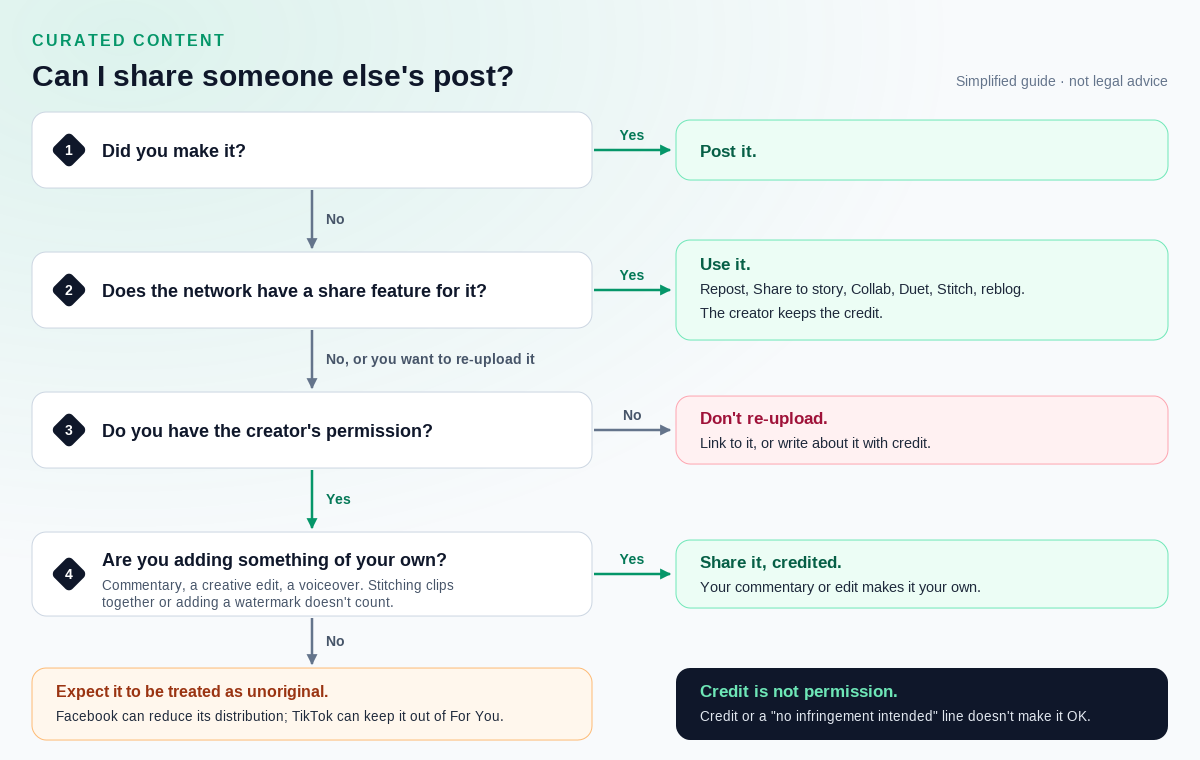
Credit is not permission: copyright applies automatically, fair use is decided case by case, and Instagram does not count a re-upload as original just because the caption credits the creator. This is general information, not legal advice.
- Copyright is automatic. The U.S. Copyright Office says copyright protects original works as soon as they are fixed in a tangible form. Checked against U.S. Copyright Office: What is Copyright?
- Fair use has no formula. Courts weigh four factors: the purpose of the use, the nature of the work, how much is used and the effect on the market for the original. Checked against U.S. Copyright Office: Fair Use Index They decide case by case, and no set percentage or amount is guaranteed safe. Checked against U.S. Copyright Office: Fair Use Index
- YouTube calls credit a myth. YouTube Help lists as common copyright myths that giving credit lets you use content and that disclaimers such as “no infringement intended” make a use allowed. Checked against YouTube Help: Common copyright myths Its fair use page says transformativeness is usually key, and credit won’t turn a non-transformative copy into fair use. Checked against YouTube Help: Fair use on YouTube
- Instagram says the same. Posting someone else’s content can infringe even if you gave credit, added a disclaimer, didn’t profit or modified it. Checked against Instagram Help Center: How to make sure content you post to Instagram or Threads doesn't violate copyright law Instagram says re-uploading someone else’s work with only a border, watermark, subtitles or a caption credit does not count as original, and since April 2026 accounts that mainly post content they did not create are removed from its recommendations. Checked against Instagram for Creators — Rewarding original creators on Instagram (dated )
- TikTok limits unoriginal posts. TikTok says copied content, largely repurposed content without creative edits, low-value compilations and videos with someone else’s visible watermark may be removed from the For You feed. Checked against TikTok Creator Academy: Understanding TikTok's Originality Policy
- Facebook penalises repeat reposters. Meta says Facebook accounts that repeatedly and improperly reuse someone else’s videos, photos or text posts will lose access to Facebook monetization programs for a period and get reduced distribution on everything they share. Checked against Meta for Creators blog: Combating unoriginal content (July 2025) Meta announced this on 14 July 2025, TechCrunch reported. Checked against TechCrunch, 'Following YouTube, Meta announces crackdown on unoriginal Facebook content' (14 Jul 2025)Press report
How to share others’ posts with each network’s own features
Each network below has a built-in way to share someone else’s post without copying it: use it instead of downloading and re-uploading.
| Network | Feature | How it works | Source |
|---|---|---|---|
| Repost | Adds a public reel or post to your Reposts tab; only originals can be reposted, and creators can turn reposts off | Checked against Instagram Help Center: Repost a reel or a post on Instagram | |
| Share to story | Only if the account is public and allows resharing | Checked against Instagram Help Center: Share someone's post from feed to your Instagram story | |
| Collab post | Co-authored post shown on both profiles | Checked against Instagram Help Center: Create collaborative posts on Instagram | |
| TikTok | Repost | Shares it with your friends and community in their For You feed, labelled as a repost | Checked against TikTok Help Center: Repost |
| TikTok | Duet | Your video side by side with theirs; they must allow it | Checked against TikTok Help Center: Duets |
| TikTok | Stitch | Part of their video inside yours; they choose who can | Checked against TikTok Help Center: Stitch |
| Repost or Repost with your thoughts | Public posts from members or Pages; group posts can’t be reposted | Checked against LinkedIn Help: How to repost a post on LinkedIn | |
| Threads | Repost or Quote | A quote is included in a thread you post | Checked against Instagram Help Center (Threads): Like, repost or quote a thread or reply on Threads |
| Save | Saves a Pin to one of your boards | Checked against Pinterest Help: Save Pins to a board | |
| Tumblr | Reblog | Reblog instead of reposting, with attribution | Checked against Tumblr: User Guidelines (Misattribution or Non-Attribution, archived)Archived copy, 11 November 2026 |
For step-by-step help, see our guides to reposting on Instagram and how to repost on TikTok.
Which content curation tools are worth using?
You can curate well with free tools: an alert service for web results, an RSS reader for sites you follow, and each network’s own save and share features. No tool replaces your judgement about what is worth sharing.
- Google Alerts fits if you want an email when new Google Search results appear for a topic. Checked against Google Search Help: Create an alert It watches web results, not posts inside social networks.
- Inoreader fits if you follow many sites by RSS. It is an RSS and news reader that publishes a Free plan alongside paid plans, billed monthly or annually. Checked against Inoreader: PricingVendor's own description Check current plans on Inoreader’s pricing page.
- The networks’ own features fit if you curate inside one app: saving Pins to boards, or the share features in the table above.
Two names still appear in older lists. Mozilla says Pocket shut down on 8 July 2025, with saves exportable only until 12 November 2025. Checked against Mozilla Support: Pocket has shut down - What you need to know (Internet Archive capture)Archived copy, 2 November 2025 Feedly now presents itself as an AI platform for cyber threat intelligence teams rather than a general news reader. Checked against Feedly: homepageVendor's own description
How much of your content should be curated?
There is no proven ratio: we found no primary research or platform guidance that supports a fixed split such as 60/40, a “rule of thirds” or 5-3-2. Checked against Search of platform guidance and research databases (no primary source found)Not verified Treat those as planning habits, not rules.
A sensible content curation strategy starts with mostly original posts and a smaller share of curated ones, then adjusts using each network’s own analytics. The platform rules above point the same way: Instagram keeps accounts that mainly post other people’s work out of recommendations, so the more you curate, the more your own take matters. For original post ideas, see our list of content ideas, and read why original posts get recommended on Instagram.
Draft a curated post for each network with Outfeed
Curating across several networks means writing the same credit and takeaway several ways; here is where Outfeed fits that job.
Draft your next curated post with Outfeed AI
Curated content FAQ
What is curated content?
Content made by other people that you select, organise and share with credit and your own context, such as a roundup of useful articles or a reposted video with your commentary.
What is an example of curated content?
A weekly post that links three industry articles with a one-line takeaway from you, or a reel reposted with the network’s own Repost button so the original creator keeps the credit. Checked against Instagram Help Center: Repost a reel or a post on Instagram
Is it legal to share someone else’s content if you credit them?
Credit alone is not permission. YouTube lists giving credit as a copyright myth Checked against YouTube Help: Common copyright myths, Instagram says posting someone else’s content can infringe even with credit Checked against Instagram Help Center: How to make sure content you post to Instagram or Threads doesn't violate copyright law, and the U.S. Copyright Office says fair use is decided case by case. Checked against U.S. Copyright Office: Fair Use Index Use the network’s own share features or ask the creator.
What is the difference between curated and created content?
Created content is your own original work. Curated content is someone else’s work that you select and share with credit, ideally adding your own commentary or context.
Is there a right ratio of curated to original content?
We found no primary research or platform guidance that sets one. Checked against Search of platform guidance and research databases (no primary source found)Not verified Ratios like 60/40 or 5-3-2 are rules of thumb, so start with a mix you can sustain and adjust it using each network’s own analytics.