
Social Media Community Management: Guidelines and Moderation
Social media community management is the work that starts after a post goes out: answering comments, setting the rules for your comment sections, moderating what breaks them and building a relationship with the people who follow you. This guide gives you a set of community guidelines to copy, a moderation ladder mapped to each network’s own controls, and a plain answer on tools and agencies.
Posting itself is covered in our social media marketing playbook for small businesses; this page starts where the post ends and the replies begin.
Table of Contents
- What is social media community management?
- Community management vs social media management: what’s the difference?
- Write your community guidelines first
- How do you moderate comments on social media? A moderation ladder
- How to build a community on social media
- Should you hire a social media community management agency?
- Community management tools
- Social media community management FAQ
What is social media community management?
Social media community management is looking after the relationship between a brand and the people who follow, comment on and talk about it on social media. Cambridge defines community management as the job of making sure a brand has a positive image and good relationships with its customers or followers on social media Checked against Cambridge Advanced Learner's Dictionary & Thesaurus, and uses the same wording for the person who does it, the community manager. Checked against Cambridge Advanced Learner's Dictionary & Thesaurus The community is the group itself: Cambridge Business English defines an online community as a group of people who use a particular internet service or belong to a particular group on the internet. Checked against Cambridge Business English Dictionary
It runs both ways. The Chartered Institute of Public Relations notes that understanding is a two-way process: an organisation has to listen to the people it deals with, not only send them information. Checked against CIPR (Chartered Institute of Public Relations): About PR
Community management vs social media management: what’s the difference?
Social media management plans and publishes posts; community management handles what happens after they go out: replies, moderation and the relationships that grow from them.
| Social media management | Community management | |
|---|---|---|
| When | Before the post | After the post |
| Main work | Planning, writing, scheduling, publishing | Replying, moderating, enforcing guidelines, escalating |
| Main tools | Content calendar, scheduler | Each network’s comment controls, an inbox tool |
Both are relationship work. PRSA defines public relations as “a strategic communication process that builds mutually beneficial relationships between organizations and their publics”. Checked against Public Relations Society of America (PRSA): About Public Relations The CDC’s crisis-communication framework lists community engagement as an objective for every phase and describes it as two-way communication with active listening. Checked against CDC: CERC Introduction (Crisis and Emergency Risk Communication, 2018 update) For the publishing role, see social media management and what a social media specialist does.
Write your community guidelines first
Publish short rules people can read before they comment: what’s welcome, what you hide or remove, and how you run giveaways and ask for reviews. Put them on your website and link them from your profiles.
Illustrative template: community guidelines for [Brand]
- Welcome here: questions, feedback, criticism of our products and your own experiences with them.
- Hidden or removed: spam and repeated posting, scams, harassment, hate, threats and other people’s private information.
- Giveaways: we never ask you to like, share or follow to enter. Meta’s spam standard bans exchanging engagement for anything of value, including like- or share-gating. Checked against Meta Transparency Center: Community Standards, Spam
- Reviews: we ask every customer, not only happy ones, and staff, family and friends who review us say so. Checked against FTC: Soliciting and Paying for Online Reviews: A Guide for Marketers (January 2022) We never tie a reward to a positive or negative review. Checked against FTC press release, 14 August 2024: final rule banning fake reviews and testimonials
- What happens next: a comment that breaks these rules is hidden first; repeat cases are restricted, then blocked or reported.
- Complaints: [email address].
Bluesky’s Community Guidelines ban similar tricks: manipulating engagement metrics or follower counts, and undisclosed sponsored content. Checked against Bluesky Social: Community Guidelines (last updated 19 September 2025)
How do you moderate comments on social media? A moderation ladder
Use the lightest control that solves the problem: filter words first, then hold comments for review, hide, restrict or limit, delete, and turn comments off only when nothing else works.
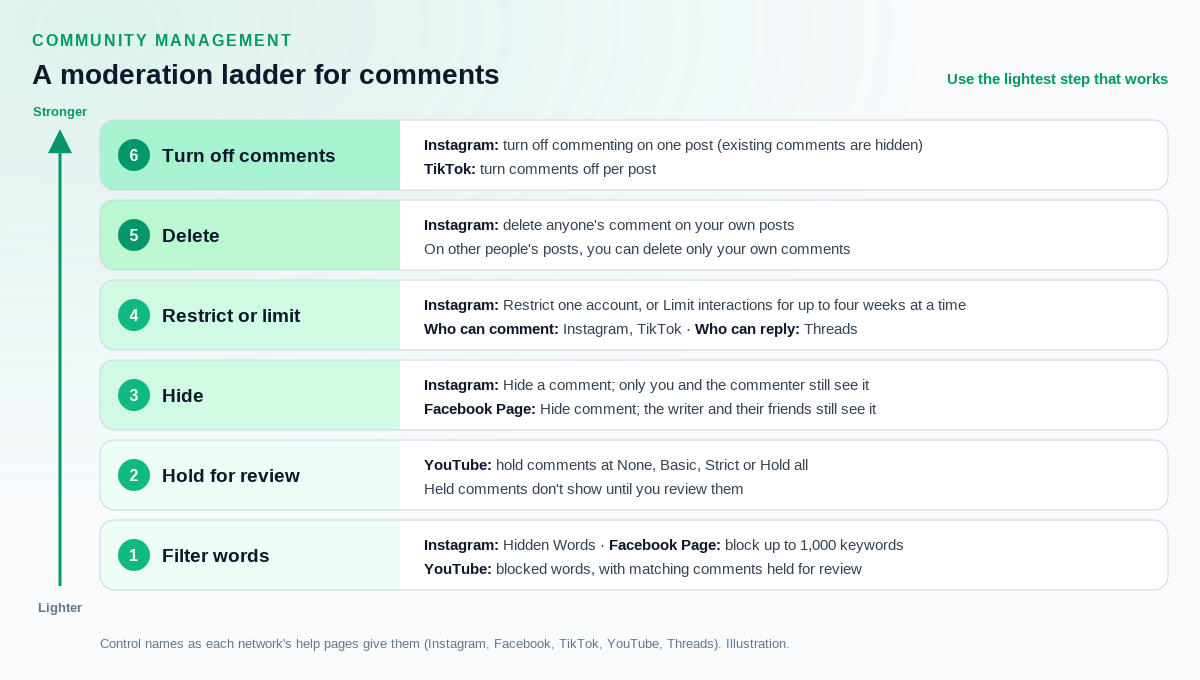
The controls each network documents, lightest first:
| Network | Controls |
|---|---|
| Hidden Words hides comments containing words, phrases or emojis you list Checked against Instagram Help Center: Hide comments or message requests you don't want to see on Instagram (Manage custom words and phrases); Hide unwanted comments filters common offensive words and is on by default. Checked against Instagram Help Center: Hide comments or message requests you don't want to see on Instagram A comment you hide stays visible only to you and its writer. Checked against Instagram Help Center: Hide comments or message requests you don't want to see on Instagram (Manually hide comments) Restrict keeps a person’s new comments visible only to them unless you approve them Checked against Instagram Help Center: Restrict or unrestrict someone on Instagram; Limit interactions hides comments from groups you choose for up to four weeks at a time Checked against Instagram Help Center: Temporarily limit people from interacting with you on Instagram; you can also choose who may comment. Checked against Instagram Help Center: Hide comments or message requests you don't want to see on Instagram ("Choose who can comment on your posts") You can delete anyone’s comment on your own posts Checked against Instagram Help Center: Delete a comment on Instagram or turn commenting off for one post, which hides existing comments. Checked against Instagram Help Center: Turn comments on or off for Instagram posts | |
| Facebook Page | Block up to 1,000 keywords; matching comments are hidden, though their writer and friends still see them. Checked against Facebook Help Center: Block certain words from appearing in comments on your Facebook Page A comment you hide also stays visible to its writer and their friends. Checked against Facebook Help Center: Hide a comment from a post on your Facebook Page |
| TikTok | Comment settings live under Settings and privacy > Privacy > Comments Checked against TikTok Help Center: Manage comments; allow comments from Everyone (public accounts), Followers (private accounts) or Friends, or turn comments off for a single post. Checked against TikTok Help Center: Who can comment on TikTok |
| YouTube | Hold comments for review at None, Basic, Strict or Hold all Checked against YouTube Help: Learn about comment settings; a blocked-words list sends matches to the Held tab, and you can hide users or mark approved ones. Checked against YouTube Help: Learn about comment settings |
| Threads | Choose who can reply to and quote each post, including followers only, and, since October 30, 2025, approve replies before they appear. Checked against Instagram Help Center (Threads): Manage who can reply and quote your post on Threads |
| LinkedIn Page | Admins can turn comments off before posting (desktop and iOS) and switch them on or off later Checked against LinkedIn Help: Turn off comments on a new LinkedIn Page post; deleting a comment removes its likes and replies, and the member isn’t notified. Checked against LinkedIn Help: Delete comments on a Page post |
| Bluesky | Bluesky’s own moderation applies to every account, and since March 2024 you can subscribe to independent moderation services (labelers) that add labels on top. Checked against Bluesky blog: Bluesky’s Stackable Approach to Moderation |
For X and Pinterest, check each network’s help centre for its current reply and comment settings. Step-by-step guides: managing Instagram comments and pinning comments on TikTok. When comments spike because something has gone wrong, moderation turns into crisis communications on social media.
How to build a community on social media
A community management strategy comes down to three habits: post things that invite a reply, answer the replies you get, and keep a steady rhythm. Treat it as a conversation, not a broadcast. Two principles from the CDC’s crisis-communication manual carry over to everyday comments: acknowledge what people feel Checked against CDC: CERC Introduction (Crisis and Emergency Risk Communication, 2018 update), and stay respectful, especially when people feel vulnerable. Checked against CDC: CERC Introduction (Crisis and Emergency Risk Communication, 2018 update)
- Ask questions you want answered, such as which product to restock or what to cover next, and act on the answers in public.
- Answer what you get, questions first.
- Keep a rhythm people can expect, so regulars know when to come back.
Track a few numbers each week to see whether it’s working:
- Reply time: how long questions and complaints wait for a first answer.
- Answer rate: the share of questions that got a reply.
- Moderation load: how many comments you hid, removed or reported, and why.
Over time, how you answer becomes your brand reputation management.
Should you hire a social media community management agency?
Hire help when comments arrive outside your hours or in languages you don’t cover; keep it in-house when good answers need product or policy knowledge only your team has. Before you sign:
- Hand over the guidelines above, plus what to escalate (complaints, legal threats, press, safety) and to whom.
- Give access through each network’s own roles, such as LinkedIn Page admin roles, not a shared password.
Whoever replies, the result is yours. The FTC warns that some reputation-management companies write fake reviews, that a business can be held responsible for what they do on its behalf, and that review platforms could remove its listings. Checked against FTC: Soliciting and Paying for Online Reviews: A Guide for Marketers (January 2022)
Community management tools
Each network’s own controls are free and cover most moderation; paid inbox tools bring comments and messages from several networks into one queue. These are examples of the type, not a ranking:
| Tool | What it lists | Fits if |
|---|---|---|
| Native controls | The ladder above | One or two networks |
| Agorapulse | A social inbox, comment and ad-comment moderation, saved replies, sentiment detection and automated moderation rules Checked against Agorapulse: Pricing PlansVendor's own description | A team shares replies across networks |
| Hootsuite | An inbox for public and private conversations on every plan, with assignment and routing from Advanced Checked against Hootsuite: Plans, Prices, and FeaturesVendor's own description | You need replies routed to teammates |
| Buffer | A community inbox on its Free plan Checked against Buffer: PricingVendor's own description | You want to start without paying |
Tracking mentions beyond your own posts is social listening, a separate kind of tool.
The posting half can be planned ahead; the replies can’t.
Social media community management FAQ
What is social media community management?
It is looking after the relationship between a brand and the people who follow, comment on and talk about it on social media. Cambridge defines community management as the job of making sure that a brand has a positive image and good relationships with its customers or followers on social media. In practice that means replying, moderating, writing community guidelines and escalating problems.
What is the difference between community management and social media management?
Social media management plans, writes and publishes posts. Community management handles what happens after a post goes out: replies, moderation and the relationships that grow from them. In a small team one person may do both, but the skills differ: one is planning and publishing, the other is conversation and judgement.
What does a social media community manager do?
Cambridge defines a community manager as someone whose job is to make sure that a brand has a positive image and good relationships with its customers or followers on social media. Day to day that means answering comments and questions, applying the community guidelines, moderating comments with each network’s controls, escalating complaints and noticing patterns worth passing on to the rest of the business.
How do you moderate comments on social media?
Start with the lightest control that works. Filter words first (Instagram Hidden Words, Facebook Page blocked keywords, YouTube blocked words), then hold comments for review where the network allows it, hide individual comments, restrict or limit who can comment, delete what breaks your guidelines, and turn comments off on a post only when nothing else works.
What tools do community managers use?
Each network’s own comment controls are free and cover most moderation. Teams handling several networks can add an inbox tool that brings comments and messages into one queue, such as Agorapulse, Hootsuite or Buffer, which all list an inbox. Tracking mentions beyond your own posts is social listening, a separate kind of tool.