
YouTube Verify: How to Verify Your Account by Phone
YouTube verify is a phone check. On your phone, open m.youtube.com/verify, choose a text message or a voice call, and type in the 6-digit code; on a computer, the same check sits in YouTube Studio under Settings > Channel > Feature eligibility. Passing it unlocks intermediate features, including videos longer than 15 minutes and custom thumbnails. Checked against YouTube Help: Get access to intermediate and advanced features
Not the checkmark you were after? The badge next to a channel’s name is a separate process with a 100,000-subscriber bar and its own application: see how to get verified on YouTube. This guide is part of our series on growing a YouTube channel and covers the phone check, what it unlocks, the limits YouTube sets and the route to advanced features.
Table of Contents
- What does YouTube verify unlock?
- How do I verify my YouTube account?
- How many channels can one phone number verify?
- Why can’t I verify my YouTube account with my phone?
- How do I get advanced features?
- Can you verify a YouTube account without a phone number?
- Is account verification the same as the checkmark?
- Does Outfeed handle YouTube verification?
- YouTube verify FAQ
What does YouTube verify unlock?
Intermediate features: videos longer than 15 minutes, live streaming on a computer, custom thumbnails and creating a podcast. YouTube sorts creator tools into three levels, and phone verification is the step between the first two. The third level, advanced features, takes phone verification plus either channel history or an ID or video check.
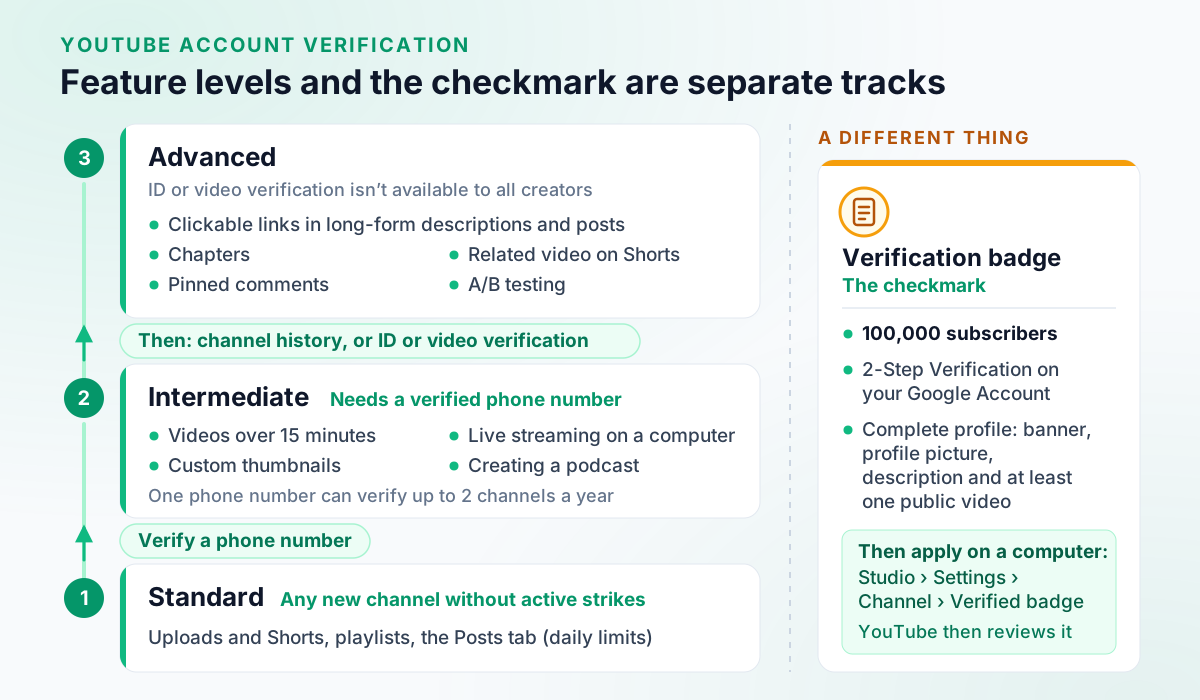
| Level | How a channel gets it | What it adds |
|---|---|---|
| Standard | Creating a channel, with no active Community Guidelines strikes | Uploading videos and Shorts, creating playlists, the Posts tab |
| Intermediate | Verifying a phone number | Videos longer than 15 minutes, live streaming on a computer, custom thumbnails, creating a podcast |
| Advanced | Phone verification plus channel history, or ID or video verification | Content ID appeals, embedding live streams, applying for monetization, clickable links in long-form descriptions and posts, a Related Video on a Short, pinned comments, RSS upload, clickable links in channel details, chapters, A/B testing, multi-language features |
Checked against YouTube Help: Learn about feature access for YouTube Creators.
Some features also come with daily limits, and phone verification raises fewer of them than you might expect. In YouTube’s table, uploading videos and Shorts, creating playlists and the Posts tab get a higher daily limit only with channel history or identity verification, while live streaming on a computer and custom thumbnails get a limited daily limit with phone verification and a higher one with channel history or identity. Checked against YouTube Help: Learn about feature access for YouTube Creators YouTube publishes no numbers for these limits; a channel with advanced access that hits one has to wait 24 hours. Checked against YouTube Help: Learn about feature access for YouTube Creators The table also explains why a custom thumbnail needs a verified account Checked against YouTube Help: Add custom thumbnails on YouTube and why clickable links in a description wait for advanced features. Checked against YouTube Help: Learn about feature access for YouTube Creators
One wrinkle: YouTube’s older “Verify your YouTube account” article still lists appealing copyright claims as a phone-verification perk, while the feature table puts Content ID appeals under advanced features. This page follows the table. The table has a quirk of its own: it lists adding a Related Video to a Short and adding channels to your account under advanced features, yet ticks the phone-verification column for both, so treat them as advanced features and don’t count on phone verification alone. Checked against YouTube Help: Learn about feature access for YouTube Creators Checked against YouTube Help: Learn about feature access for YouTube Creators
Check which features your channel has
YouTube Studio on a computer lists your access under Feature eligibility, with “Enabled” next to each feature you have:
On a computer:
- On a computer, sign in to YouTube Studio.
- Click Settings.
- Click Channel.
- Click Feature eligibility.
Checked against YouTube Help: Learn about feature access for YouTube Creators.
Not every feature is managed from that tab, YouTube adds, and some have separate eligibility requirements.
How do I verify my YouTube account?
Verify a phone number, either in YouTube Studio on a computer or at m.youtube.com/verify on a phone. YouTube sends the code by text or voice call; on the mobile route you choose which. These are YouTube’s steps for both:
On a computer: YouTube Studio on a computer:
- On a computer, sign in to YouTube Studio.
- Click Settings.
- Click Channel.
- Click Feature eligibility, then Intermediate features, then VERIFY PHONE NUMBER.
- Enter a phone number. We'll send a verification code by text or phone call to that number.
On a mobile device (Android and iPhone variants match):
- Go to m.youtube.com/verify on your mobile device. Sign in if you're prompted to do so.
- Choose how to get your verification code.
- Enter the 6-digit verification code.
Checked against YouTube Help: Get access to intermediate and advanced features.
YouTube notes that only primary channel owners can verify to get access to additional features, and that it may also ask you to verify when you sign up. Its “Verify your YouTube account” article links youtube.com/verify for the same check.
How many channels can one phone number verify?
Two a year. “To help prevent abuse, a phone number can only be associated with 2 channels per year,” YouTube says. Try a third and you’ll see “This phone number has already created the maximum number of accounts”; YouTube’s answer is to use a different phone number. Checked against YouTube Help: Verify your YouTube account
So if one number has already verified two channels, say a personal channel and a brand channel, it can’t verify a third within the year.
Why can’t I verify my YouTube account with my phone?
Usually one of three reasons: the number has reached its 2-channel yearly limit, your carrier doesn’t support texts or calls from Google, or you’re signed in to an account where you aren’t the primary owner. Match the symptom:
- “This phone number has already created the maximum number of accounts.” That’s the yearly cap. You need a different number.
- The code never arrives. YouTube says you should get the code immediately; if you haven’t, request a new one, try the other option (text message or voice call) or use a phone number from a different carrier, because some countries, regions and carriers don’t support text messages from Google. Checked against YouTube Help: Verify your YouTube account
- “Advanced YouTube features aren’t available for this account.” You’re signed in to an account where you’re not the primary owner, such as a supervised account or a Brand Account. Only primary channel owners can verify their identity for extra features. Checked against YouTube Help: Get access to intermediate and advanced features
How do I get advanced features?
Verify your phone first, then either build channel history or verify your identity with an ID or a video. YouTube says most active channels already have enough channel history. ID and video verification aren’t available to all creators, and only the primary owner can complete them; on a Brand Account channel, every user gets the same features as the primary owner. Checked against YouTube Help: Get access to intermediate and advanced features
Channel history is YouTube’s record of your channel activity (uploads, live streams, audience engagement) and of Google Account data: when and how the account was created, how often it’s used and how you connect to Google services. Community Guidelines strikes, posting the same content repeatedly, spam or scams, misleading metadata, impersonation and copyright strikes can delay or restrict access. Active channels that follow the Guidelines can usually rebuild enough history within 2 months, YouTube says.
Both identity checks need a smartphone. You can start in YouTube Studio on a computer, under Feature eligibility > Advanced features, and finish on your phone from Google’s email or QR code, or start on the phone itself:
On a mobile device (Android and iPhone variants match):
- ID: Go to https://myaccount.google.com/identity-document/submit on your mobile device. If you're asked to do so, sign in with the account you want features for.
- Follow the prompts to take a picture of your ID. A valid ID can include a passport or driver's license.
- Tap Submit. Review usually takes 24 hours. You'll get an email when it's approved.
- Video: Go to https://myaccount.google.com/video-verification/submit on your mobile device, then follow the prompts to perform an action, like following a dot, or turning your head.
Checked against YouTube Help: Get access to intermediate and advanced features.
Review usually takes 24 hours, and you’ll get an email when it’s approved. If a second attempt is rejected, you have to wait 30 days before trying either method again (a rejected second video can be appealed), or you can build channel history instead. ID verification needs a phone with a full HD rear-facing camera.
Your ID or video doesn’t stay on file forever. YouTube says it’s usually deleted a few months after you’ve built enough channel history, or after 1 year if you haven’t used advanced features, and it’s automatically deleted from your Google Account within 2 years. Google may keep ID, video and facial recognition data to prevent abuse for a maximum of 3 years from your last interaction with YouTube. Deleting it yourself before you’ve built channel history removes advanced features until you build history or verify again. And if you’d rather not provide an ID or video at all, YouTube says you don’t need to: you can always build channel history instead. Checked against YouTube Help: Get access to intermediate and advanced features
Can you verify a YouTube account without a phone number?
Not for intermediate or advanced features. YouTube says intermediate features require verifying your phone number, and advanced features need that same phone verification plus channel history or an ID or video check. Without it, a channel keeps standard features (uploading videos and Shorts, playlists and the Posts tab) within lower daily limits. Checked against YouTube Help: Learn about feature access for YouTube Creators
An ID or video check doesn’t replace the phone step; it’s the second half of the advanced route.
If YouTube is asking you to confirm your age, that’s a different process. YouTube says advanced-features verification is not age estimation: a user estimated to be under 18 gets teen protections and can verify their age with a selfie, a government ID or a credit card. Checked against YouTube Help: Get access to intermediate and advanced features
Is account verification the same as the checkmark?
No. Phone verification unlocks tools. The checkmark next to a channel’s name is a verification badge with its own requirements: 100,000 subscribers, 2-Step Verification on the Google Account and a complete profile, then an application that YouTube reviews. YouTube says verified channels get no extra features. Checked against YouTube Help: Verification badges on channels The full process is in how to get verified on YouTube.
Does Outfeed handle YouTube verification?
YouTube verify FAQ
How do I verify my YouTube account?
Verify a phone number. On a phone, go to m.youtube.com/verify, choose a text message or a voice call, and enter the 6-digit code. On a computer, sign in to YouTube Studio and go to Settings, Channel, Feature eligibility, Intermediate features, then Verify phone number.
What does verifying your YouTube account unlock?
Phone verification unlocks YouTube’s intermediate features: videos longer than 15 minutes, live streaming on a computer, custom thumbnails and creating a podcast. Advanced features, such as clickable links in long-form descriptions, chapters and pinned comments, also need channel history or an ID or video check.
Why can’t I verify my YouTube account with my phone number?
A phone number can verify no more than 2 channels a year; past that, YouTube shows “This phone number has already created the maximum number of accounts” and you need a different number. Not all carriers support texts or voice calls from Google, so if a text doesn’t arrive after a few minutes, try the voice call. Only primary channel owners can verify for extra features.
How do I verify my YouTube account without a phone number?
You can’t unlock YouTube’s intermediate or advanced features without one. YouTube says intermediate features require verifying a phone number, and advanced features need phone verification plus enough channel history or an ID or video check. Without it, a channel keeps standard features, such as uploading videos and Shorts, within lower daily limits.
Is verifying a YouTube account the same as getting the checkmark?
No. Phone verification unlocks features such as longer videos and custom thumbnails. The checkmark is a separate verification badge: a channel needs 100,000 subscribers, 2-Step Verification on its Google Account and a complete profile to apply, and YouTube says verified channels get no extra features.