
Social Media Customer Service: A Playbook for Small Teams
Social media customer service is answering customers’ questions and complaints where they raise them: in comments, mentions and direct messages on the networks they already use. For a small team it comes down to four decisions: which channels you answer, how fast, who replies, and when a conversation moves out of public view.
This playbook covers each one from the networks’ own messaging rules, with reply templates to copy. It is one part of social media management.
Table of Contents
- What is social media customer service?
- How fast should you respond to customers on social media?
- How to set up social customer care
- Triage and escalation: who answers what
- Public reply or DM? Response rules by network
- Social media customer service reply templates
- How to measure social media customer service
- Social media customer service software and social inbox tools
- FAQ
What is social media customer service?
Social customer service is ordinary customer service, done in public or semi-public channels. The Cambridge Dictionary defines customer service as the part of an organization that answers customers’ questions and exchanges goods that are not satisfactory, and as the practice of treating customers in a polite and helpful way. Checked against Cambridge Dictionary: customer service
On social media, that happens in comments, mentions, reviews and direct messages (DMs). Two things set it apart from email or phone:
- Other people watch. A public reply answers one customer and shows everyone reading how you treat customers.
- Each network sets its own rules for who can message whom, reply windows and automation.
How fast should you respond to customers on social media?
Answer within the hours you publish, and inside each network’s reply window: for Facebook and Instagram messages handled through Meta’s messaging APIs, the route inbox tools use, Meta’s policy gives a business 24 hours to respond for most user actions. If the person wrote after clicking a click-to-message ad, the window is up to 7 days from their first message. Checked against Meta for Developers: Messenger Platform policy overview
Missed it? Meta’s Human Agent message tag lets a business reply manually within a separate 7-day period after the standard window. Checked against Meta for Developers: Messenger Platform policy overview (Message Tags) It is for a person typing, not automated follow-ups.
LinkedIn’s own advice for Page messages is simply to reply as quickly as possible. Checked against LinkedIn Help: Messages for LinkedIn Pages
Inside those windows, pick a response time you can actually staff and publish it with your hours. A promised response time you keep beats a faster one you miss.
How to set up social customer care: channels, hours and an owner
Set up social customer care by choosing your channels, publishing your hours with an away message, and naming who replies. Our suggested checklist:
- Pick the channels customers actually use, and drop ones that no longer exist. Google says that as of 31 July 2024 chat is no longer available in Google Business Profile; customers can still call, and eligible businesses can be contacted by text or WhatsApp from the profile. Checked against Google Business Profile Help: Changes to Google Business Profile chat and call history
- Publish your hours and set an away message. Meta Business Suite’s Inbox automations reply automatically to people who message, or comment on a post of, a connected Facebook Page, Instagram business account or WhatsApp Business account. Checked against Meta Business Help Center: About automated responses in Meta Business Suite Inbox The templates are instant reply, away message, frequently asked questions, location, contact information, hours, custom keywords and comment to message, plus a filter for unanswered messages; custom keywords and comment to message are desktop only. Checked against Meta Business Help Center: About automated responses in Meta Business Suite Inbox The WhatsApp Business App can greet people when they start a conversation and respond while you are away. Checked against WhatsApp Business: Business AppVendor's own description
- Name an owner and decide who may reply. On LinkedIn, only super and content admins can view and reply to Page messages, and replies go out as the Page. Checked against LinkedIn Help: Messages for LinkedIn Pages
- Decide what you won’t answer. UK guidance for civil servants says they need not answer every social media query, should check who someone is before responding (sending journalists to the press office), and should not share personal details of the public or themselves. Checked against GOV.UK: Social media guidance for civil servants: October 2014 (Engaging with the public) The same rules suit a business.
Triage and escalation: who answers what
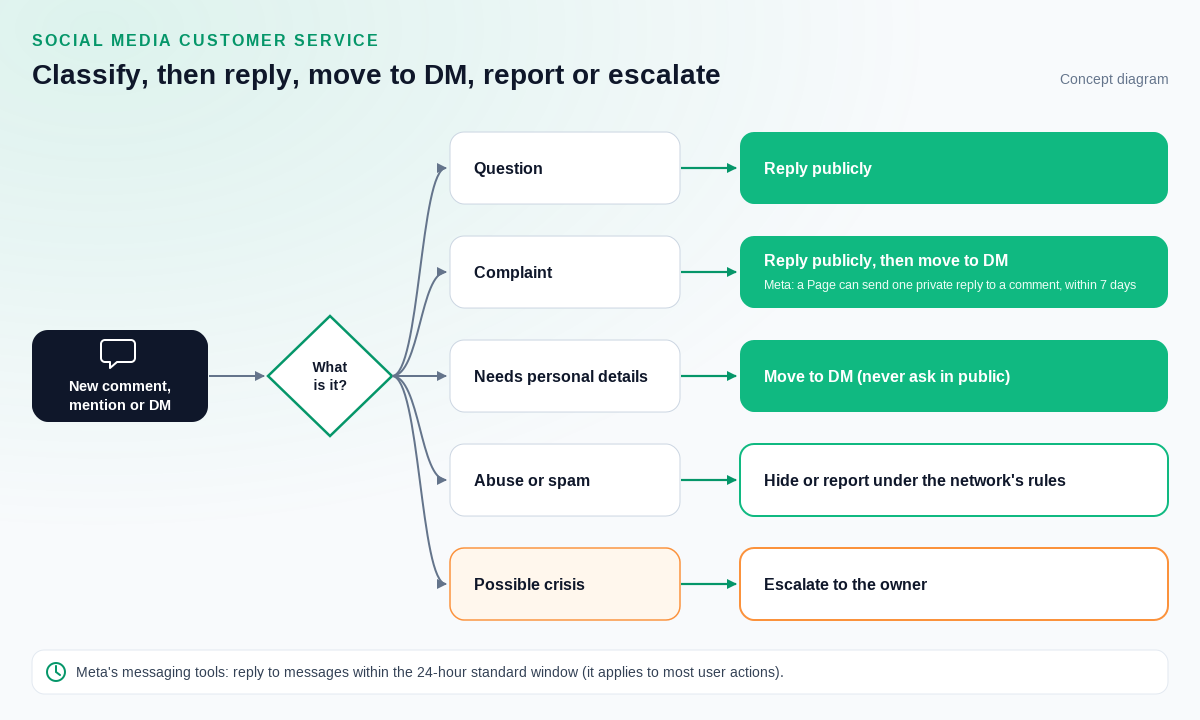
Triage means sorting each new comment, mention or DM by type, then sending it down one fixed path: reply publicly, move to DM, hide or report, or escalate. This matrix is our recommended playbook for a small team.
| Message type | First action | Who handles it |
|---|---|---|
| Question | Reply publicly | Whoever is on shift |
| Complaint | Reply publicly, then move to DM | Whoever is on shift; the owner if it repeats |
| Needs personal details (order, account, booking) | Move to DM; never ask for details in public | Whoever is on shift |
| Abuse or spam | Hide or report it under the network’s rules | Whoever is on shift |
| Possible crisis (many similar complaints, safety, legal) | Escalate to the owner | The named owner |
Hiding is for spam and abuse, not complaints. A complaint gets a reply. For the abuse row, the networks give you filters: Meta announced on 10 December 2021 a one-click hide action next to each Facebook comment and keyword blocking that also catches variations spelled with numbers or symbols. Checked against Meta for Creators blog: Leveling up comment moderation and creator support (10 Dec 2021) On Instagram, Hidden Words lets you list custom words, phrases, numbers or emojis to hide from comments on your posts and from message requests. Checked against Instagram Help Center: Hide comments or message requests you don't want to see on Instagram (Manage custom words and phrases)
Reviews are public replies too. A business must verify its Google Business Profile before replying to reviews; Google checks each reply against its content policies, and an approved reply appears publicly under the review in the business’s name. Checked against Google Business Profile Help: Manage customer reviews
Brand monitoring finds the complaints that don’t tag you. And if dozens of the same complaint arrive in an hour, stop answering one by one and hand it to your crisis plan.
Public reply or DM? Response rules by network
Reply in public when the answer helps everyone; move to a private message when you need personal details. On Facebook, Meta’s policy lets a Page send one private message in reply to a person’s comment or visitor post through its messaging platform, currently within 7 days of that comment. Checked against Meta for Developers: Messenger Platform policy overview (Private Replies) Who can message whom differs on every network:
| Network | Who can message you privately | Rules and native tools for replies |
|---|---|---|
| Facebook and Instagram | People who message your Page or professional account | 24-hour standard window through Meta’s messaging APIs (7 days after a click-to-message ad). Meta Business Suite’s inbox gathers messages and comments in one place. Instagram’s mobile app gives business and creator accounts Primary, General and Requests folders. |
| LinkedIn Pages | Members, once Page messaging is on | Admins can message a member only after the member writes to the Page first. Conversation topics let you filter the inbox. |
| X | People you don’t follow can message you only if you allow messages from everyone, they are Verified and you allow Verified users, or you messaged them before | Messages from people you don’t follow land in Requests, where you accept or delete them. |
| TikTok | Friends and accounts you follow; others send a message request | Automatic messages (welcome message, keyword reply, suggested questions, chat prompts) only for accounts with Advanced Access and Verified Business Accounts. |
| Threads | DMs since 1 July 2025; people you don’t follow go to a requests folder (announced 12 September 2025) | Group chats of up to 50 people since 15 October 2025. |
| Bluesky | By default, only people you follow; you can switch to no one or everyone | One-to-one DMs since 22 May 2024. |
| YouTube | Not covered here: this row is about public comments | YouTube Studio shows Published and Held comments, filtered by questions, response status and more. |
Checked against Meta for Developers: Messenger Platform policy overview.
Checked against Meta Business Help Center: About Inbox in Meta Business Suite.
Checked against Instagram Help Center: How do I organize Instagram messages?.
Checked against LinkedIn Help: Messages for LinkedIn Pages.
Checked against LinkedIn Help: Messages for LinkedIn Pages.
Checked against X Help Center: About Direct Messages.Archived copy, 6 September 2026 View the archived copy.
Checked against X Help Center: About Direct Messages.Archived copy, 6 September 2026 View the archived copy.
Checked against TikTok Help Center: How to manage who can message you.
Checked against TikTok Business Help Center: About automatic messages for TikTok accounts (last updated May 2026).
Checked against About Meta newsroom: Introducing Messaging and Highlighted Perspectives on Threads.
Checked against Bluesky blog: Just shipped: Bluesky Direct Messages!.
Checked against YouTube Help: Review & reply to comments.
If customers can’t reach your brand on X because you don’t follow them, open DMs to everyone in Settings and privacy, then Privacy and safety, then Direct Messages. Checked against X Help Center: About Direct MessagesArchived copy, 6 September 2026 View the archived copy Our X marketing strategy covers the rest.
Automate only inside each network’s rules:
- Meta keyword replies: a custom keyword automation can match up to 5 keywords or phrases, matched exactly and case-sensitively, and it sends after 15 minutes unless someone replies first. Checked against Meta Business Help Center: About automated responses in Meta Business Suite Inbox If an away message and a keyword automation both trigger, only the template response is sent. Checked against Meta Business Help Center: About automated responses in Meta Business Suite Inbox
- X bots must say they are bots. An API-based bot account must clearly state what it is and who is responsible for it. Checked against X Developer Platform: Developer Policy Automated replies go only to people who opted in, one per interaction, with an easy opt-out; auto-replies based on keyword searches are not permitted, and AI reply bots need X’s prior written approval. Checked against X Help Center: Automation rulesArchived copy, 1 October 2026 View the archived copy X also bans unsolicited bulk or automated DMs. Checked against X Help Center: Automation rulesArchived copy, 1 October 2026 View the archived copy
Social media customer service reply templates
The best practice for social media customer service replies is short, specific and human: acknowledge, answer or take the next step, and keep personal details out of public view. Example templates we wrote to adapt; swap the bracketed parts.
| Situation | Public reply (template) | DM follow-up (template) |
|---|---|---|
| Product question | ”Hi [name], yes: [short answer]. Full details are here: [link].” | Usually none. |
| Public complaint | ”Sorry about this, [name]. That’s not the experience we want for you. We’ve sent you a DM so we can sort it out." | "Thanks for flagging this, [name]. Can you tell us what happened and when? We’ll take it from here.” |
| Order or account issue | ”We’d like to look into this, [name]. Please check your DMs, and don’t post your order number or contact details here." | "Please send your order number here. We’ll never ask for your password or card details.” |
| Delay or outage | ”We know [service] is [down or slow] right now and we’re working on it. Next update here by [time]." | "Thanks for your patience. We’ll message you as soon as it’s fixed.” |
| Refund request | ”We can help with that, [name]. We’ve sent you a DM with the next step." | "Here’s how refunds work for [product]: [policy in one line]. To start yours, [step].” |
| Abusive comment | No reply. Hide or report it under the network’s rules and keep a screenshot. | None. |
| Praise | ”Thank you, [name]! Glad [product] did the job. We’ll pass this on to the team.” | None needed. |
On Instagram, professional accounts can save a sent message as a saved reply with a keyboard shortcut, then type the shortcut to fill it in. Checked against Instagram Help Center: How do I organize Instagram messages? (Saved replies)
Comment replies are engagement too: see what engagement means and Facebook engagement posts.
How to measure social media customer service
Measure social media customer service with a few numbers you can count by hand each week: how fast you first reply, how many conversations you resolve, and how many move to a private channel. These are our suggested measures, not industry benchmarks:
- First response time: the time from a customer’s message or comment to your first reply, checked against the response time you published.
- Replies inside the network’s window: for Facebook and Instagram messages, how many you answered within Meta’s 24-hour standard window.
- Resolution rate: the share of conversations that ended with the issue fixed or a clear answer, not just a reply.
- Moved-to-private rate: how many public complaints you took to DMs, a useful check that personal details stay out of public view.
- Repeat issues: the same question three times in a week belongs in a post, an FAQ or your away message.
Compare each week with the last one rather than with someone else’s average.
Social media customer service software and social inbox tools
Start with the networks’ own free inboxes; pay for social media customer service software when messages from several networks need sharing, routing or tagging across a team. Meta Business Suite is free Prices verified on facebook.com/business/help/205614130852988, and its inbox covers Messenger, Instagram and WhatsApp messages plus Facebook and Instagram comments, with labels, filters and automations. Checked against Meta Business Help Center: About Inbox in Meta Business Suite Our Meta Business Manager guide covers the setup around it.
When you outgrow it, these social inbox tools and help desks are the usual next step, in the vendors’ own words:
| Tool | What the vendor says it does | Plans with it | Fits if |
|---|---|---|---|
| Sprout Social Smart Inbox | Comments, DMs and mentions from connected profiles in one stream, with custom views and sorting by network, type or status | All plans; tagging on Professional and Advanced; saved replies and automated rules on Advanced | You already run Sprout for publishing and want tagging (Professional) or saved replies and automated rules (Advanced) |
| Hootsuite inbox | Public and private conversations across networks in one place | Every plan; DM automations from Professional; assigning and routing from Advanced | Several people split the inbox and need assignment |
| Agorapulse | Social inbox, comment, ad-comment and Google review moderation, assigning, saved replies | Inbox on all four plans; saved replies, labels and bulk actions from Advanced | Comment moderation is a big share of the work |
| Later | Reply to Instagram DMs, comments and mentions, Facebook DMs and comments, and TikTok comments on the web | Growth and Scale, not Starter | You already use Later and mostly reply on Instagram, Facebook and TikTok |
| Zendesk social messaging | Facebook, X, WhatsApp, WeChat, LINE, Instagram Direct and Apple Messages for Business, with routing and auto-replies | Support-only plans add public social channels only | Social is one channel inside a help desk with tickets |
Checked against Sprout Social: Smart Inbox.Vendor's own description
Checked against Sprout Social: Smart Inbox (FAQ).Vendor's own description
Checked against Hootsuite: Plans, Prices, and Features.Vendor's own description
Checked against Agorapulse: Pricing Plans.Vendor's own description
Checked against Agorapulse: Pricing Plans.Vendor's own description
Checked against Later: Pricing.Vendor's own description
Checked against Zendesk help: Getting started with social messaging.Vendor's own description
Two notes before you choose. Hootsuite renamed its products on 24 June 2026, and its Inbox is now called Nest, so older guides use the old name. Checked against Hootsuite press release (GlobeNewswire), published by BNN Bloomberg, 24 June 2026Vendor's own description And Zendesk says it does not currently offer in-product integrations for some popular social channels, such as TikTok. Checked against Zendesk help: Getting started with social messagingVendor's own description
Logging each conversation against a customer record is a social CRM, a different tool.
So keep customer conversations in a network’s own inbox or one of the tools above.
Try Outfeed AI to schedule posts that answer common questions
Social media customer service FAQ
How fast should brands respond to customers on social media?
Within your published hours and each network’s rules: Meta’s messaging API policy gives businesses a 24-hour standard window for most messages. Checked against Meta for Developers: Messenger Platform policy overview Publish a response time you can keep: a promise you keep beats a faster one you miss.
Should you move customer complaints to DMs?
Reply publicly first so others see you responded, then move to a private message for anything needing order numbers, account details or other personal information. Never ask customers to post personal details in a public comment.
Can businesses reply to Facebook and Instagram messages after 24 hours?
Through Meta’s messaging APIs, which inbox tools use, most replies must go out within a 24-hour standard window, or up to 7 days after a person messages from a click-to-message ad. Checked against Meta for Developers: Messenger Platform policy overview A Human Agent tag lets a person reply manually within a further 7-day period. Checked against Meta for Developers: Messenger Platform policy overview (Message Tags)
What tools do you need for social media customer service?
Start with each network’s free inbox, such as Meta Business Suite’s inbox for Facebook, Instagram and WhatsApp. Checked against Meta Business Help Center: About Inbox in Meta Business Suite Busier teams add a social inbox tool or a help desk; the software table compares them.
Is it OK to use automated replies on social media?
Yes, within each network’s rules. Meta Business Suite offers instant replies, away messages and keyword automations Checked against Meta Business Help Center: About automated responses in Meta Business Suite Inbox, and X requires API-based bot accounts to say clearly what they are and who is responsible for them. Checked against X Developer Platform: Developer Policy