
How to Change Background Color on Instagram Story (4 Ways)
Here’s how to change background color on Instagram story: to fill the whole screen with one color, open Draw, choose the pen, pick a color and press and hold anywhere on the screen, as Popular Science describes it. Checked against Popular Science: Perfect your aesthetic by choosing your own Instagram Story background (March 7, 2022)Press report Instagram’s own Help Center documents three more color tools: Draw colors with Choose colors, a color Background behind text, and Background when you reshare a feed post. Checked against Instagram Help Center: Tips for uploading, recording and editing your Instagram story Checked against Instagram Help Center: Tips for uploading, recording and editing your Instagram story Checked against Instagram Help Center: AI backgrounds in Instagram Stories
New to the app? Start with how to use Instagram.
Table of Contents
- How to change background color on Instagram story (quick answer)
- How do you fill the whole background with one color?
- How do you draw a color on your story or match one from your photo?
- How do you put a color behind text on a story?
- How do you change the background when you share a post to your story?
- How do you make a story with no photo?
- Why can’t I change my Instagram story background color?
- What size should a story background be?
- FAQ
How to change background color on Instagram story (quick answer)
Pick the method by what you want behind your story: one solid color, a color drawn or matched from your photo, a color block behind words, or a backdrop behind a reshared post. Each Instagram story background color option lives in a different tool, so use this table to find yours:
| You want | Use | Source |
|---|---|---|
| One solid color over the whole screen | Draw, the pen, a color, then press and hold the screen (a press how-to; Instagram doesn’t document it) | Checked against Popular Science: Perfect your aesthetic by choosing your own Instagram Story background (March 7, 2022)Press report |
| A color drawn over your photo or video, or a color matched from it | Draw, then a color circle or Choose colors | Checked against Instagram Help Center: Tips for uploading, recording and editing your Instagram story |
| A color block behind your words | Text, then Background at the top | Checked against Instagram Help Center: Tips for uploading, recording and editing your Instagram story |
| A backdrop behind a feed post you reshare | Background, which generates options with Meta AI | Checked against Instagram Help Center: AI backgrounds in Instagram Stories |
No photo or video to start from? Make the story in Create mode, covered below.
How do you fill the whole background with one color?
Open Draw, choose the pen tip, pick a color, then press and hold anywhere on the screen for about two seconds: the whole story fills with that color. That’s how Popular Science described it in March 2022. Checked against Popular Science: Perfect your aesthetic by choosing your own Instagram Story background (March 7, 2022)Press report Instagram’s Help Center doesn’t document the gesture, so icons may have moved since. Checked against Instagram Help Center: Tips for uploading, recording and editing your Instagram storyNot verified
As Popular Science describes it:
- Start a story with any photo in the draft.
- Open Draw and choose the pen tip.
- Pick a color at the bottom, or use the eyedropper (Instagram calls it Choose colors) to match one from your photo.
- Press and hold anywhere on the screen for about two seconds.
- Tap Done.
Checked against Popular Science: Perfect your aesthetic by choosing your own Instagram Story background (March 7, 2022).Press report
Want a tint rather than a solid block? Choose the highlighter instead of the pen. Popular Science says it puts a translucent tint over the photo, and pressing and holding again makes it more opaque, then solid. Checked against Popular Science: Perfect your aesthetic by choosing your own Instagram Story background (March 7, 2022)Press report
How do you draw a color on your story or match one from your photo?
Open the Draw tool, pick a brush and thickness, then tap a color circle, or tap Choose colors and drag it over your photo to match a color from it. Choose colors is Instagram’s name for what most guides call the eyedropper. Checked against Instagram Help Center: Tips for uploading, recording and editing your Instagram story
First, start a story the usual way:
On iPhone:
- Tap Create at the top or swipe right anywhere in Feed.
- Scroll to Story at the bottom.
- Tap Record at the bottom of the screen to take a photo, or tap and hold to record a video. To choose a photo or video from your phone's gallery or camera roll, swipe up anywhere on the screen.
- Tap Draw, Text or Sticker to draw, add text or a sticker to your photo or video. To remove text or a sticker, drag and drop it on Delete at the bottom of the screen.
- When you're ready to share, tap Your Story in the bottom left.
Checked against Instagram Help Center: Share a photo or video to your Instagram story.
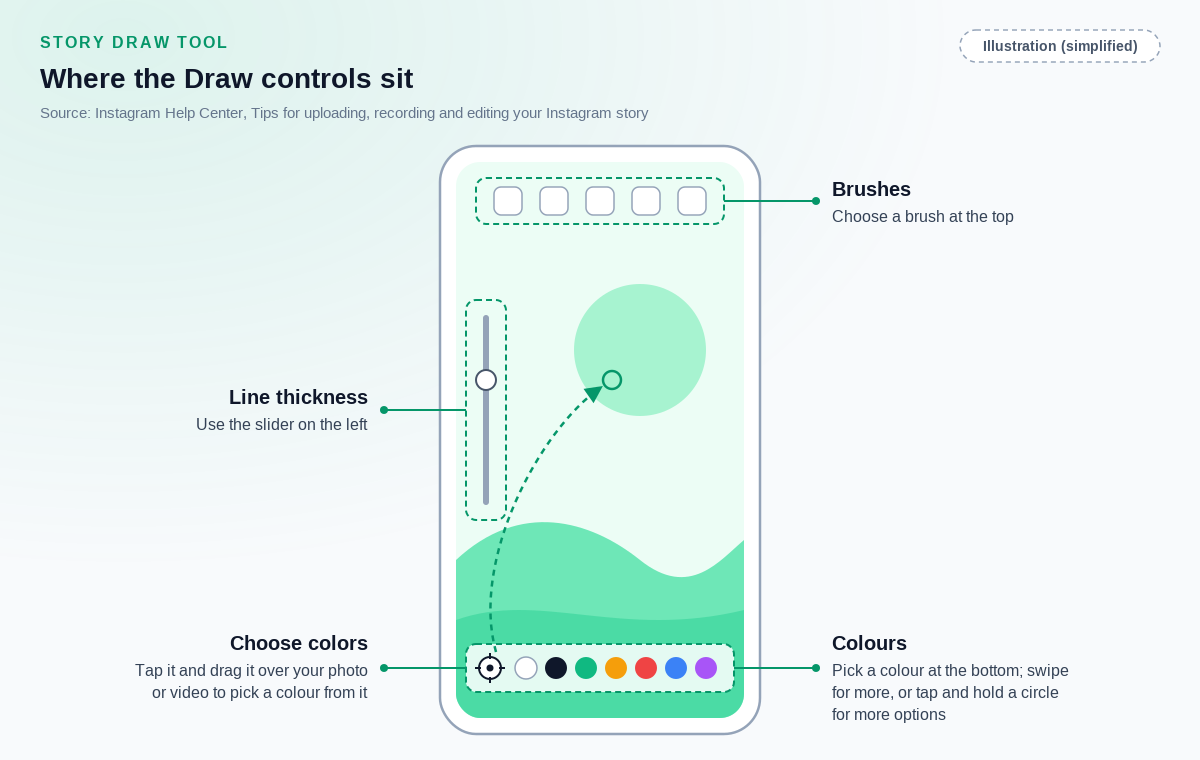
Then change the color with Draw, as Instagram’s story tips describe it:
- Tap Draw.
- Choose a brush at the top of the screen.
- Set the line thickness with the slider on the left.
- Tap a color at the bottom. Swipe for more colors, or tap and hold a circle for more options.
- To match a color in your photo or video, tap Choose colors and drag it to the spot you want.
Checked against Instagram Help Center: Tips for uploading, recording and editing your Instagram story.
How do you put a color behind text on a story?
Add text, tap Background at the top of the screen and pick a color. The color circles at the bottom set the text color, and tapping and holding a circle gives you a custom color. Checked against Instagram Help Center: Tips for uploading, recording and editing your Instagram story
- Tap Text and type your words.
- Tap Background at the top of the screen.
- Pick a color.
- To change the text color, tap a circle at the bottom; tap and hold one for a custom color.
Checked against Instagram Help Center: Tips for uploading, recording and editing your Instagram story.
How do you change the background when you share a post to your story?
Tap Background after you add the post to your story, then pick one of the backdrops Meta AI generates. You can only reshare someone’s feed post if their account is public and they allow resharing, and resharing isn’t available to everyone. Checked against Instagram Help Center: Share someone's post from feed to your Instagram story The full sharing steps are in our guide to share a post to your story. For the backdrop itself, Instagram lists these steps:
Generate an AI background when you reshare a post (iPhone):
- Tap Share below the photo or video in Feed.
- Tap Add to story to add the content to your story.
- Tap Background and background options will appear at the bottom.
- Tap a background option to test it out, or tap Reload to generate new backgrounds.
- Tap Done to select a background.
- Tap Post.
Checked against Instagram Help Center: AI backgrounds in Instagram Stories.
Instagram notes that your AI interactions follow Meta’s terms and may be used to improve Meta’s AI. Checked against Instagram Help Center: AI backgrounds in Instagram Stories
How do you make a story with no photo?
Use Create, under Options on the left of the Stories camera: it starts a story without a photo or video. Swipe left at the bottom of the screen to type something, add a GIF or ask a question, among other options. Checked against Instagram Help Center: Tips for uploading, recording and editing your Instagram story The same Options menu also holds Boomerang, Layout and Hands-Free. Checked against Instagram Help Center: Tips for uploading, recording and editing your Instagram story
Instagram announced Create mode on 30 April 2019 as part of a new camera design, “an easy way to share without a photo or video”. Checked against About Instagram: New features connecting friends, family and interests on Instagram (April 30, 2019) TechCrunch reported its launch on 8 October 2019, replacing the older Type mode, so guides that still say “Type mode” describe the pre-2019 camera. Checked against TechCrunch: Instagram launches Create mode with On This Day throwbacks (October 8, 2019)Press report
Why can’t I change my Instagram story background color?
The usual reasons: you’re on a computer, the post you’re resharing doesn’t allow it, or you’re looking for a tool Instagram doesn’t document. Check each:
- You’re on a computer. Instagram’s help says sharing a photo or video to your story isn’t available on computers, so story edits happen in the app. Checked against Instagram Help Center: Share a photo or video to your Instagram story (computer version)
- No Background button on a reshare. You can only reshare a feed post if the account is public and allows resharing, and resharing isn’t available to everyone. Checked against Instagram Help Center: Share someone's post from feed to your Instagram story
- The fill or a gradient doesn’t work. Instagram’s Help Center doesn’t document a full-screen color fill or a gradient background, so the press-and-hold fill above may behave differently in your app version. Checked against Instagram Help Center: Tips for uploading, recording and editing your Instagram storyNot verified
- You need several photos. Instagram’s documented way to put more than one photo in a story is Layout in the Stories camera. Here’s how to add several photos to one story. Checked against Instagram Help Center: Combine multiple photos into one on your Instagram story
What size should a story background be?
Make backgrounds in the story frame’s shape: stories are 9:16, and the widely reported upload size is 1080 x 1920 pixels. A background made at that shape already matches the story frame.
For more to put on top of the color, see these Instagram story ideas, design matching highlight covers for the stories you keep, search story filters for ready-made looks, or mention someone in your story. Looking for the color behind your messages rather than your story? Change your chat background instead.
Stories are made in the Instagram app:
Keep your Instagram feed on schedule with Outfeed AI
How to change background color on Instagram story: FAQ
How do you fill an Instagram story background with one color?
Open Draw, choose the pen tip, pick a color, then press and hold anywhere on the screen for about two seconds, as Popular Science described it in March 2022. Instagram’s Help Center doesn’t document this gesture.
How do I use the eyedropper on an Instagram story?
Instagram calls it Choose colors. Tap Draw, then tap Choose colors at the bottom and drag it over your photo or video to pick a color from it.
How do you change the background color when sharing a post to your story?
When you reshare a feed post to your story, tap Background to apply a backdrop generated with Meta AI. Tap Reload for new options, Done to pick one, then post.
Can I make a gradient background on an Instagram story?
Instagram’s Help Center doesn’t document a gradient background. Its documented color tools are Draw colors, Choose colors, the Background behind text and Create mode.
Can I change my story background on a computer?
Not from Instagram’s documented tools. Instagram’s help says sharing a photo or video to your story isn’t available on computers, so story edits happen in the app.