
TikTok Video Size 2026: 1080x1920, Ratios and Files
Last verified: 27 September 2026
Export at 1080 x 1920 pixels, a 9:16 vertical frame, and a video fills TikTok’s full-screen feed. No TikTok page names that as the TikTok video size, though; it’s the convention editing apps settle on. What TikTok does publish is a range: its developer documentation accepts videos from 360 x 360 to 4096 x 4096 pixels, up to 4 GB through its posting API.
The harder part is the share of the frame you can actually use. TikTok’s caption, username and button rail sit on top of the video, so the safe-zone margins further down matter more than the export size. How long a TikTok can run is a separate question, answered in how long TikTok videos can be.
| Placement | Upload size (px) | Aspect ratio | Safe zone | Max file size | Source |
|---|---|---|---|---|---|
| Video post | 1080 x 1920 Widely reported Min 360 x 360 · Max 4096 x 4096 | 9:16 | Top 240 px · Right 120 px · Bottom 660 px · Left 120 px, on 1080 x 1920, plus Action rail (like, comment, share, profile) 180 x 1080 px Ad guidance: TikTok Ads Manager: in-feed ad specifications (downloadable safe-zone file) | 4 GB Content Posting API limit. The app publishes no cap. | TikTok Support: camera tools (video length) |
| Photo post (carousel) | Not recorded | 9:16 Widely reported | Not recorded | 20 MB Per image, Content Posting API. | TikTok Content Posting API: photo post reference |
| Profile photo Widely reported | 200 x 200 | 1:1 | Not recorded | Not recorded | Hootsuite social media image sizes guide (updated 2026-09-02) |
Widely reported: the platform does not publish it.
Preparing a photo post or a new profile picture? The free image resizer for TikTok and Instagram presets crops and exports in your browser, with no upload and no account. It works on still images, not video.
Table of Contents
- What is the correct TikTok video size in 2026?
- What aspect ratios and dimensions does TikTok accept?
- What is the TikTok safe zone?
- What file size, format and frame rate does TikTok accept?
- What size is a TikTok profile picture and photo post?
- How do you fit a 16:9 video into TikTok’s 9:16 frame?
- How Outfeed handles TikTok video specs
- Frequently asked questions
What is the correct TikTok video size in 2026?
Export at 1080 x 1920 pixels in a 9:16 frame, and the video fills TikTok’s full-screen vertical feed. TikTok’s help centre doesn’t publish a recommended organic resolution, which is why the table marks this size “widely reported”. It’s the convention editing apps and size guides settle on. The closest thing TikTok publishes is its in-feed ad spec, which asks for 9:16 at 540 x 960 or larger and “at least 720P”.
Why a 1080 x 1920 file still loses its edges
The export size, the size a phone draws and the usable area are separate on TikTok:
- Upload size is the file you export: the widely used 1080 x 1920 pixels.
- Display size is what a phone actually draws on screen. TikTok doesn’t publish one, and it varies from screen to screen.
- Safe zone is the part of the frame no caption, username or button covers. On TikTok it is much smaller than the frame, as the safe zone section below shows.
Does TikTok support 4K?
TikTok accepts a vertical 4K file but doesn’t say it shows one. Its posting API takes pictures up to 4096 x 4096 pixels, which covers a vertical 4K export. TikTok doesn’t publish the resolution it plays videos back at, though, so nothing in its documentation promises viewers more detail than a 1080 x 1920 upload gives them. For photo posts TikTok is explicit: its API caps images at “Maximum 1080p”.
Why does TikTok make my video look blurry?
TikTok doesn’t publish the compression it applies after upload, so no export setting can guarantee what viewers see. What you control is the file: MP4 with H.264 (TikTok’s API documentation recommends both), a frame rate between 23 and 60 FPS, and a 9:16 frame so nothing gets cropped or padded. Small text is the easiest detail to lose, so keep on-screen words large.
What aspect ratios and dimensions does TikTok accept?
TikTok’s posting API accepts any video from 360 x 360 to 4096 x 4096 pixels, so square and landscape videos upload as well as vertical ones. Only 9:16 matches the full-screen feed, though. A square or landscape video can fill that frame only if it’s cropped. Shown whole, it leaves empty space above and below and looks small on a phone held upright.
So when a guide lists “TikTok dimensions”, it usually means the 9:16 upload. The accepted range is far wider, and it matters when you repost landscape footage:
- Vertical (9:16): fills the screen, which is why 9:16 is the usual answer to “what is the TikTok aspect ratio?”
- Square (1:1): uploads, and shown whole it leaves space above and below. Fine for footage you can’t recrop, weak for anything meant to feel native.
- Landscape (16:9): uploads, and shown whole it becomes a short strip with most of the screen empty.
Can you post horizontal videos on TikTok, then? Yes. They just don’t use the screen. If the footage matters, crop it to vertical (the maths is in the last section). YouTube Shorts and Instagram Reels take the same vertical shape, so one vertical master usually serves all three: compare the same 9:16 frame on YouTube Shorts.
What is the TikTok safe zone?
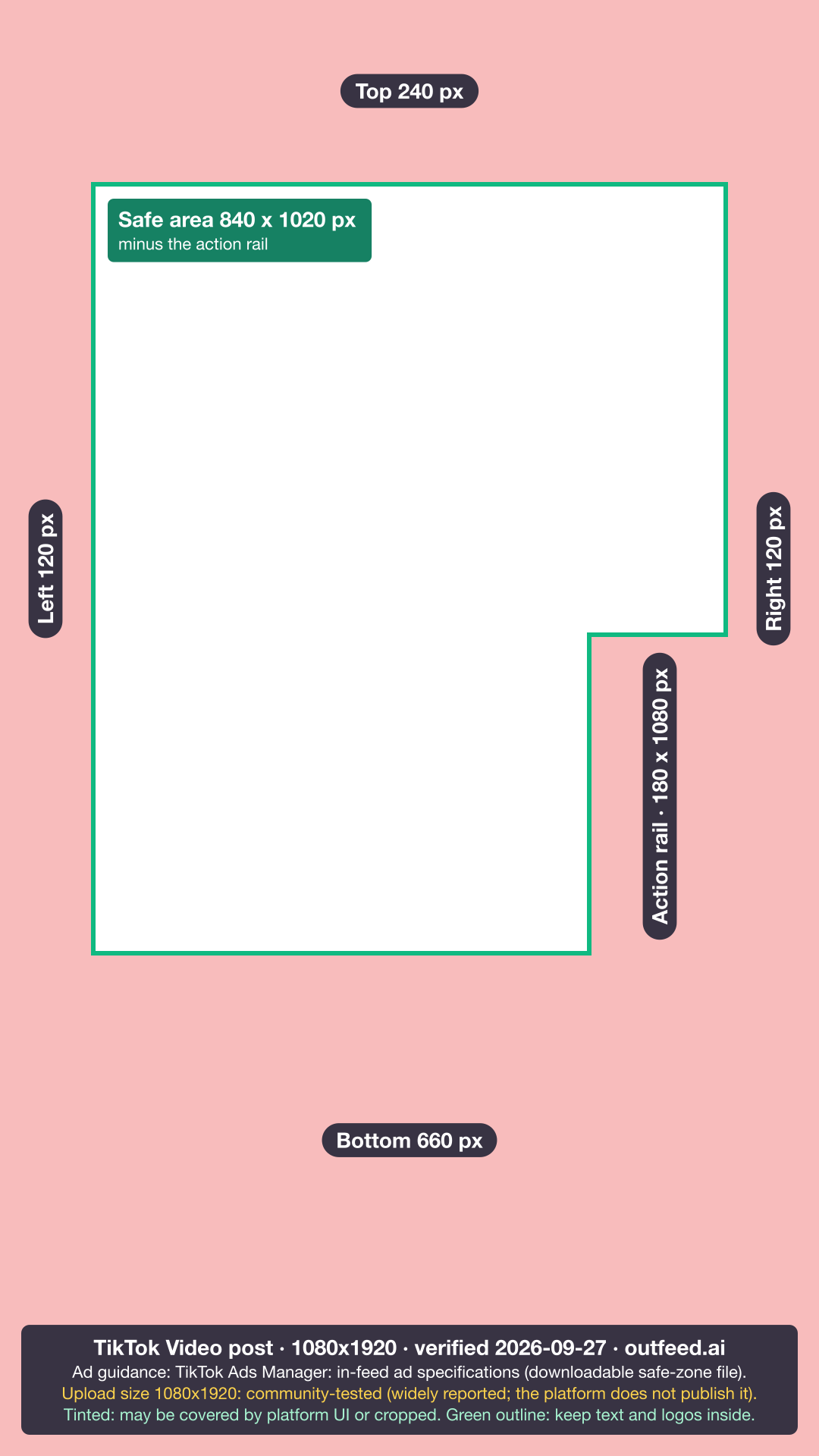
On a 1080 x 1920 frame, keep text, logos and faces at least 240 px from the top, 660 px from the bottom and 120 px from each side, and clear of the button rail on the right. Those margins are measured from the safe-zone file in TikTok’s in-feed ad specifications. TikTok publishes no organic safe zone, so the ad file is the nearest guide: organic posts also show a caption and a button rail over the video, though TikTok doesn’t say they occupy exactly the same bands.
That’s why a correctly sized video can still lose its text: the app draws on top of the frame.
- The bottom band (660 px, about a third of the frame’s height) holds your username, caption and sound. It’s the biggest loss, and why subtitles placed “near the bottom” vanish.
- The right-hand rail holds the profile, like, comment and share buttons over the lower part of the frame. Anything placed there, even inside the side margins, sits under a button.
- The top band (240 px) is narrower, but TikTok’s file still marks it off-limits for text.
TikTok also says its ad safe zone shrinks as the caption gets longer. Hashtags are part of the caption, so a long set from the TikTok hashtag generator takes up that room too. If you write long captions, for example with the TikTok caption generator, keep key visuals higher than the margins alone suggest.
Want to check a frame yourself? Download the TikTok safe-zone overlay (PNG) and place it over your edit.
What file size, format and frame rate does TikTok accept?
Through TikTok’s Content Posting API, a video can be up to 4 GB, as MP4 (recommended), WebM and MOV, at 23 to 60 frames per second, with H.264 recommended. The TikTok app itself publishes no file-size cap. Those API figures come from TikTok’s media transfer guide for developers, and they are the limits any scheduling tool works within.
| File spec | TikTok’s limit | Source |
|---|---|---|
| Maximum file size | 4 GB through the posting API; the app publishes no cap | TikTok Content Posting API |
| File types | MP4 (recommended), WebM and MOV | TikTok Content Posting API |
| Video codec | H.264 recommended | TikTok Content Posting API |
| Frame rate | 23 to 60 FPS | TikTok Content Posting API |
| Picture size | 360 x 360 to 4096 x 4096 px | TikTok Content Posting API |
| Length | Up to 60 min when uploaded in the app; see the full TikTok length limits | TikTok Support |
Where do the 72 MB and 287.6 MB limits come from?
Many size guides still say TikTok caps uploads at 72 MB on Android and 287.6 MB on iOS. Neither figure has a current TikTok source. TikTok’s help centre publishes no file-size cap for app uploads, and the only cap in its developer documentation is 4 GB for the API.
What size is a TikTok profile picture and photo post?
A TikTok profile picture is commonly uploaded at 200 x 200 pixels, and a photo post holds up to 35 images. The profile size is widely reported rather than official: TikTok doesn’t publish a profile-picture size for accounts. The 98 x 98 figure you may also see is the profile image in TikTok’s ad specs, with the key element inside the central 66 x 66: an ad figure, not your account’s upload size.
For photo posts, TikTok’s photo post API reference sets the limits schedulers work to:
- Images per post: up to 35.
- File types: JPEG and WebP, up to 20 MB each.
- Resolution: “Maximum 1080p”. TikTok doesn’t say which side that applies to, so no maximum pixel size is given here.
- Shape: TikTok doesn’t specify one. 9:16 is the vertical default most creators use, which is why the table labels it widely reported.
What size is a TikTok cover or thumbnail?
TikTok doesn’t publish a separate cover size, so design a cover at the video’s own 1080 x 1920 frame. In TikTok’s direct post API reference, a scheduler picks the cover as a moment in the video rather than uploading a separate image. TikTok doesn’t document how profile grids and search results crop covers, so keep cover text near the centre.
How do you fit a 16:9 video into TikTok’s 9:16 frame?
Crop a vertical slice out of the landscape frame, or place the whole landscape frame inside a vertical one. From a 1920 x 1080 source, a full-height 9:16 crop is about 608 x 1080 pixels, roughly a third of the original width, which then has to be scaled up to fill the frame. Placed whole instead, the video becomes a 1080 x 608 strip, about a third of the screen’s height.
That gives you three honest options:
- Reframe and crop. Best when the action is central. Because the slice is scaled up, a 1080p source loses sharpness; shoot wider or in 4K when you know the footage is headed for TikTok.
- Letterbox on purpose. Keep the whole frame and use the empty bands for a headline or captions, inside the safe zone.
- Re-edit vertically. For anything you’ll post more than once, a separate vertical edit beats any crop.
The aspect ratio calculator works out the crop for any source size. If the landscape video is also long, check how long a TikTok can be before you cut it, because the limit depends on how you post. For every other network’s sizes in one table, use the all-platform image and video size cheat sheet.
How Outfeed handles TikTok video specs
Outfeed is a chat-first social media manager that publishes to nine platforms, TikTok, Instagram and YouTube among them, with a per-platform preview of each post before it goes out. For TikTok, Outfeed’s publisher blocks a video over 10 minutes or 4 GB instead of sending it to TikTok, so export at the size above before you add the file. One current limitation: while TikTok reviews Outfeed’s app, TikTok posts publish as private, visible only to the connected account.
When the file is ready, you can schedule it for the best time to post on TikTok from the same conversation. Try Outfeed AI to preview how one clip will post to TikTok, Reels and Shorts before anything goes live.
Frequently asked questions
What size should a TikTok video be?
1080 x 1920 pixels at a 9:16 aspect ratio is the widely used TikTok video size. TikTok itself publishes no recommended organic resolution: its Content Posting API accepts videos from 360 to 4,096 pixels on each side, and its in-feed ad specs ask for 9:16 at 540 x 960 or larger.
What aspect ratio is TikTok?
TikTok’s full-screen feed is 9:16, a vertical frame. Square (1:1) and landscape (16:9) videos still upload, because TikTok’s API accepts any picture size from 360 to 4,096 pixels per side, but only a 9:16 video fills the screen without being cropped or leaving empty space.
What is the maximum file size for a TikTok video?
4 GB through TikTok’s Content Posting API, which is the route scheduling tools use. The TikTok app publishes no file-size cap, so any single maximum quoted for app uploads has no current TikTok source.
Does TikTok support 4K video?
TikTok’s API accepts videos up to 4,096 pixels on each side, so a vertical 4K file uploads. TikTok does not publish the resolution it plays videos back at, so nothing in its documentation says viewers see more detail from a 4K upload than from 1080 x 1920.
What is the TikTok safe zone?
On a 1080 x 1920 frame, keep text and faces 240 px from the top, 660 px from the bottom and 120 px from each side, and clear of the button rail on the right. The margins come from TikTok’s in-feed ad safe-zone file. TikTok publishes none for organic posts, so the ad file is the nearest guide, not a confirmed organic layout.