
YouTube Shorts Dimensions and 3-Minute Limit (2026)
Last verified: 27 September 2026
Square or vertical, and no longer than 3 min: those are the only two conditions YouTube uses to turn an upload into a Short in 2026. For the frame itself, the standard YouTube Shorts dimensions are 1080 x 1920 pixels at 9:16, the vertical HD size Google publishes in its Ads specs. A square video qualifies as a Short too.
YouTube’s own Shorts help never names a pixel size, so the pixel figure here is Google’s Ads number and is labelled that way. The length rule has moved too: the 60-second cap some pages still quote was replaced in October 2024.
What Are the YouTube Shorts Dimensions in 2026?
Export a vertical Short at 1080 x 1920 pixels; the two shapes YouTube accepts are 9:16 and 1:1, vertical and square. YouTube Help’s three-minute Shorts page defines Shorts only as videos “with a square or vertical aspect ratio” and gives no resolution. The 1080 x 1920 figure is Google’s recommended size for vertical video in its Google Ads video ad specs: the nearest official Google number, and labelled that way in the table below.
| Placement | Upload size (px) | Minimum size (px) | Aspect ratio | Video length | Safe zone | Max file size | Source |
|---|---|---|---|---|---|---|---|
| Short | 1080 x 1920 Ad spec: Google Ads Help: video ad specs | Not recorded | 9:16, 1:1 | Up to 3 min | Top 288 px · Right 192 px · Bottom 672 px · Left 48 px, on 1080 x 1920 Ad guidance: Google Ads Help: About video ad specs (vertical safe-zone overlay) | Not recorded | YouTube Help: Understand three-minute YouTube Shorts |
| Shorts thumbnail | 2160 x 3840 | 360 x 640 Widely reported | 9:16 | Not recorded | Not recorded | 50 MB Desktop upload. | YouTube Help: Add custom thumbnails on YouTube |
Widely reported: the platform does not publish it.
Convert this ratio to pixels at any width, or check a size you already have, with the free aspect ratio calculator. It’s free and needs no account.
What the table leaves blank is deliberate. YouTube publishes no minimum or maximum resolution for Shorts and no Shorts-specific file-size cap, so guides that list resolution tiers or a special Shorts file limit aren’t quoting YouTube. The only published cap is the general upload limit of 256 GB, which applies to every upload and which no Short comes near. The thumbnail’s minimum carries a “Widely reported” badge because YouTube publishes only the minimum height, 640 pixels; the width is derived from the 9:16 shape.
Table of Contents
- What Are the YouTube Shorts Dimensions in 2026?
- How Long Can a YouTube Short Be?
- Can a YouTube Short Be Horizontal or Square?
- What Is the YouTube Shorts Safe Zone?
- What Size Is a YouTube Shorts Thumbnail?
- How Do Shorts Specs Compare With TikTok and Instagram Reels?
- Do You Need #Shorts in the Title?
- How Outfeed Handles Shorts, Reels and TikTok
- Frequently Asked Questions
How Long Can a YouTube Short Be?
A YouTube Short can be up to 3 min long. The limit applies to videos uploaded on or after 15 October 2024, when YouTube raised it from 60 seconds, and Official Artist Channels got the same rule for uploads from 8 December 2025. A vertical video between one and three minutes long that was uploaded before the change keeps its old category: YouTube says such videos “will remain the same, as a long-form video.”
So guides that still stop Shorts at 60 seconds are describing the rule as it stood before October 2024. The same YouTube page also notes that some songs from its audio library can be used for only part of a longer Short, so check the track’s limit when you add music.
What changed on 24 September 2026?
Longer Shorts with a Content ID claim are no longer blocked automatically. YouTube’s three-minute Shorts page now says that starting on September 24, 2026, “new Shorts longer than one minute (but under three minutes) with an active Content ID claim will no longer be automatically blocked and may remain playable on YouTube.” The wording covers new Shorts only, and says they “may” remain playable, so it isn’t a promise that every claimed Short stays up.
Can a YouTube Short Be Horizontal or Square?
Square, yes. Horizontal, no. YouTube categorizes square or vertical uploads of up to 3 min as Shorts. A horizontal 16:9 upload stays a regular long-form video however short it is, and plays in the standard landscape player.
If you shot landscape and want a Short, crop a vertical or square version rather than uploading the wide file. A 9:16 window cut from a 16:9 frame keeps only about a third of its width, so reframe around the subject instead of cropping the centre blindly. The landscape master belongs with the standard YouTube video size specs, which cover the 16:9 resolution ladder and upload limits.
There is no separate switch to flip. YouTube’s guide to uploading Shorts from a computer uses the ordinary YouTube Studio route, Create and then Upload videos, and asks only for a file “with a square or vertical aspect ratio” of up to 3 min. Get the shape and the running time right and the category follows; get either wrong and it publishes as a regular long-form video instead.
What Is the YouTube Shorts Safe Zone?
Keep text, faces and logos at least 288 px from the top, 672 px from the bottom, 192 px from the right edge and 48 px from the left of a 1080 x 1920 frame. Those margins are measured from Google’s official vertical safe-zone overlay for YouTube video ads. YouTube publishes no separate safe zone for organic Shorts. Organic Shorts also show a title, channel name, subscribe button and right-hand action buttons over the video, but YouTube doesn’t say they occupy exactly these bands, so treat the margins as the nearest published guide.
Download the YouTube Shorts safe-zone overlay (PNG) and drop it over a frame in your editor to see what the interface will cover. The right margin is wider than the left because the action buttons stack on that side.
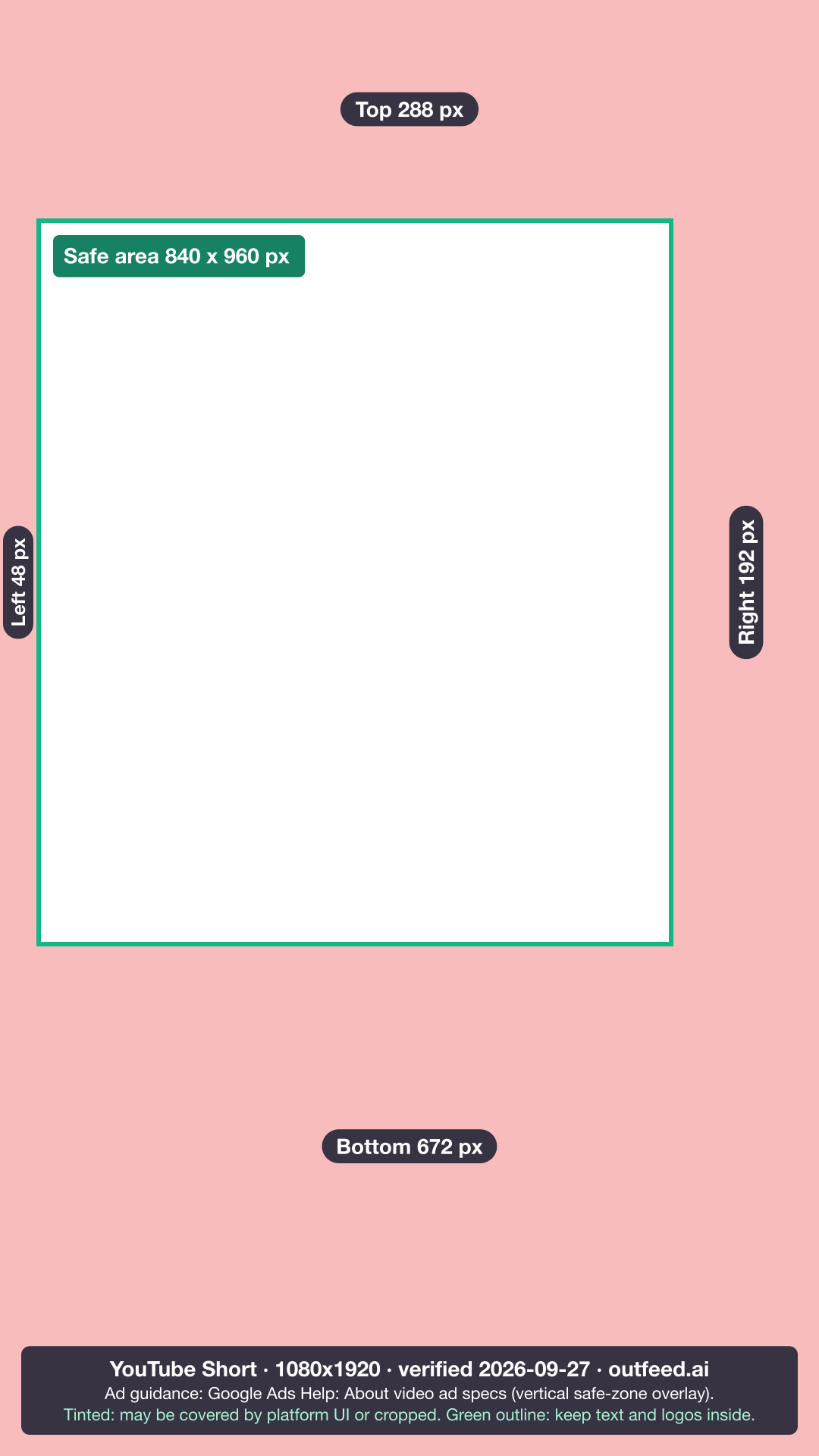
Why do other guides give different margins? Most widely shared Shorts safe zones cite no source, and they contradict each other: some give their own pixel margins, others say to keep everything inside a centred box. The margins above are the only ones measured from a first-party Google file. They are ad guidance, used here for organic Shorts because no organic equivalent exists.
What Size Is a YouTube Shorts Thumbnail?
YouTube Help recommends 2160 x 3840 pixels at 9:16, with a minimum height of 640 pixels. Accepted formats are JPG and PNG, up to 50 MB per file. The catch is where you can add one: according to YouTube’s custom thumbnail help page, “custom thumbnails for Shorts are currently only available to add in YouTube Studio on a computer,” and custom thumbnails of any kind need a verified account.
YouTube adds one more rule worth knowing. A vertical video given a 16:9 custom thumbnail has it replaced by an auto-generated one on the home, explore and subscription pages. Design Shorts thumbnails in the vertical frame from the start.
How Do Shorts Specs Compare With TikTok and Instagram Reels?
All three take a 9:16 vertical frame, but their length ceilings differ sharply: 3 min on YouTube Shorts, 60 min for a video uploaded in the TikTok app, and 20 min for a Reel recorded or edited in Instagram’s app. One vertical export can go to all three, but a clip that runs past 3 min won’t be a Short.
| Placement | Upload size (px) | Aspect ratio | Video length | Max file size | Safe zone | Source |
|---|---|---|---|---|---|---|
| YouTube · Short | 1080 x 1920 Ad spec: Google Ads Help: video ad specs | 9:16, 1:1 | Up to 3 min | Not recorded | Top 288 px · Right 192 px · Bottom 672 px · Left 48 px, on 1080 x 1920 Ad guidance: Google Ads Help: About video ad specs (vertical safe-zone overlay) | YouTube Help: Understand three-minute YouTube Shorts |
| TikTok · Video post | 1080 x 1920 Widely reported Min 360 x 360 · Max 4096 x 4096 | 9:16 | Up to 60 min | 4 GB Content Posting API limit. The app publishes no cap. | Top 240 px · Right 120 px · Bottom 660 px · Left 120 px, on 1080 x 1920, plus Action rail (like, comment, share, profile) 180 x 1080 px Ad guidance: TikTok Ads Manager: in-feed ad specifications (downloadable safe-zone file) | TikTok Support: camera tools (video length) |
| Instagram · Reel | 1080 x 1920 Widely reported | 9:16 Between 1.91:1 and 9:16 (Instagram Help). | 3 s to 20 min | 300 MB Publishing API limit. The app publishes no cap. | Top 14% · Right 6% · Bottom 35% · Left 6%, on 1080 x 1920 Ad guidance: Meta Ads Guide: Instagram Reels ads | Instagram Help: Reel size & aspect ratios on Instagram |
Widely reported: the platform does not publish it.
Three notes on reading it:
- TikTok and Instagram don’t publish a recommended organic resolution. 1080 x 1920 is widely reported for both, which is why those cells carry a badge; the Shorts figure is Google’s own.
- Scheduling tools work to API limits, not app limits. TikTok’s Content Posting API caps videos at 10 minutes, and Instagram’s publishing API takes Reels from 3 seconds to 15 minutes. Instagram also says “Reels over 3 minutes won’t be recommended to new audiences.” The full breakdowns are in our guides to how long TikTok videos can be and Instagram video length limits.
- All three safe zones come from ad documentation, so treat them as the best published guide to where each app’s interface sits, not as organic rules. For TikTok’s frame and its overlay, see the TikTok video size guide.
Do You Need #Shorts in the Title?
No. YouTube sorts an upload into Shorts by its shape and length and lists no hashtag requirement; our guide to the best hashtags for YouTube Shorts covers what the tag still does and which tags to use instead, and the free YouTube hashtag generator builds a set for your description.
How Outfeed Handles Shorts, Reels and TikTok
Outfeed AI publishes to nine platforms, YouTube, Instagram and TikTok among them, from one chat, and shows a per-platform preview of each post before it goes live, so one vertical export can go to Shorts, Reels and TikTok in a single conversation. YouTube, not the publishing tool, decides what counts as a Short: a square or vertical upload of 3 min or less becomes one under YouTube’s own rule.
What Outfeed’s publisher does enforce is each destination’s API limits. It blocks an Instagram video shorter than 3 s, longer than 15 minutes or larger than 300 MB, and a TikTok video over 10 minutes or 4 GB. One caveat, stated plainly: while TikTok reviews Outfeed’s app, TikTok posts publish as private, visible only to the connected account.
When the file is ready, the best time to post on YouTube is the next decision. Publish your next Short with Outfeed AI.
For every other platform’s sizes, see each platform’s image and video specs in one table.
Frequently Asked Questions
What are the dimensions for YouTube Shorts?
YouTube Help defines a Short by shape and length, not pixels: a square or vertical video up to 3 min long. For vertical Shorts, export 1080 x 1920 pixels at 9:16, the vertical HD size Google recommends in its Ads video specs. A square 1:1 video also counts as a Short.
How long can a YouTube Short be in 2026?
Up to 3 min, for videos uploaded on or after 15 October 2024 (8 December 2025 for Official Artist Channels). The limit was 60 seconds before that, and older uploads keep their category. From 24 September 2026, new Shorts over one minute with an active Content ID claim are no longer blocked automatically.
Can YouTube Shorts be horizontal?
No. YouTube only categorizes square or vertical videos of up to 3 min as Shorts. A horizontal 16:9 upload stays a regular long-form video however short it is. To post landscape footage as a Short, crop a 9:16 or square version first.
What is the YouTube Shorts safe zone?
YouTube publishes no organic Shorts safe zone. Google’s official vertical safe-zone overlay for YouTube video ads, on a 1080 x 1920 frame, keeps 288 px clear at the top, 672 px at the bottom, 192 px on the right and 48 px on the left. It’s the nearest published guide for organic Shorts, not a confirmed organic layout.
What size is a YouTube Shorts thumbnail?
YouTube Help recommends 2160 x 3840 pixels at 9:16, with a minimum height of 640 pixels, in JPG or PNG up to 50 MB. Custom Shorts thumbnails can currently be added only in YouTube Studio on a computer, and custom thumbnails need a verified account.