
Instagram Emoji: How to Use Emojis on Instagram
You can use Instagram emoji in captions, comments and hashtags, in the text you add to a Story, and as reactions to chat messages. On someone else’s Story you can tap Like or reply with a message, and the only published rule for your bio is its length. Usernames are the exception: Instagram mentions periods, numbers and underscores there, not emoji.
Below: where each one works according to Instagram’s own Help Center, how reactions work, and the meanings worth checking before you post, with more in our emoji meanings dictionary. Every Instagram Help Center fact here was checked on 3 October 2026. Labels in the app can change between versions, so treat the steps as current on that date.
Table of Contents
- Where can you use Instagram emoji?
- How do emoji reactions work on Instagram?
- How do you add emoji to captions and comments?
- Can you put emoji in your Instagram bio?
- Can you use emoji in usernames and hashtags?
- Which Instagram emoji meanings should you check first?
- Can you schedule Instagram captions with emoji?
- Frequently Asked Questions
Where can you use Instagram emoji?
Almost anywhere you type, plus two ways to react. Here is each place, what Instagram’s Help Center says about it and the article it comes from, all checked 3 October 2026:
| Where | What Instagram’s Help Center says | Source |
|---|---|---|
| Captions and comments | You can add hashtags in the caption or comments of a post, typing # followed by text or emoji | Use hashtags on Instagram |
| Chats (DMs) | Tap and hold a message you received, then tap an emoji to react. On a computer, hover over it and click Emoji | React and reply to messages on Instagram |
| Your Story | After you tap Add text, you can add emoji | Tips for uploading, recording and editing your Instagram story |
| Someone else’s Story | Tap Like next to the reply bar, or reply with a message | Like a story on Instagram and Manage who can reply to your Instagram story |
| Bio | A bio of up to 150 characters. The article doesn’t mention emoji | Checked against Instagram Help Center: Add a bio to your Instagram profile |
| Username | Periods, numbers, underscores or abbreviations are the only additions it mentions | What can you do if an Instagram username is already claimed |
Two things people often ask about have no Instagram Help Center article that we could find: changing the emoji in your reaction row, and emoji quick reactions to Stories. Where Instagram doesn’t document something, this guide doesn’t give steps for it.
How do emoji reactions work on Instagram?
In chats, Instagram documents emoji reactions directly: tap and hold a message you received, then tap an emoji. On Stories it documents a Like and a reply; we found no article on emoji reactions there. Here are Instagram’s own steps for each.
React to a message with an emoji
Instagram publishes the same steps for iPhone and Android:
- Tap Messages at the bottom.
- Tap the conversation you want to view.
- Tap and hold a message you receive, then tap an emoji to use as a reaction to it.
On a computer, click Messages on the left, click the conversation, then hover over a message you receive and click Emoji. Steps from React and reply to messages on Instagram, checked 3 October 2026.
Changing your reaction emoji
Meta announced custom emoji reactions for Instagram chats on 30 September 2020, listing “Custom Emoji Reactions: Create a shortcut of your favorite emojis to react quickly to messages from friends” among the new messaging features (Meta newsroom). We found no Instagram Help Center article with steps for changing them, or one listing which emoji appear in the reaction row (checked 3 October 2026), so this guide gives neither.
Reacting to someone’s Story
Instagram’s Help Center documents two responses. Tap Like, next to the reply bar, while you watch the story: only the person who shared it can see your like, and tapping Like again removes it. Or reply with a message, emoji included: by default, anyone who can see a story can reply to it directly with a message.
To choose who can reply to your own stories, Instagram’s steps on iPhone and Android are:
- Tap Profile or your profile picture in the bottom right to go to your profile.
- Tap Menu in the top right.
- Below How others can interact with you, tap Messages and story replies.
- Tap Story replies, then select who can reply to your stories.
Steps from Manage who can reply to your Instagram story with a message, checked 3 October 2026.
How do you add emoji to captions and comments?
With your phone’s or computer’s own emoji keyboard. Instagram’s hashtag help has you type # followed by text or emoji in the caption, and hashtags work in comments too. Our guides to the emoji keyboard shortcut for Windows, Chromebook and phones and the emoji keyboard shortcut on a Mac walk through the methods Apple, Microsoft and Google document.
Length is the limit to watch. A caption can hold up to 2,200 characters, the figure in Instagram’s publishing documentation, and Instagram doesn’t say how emoji count toward it. Leave a margin on long, emoji-heavy captions; the free Instagram character counter shows how close you are.
When you pick emoji for Instagram captions, placement matters as much as choice. Put emoji after the words they decorate rather than in place of them: screen readers that support emoji read each one’s name aloud, as our social media emoji guide for brands explains with sources. For the words themselves, the free Instagram caption generator drafts captions by topic and tone.
Can you put emoji in your Instagram bio?
Nothing in Instagram’s published rules stops you. Its bio article gives one limit, 150 characters, and doesn’t mention emoji or say how they count toward it, so keep a few characters spare.
Checked against Instagram Help Center: Add a bio to your Instagram profile.
For ready-to-copy sets and the bio limits on other networks, see our bio emoji ideas. To draft the words first, the free Instagram bio generator writes bios by niche and vibe with a live character counter.
Can you use emoji in usernames and hashtags?
Hashtags, yes; for usernames, Instagram doesn’t list emoji as an option. Its hashtag help tells you to type # followed by text or emoji, and adds that numbers are allowed in hashtags while spaces and special characters such as $ or % won’t work (Use hashtags on Instagram, checked 3 October 2026).
On usernames, Instagram’s Help Center only says you can add periods, numbers, underscores or abbreviations when the one you want is taken. It publishes no full list of allowed characters, and emoji aren’t on the short list it gives (Instagram Help Center, checked 3 October 2026).
Which Instagram emoji meanings should you check first?
Start with the most common ones. These eight all sit in the top five rows of Unicode’s 2019 emoji frequency ranking, a median across several sources rather than Instagram-only data, and they are listed here in Unicode’s order. Checked against Unicode's emoji frequency page (2019 data)
| Emoji | Name | Code point(s) | Emoji version (year) | Common meaning |
|---|---|---|---|---|
| 😂 | face with tears of joy | U+1F602 | E0.6 (Unicode 6.0) 2010 | Shows that something is very funny, like typing "LOL" or "haha". |
| ❤️ | red heart | U+2764 U+FE0F | E0.6 (Unicode 6.0) 2010 | Expresses love and romance, the classic meaning of a red heart.Note: Dictionary.com notes it can also be used flirtatiously, so context matters. |
| 😍 | smiling face with heart-eyes | U+1F60D | E0.6 (Unicode 6.0) 2010 | Shows enthusiastic love, adoration or infatuation, as if saying "I love this". |
| 👏 | clapping hands | U+1F44F | E0.6 (Unicode 6.0) 2010 | Shows applause, and repeated several times it reads as a round of applause.One source only: Emojipedia. |
| 🔥 | fire | U+1F525 | E0.6 (Unicode 6.0) 2010 | Says something is impressive, exciting or excellent, like the slang "fire" or "lit".Note: Dictionary.com notes that, because "lit" and "fire" are also drug slang, it is sometimes used that way. |
| 👌 | OK hand | U+1F44C | E0.6 (Unicode 6.0) 2010 | Means "OK", "sounds good" or "yes, that's right".Note: The same hand sign is offensive in some places, including parts of Europe, the Middle East and South America.Note: Since the late 2010s it has also been used as a white-supremacist symbol, so context matters.Note: Dictionary.com notes it can be combined with other emoji for a sexual meaning. |
| ✨ | sparkles | U+2728 | E0.6 (Unicode 6.0) 2010 | Adds positive feelings such as excitement, love, beauty or gratitude.Note: Since late 2023 a similar sparkle icon is widely used to mark AI features in apps.Note: Dictionary.com notes it is occasionally used with a sexual meaning. |
| 🙌 | raising hands | U+1F64C | E0.6 (Unicode 6.0) 2010 | Celebrates a success or joyful moment, like saying "we did it!". |
Characters, names, code points and versions from Unicode's emoji-test.txt (Emoji 18.0) and the Emoji Versions table in Unicode Technical Standard #51, checked . The year is when Unicode first defined the emoji, not when phones added it: vendors roll new emoji out later, at different times. E0.6 and E0.7 are Unicode's labels for emoji added in Unicode 6.0 (2010) and Unicode 7.0 (2014), before Emoji 1.0 was released in 2015. Emoji show in your device's own font, so they look different on other phones and computers. Meanings paraphrased from Emojipedia and Dictionary.com Emoji Dictionary, checked ; meanings vary by person and context.
Read the notes in the meaning column before you post from a brand account, especially for the OK hand, fire and sparkles emoji: each has a second reading that a brand would not want to be caught out by.
Meanings shift with context and community, so check rather than rely on memory. Our guide to emoji faces explains every smiley, and the most used emojis covers what Unicode’s frequency data does and doesn’t show.
Can you schedule Instagram captions with emoji?
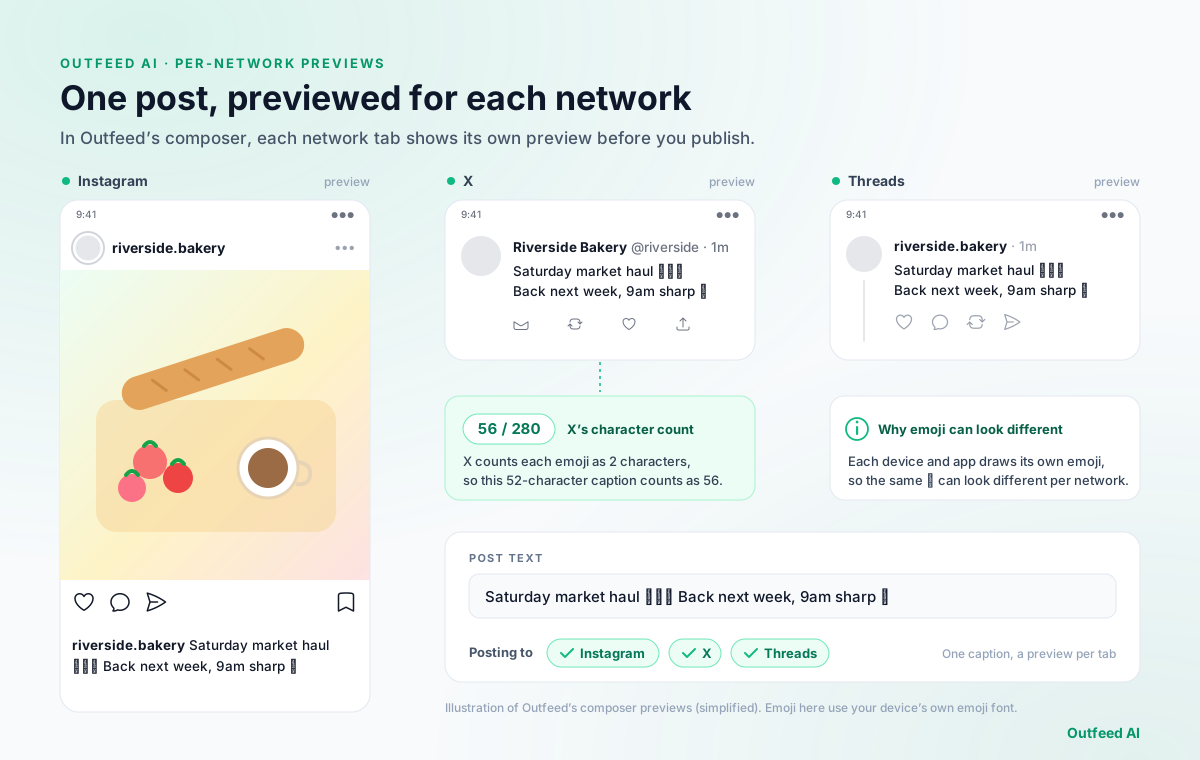
If the same caption is also going to X and Threads, this is how one emoji caption looks as Outfeed’s per-network previews:
Once your caption reads well, pick a slot with our guide to the best time to post on Instagram.
Schedule your next Instagram post in Outfeed AI
Frequently Asked Questions
How do I change my emoji reactions on Instagram?
We found no Instagram Help Center article with steps for changing them (checked 3 October 2026). Meta announced custom emoji reactions for Instagram chats on 30 September 2020, describing a shortcut of your favourite emojis for reacting to messages. What Instagram does document is reacting: tap and hold a message you received, then tap an emoji. On a computer, hover over the message and click Emoji.
How do I react with an emoji to an Instagram Story?
Instagram’s Help Center documents two ways to respond to someone’s story. Tap Like, next to the reply bar, and only the person who shared the story can see your like. Or reply with a message, emoji included: by default, anyone who can see a story can reply to it. We found no Instagram help article on emoji quick reactions for Stories (checked 3 October 2026).
Can you use emojis in an Instagram username?
Instagram’s Help Center doesn’t list emoji as an option: it says you can add periods, numbers, underscores or abbreviations to a username, and it gives no full list of allowed characters. Hashtags are different: Instagram’s hashtag help tells you to type # followed by text or emoji.
What do Instagram emoji reactions mean?
Instagram doesn’t give reactions meanings of their own: a reaction means what that emoji means anywhere else, and meanings shift with context. A red heart, for example, is used for love but also for thanks, support or happiness, according to Emojipedia and Dictionary.com. Check anything less familiar in a dated emoji dictionary before you react from a brand account.