
How to Get More Views on YouTube: Find the Bottleneck
To get more views on YouTube, find the step where viewers drop off and fix that one: impressions (YouTube showing your thumbnail), click-through rate (people clicking) or average view duration (people staying). For long videos, YouTube says it looks first at whether viewers choose to watch a recommendation, then at how long they watch, then at likes and surveys. Checked against YouTube Help: Search & discovery tips (Video)
This guide to how to get more views on YouTube takes those steps one at a time, with YouTube Studio’s reports and YouTube’s own guidance, and it is one part of our practical plan for growing a YouTube channel. One warning before you compare numbers: since 24 August 2026 a view counts from the first frame, so recent view counts and older ones are not like for like (more below). Checked against YouTube Official Blog: What are 'Engaged' Views on YouTube? (19 Aug 2026)
Table of Contents
- How to get more views on YouTube: find the bottleneck
- What counts as a view on YouTube?
- Why are my YouTube videos not getting views?
- How do you get more clicks from the same impressions?
- How do you keep viewers watching for longer?
- Do Shorts help your long videos get views?
- How do you promote YouTube videos without breaking the rules?
- Does the time you post on YouTube matter?
- YouTube views FAQ
How to get more views on YouTube: find the bottleneck
Every view passes three gates: YouTube shows your thumbnail (an impression), someone clicks it (impressions click-through rate), and they stay (average view duration). Check them in that order for each video. The first weak number is usually the quickest place to increase views on YouTube.
YouTube defines each gate precisely, and the definitions change how you read them:
| Gate | What YouTube counts | A weak number usually means | Source |
|---|---|---|---|
| Impressions | A thumbnail shown on YouTube for more than 1 second with at least 50% of it visible. External sites, the mobile website, YouTube Kids, YouTube Music, cards, end screens and notifications don’t count. | YouTube rarely shows the video in search, on Home or in suggestions | Checked against YouTube Help: Check your YouTube thumbnail impressions and watch time |
| Impressions click-through rate | How often viewers watched after seeing a counted impression, so total views divided by impressions won’t match it | The title and thumbnail aren’t earning the click | Checked against YouTube Help: Impressions & click-through-rate FAQs |
| Average view duration | The average minutes watched among those who stayed to watch; average percentage viewed is the same as a share of the video | The video loses people before it delivers, or doesn’t match what the title promised | Checked against YouTube Help: Understand your YouTube content performance |
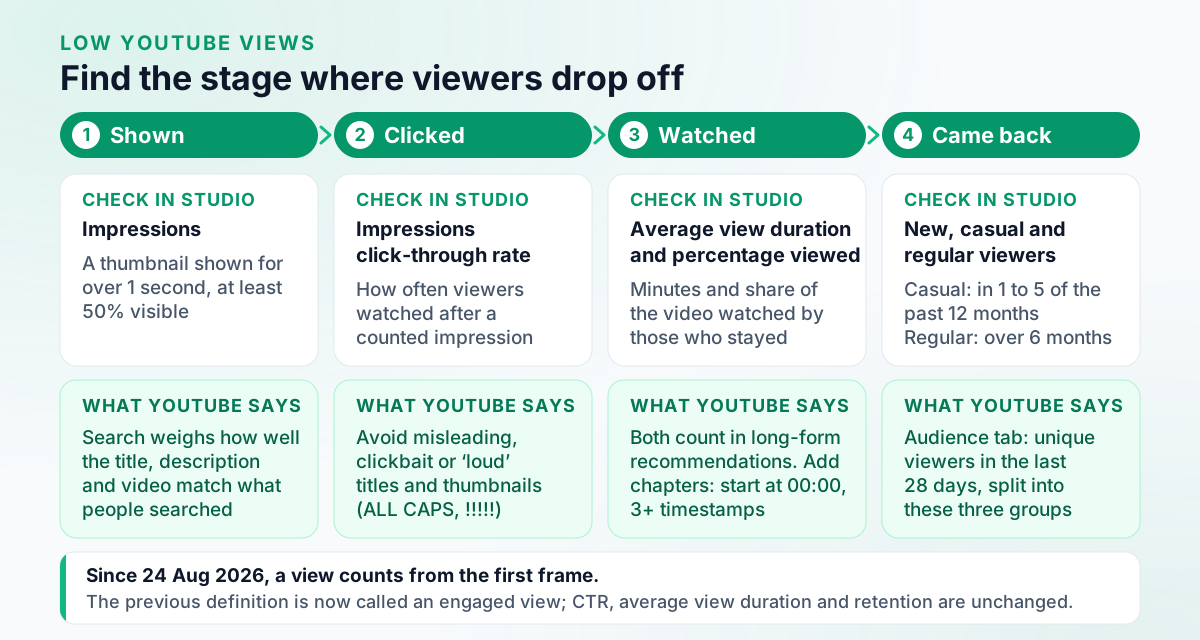
A fourth check is whether viewers come back: the Audience tab splits the unique viewers of the last 28 days into new, casual and regular viewers. Checked against YouTube Help: Understand your YouTube audience
To open these numbers for your channel or for one video:
On a computer: Channel level:
- Sign in to YouTube Studio.
- From the left menu, click Analytics.
On a computer: Video level:
- Sign in to YouTube Studio.
- From the left menu, select Content.
- Point to your video and select Analytics.
Checked against YouTube Help: Get started with YouTube Analytics (Computer).
On a phone, the YouTube Studio app has the fuller reports:
On any device: YouTube app:
- Open the YouTube app.
- Tap your profile picture > View channel.
- From the middle menu, tap Analytics.
- Or select an individual video, tap More > View analytics.
On any device: YouTube Studio app (channel):
- Open the YouTube Studio app.
- From the bottom menu, tap Analytics.
On any device: YouTube Studio app (video):
- Open the YouTube Studio app.
- From the bottom menu, tap Content.
- Select your video and in the Analytics section, tap VIEW MORE.
Checked against YouTube Help: Get started with YouTube Analytics (Android phone & tablet).
The Reach tab also splits where views came from, inside YouTube (browse features, the Shorts feed, suggested videos, YouTube search, playlists, end screens and more) and outside it, and its “Traffic source: YouTube Search” card shows the search terms that found the video. Checked against YouTube Help: Understand your YouTube video reach YouTube began gradually rolling out an updated YouTube Studio in July 2026, so your Analytics page may look different from older screenshots. Checked against YouTube Help: Get started with YouTube Analytics For a tour of every report, see our guide to YouTube Analytics.
What counts as a view on YouTube?
Since 24 August 2026, YouTube counts a view from the first frame on every format: Shorts, long-form videos, podcasts and live streams. The previous definition is now called an engaged view, and YouTube says click-through rate, average view duration, retention, recommendations and the YouTube Partner Program did not change. Checked against YouTube Official Blog: What are 'Engaged' Views on YouTube? (19 Aug 2026)
Engaged views count the times viewers stayed to watch past the initial seconds, not including loops, and YouTube calculates average view duration, average percentage viewed and unique viewers from them. Checked against YouTube Help: Understand your YouTube content performance A thumbnail that autoplays when someone hovers over it now counts as a view from the first frame; one that is only seen is still just an impression. Checked against YouTube Official Blog: What are 'Engaged' Views on YouTube? (19 Aug 2026)
Two practical consequences:
- Don’t read the change as growth. A view count from after 24 August 2026 and one from before it aren’t like for like, so compare engaged views and watch time across that date instead.
- Views alone don’t decide money. YouTube Partner Program earnings stay based on engaged views and engaged watch hours. Checked against YouTube Help: Understand your YouTube content performance What YouTube pays, and the thresholds for joining, are in how much YouTube pays per 1,000 views.
Why are my YouTube videos not getting views?
Usually one gate is failing. Few impressions means YouTube rarely shows the video; impressions with few clicks point at the title and thumbnail; clicks followed by short viewing point at the video itself. YouTube also names outside factors that move views when nothing is wrong: topic interest, competition and seasonality. Checked against YouTube Help: Search & discovery tips (Video)
When impressions are the problem, it helps to know how YouTube decides what to show:
- Search matches the query. YouTube says search ranking weighs relevance (how well the title, tags, description and video content match the query), engagement (such as watch time for that query) and quality signals of expertise, authoritativeness and trustworthiness, and that it doesn’t accept payment for better organic placement. Checked against How YouTube Works: How YouTube search works Tags barely register: asked how important they are, YouTube answers “Not important”, since they mainly help correct common misspellings. Checked against YouTube Help: YouTube performance FAQ & Troubleshooting
- Recommendations find viewers. YouTube says its recommendation system uses viewing behaviour, likes, dislikes, subscriptions and feedback such as satisfaction surveys, and finds videos for each viewer rather than promoting videos to an audience. Checked against How YouTube Works: Recommendations So going viral on YouTube is many individual viewers choosing your video, not a push from YouTube.
- The audience setting steers both. Videos set as made for kids are more likely to be recommended alongside other kids’ videos, and content that isn’t designated correctly may not be recommended alongside similar videos. Checked against YouTube Help: YouTube performance FAQ & Troubleshooting
- Subscribers don’t watch every upload. YouTube explains that views can be lower than your subscriber count for exactly that reason. Checked against YouTube Help: Understand your YouTube content performance
Some common worries are myths, by YouTube’s account: channel location settings aren’t used for recommendations, monetization status doesn’t affect discovery, switching an unlisted video to public doesn’t hurt it, and one under-performing video doesn’t by itself hurt a channel. Checked against YouTube Help: YouTube performance FAQ & Troubleshooting
How do you get more clicks from the same impressions?
Improve the title and thumbnail, then judge them on click-through rate. YouTube’s title tips are to be accurate, be succinct with the most important words first (episode numbers and branding at the end), and limit ALL CAPS and emoji. Checked against YouTube Help: Thumbnail & title tips
- Judge early, in the right feed. YouTube suggests checking click-through rate on Home and Suggested in the first 24 hours for general audiences, and in the Subscriptions feed in the first 24 hours for subscribers. Checked against YouTube Help: Thumbnail & title tips
- Read it next to impressions. Large impression counts, such as from Home, naturally lower click-through rate, and YouTube says a high click-through rate with low average view duration and lower-than-expected impressions signals a clickbait thumbnail. Checked against YouTube Help: Impressions & click-through-rate FAQs
- Test instead of guessing. YouTube’s Test & compare help article now redirects to A/B test titles & thumbnails, which tests up to 3 titles, 3 thumbnails or 3 title-and-thumbnail pairs on one video. Checked against YouTube Help: A/B test titles & thumbnails YouTube picks the winner by watch time share, not click-through rate. Checked against YouTube Help: A/B test titles & thumbnails
- Give older videos a second look. Changing a title or thumbnail may re-rank a video, YouTube says, because viewers respond to it differently, not because of the edit itself. Checked against YouTube Help: YouTube performance FAQ & Troubleshooting
Design rules, eligibility and the test steps are in our YouTube thumbnail best practices. For title drafts worth testing, try the free YouTube title generator.
How do you keep viewers watching for longer?
Deliver what the title and thumbnail promised, early, then make the next video easy to reach. YouTube says relative watch time matters more for short videos and absolute watch time for longer ones, so cut whatever delays the payoff rather than padding the running time. Checked against YouTube Help: YouTube performance FAQ & Troubleshooting
- Find where people leave. The Engagement tab has a “Key moments for audience retention” report, and “typical retention” compares the video with your 10 latest videos of similar length. Checked against YouTube Help: Understand your YouTube content performance
- Add chapters. List timestamps and titles in the description, starting with 00:00, with at least three in ascending order and each chapter at least 10 seconds long. Chapters need advanced features. Checked against YouTube Help: Video Chapters
- Point to the next video. End screens and playlists appear as their own traffic sources in Analytics, so you can see whether they send views. Checked against YouTube Help: Understand your YouTube video reach A video must be 25 seconds or longer to have an end screen. Checked against YouTube Help: Upload YouTube videos (Computer)
- Turn a series into a show. YouTube Studio can add show features to a playlist, organising its videos into seasons and episodes, which may make it eligible for search, “Recommended shows” and “Continue watching”. Checked against YouTube Help: Create shows from your videos
Do Shorts help your long videos get views?
They can’t hurt them. YouTube says Shorts performance doesn’t negatively affect long-form recommendations, and that Shorts can help with audience discovery. Checked against YouTube Help: Search & discovery tips (Shorts)
YouTube Studio can cut a Short straight from one of your long videos. The source video is added to that Short as its related video automatically, unless the Short is private, unlisted or made for kids, and YouTube says you won’t be penalized for reusing your own content this way. AI-powered suggestions in the tool are available only in some countries and languages.
On a computer: Create a Short:
- In YouTube Studio, select Content > Videos.
- Click the existing video that you want to use.
- In the left-hand menu, select Clips and Shorts.
- Click Create clip or Short > choose Short.
- Select which part of your existing video you'd like to extract into a new Short (select text in the transcript and click "Confirm selection", enter timestamps in the timeline editor, or pick an AI-powered suggestion if available).
- Select Preview Short.
- Click Create Draft. Complete the standard upload dialog to publish.
Checked against YouTube Help: Video Clips & Shorts in YouTube Studio.
On any other Short, a Related video adds a clickable link to one of your own public or unlisted videos below your channel handle; it needs advanced features. Checked against YouTube Help: Add a related video to your YouTube Shorts Length, music, links and the dated Shorts changes are in our YouTube Shorts best practices.
How do you promote YouTube videos without breaking the rules?
Promote to real people: share the video where your audience already is, ask viewers to like, subscribe and share, and link your videos to each other. What YouTube bans is inflating the numbers, and its fake engagement policy says channels that do it may be terminated. Checked against YouTube Help: Fake engagement policy
Outside traffic counts too: YouTube notes that when a lot of a video’s traffic comes from outside YouTube, it can have more views than impressions. Checked against YouTube Help: Check your YouTube thumbnail impressions and watch time
The fake engagement policy bans artificially increasing views, likes, comments or other metrics through automatic systems or by serving videos to unsuspecting viewers, promoting view, like or subscriber services, and “sub4sub” offers. YouTube’s Terms of Service separately forbid paying people or giving them incentives to increase a video’s views, likes or dislikes, or a channel’s subscribers. Checked against YouTube Terms of Service (effective 15 Dec 2023) So a service that sells views, likes or subscribers falls under both. Three details from the policy page:
- “You’re allowed to encourage viewers to subscribe, hit the like button, share, or leave a comment.”
- Artificial traffic isn’t counted and can lead to strikes.
- If you hire someone to promote your channel, their decisions may impact your channel: a violating method can lead to removal whether you used it or someone you hired did. Checked against YouTube Help: Fake engagement policy
Does the time you post on YouTube matter?
Less than most timing guides suggest. YouTube says publish time is not known to affect a video’s long-term performance, though it matters for live streams and Premieres and can help early viewership. Checked against YouTube Help: YouTube performance FAQ & Troubleshooting
Frequency follows the same pattern: YouTube says there is no minimum posting cadence and that growth in views across uploads is not correlated with time between uploads, though after a break it can take some time to “warm up” your audience again. Checked against YouTube Help: YouTube performance FAQ & Troubleshooting
When you do want a video live while your viewers are around, the Audience tab’s “When your viewers are on YouTube” report shows when they were on YouTube over the last 28 days, and YouTube suggests it for timing Premieres and live streams. Checked against YouTube Help: Understand your YouTube audience Our guide to the best time to post on YouTube collects third-party timing studies as a starting point.
YouTube views FAQ
How do I get more views on YouTube?
Find the weak step in YouTube Studio and fix it: impressions (YouTube showing your thumbnail), click-through rate (people clicking) or average view duration (people staying). For long videos, YouTube says it looks first at whether viewers choose to watch a recommendation, then at how long they watch, then at likes and post-watch surveys. Paying people to increase your views breaks YouTube’s Terms of Service.
Why are my YouTube videos not getting views?
Check which step fails in YouTube Studio. Few impressions means YouTube rarely shows the video; impressions with a low click-through rate point at the title and thumbnail; clicks with a short average view duration point at the video. YouTube also names topic interest, competition and seasonality, and says content with the wrong made-for-kids setting may not be recommended alongside similar videos.
What counts as a view on YouTube?
Since 24 August 2026, YouTube counts a view from the first frame on every format: Shorts, long-form videos, podcasts and live streams. The previous definition is now called an engaged view: the times viewers stayed to watch past the initial seconds, not including loops. YouTube says click-through rate, average view duration, retention, recommendations and the Partner Program did not change.
Does the time you post on YouTube matter?
Not for long-term results, according to YouTube: it says publish time is not known to impact a video’s long-term performance, though timing matters for live streams and Premieres and can help early viewership. YouTube also says there is no minimum posting cadence.
Do YouTube tags still help get views?
Very little. Asked how important tags are, YouTube answers ‘Not important’: they mainly help correct common misspellings. YouTube’s search ranking looks at how well the title, tags, description and video content match a query, together with engagement and quality signals.