
How to Track Influencer Conversions: Links, Codes, GA4
To track influencer conversions, give each creator a link, code or affiliate ID that nobody else uses, make the purchase or sign-up you’re paying for a key event in Google Analytics, and read the results creator by creator. The six steps below show how to track influencer conversions, plus what platforms share with tagged brands.
Tracking is the last step of an influencer marketing strategy; which numbers count as a win is covered in how to measure influencer success.
Table of Contents
- How to track influencer conversions: three ways to capture a sale
- Step 1: How do you set up UTM links for influencers?
- Step 2: Are promo codes or affiliate links better?
- Step 3: Where can creators put a clickable link?
- Step 4: Where do conversions show up in Google Analytics 4?
- Step 5: What do platforms report back to the brand?
- Step 6: How do you count sales without a click?
- Which influencer tracking tools are there?
- Influencer conversion tracking FAQ
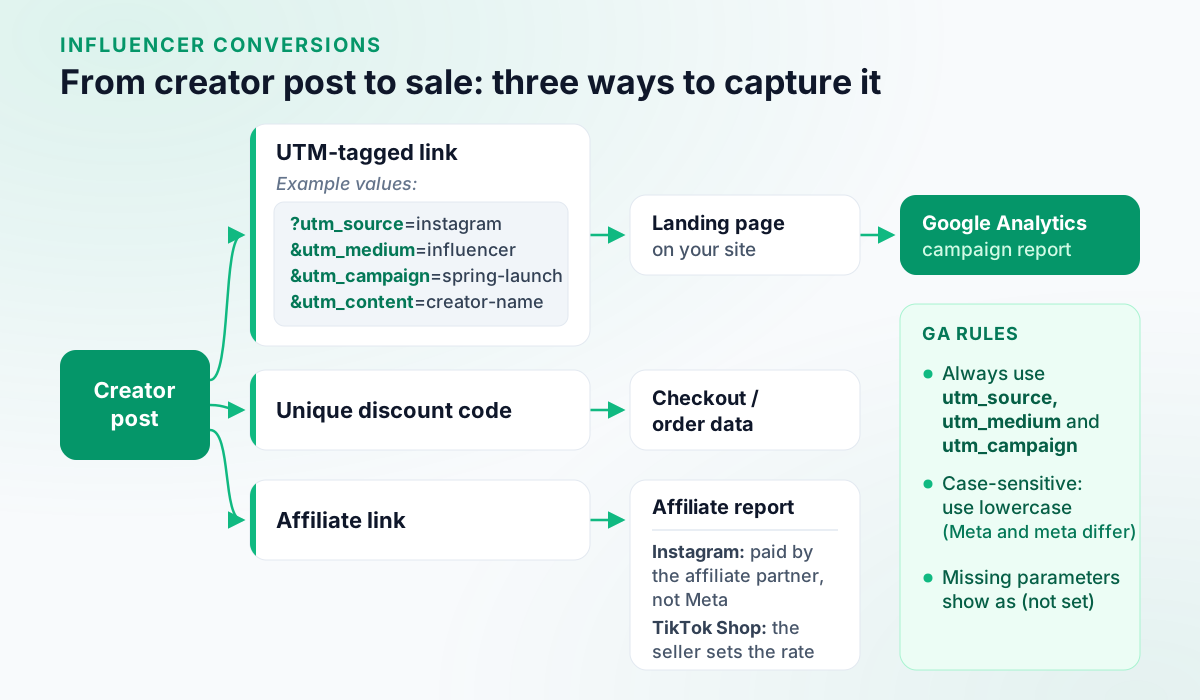
How to track influencer conversions: three ways to capture a sale
Capture each conversion in one of three ways; each lands in a different report. A UTM-tagged link labels the creator’s visitors in Google Analytics. A unique discount code shows up in your store’s order data, even when the buyer never clicked. An affiliate link is counted by the affiliate programme, which reports sales per creator.
Step 1: How do you set up UTM links for influencers?
Build one tagged link per creator per platform, from a naming scheme you never change. Google Analytics says to always use utm_source, utm_medium and utm_campaign
Checked against Google Analytics Help: URL builders: Collect campaign data with custom URLs; add utm_content to tell creators apart. Values are case-sensitive (Meta and meta are two sources), so Google recommends lowercase, one utm_source per platform and one utm_medium per channel; missing parameters show as (not set).
Checked against Google Analytics Help: URL builders: Collect campaign data with custom URLs
| Parameter | Example value | What it records |
|---|---|---|
utm_source | instagram | The platform |
utm_medium | influencer | The channel (same for all creators) |
utm_campaign | spring-launch | The campaign |
utm_content | creator-name | The creator |
As one link:
https://example.com/spring-launch?utm_source=instagram&utm_medium=influencer&utm_campaign=spring-launch&utm_content=creator-nameBuild each link in the free UTM generator and log who got which. For videos and podcasts, a short landing-page address per creator, redirecting to their tagged link, catches people who type it in.
Step 2: Are promo codes or affiliate links better?
Neither wins alone, so give each creator one of each. A unique code counts buyers who never clicked, which matters wherever links aren’t clickable, but anyone who sees it can use it. An affiliate link counts sales and commission automatically, but only for buyers who click.
Instagram’s affiliate partnerships let eligible creators add affiliate product links to reels and feed posts, with commission paid by the affiliate partner, not Meta; the feature is rolling out gradually. Checked against Instagram Help Center: About affiliate partnerships on Instagram On TikTok Shop in the US, the seller sets each product’s commission rate. Checked against TikTok Shop Seller University (US): Setting Up Affiliate Collaborations
Codes and affiliate links still need a disclosure. Instagram asks for its paid partnership label on posts with third-party affiliate links. Checked against Instagram Help Center: What is considered branded content TikTok’s Branded Content Policy, effective 31 August 2026, counts affiliate links and promo codes as branded content that needs its commercial content disclosure toggle. Checked against TikTok: Branded Content Policy (published 4 August 2026, effective 31 August 2026) In the US, FTC staff say “affiliate link” alone isn’t adequate and suggest wording such as “I get commissions for purchases made through links in this post.” Checked against FTC: FTC's Endorsement Guides: What People Are Asking What sponsored posts must disclose covers each country; none of this is legal advice.
Step 3: Where can creators put a clickable link?
Wherever each platform makes links clickable, which differs by app and format; a code covers the rest.
- Instagram Stories: the Link sticker, open to every account except new accounts and accounts that repeatedly break the Community Guidelines. Checked against About Instagram: Share Links in Instagram Stories to Everyone (2021-10-27) Story insights count link taps under Interactions, so ask for that screenshot. Checked against Instagram Help Center: View insights on your Instagram Stories Instagram notes stickers may be unavailable in Japan and in Europe. Checked against Instagram Help Center: Using stickers on Instagram (availability note) See how to add a link to an Instagram story.
- Instagram profile: up to 5 website links. Checked against Instagram Help Center: Add a website to your Instagram profile
- TikTok profile: a website link needs at least 1,000 followers or a Verified Business Account. Checked against TikTok Help Center: How to add a link to your TikTok profile See how to add a link to your TikTok bio.
- YouTube: links in long-form video descriptions need advanced feature access to be clickable Checked against YouTube Help: Learn about feature access for YouTube Creators; URLs in Shorts descriptions and comments aren’t clickable. Checked against YouTube Help: Sharing links with your audiences A Short in a reported brand deal campaign can carry one link to the brand’s website. Checked against YouTube Help: Add a link to a brand's site to your Short
Link in bio meaning shows where clickable links work on each app, link-in-bio pages included.
Step 4: Where do conversions show up in Google Analytics 4?
Only once GA4 knows which action counts. In March 2024 Google Analytics renamed the events it called conversions to key events; a “conversion” now means an action used to measure Google Ads campaigns. Checked against Google Analytics Help: Conversions vs. key events in Google Analytics Mark the purchase or sign-up as a key event in Admin. Google says a tagged link’s values appear in the Traffic acquisition report, where Session campaign and Session source / medium show which campaign and platform brought each session:
On a computer: Google Analytics:
- Sign in to Google Analytics.
- From the left menu, select Reports.
- On the left, select Acquisition > Traffic acquisition.
Checked against Google Analytics Help: [GA4] Traffic acquisition report.
Divide each creator’s key events by the sessions their link brought for a conversion rate, and compare creators with each other, not with an outside average.
Step 5: What do platforms report back to the brand?
A brand tagged as the paid partner on Instagram or Facebook branded content can see that content’s organic insights: reach and engagement for feed posts, a 14-day window of reach, taps forward and back, replies and exits for Stories, and Live insights for 2 years or until the Live is deleted. They sit in Meta Business Suite; partnership ads have their own route in the Instagram app:
On a computer: Meta Business Suite:
- In Meta Business Suite, go to All Tools.
- Under Analyze and report, click Insights.
In the app: Instagram app: branded content boosted as a partnership ad:
- In the Instagram app, go to your business profile.
- Tap Menu in the top right.
- Tap Professional dashboard.
- Tap See all next to Your tools.
- Tap Partnership ads.
- Tap Active ads or Inactive ads.
- Select the content and tap the three dots to view insights.
Checked against Meta Business Help Center: View Branded Content Insights.
Meta’s Branded Content Policies require creators to tag the partner with the branded content tool anyway. Checked against Instagram Help Center: Branded Content Policies For other posts, name in the brief which analytics screenshots each creator sends, and for which dates.
Step 6: How do you count sales without a click?
With the code and one checkout question. A unique code catches people who saw the post and bought days later on another device; a “How did you hear about us?” field listing your creators catches the rest. Self-reported answers are approximate: read them beside code and link data.
Which influencer tracking tools are there?
None of the steps above needs influencer software. Influencer platforms and affiliate software pull links, codes and payouts into one place; when you compare tools, check whether each reports engagement, reach and conversions per creator. What six say on their own sites (alphabetical, not a ranking):
| Tool | What its own site says about tracking |
|---|---|
| Aspire | Affiliate links and promo codes, plus creator payments Checked against Aspire home page |
| impact.com | Affiliates and influencers managed in one place Checked against impact.com: Creator |
| Later | Reporting on paid, organic and sales performance Checked against Later: AI-Powered Influencer Marketing Platform |
| Meltwater | Reporting, with Shopify and WooCommerce sales tracking Checked against Meltwater: Influencer Marketing |
| Refersion | Affiliate-tracking software for e-commerce brands, with a first-party tracking domain (no cookies) Checked against Refersion: Affiliate Management Pricing (plan features) |
| Sprout Social Influencer Marketing | Attribution with affiliate links, UTMs or pixels Checked against Sprout Social: Influencer Marketing |
More options in influencer marketing platforms and affiliate marketing tools.
Tag your brand’s own campaign posts with the same utm_campaign, so creator traffic sits beside yours in one report.
Influencer conversion tracking FAQ
How do you track influencer sales?
Give each creator a unique discount code and a UTM-tagged link, mark the purchase as a key event in Google Analytics, then count each creator’s code orders and tagged sessions. A ‘How did you hear about us?’ question at checkout catches buyers who used neither.
How do you set up UTM links for influencers?
Build one link per creator per platform from a fixed scheme: utm_source for the platform, utm_medium for the channel, utm_campaign for the campaign and utm_content for the creator. Google Analytics says to always use utm_source, utm_medium and utm_campaign; values are case-sensitive, so keep them lowercase.
Are promo codes or affiliate links better for tracking influencers?
Use both. A code also counts buyers who never click, such as viewers of a YouTube Short, where URLs typed into the description aren’t clickable; an affiliate link counts sales automatically, but only from clicks. Under TikTok’s Branded Content Policy, a creator’s post promoting a brand with either one is branded content and needs the disclosure toggle.
How do you track influencer conversions in Google Analytics 4?
Mark the purchase or sign-up as a key event, the name Google Analytics has used for conversions since March 2024. Give each creator a UTM-tagged link, then open Reports, Acquisition, Traffic acquisition: Session campaign and Session source / medium show which campaign and platform brought each session.